
Practice Free Amazon DEA-C01 Exam Online Questions
A data engineer configured an AWS Glue Data Catalog for data that is stored in Amazon S3 buckets.
The data engineer needs to configure the Data Catalog to receive incremental updates.
The data engineer sets up event notifications for the S3 bucket and creates an Amazon Simple Queue Service (Amazon SQS) queue to receive the S3 events.
Which combination of steps should the data engineer take to meet these requirements with LEAST operational overhead? (Select TWO.)
- A . Create an S3 event-based AWS Glue crawler to consume events from the SQS queue.
- B . Define a time-based schedule to run the AWS Glue crawler, and perform incremental updates to the Data Catalog.
- C . Use an AWS Lambda function to directly update the Data Catalog based on S3 events that the SQS queue receives.
- D . Manually initiate the AWS Glue crawler to perform updates to the Data Catalog when there is a change in the S3 bucket.
- E . Use AWS Step Functions to orchestrate the process of updating the Data Catalog based on 53 events that the SQS queue receives.
A,C
Explanation:
The requirement is to update the AWS Glue Data Catalog incrementally based on S3 events. Using an S3 event-based approach is the most automated and operationally efficient solution.
A company has used an Amazon Redshift table that is named Orders for 6 months. The company performs weekly updates and deletes on the table. The table has an interleaved sort key on a column that contains AWS Regions.
The company wants to reclaim disk space so that the company will not run out of storage space. The company also wants to analyze the sort key column.
Which Amazon Redshift command will meet these requirements?
- A . VACUUM FULL Orders
- B . VACUUM DELETE ONLY Orders
- C . VACUUM REINDEX Orders
- D . VACUUM SORT ONLY Orders
C
Explanation:
Amazon Redshift is a fully managed, petabyte-scale data warehouse service that enables fast and cost-effective analysis of large volumes of data. Amazon Redshift uses columnar storage, compression, and zone maps to optimize the storage and performance of data. However, over time, as data is inserted, updated, or deleted, the physical storage of data can become fragmented, resulting in wasted disk space and degraded query performance. To address this issue, Amazon Redshift provides the VACUUM command, which reclaims disk space and resorts rows in either a specified table or all tables in the current schema1.
The VACUUM command has four options: FULL, DELETE ONLY, SORT ONLY, and REINDEX. The option that best meets the requirements of the question is VACUUM REINDEX, which re-sorts the rows in a table that has an interleaved sort key and rewrites the table to a new location on disk. An interleaved sort key is a type of sort key that gives equal weight to each column in the sort key, and stores the rows in a way that optimizes the performance of queries that filter by multiple columns in the sort key. However, as data is added or changed, the interleaved sort order can become skewed, resulting in suboptimal query performance. The VACUUM REINDEX option restores the optimal interleaved sort order and reclaims disk space by removing deleted rows. This option also analyzes the sort key column and updates the table statistics, which are used by the query optimizer to generate the most efficient query execution plan23.
The other options are not optimal for the following reasons:
A data engineer needs to join data from multiple sources to perform a one-time analysis job. The data is stored in Amazon DynamoDB, Amazon RDS, Amazon Redshift, and Amazon S3.
Which solution will meet this requirement MOST cost-effectively?
- A . Use an Amazon EMR provisioned cluster to read from all sources. Use Apache Spark to join the data and perform the analysis.
- B . Copy the data from DynamoDB, Amazon RDS, and Amazon Redshift into Amazon S3. Run Amazon Athena queries directly on the S3 files.
- C . Use Amazon Athena Federated Query to join the data from all data sources.
- D . Use Redshift Spectrum to query data from DynamoDB, Amazon RDS, and Amazon S3 directly from Redshift.
C
Explanation:
Amazon Athena Federated Query is a feature that allows you to query data from multiple sources using standard SQL. You can use Athena Federated Query to join data from Amazon DynamoDB, Amazon RDS, Amazon Redshift, and Amazon S3, as well as other data sources such as MongoDB, Apache HBase, and Apache Kafka1. Athena Federated Query is a serverless and interactive service, meaning you do not need to provision or manage any infrastructure, and you only pay for the amount of data scanned by your queries. Athena Federated Query is the most cost-effective solution for performing a one-time analysis job on data from multiple sources, as it eliminates the need to copy or move data, and allows you to query data directly from the source.
The other options are not as cost-effective as Athena Federated Query, as they involve additional steps or costs.
Option A requires you to provision and pay for an Amazon EMR cluster, which can be expensive and time-consuming for a one-time job.
Option B requires you to copy or move data from DynamoDB, RDS, and Redshift to S3, which can incur additional costs for data transfer and storage, and also introduce latency and complexity.
Option D requires you to have an existing Redshift cluster, which can be costly and may not be necessary for a one-time job.
Option D also does not support querying data from RDS directly, so you would need to use Redshift Federated Query to access RDS
data, which adds another layer of complexity2.
Reference: Amazon Athena Federated Query
Redshift Spectrum vs Federated Query
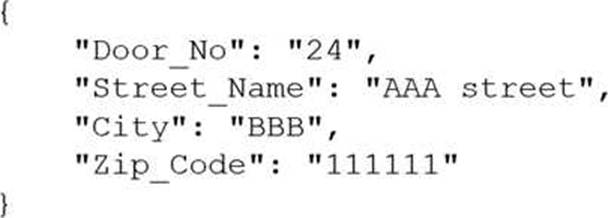
A company receives .csv files that contain physical address data. The data is in columns that have the following names: Door_No, Street_Name, City, and Zip_Code.
The company wants to create a single column to store these values in the following format:
Which solution will meet this requirement with the LEAST coding effort?
- A . Use AWS Glue DataBrew to read the files. Use the NEST TO ARRAY transformation to create the new column.
- B . Use AWS Glue DataBrew to read the files. Use the NEST TO MAP transformation to create the new column.
- C . Use AWS Glue DataBrew to read the files. Use the PIVOT transformation to create the new column.
- D . Write a Lambda function in Python to read the files. Use the Python data dictionary type to create the new column.
B
Explanation:
The NEST TO MAP transformation allows you to combine multiple columns into a single column that contains a JSON object with key-value pairs. This is the easiest way to achieve the desired format for the physical address data, as you can simply select the columns to nest and specify the keys for each column. The NEST TO ARRAY transformation creates a single column that contains an array of values, which is not the same as the JSON object format. The PIVOT transformation reshapes the data by creating new columns from unique values in a selected column, which is not applicable for this use case. Writing a Lambda function in Python requires more coding effort than using AWS Glue DataBrew, which provides a visual and interactive interface for data transformations.
Reference: 7 most common data preparation transformations in AWS Glue DataBrew (Section: Nesting and unnesting columns)
NEST TO MAP – AWS Glue DataBrew (Section: Syntax)
A company stores customer data in an Amazon S3 bucket. Multiple teams in the company want to use the customer data for downstream analysis. The company needs to ensure that the teams do not have access to personally identifiable information (PII) about the customers.
Which solution will meet this requirement with LEAST operational overhead?
- A . Use Amazon Macie to create and run a sensitive data discovery job to detect and remove PII.
- B . Use S3 Object Lambda to access the data, and use Amazon Comprehend to detect and remove PII.
- C . Use Amazon Kinesis Data Firehose and Amazon Comprehend to detect and remove PII.
- D . Use an AWS Glue DataBrew job to store the PII data in a second S3 bucket. Perform analysis on the data that remains in the original S3 bucket.
D
Explanation:
Step 1: Understanding the Data Use Case
The company has data stored in an Amazon S3 bucket and needs to provide teams access for analysis, ensuring that PII data is not included in the analysis. The solution should be simple to implement and maintain, ensuring minimal operational overhead.
Step 2: Why Option D is Correct
Option D (AWS Glue DataBrew) allows you to visually prepare and transform data without needing to write code. By using a DataBrew job, the company can:
Automatically detect and separate PII data from non-PII data.
Store PII data in a second S3 bucket for security, while keeping the original S3 bucket clean for
analysis.
This approach keeps operational overhead low by utilizing DataBrew’s pre-built transformations and the easy-to-use interface for non-technical users. It also ensures compliance by separating sensitive PII data from the main dataset.
Step 3: Why Other Options Are Not Ideal
Option A (Amazon Macie) is a powerful tool for detecting sensitive data, but Macie doesn’t inherently remove or mask PII. You would still need additional steps to clean the data after Macie identifies PII.
Option B (S3 Object Lambda with Amazon Comprehend) introduces more complexity by requiring custom logic at the point of data access. Amazon Comprehend can detect PII, but using S3 Object Lambda to filter data would involve more overhead.
Option C (Kinesis Data Firehose and Comprehend) is more suitable for real-time streaming data use cases rather than batch analysis. Setting up and managing a streaming solution like Kinesis adds unnecessary complexity.
Conclusion:
Using AWS Glue DataBrew provides a low-overhead, no-code solution to detect and separate PII data, ensuring the analysis teams only have access to non-sensitive data. This approach is simple, compliant, and easy to manage compared to other options.
A data engineer needs to schedule a workflow that runs a set of AWS Glue jobs every day. The data engineer does not require the Glue jobs to run or finish at a specific time.
Which solution will run the Glue jobs in the MOST cost-effective way?
- A . Choose the FLEX execution class in the Glue job properties.
- B . Use the Spot Instance type in Glue job properties.
- C . Choose the STANDARD execution class in the Glue job properties.
- D . Choose the latest version in the GlueVersion field in the Glue job properties.
A
Explanation:
The FLEX execution class allows you to run AWS Glue jobs on spare compute capacity instead of dedicated hardware. This can reduce the cost of running non-urgent or non-time sensitive data integration workloads, such as testing and one-time data loads. The FLEX execution class is available for AWS Glue 3.0 Spark jobs. The other options are not as cost-effective as FLEX, because they either use dedicated resources (STANDARD) or do not affect the cost at all (Spot Instance type and GlueVersion).
Reference: Introducing AWS Glue Flex jobs: Cost savings on ETL workloads
Serverless Data Integration C AWS Glue Pricing
AWS Certified Data Engineer – Associate DEA-C01 Complete Study Guide (Chapter 5, page 125)
During a security review, a company identified a vulnerability in an AWS Glue job. The company discovered that credentials to access an Amazon Redshift cluster were hard coded in the job script.
A data engineer must remediate the security vulnerability in the AWS Glue job. The solution must securely store the credentials.
Which combination of steps should the data engineer take to meet these requirements? (Choose two.)
- A . Store the credentials in the AWS Glue job parameters.
- B . Store the credentials in a configuration file that is in an Amazon S3 bucket.
- C . Access the credentials from a configuration file that is in an Amazon S3 bucket by using the AWS Glue job.
- D . Store the credentials in AWS Secrets Manager.
- E . Grant the AWS Glue job 1AM role access to the stored credentials.
D,E
Explanation:
AWS Secrets Manager is a service that allows you to securely store and manage secrets, such as database credentials, API keys, passwords, etc. You can use Secrets Manager to encrypt, rotate, and audit your secrets, as well as to control access to them using fine-grained policies. AWS Glue is a fully managed service that provides a serverless data integration platform for data preparation, data cataloging, and data loading. AWS Glue jobs allow you to transform and load data from various sources into various targets, using either a graphical interface (AWS Glue Studio) or a code-based interface (AWS Glue console or AWS Glue API).
Storing the credentials in AWS Secrets Manager and granting the AWS Glue job 1AM role access to the stored credentials will meet the requirements, as it will remediate the security vulnerability in the AWS Glue job and securely store the credentials. By using AWS Secrets Manager, you can avoid hard coding the credentials in the job script, which is a bad practice that exposes the credentials to unauthorized access or leakage. Instead, you can store the credentials as a secret in Secrets Manager and reference the secret name or ARN in the job script. You can also use Secrets Manager to encrypt the credentials using AWS Key Management Service (AWS KMS), rotate the credentials automatically or on demand, and monitor the access to the credentials using AWS CloudTrail. By granting the AWS Glue job 1AM role access to the stored credentials, you can use the principle of least privilege to ensure that only the AWS Glue job can retrieve the credentials from Secrets Manager. You can also use resource-based or tag-based policies to further restrict the access to the credentials.
The other options are not as secure as storing the credentials in AWS Secrets Manager and granting the AWS Glue job 1AM role access to the stored credentials. Storing the credentials in the AWS Glue job parameters will not remediate the security vulnerability, as the job parameters are still visible in the AWS Glue console and API. Storing the credentials in a configuration file that is in an Amazon S3 bucket and accessing the credentials from the configuration file by using the AWS Glue job will not be as secure as using Secrets Manager, as the configuration file may not be encrypted or rotated, and the access to the file may not be audited or controlled.
Reference: AWS Secrets Manager
AWS Glue
AWS Certified Data Engineer – Associate DEA-C01 Complete Study Guide, Chapter 6: Data Integration
and Transformation, Section 6.1: AWS Glue
A data engineer must manage the ingestion of real-time streaming data into AWS. The data engineer wants to perform real-time analytics on the incoming streaming data by using time-based aggregations over a window of up to 30 minutes. The data engineer needs a solution that is highly fault tolerant.
Which solution will meet these requirements with the LEAST operational overhead?
- A . Use an AWS Lambda function that includes both the business and the analytics logic to perform time-based aggregations over a window of up to 30 minutes for the data in Amazon Kinesis Data Streams.
- B . Use Amazon Managed Service for Apache Flink (previously known as Amazon Kinesis Data Analytics) to analyze the data that might occasionally contain duplicates by using multiple types of aggregations.
- C . Use an AWS Lambda function that includes both the business and the analytics logic to perform aggregations for a tumbling window of up to 30 minutes, based on the event timestamp.
- D . Use Amazon Managed Service for Apache Flink (previously known as Amazon Kinesis Data Analytics) to analyze the data by using multiple types of aggregations to perform time-based analytics over a window of up to 30 minutes.
A
Explanation:
This solution meets the requirements of managing the ingestion of real-time streaming data into AWS and performing real-time analytics on the incoming streaming data with the least operational overhead. Amazon Managed Service for Apache Flink is a fully managed service that allows you to run Apache Flink applications without having to manage any infrastructure or clusters. Apache Flink is a framework for stateful stream processing that supports various types of aggregations, such as tumbling, sliding, and session windows, over streaming data. By using Amazon Managed Service for Apache Flink, you can easily connect to Amazon Kinesis Data Streams as the source and sink of your streaming data, and perform time-based analytics over a window of up to 30 minutes. This solution is also highly fault tolerant, as Amazon Managed Service for Apache Flink automatically scales, monitors, and restarts your Flink applications in case of failures.
Reference: Amazon Managed Service for Apache Flink
Apache Flink
Window Aggregations in Flink
A company uses an organization in AWS Organizations to manage multiple AWS accounts. The company uses an enhanced fanout data stream in Amazon Kinesis Data Streams to receive streaming data from multiple producers. The data stream runs in Account A. The company wants to use an AWS Lambda function in Account B to process the data from the stream. The company creates a Lambda execution role in Account B that has permissions to access data from the stream in Account A.
What additional step must the company take to meet this requirement?
- A . Create a service control policy (SCP) to grant the data stream read access to the cross-account Lambda execution role. Attach the SCP to Account A.
- B . Add a resource-based policy to the data stream to allow read access for the cross-account Lambda execution role.
- C . Create a service control policy (SCP) to grant the data stream read access to the cross-account Lambda execution role. Attach the SCP to Account B.
- D . Add a resource-based policy to the cross-account Lambda function to grant the data stream read
access to the function.
B
Explanation:
To allow cross-account access to a Kinesis Data Stream, you must add a resource-based policy to the Kinesis stream in Account A, explicitly granting the Lambda execution role in Account B the required permissions.
SCPs (A & C) set permissions boundaries, but do not grant access.
Option D incorrectly refers to the Lambda function C but the Kinesis resource must allow access.
“You must add a resource-based policy to the Kinesis Data Stream in Account A to allow a Lambda function in Account B to consume from the stream.”
Reference: AWS Documentation C Cross-account Lambda access to Kinesis
A financial company wants to use Amazon Athena to run on-demand SQL queries on a petabyte-scale dataset to support a business intelligence (BI) application. An AWS Glue job that runs during non-business hours updates the dataset once every day. The BI application has a standard data refresh frequency of 1 hour to comply with company policies.
A data engineer wants to cost optimize the company’s use of Amazon Athena without adding any
additional infrastructure costs.
Which solution will meet these requirements with the LEAST operational overhead?
- A . Configure an Amazon S3 Lifecycle policy to move data to the S3 Glacier Deep Archive storage class after 1 day
- B . Use the query result reuse feature of Amazon Athena for the SQL queries.
- C . Add an Amazon ElastiCache cluster between the Bl application and Athena.
- D . Change the format of the files that are in the dataset to Apache Parquet.
B
Explanation:
The best solution to cost optimize the company’s use of Amazon Athena without adding any additional infrastructure costs is to use the query result reuse feature of Amazon Athena for the SQL queries. This feature allows you to run the same query multiple times without incurring additional charges, as long as the underlying data has not changed and the query results are still in the query result location in Amazon S31. This feature is useful for scenarios where you have a petabyte-scale dataset that is updated infrequently, such as once a day, and you have a BI application that runs the same queries repeatedly, such as every hour. By using the query result reuse feature, you can reduce the amount of data scanned by your queries and save on the cost of running Athena. You can enable or disable this feature at the workgroup level or at the individual query level1.
Option A is not the best solution, as configuring an Amazon S3 Lifecycle policy to move data to the S3 Glacier Deep Archive storage class after 1 day would not cost optimize the company’s use of Amazon Athena, but rather increase the cost and complexity. Amazon S3 Lifecycle policies are rules that you can define to automatically transition objects between different storage classes based on specified criteria, such as the age of the object2. S3 Glacier Deep Archive is the lowest-cost storage class in Amazon S3, designed for long-term data archiving that is accessed once or twice in a year3. While moving data to S3 Glacier Deep Archive can reduce the storage cost, it would also increase the retrieval cost and latency, as it takes up to 12 hours to restore the data from S3 Glacier Deep Archive3. Moreover, Athena does not support querying data that is in S3 Glacier or S3 Glacier Deep Archive storage classes4. Therefore, using this option would not meet the requirements of running on-demand SQL queries on the dataset.
Option C is not the best solution, as adding an Amazon ElastiCache cluster between the BI application and Athena would not cost optimize the company’s use of Amazon Athena, but rather increase the cost and complexity. Amazon ElastiCache is a service that offers fully managed in-memory data stores, such as Redis and Memcached, that can improve the performance and scalability of web applications by caching frequently accessed data. While using ElastiCache can reduce the latency and load on the BI application, it would not reduce the amount of data scanned by Athena, which is the main factor that determines the cost of running Athena. Moreover, using ElastiCache would introduce additional infrastructure costs and operational overhead, as you would have to provision, manage, and scale the ElastiCache cluster, and integrate it with the BI application and Athena.
Option D is not the best solution, as changing the format of the files that are in the dataset to Apache Parquet would not cost optimize the company’s use of Amazon Athena without adding any additional infrastructure costs, but rather increase the complexity. Apache Parquet is a columnar storage format that can improve the performance of analytical queries by reducing the amount of data that needs to be scanned and providing efficient compression and encoding schemes. However, changing the format of the files that are in the dataset to Apache Parquet would require additional processing and transformation steps, such as using AWS Glue or Amazon EMR to convert the files from their original format to Parquet, and storing the converted files in a separate location in Amazon S3. This would increase the complexity and the operational overhead of the data pipeline, and also incur additional costs for using AWS Glue or Amazon EMR.
Reference: Query result reuse
Amazon S3 Lifecycle
S3 Glacier Deep Archive
Storage classes supported by Athena
[What is Amazon ElastiCache?]
[Amazon Athena pricing]
[Columnar Storage Formats]
AWS Certified Data Engineer – Associate DEA-C01 Complete Study Guide