
Practice Free AB-730 Exam Online Questions
You join an internal Microsoft Teams meeting late and want to catch up on what you missed. The meeting is being recorded. You need to summarize the portion of the meeting that you missed as soon as possible.
What is the best approach to achieve the goal? More than one answer choice may achieve the goal. Select the BEST answer.
- A . From the Teams app, ask Copilot in Teams to summarize what you missed so far.
- B . From the meeting, read the transcript.
- C . From the Microsoft 365 Copilot app, ask Copilot to tell you what you missed.
- D . From the Teams app, view the intelligent recap.
A
Explanation:
Microsoft 365 Copilot in Teams is designed to provide real-time meeting assistance, including summarizing discussions, identifying key decisions, and highlighting action items. When joining a meeting late, the most efficient and immediate method to catch up is to directly prompt Copilot within the Teams meeting experience.
Option A is the best answer because Copilot in Teams can summarize what has occurred so far during the live meeting. It leverages the meeting transcript, speaker attribution, and contextual signals to generate a concise, structured summary in real time. This minimizes delay and provides actionable insights instantly.
Reading the transcript (Option B) would require manual review and is not the fastest method. Intelligent recap (Option D) is typically available after the meeting concludes and processes recording data. Asking Copilot from the separate Microsoft 365 Copilot app (Option C) may not provide immediate, in-meeting contextual awareness.
Therefore, the fastest and most effective approach is to ask Copilot in Teams to summarize what you missed.
You use Microsoft 365 Copilot to generate a training plan.
You need to check if there are any existing training plans in your organization that are similar to the new training plan.
What should you use in Copilot?
- A . Search
- B . Designer
- C . Apps
- D . Pages
A
Explanation:
Microsoft 365 Copilot integrates with Microsoft Search to help users discover relevant content across their organization’s Microsoft 365 data estate, including SharePoint, OneDrive, Teams, and Exchange. When the objective is to determine whether similar training plans already exist, the appropriate action is to perform a search across organizational content.
Using Search allows Copilot to query indexed enterprise documents and return files, plans, or related materials that the user has permission to access. This supports content reuse, avoids duplication of work, and aligns with Microsoft’s guidance on leveraging organizational knowledge efficiently.
Designer is focused on visual content creation, Apps provides access to Microsoft 365 applications, and Pages is used for creating and organizing content within Copilot. None of these options are intended for discovering existing documents across the tenant.
Therefore, to identify similar existing training plans within your organization, the correct tool to use in Copilot is Search.
You need to access Microsoft 365 Copilot from a web browser.
Which URL should you use?
- A . https://m365.cloud.microsoft
- B . https://copilotstudio.microsoft.com
- C . https://myapps.microsoft.com
- D . https://myaccountmicrosoft.com
A
Explanation:
Microsoft 365 Copilot can be accessed via its dedicated web experience for enterprise users. The correct web entry point for Microsoft 365 Copilot is https://m365.cloud.microsoft, which provides authenticated access to Copilot features within the Microsoft 365 environment.
This URL routes users into the Microsoft 365 ecosystem where Copilot integrates with organizational data such as SharePoint, OneDrive, Teams, and Outlook. It ensures that users are authenticated through Microsoft Entra ID and that access controls are enforced according to tenant policies.
Option B refers to Copilot Studio, which is used to build and manage custom copilots and agents rather than access the Microsoft 365 Copilot chat experience.
Option C (My Apps) is a general application launcher portal.
Option D is an incorrect account management URL and does not provide Copilot access.
Therefore, to access Microsoft 365 Copilot from a web browser, the correct URL is https://m365.cloud.microsoft.
HOTSPOT
You run a prompt by using the Researcher agent in Microsoft 365 Copilot.
For each of the following statements, select Yes if the statement is true. Otherwise, select No. NOTE: Each correct selection is worth one point.
Explanation:
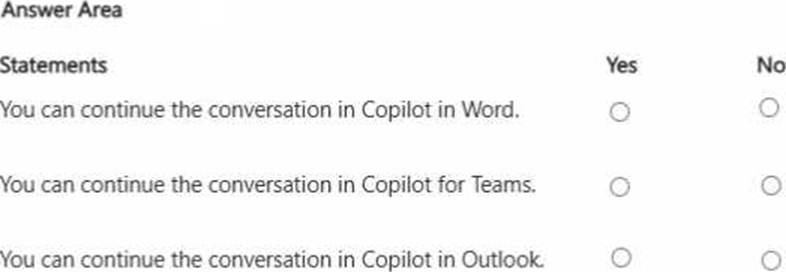
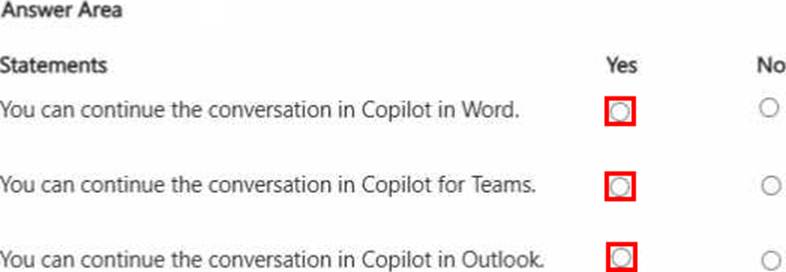
You can continue the conversation in Copilot in Word. Answer. Yes
You can continue the conversation in Copilot for Teams. Answer. Yes
You can continue the conversation in Copilot in Outlook. Answer. Yes
Microsoft 365 Copilot provides cross-application continuity across supported Microsoft 365 apps. When using the Researcher agent, users can continue or extend their work within applications such as Word, Teams, and Outlook.
In Word, users can incorporate research results directly into drafted documents, enabling seamless transition from research to content creation. In Teams, Copilot supports contextual collaboration by allowing insights from research to inform meetings or chats. In Outlook, findings can be referenced to compose informed and data-driven communications.
This interoperability is enabled by Microsoft Graph integration, which allows Copilot to securely access and contextualize enterprise data across applications while respecting organizational permissions.
These capabilities demonstrate effective management of prompts and conversations by maintaining workflow continuity, enhancing productivity, and supporting enterprise-grade collaboration powered by generative AI.
You are using Microsoft 365 Copilot to plan a trip and have asked Copilot to remember several details about the trip.
You cancel the trip plans.
You need to ensure that Copilot forgets the details.
What should you do?
- A . From the My Account portal, delete the Copilot activity history.
- B . From Copilot delete custom instructions.
- C . From Copilot delete memories.
- D . From Copilot delete all the conversation about the trip.
C
Explanation:
Microsoft 365 Copilot includes a memory capability that allows it to retain user-provided preferences
or details across interactions when explicitly instructed to remember them. These stored details are referred to as memories and are separate from standard conversation history.
If you previously asked Copilot to remember specific trip-related details, those details are stored as structured memory items. Simply deleting the conversation does not necessarily remove stored memory entries. Likewise, deleting activity history through the My Account portal removes conversation records but does not directly manage structured Copilot memories. Custom instructions define persistent behavioral preferences and are unrelated to trip-specific stored data.
To ensure Copilot no longer retains those trip details, you must delete the stored memories directly within Copilot. Microsoft documentation explains that users can view and manage saved memories and remove them individually to control what Copilot retains.
Therefore, the correct action to ensure Copilot forgets the trip details is to delete the memories.
HOTSPOT
You have a Microsoft 365 Copilot license.
You plan to run several prompts.
What should you use to ensure that Copilot generates the best response for each prompt? More than one answer choice may achieve the goal. To answer, select the Best options in the answer area. NOTE: Each correct selection is worth one point.
Explanation:
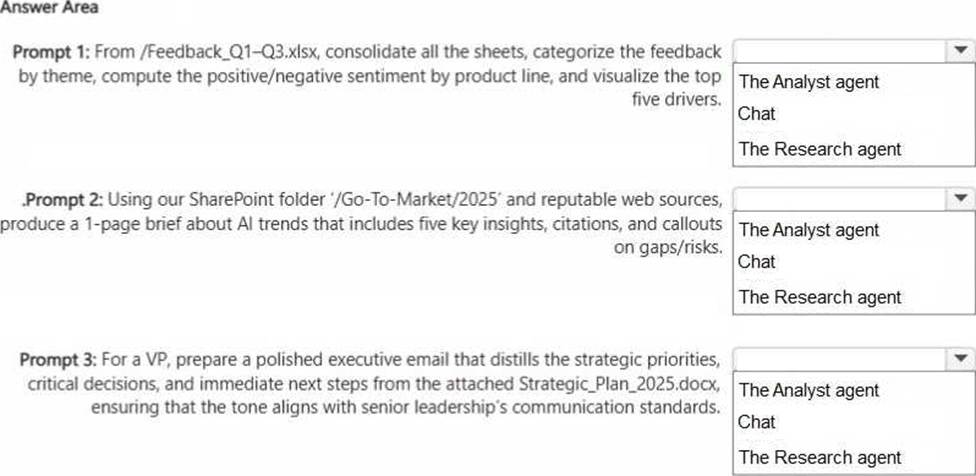
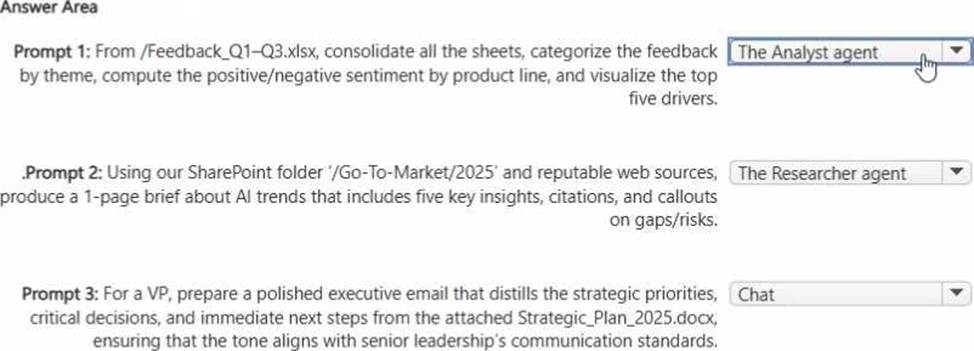
Use the Analyst agent for Prompt 1 because it is optimized for structured data work: consolidating worksheets, performing calculations, sentiment breakdowns by category (product line), and producing visualizations. These tasks align with analysis-style workflows where quantitative processing and charting are required.
Use the Researcher agent for Prompt 2 because it is designed to synthesize information from multiple sources, including SharePoint content plus web grounding, and to produce a well-structured brief with citations. Researcher is best when you need evidence-backed insights, reputable sourcing, and an organized narrative with risks and gaps.
Use Chat for Prompt 3 because the goal is drafting a refined executive email based on an attached document with tone control and communication standards. Chat excels at business writing, rewriting, tone adjustment, and producing polished communications without needing the deeper research workflow or heavy data analytics specialization.
You are using Microsoft 365 Copilot to enhance your productivity in Microsoft Word.
Which two tasks can you achieve by using Copilot in Word?
- A . Insert a table of contents based on the headings in your document.
- B . Insert a custom watermark that has specific text and formatting.
- C . Generate a summary of the key points in your document.
- D . Customize the page margins to match your company’s document standards.
A, C
Explanation:
Copilot in Word assists with content generation, summarization, rewriting, and structural organization. It can analyze document headings and insert a table of contents based on structured heading styles, supporting document navigation. It can also generate summaries of key points, which aligns directly with generative AI text analysis capabilities.
Custom watermark formatting and precise page margin configuration are traditional Word formatting functions and are not core generative AI capabilities of Copilot.
Therefore, the correct answers are A and C.
You ask Microsoft 365 Copilot to create a report based on information from the web. You verify the response and discover that some information is fictional.
What is this an example of?
- A . deepfake
- B . fabrication
- C . overreliance
- D . prompt injection
- E . bias
B
Explanation:
This scenario is an example of fabrication, which is commonly referred to in generative AI contexts as a hallucination. Fabrication occurs when an AI system generates information that appears credible but is factually incorrect, invented, or unsupported by verifiable sources.
According to Microsoft AI Business Professional guidance, large language models predict text based on patterns learned during training. They do not “know” facts in the human sense. As a result, when asked to generate reports using web-based information, the model may produce plausible-sounding but fictional details if sufficient grounding or reliable sources are not provided.
Deepfake refers specifically to synthetic media such as manipulated images, audio, or video. Overreliance describes a human behavior risk where users trust AI outputs without verification. Prompt injection is a malicious technique designed to manipulate model behavior. Bias refers to systematic unfairness in outputs.
In this case, the presence of fictional information in the generated report directly aligns with fabrication, making option B the correct answer.
HOTSPOT
Select the answer that correctly completes the sentence.


Explanation:
a specific date range of activity
The Microsoft 365 My Account portal provides users with control over their Copilot activity history in alignment with enterprise privacy and compliance standards. When selecting Delete history, users can remove Copilot activity based on a defined time range rather than deleting only a single conversation or all activity universally.
This functionality reflects Microsoft’s commitment to transparency, user control, and responsible AI governance. Allowing deletion by date range enables organizations and individuals to manage data retention policies efficiently while maintaining compliance with regulatory frameworks such as GDPR and internal data governance policies.
The other options are incorrect because deleting a specific conversation or all conversations with a specific agent is not the primary method offered in the My Account activity deletion setting. Instead, deletion is structured around activity time periods.
This capability reinforces generative AI best practices: secure data management, lifecycle control of AI interactions, and user-directed privacy management within enterprise environments.
A colleague from another company shares a link to a prompt.
When you select the link, you receive the following response: "Prompt not found. Sorry, it looks like the prompt is no longer available."
What is a possible cause of the response?
- A . The prompt is a scheduled prompt.
- B . The prompt contains a reference to a file that you do NOT have access to.
- C . The prompt is outdated.
- D . The prompt contains a file that has a sensitivity label applied.
- E . The prompt is outside of your organization.
E
Explanation:
Microsoft 365 Copilot operates within the security, compliance, and identity boundaries of a Microsoft 365 tenant. Shared prompts, prompt links, and Copilot artifacts are governed by organizational access controls and tenant isolation. If a prompt is created and shared from outside your organization, cross-tenant access may not be supported depending on the sharing configuration and administrative policies.
When a user attempts to open a prompt that resides in another organization’s tenant without proper cross-tenant sharing permissions, Copilot cannot locate or validate the resource within the user’s own environment. As a result, the system displays a “Prompt not found” message.
Option B would typically result in an access or permissions error rather than the prompt being unavailable entirely. Sensitivity labels and scheduled prompts do not inherently cause a “not found” error. Therefore, the most likely cause is that the prompt exists outside your organization’s tenant boundary and is not accessible to you.