
Practice Free SK0-005 Exam Online Questions
Several new components have been added to a mission-critical server, and corporate policy states all new components must meet server hardening requirements.
Which of the following should be applied?
- A . Definition updates
- B . Driver updates
- C . OS security updates
- D . Application updates
B
Explanation:
Driver updates should be applied to the new components that have been added to a mission-critical server, as part of the server hardening requirements. Drivers are software programs that enable the communication and functionality of hardware devices, such as network cards, storage controllers, or graphics cards. Updating drivers can improve the performance, compatibility, and stability of the new components with the server operating system and applications.
Reference: CompTIA Server+ Certification Exam Objectives, Domain 2.0: Hardware, Objective 2.2: Given a scenario, install, configure and maintain server components.
A technician recently replaced a NIC that was not functioning. Since then, no device driver is found when starting the server, and the network card is not functioning.
Which of the following should the technician check first?
- A . The boot log
- B . The BIOS
- C . The HCL
- D . The event log
C
Explanation:
The technician should check the hardware compatibility list (HCL) first to see if the new NIC is supported by the server’s operating system. The HCL is a list of hardware devices that have been tested and verified to work with a specific operating system. If the NIC is not on the HCL, it means that there is no device driver available or compatible for it, and the NIC will not function properly.
Reference: CompTIA Server+ SK0-005 Certification Study Guide, Chapter 5, Lesson 5.2, Objective 5.2
Which of the following techniques can be configured on a server for network redundancy?
- A . Clustering
- B . Vitalizing
- C . Cloning
- D . Teaming
D
Explanation:
Teaming is a technique that can be configured on a server for network redundancy. Teaming involves combining two or more network adapters into a single logical unit that acts as one network interface. This way, if one network adapter fails, another one can take over without disrupting network connectivity. Teaming can also improve network performance by load balancing traffic across multiple network adapters. Clustering is a technique that involves grouping two or more servers together to act as one system for high availability and fault tolerance. Virtualizing is a technique that involves creating multiple virtual machines on a single physical server to optimize resource utilization and flexibility. Cloning is a technique that involves creating an exact copy of a server’s configuration and data for backup or migration purposes.
Reference:
https://docs.microsoft.com/en-us/windows-server/networking/technologies/nic-teaming/nic-teaming
https://www.techopedia.com/definition/19588/clustering
https://www.techopedia.com/definition/4790/virtualization
https://www.techopedia.com/definition/4776/cloning
After configuring IP networking on a newly commissioned server, a server administrator installs a straight- through network cable from the patch panel to the switch. The administrator then returns to the server to test network connectivity using the ping command.
The partial output of the ping and ipconfig commands are displayed below:
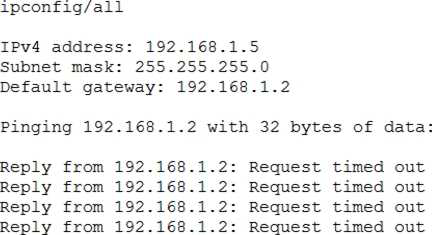
The administrator returns to the switch and notices an amber link light on the port where the server is connected.
Which of the following is the MOST likely reason for the lack of network connectivity?
- A . Network port security
- B . An improper VLAN configuration
- C . A misconfigured DHCP server
- D . A misconfigured NIC on the server
D
Explanation:
A misconfigured NIC on the server is the most likely reason for the lack of network connectivity. The output of the ping command shows that the server is unable to reach its default gateway (10.0.0.1) or any other IP address on the network. The output of the ipconfig command shows that the server has a valid IP address (10.0.0.10) and subnet mask (255.255.255.0) but no default gateway configured. This indicates that there is a problem with the NIC settings on the server, such as an incorrect IP address, subnet mask, default gateway, DNS server, etc. A misconfigured NIC can also cause an amber link light on the switch port, which indicates a speed or duplex mismatch between the NIC and the switch.
Following a recent power outage, a server in the datacenter has been constantly going offline and losing its configuration. Users have been experiencing access issues while using the application on the server. The server technician notices the data and time are incorrect when the server is online. All other servers are working.
Which of the following would MOST likely cause this issue? (Choose two.)
- A . The server has a faulty power supply
- B . The server has a CMOS battery failure
- C . The server requires OS updates
- D . The server has a malfunctioning LED panel
- E . The servers do not have NTP configured
- F . The time synchronization service is disabled on the servers
BA
Explanation:
The server has a CMOS battery failure and the time synchronization service is disabled on the servers. The CMOS battery is a small battery on the motherboard that powers the BIOS settings and keeps track of the date and time when the server is powered off. If the CMOS battery fails, the server will lose its configuration and display an incorrect date and time when it is powered on. This can cause access issues for users and applications that rely on accurate time stamps. The time synchronization service is a service that synchronizes the system clock with a reliable external time source, such as a network time protocol (NTP) server. If the time synchronization service is disabled on the servers, they will not be able to update their clocks automatically and may drift out of sync with each other and with the network. This can also cause access issues for users and applications that require consistent and accurate time across the network.
The accounting department needs more storage and wants to retain the current data for quick read-write access. The accounting server does not have any internet drive bays available to keep both disks however the server does have USB 3 0 and eSATA ports available.
Which of the following is the BEST way to accomplish the department’s goals?
- A . Copy the existing data to an external USB 3 0 enclosure.
- B . Place the existing data on a DVD and use the internal DVD-ROM drive.
- C . Transfer the existing data to an external eSATA enclosure.
- D . Move the existing data to a new. larger internal hard drive.
C
Explanation:
The best way to accomplish the department’s goals is to transfer the existing data to an external eSATA enclosure, which is a device that connects an external hard drive to a computer using an eSATA port. This will allow the accounting department to retain the current data for quick read-write access, as eSATA provides high-speed data transfer rates and supports hot-plugging. Unlike USB 3.0, eSATA does not share bandwidth with other devices, which can improve performance and reliability.
Verified Reference: [eSATA vs USB 3.0]
After installing an OS on a new server, the administrator realizes the server does not have any network connectivity. The administrator checks the network cable, and it seems to be transferring dat
a.
Which of the following should be checked next?
- A . NIC firmware
- B . IPv4 options
- C . DHCP options
- D . Firewall options
- E . DNS settings
B
Explanation:
If the network cable is functioning but there is no network connectivity, the next step would be to check the IPv4 options. This includes verifying that the server has a correct IP address, subnet mask, and gateway configuration.
IPv4 options (Answer B): Incorrect IP configuration is a common reason for network connectivity issues.
NIC firmware (Option A): Firmware issues are less likely if the NIC is detecting the cable and appears operational.
DHCP options (Option C): DHCP could be checked if automatic IP assignment is being used, but verifying IPv4 options manually is the first step.
Firewall options (Option D): Firewalls can block connectivity but should be checked after confirming IP settings.
DNS settings (Option E): DNS issues usually affect domain name resolution, not basic network connectivity.
CompTIA Server+
Reference: This topic is covered under SK0-005 Objective 3.1: Install and configure server components.
Hackers recently targeted a company with an attack that resulted in a system breach, which compromised the organization’s data. Because of the system breach, the administrator had to bypass normal change management procedures.
Which of the following change management activities was necessary?
- A . Cancelled change request
- B . Change request postponement
- C . Emergency change request
- D . Privilege change request
- E . User permission change request
C
Explanation:
An emergency change request is a type of change management activity that is used to address urgent issues that pose a significant risk to the organization, such as a system breach. An emergency change request requires immediate action and approval, and it may bypass some of the normal change management procedures, such as testing, documentation, or stakeholder communication12.
Reference =
1: Change Management Plans: A Definitive Guide – Indeed(https://www.indeed.com/career-advice/career-development/change-management-activities)
2: The 10 Best Change Management Activities – Connecteam(https://connecteam.com/top-10-change-management-activities/)
Which of the following attacks is the most difficult to mitigate with technology?
- A . Ransomware
- B . Backdoor
- C . SQL injection
- D . Phishing
D
Explanation:
Phishing is a type of attack that is the most difficult to mitigate with technology. Phishing is a technique of deceiving users into revealing their personal or confidential information, such as passwords, credit card numbers, or bank accounts, by sending them fraudulent emails or messages that appear to be from legitimate sources. Phishing relies on human factors, such as curiosity, greed, or fear, to trick users into clicking on malicious links or attachments, or entering their credentials on fake websites. Technology solutions, such as antivirus software, firewalls, or spam filters, can help detect and block some phishing attempts, but they cannot prevent users from falling victim to social engineering tactics.
Reference: [CompTIA Server+ Certification Exam Objectives], Domain 5.0: Security, Objective 5.3: Given a scenario, explain methods and techniques to secure data.
A server administrator is trying to determine the cause of a slowdown on a database server. Upon investigation, the administrator determines the issue is in the storage subsystem.
Which of the following will most likely resolve this issue?
- A . Increasing IOPS by implementing flash storage
- B . Implementing deduplication on the storage
- C . Extending capacity by installing a 4TB SATA disk
- D . Reformatting the disk as FAT32
A
Explanation:
Increasing IOPS (input/output operations per second) by implementing flash storage is the most likely solution to resolve a slowdown issue in the storage subsystem of a database server. Flash storage uses solid-state drives (SSDs) that have faster read/write speeds and lower latency than traditional hard disk drives (HDDs). This can improve the performance of database queries and transactions. Implementing deduplication, extending capacity, or reformatting the disk as FAT32 are not likely to resolve the issue, as they do not affect the IOPS of the storage subsystem.
Reference: [CompTIA Server+ Certification Exam Objectives], Domain 3.0: Storage, Objective 3.5: Summarize hardware and features of various storage technologies.