
Practice Free SK0-005 Exam Online Questions
An administrator needs to disable root login over SSH.
Which of the following tiles should be edited to complete this task?
- A . /root.ssh/sshd/config
- B . /etc.ssh/sshd_config
- C . /root/.ssh/ssh_config
- D . /etc.sshs_shd_config
B
Explanation:
To disable root login over SSH, the server administrator needs to edit the SSH configuration file located at /etc/ssh/sshd_config. This file contains various settings for the SSH daemon that runs on the server and accepts incoming SSH connections. The administrator needs to find the line that says PermitRootLogin and change it to no or comment it out with a # symbol. Then, the administrator needs to restart the SSH service for the changes to take effect.
Reference: https://www.howtogeek.com/828538/how-and-why-to-disable-root-login-over-ssh-on-linux/
A systems administrator has noticed performance degradation on a company file server, and one of the disks on it has a solid amber light. The administrator logs on to the disk utility and sees the array is rebuilding.
Which of the following should the administrator do NEXT once the rebuild is finished?
- A . Restore the server from a snapshot.
- B . Restore the server from backup.
- C . Swap the drive and initialize the disk.
- D . Swap the drive and initialize the array.
C
Explanation:
The next action that the administrator should take once the rebuild is finished is to swap the drive and initialize the disk. This is to replace the faulty disk that has a solid amber light, which indicates a predictive failure or a SMART error. Initializing the disk will prepare it for use by the RAID controller and add it to the array. The administrator should also monitor the array status and performance after swapping the drive.
Reference: https://www.salvagedata.com/how-to-rebuild-a-failed-raid/
A technician needs to install a Type 1 hypervisor on a server. The server has SD card slots, a SAS controller, and a SATA controller, and it is attached to a NAS.
On which of the following drive types should the technician install the hypervisor?
- A . SD card
- B . NAS drive
- C . SATA drive
- D . SAS drive
D
Explanation:
A SD card is a type of flash memory card that can be used to store data and run applications. A SD card can be used to install a Type 1 hypervisor on a server, as it provides fast boot time, low power consumption, and high reliability. A Type 1 hypervisor runs directly on the underlying computer’s physical hardware, interacting directly with its CPU, memory, and physical storage. For this reason, Type 1 hypervisors are also referred to as bare-metal hypervisors. A Type 1 hypervisor takes the place of a host operating system and VM resources are scheduled directly to the hardware by the hypervisor123. A NAS drive (B) is a type of network-attached storage (NAS) device that provides shared access to files and data over a network. A NAS drive cannot be used to install a Type 1 hypervisor on a server, as it requires a network connection and a host operating system to function. A SATA drive © is a type of hard disk drive (HDD) or solid state drive (SSD) that uses the Serial ATA (SATA) interface to connect to a computer. A SATA drive can be used to install a Type 1 hypervisor on a server, but it may have some disadvantages compared to a SD card, such as slower boot time, higher power consumption, and lower reliability. A SAS drive (D) is a type of hard disk drive (HDD) or solid state drive (SSD) that uses the Serial Attached SCSI (SAS) interface to connect to a computer. A SAS drive can also be used to install a Type 1 hypervisor on a server, but it may have similar disadvantages as a SATA drive, and it may also be more expensive and less compatible than a SD card.
Reference:
1 https://phoenixnap.com/kb/what-is-hypervisor-type-1-2
2 https://www.ibm.com/topics/hypervisors
3 https://www.redhat.com/en/topics/virtualization/w hat-is-a-hypervisor
An administrator is alerted to a hardware failure in a mission-critical server. The alert states that two drives have failed. The administrator notes the drives are in different RAID 1 arrays, and both are hot-swappable.
Which of the following steps will be the MOST efficient?
- A . Replace one drive, wait for a rebuild, and replace the next drive.
- B . Shut down the server and replace the drives.
- C . Replace both failed drives at the same time.
- D . Replace all the drives in both degraded arrays.
C
Explanation:
Since both drives are in different RAID 1 arrays and both are hot-swappable, the most efficient step is to replace both failed drives at the same time. This can minimize the downtime and avoid unnecessary reboots. RAID 1 provides mirroring, which means that data is duplicated on both drives in the array. Therefore, replacing one drive will not affect the data on the other drive or the functionality of the array.
Reference: https://en.wikipedia.org/wiki/Standard_RAID_levels#RAID_1
An IT administrator is configuring ten new desktops without an operating system. The infrastructure contains an imaging server and operating system loaded on a USB, a DVD, and an SD card.
Which of the following options would minimize the amount of time the administrator needs to load the operating system on every machine?
- A . SD card
- B . Optical
- C . Network
- D . USB
D
Explanation:
Using a network-based deployment, such as network booting (PXE – Preboot Execution Environment) or imaging through a server, is the most efficient way to load operating systems onto multiple machines simultaneously. This approach minimizes the manual intervention required for each device, as the administrator can initiate the operating system installation or imaging process across all desktops at once through the network. In contrast, using an SD card, DVD (Optical), or USB would require the administrator to physically move the media from one desktop to another, significantly increasing the setup time for each device.
A technician is trying to determine the reason why a Linux server is not communicating on a network.
The returned network configuration is as follows:
eth0: flags=4163<UP, BROADCAST, RUNNING, MULTICAST> mtu 1500 inet 127.0.0.1 network 255.255.0.0 broadcast 127.0.0.1
Which of the following BEST describes what is happening?
- A . The server is configured to use DHCP on a network that has multiple scope options
- B . The server is configured to use DHCP, but the DHCP server is sending an incorrect subnet mask
- C . The server is configured to use DHCP on a network that does not have a DHCP server
- D . The server is configured to use DHCP, but the DHCP server is sending an incorrect MTU setting
C
Explanation:
The reason why the Linux server is not communicating on a network is that it is configured to use DHCP on a network that does not have a DHCP server. DHCP (Dynamic Host Configuration Protocol) is a protocol that allows a client device to obtain an IP address and other network configuration parameters from a DHCP server automatically. However, if there is no DHCP server on the network, the client device will not be able to obtain a valid IP address and will assign itself a link-local address instead. A link-local address is an IP address that is only valid within a local network segment and cannot be used for communication outside of it. A link-local address has a prefix of 169.254/16 in IPv4 or fe80::/10 in IPv6. In this case, the Linux server has assigned itself a link-local address of 127.0.0.1, which is also known as the loopback address. The loopback address is used for testing and troubleshooting purposes and refers to the device itself. It cannot be used for communication with other devices on the network.
A VLAN needs to be configured within a virtual environment for a new VM.
Which of the following will ensure the VM receives a correct IP address?
- A . A virtual router
- B . A host NIC
- C . A VPN
- D . A virtual switch
- E . A vNlC
D
Explanation:
The correct answer is D. A virtual switch.
A virtual switch is a software-based network device that connects the virtual machines (VMs) in a virtual environment and allows them to communicate with each other and with the physical network. A virtual switch can also create and manage virtual LANs (VLANs), which are logical segments of a network that separate the traffic of different VMs or groups of VMs. A VLAN needs a DHCP server to assign IP addresses to the VMs that belong to it. A virtual switch can act as a DHCP relay agent and forward the DHCP requests from the VMs to the DHCP server on the physical network. This way, the VMs can receive correct IP addresses for their VLANs123
A virtual router is a software-based network device that routes packets between different networks or subnets. A virtual router can also create and manage VLANs, but it is not necessary for a VM to receive a correct IP address. A virtual router can be used to provide additional security, redundancy, or load balancing for the VMs12
A host NIC is a physical network interface card that connects the host machine to the physical network. A host NIC can also support VLAN tagging, which allows the host machine to communicate with different VLANs on the network. However, a host NIC alone cannot ensure that a VM receives a correct IP address for its VLAN. The host NIC needs to be connected to a virtual switch that can relay the DHCP requests from the VMs to the DHCP server12
A VPN is a virtual private network that creates a secure tunnel between two or more devices over the internet. A VPN can be used to encrypt and protect the data traffic of the VMs, but it is not related to the configuration of VLANs or IP addresses. A VPN does not affect how a VM receives a correct IP address for its VLAN14
A vNIC is a virtual network interface card that connects a VM to a virtual switch or a virtual router. A vNIC can also support VLAN tagging, which allows the VM to communicate with different VLANs on the network. However, a vNIC alone cannot ensure that a VM receives a correct IP address for its VLAN. The vNIC needs to be connected to a virtual switch or a virtual router that can relay the DHCP requests from the VMs to the DHCP server12
A junior administrator needs to configure a single RAID 5 volume out of four 200GB drives attached to the server using the maximum possible capacity. Upon completion, the server reports that all drives were used, and the approximate volume size is 400GB.
Which of the following BEST describes the result of this configuration?
- A . RAID 0 was configured by mistake.
- B . RAID 5 was configured properly.
- C . JBOD was configured by mistake.
- D . RAID 10 was configured by mistake.
D
Explanation:
The output of the configuration shows that RAID 5 was configured properly using four 200GB drives.
The approximate volume size of 400GB is correct, since RAID 5 uses one disk for parity and the rest for data. Therefore, the usable storage capacity is three-fourths of the total capacity, which is 600GB out of 800GB. The other RAID levels given would result in different volume sizes: RAID 0 would result in 800GB, RAID 1 would result in 200GB, and JBOD would result in an error since it does not support multiple drives in a single volume.
Reference: https://en.wikipedia.org/wiki/Standard_RAID_levels#RAID_5
A site is considered a warm site when it:
- A . has basic technical facilities connected to it.
- B . has faulty air conditioning that is awaiting service.
- C . is almost ready to take over all operations from the primary site.
- D . is fully operational and continuously providing services.
C
Explanation:
A warm site is a backup site that has some of the necessary hardware, software, and network resources to resume operations, but not all of them. A warm site requires some time and effort to become fully operational. A warm site is different from a cold site, which has minimal or no resources, and a hot site, which has all the resources and is ready to take over immediately.
Reference: CompTIA Server+ Study Guide, Chapter 10: Disaster Recovery, page 403.
A technician is setting up a repurposed server. The minimum requirements are 2TB while ensuring the highest performance and providing support for one drive failure.
The technician has the following six drives available:
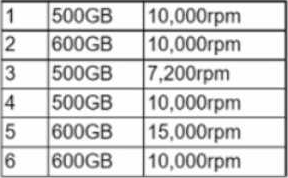
Which of the following drive selections should the technician utilize to best accomplish this goal?
- A . 1,2, 4, and 6
- B . 1, 2, 3, 5, and 6
- C . 1, 2, 4, 5, and 6
- D . 1, 2, 3, 4, and 6
C
Explanation:
RAID 5 configuration: Using five of the available drives in a RAID 5 configuration meets the requirements for:
Storage capacity: Four 600GB drives (2, 5, and 6) provide a total usable capacity of 2.4TB (4 * 600 * 0.8), exceeding the minimum requirement of 2TB. RAID 5 introduces parity data for fault tolerance, sacrificing some usable space (one drive’s worth).
Performance: The combination of multiple drives in a RAID 5 array improves read performance compared to a single drive setup.
Fault tolerance: Even with a single drive failure (any of the five drives used in the RAID 5), the remaining drives can reconstruct the lost data, allowing the server to continue operating.