
Practice Free Sales-Admn-202 Exam Online Questions
When can a user expect the Conference Pass Product to be added to the Quote during the quoting process?
- A . The user calculates a Quote.
- B . The user selects a Configuration Attribute value for a Product
- C . The user saves the Quote.
- D . The user selects a Product for the Quote.
D
Explanation:
Scenario Overview:
A Product Rule triggers the addition of the Conference Pass Product when a related Product is selected.
Key Trigger Mechanism:
Product Rules with an Action to add products execute as soon as the user selects a Product on the Quote.
Steps to Verify:
Navigate to the Product Rule for the Conference Pass.
Ensure the Evaluation Event is set to fire On Initialization or Selection.
Salesforce CPQ
Reference: Product Rules are typically triggered based on user actions such as adding Products or configuring attributes.
An admin created a dynamic bundle and needs a Product Rule to limit which products users see when configuring the bundle.
Which type of Product Action should the Admin create to ensure that only a specific set of products may be selected for the dynamic bundle?
- A . Optional filter
- B . Show
- C . Default filter
- D . Enable
D
Explanation:
Requirement:
Restrict the products visible during the configuration of a dynamic bundle.
Solution:
Use a Default Filter in a Product Rule. This ensures only the specified set of products is displayed in
the configurator for the dynamic bundle.
Why Other Options Are Incorrect:
A: Optional filter is not a valid Product Action.
B: The Show action determines visibility but does not enforce restrictions on selections dynamically.
D: Enable action is used to activate a previously disabled product but does not filter selections. Salesforce CPQ
Reference: Dynamic bundles and filtering actions are detailed in CPQ Product Rule Configuration Guidelines .
A sales rep notices on Opportunity that only some Opportunity Products are synched from Quotes.
This discrepancy causes inaccuracies in the pipeline.
Which three troubleshooting steps should the Admin take to resolve the issue? Choose 3 answers
- A . Ensure the Quote’s Account lookup is populated.
- B . Ensure the Opportunity’s Primary Quote lookup is populated.
- C . Check the Quote’s Primary checkbox for a value of True.
- D . Ensure the Quote’s Opportunity lookup is populated.
- E . Check the Quote’s Primary checkbox for a value of False.
A,B,E
Explanation:
Issue Context:
Some Opportunity Products are not syncing from the Quote, causing pipeline inaccuracies.
Troubleshooting Steps:
Universal Containers (UC) created a Custom Action called Add Subscriptions and a Search Filter for Products flagged as subscription Products.
How can UC ensure that sales reps are restricted to subscription Products when the reps click on the Custom Action called Add Subscriptions?
- A . Set the Filter value on the Add Subscriptions Search Filter to True and mark the Hidden checkbox on the subscription Search Filter to True.
- B . Remove the Subscription flag from the Product’s Search Filters Field Set.
- C . Remove the Subscription flag from the Product’s Search Results Field Set.
- D . Set the Filter Value on the Add Subscriptions Search Filter to Hidden.
D
Explanation:
Requirement Overview:
Restrict sales reps to only selecting subscription Products when using the Add Subscriptions Custom
Action.
Solution Details:
The Search Filter for the Add Subscriptions action should include only subscription Products. Setting the Filter Value to Hidden ensures that only Products matching the filter criteria are displayed.
Steps to Configure:
Navigate to the Search Filter related to the Add Subscriptions action.
Set the Filter Value to True.
Mark the Hidden checkbox to restrict visibility to subscription Products.
Validation:
Test the Custom Action to confirm that only subscription Products are visible.
The sales team at Universal Containers (UC) has received customer feedback that numerous lines on a typical Quote make it difficult to understand how the total amount breaks down across the various types of Products: Hardware, Software, and Professional Services. UC uses Quote Templates to generate Quote Documents.
Which solution would allow customers to see separate tables and subtotals organized by Product Family?
- A . Create Roll-Up Summary fields on the Quote for each Product Family and add them as merge fields to the Template Top.
- B . Create a Line Items section and set SBQQ__ProductFamily__c as the Group field.
- C . Create an HTML Template Content record with three tables to represent each Product Family.
- D . Create a Line Items section and set SBQQ__ProductFamily_c as the Roll-Up field.
B
Explanation:
Requirement Overview:
Universal Containers wants to show Quote Line items grouped by Product Family with subtotals for
each family in Quote Documents.
Solution Details:
Salesforce CPQ allows grouping of Line Items in Quote Templates.
Setting SBQQ__ProductFamily__c as the Group field organizes the Quote Lines into separate sections
for each Product Family.
Configuration Steps:
Navigate to the Quote Template.
Create a new Line Items Section.
In the Grouping field, set SBQQ__ProductFamily__c.
Save and test the template by generating a Quote Document.
Validation:
Confirm that the generated document displays separate tables for Hardware, Software, and Professional Services, with subtotals for each group.
Universal Containers wants to notify its users when approval is required to discourage users from discounting while in the Quote Line Editor.
Which type of Product Rule should be used to meet this requirement?
- A . Validation
- B . Filter
- C . Alert
- D . Selection
C
Explanation:
Requirement:
Notify users in the Quote Line Editor when approval is required to discourage excessive discounting.
Solution:
Use a Product Rule with Alert Action to display a notification or message in the Quote Line Editor when a user exceeds predefined discount thresholds. Why Other Options Are Incorrect:
A: Validation Rules prevent actions but do not notify users.
B: Filter Rules are used for restricting product selection, not notifications.
D: Selection Rules govern product compatibility and are irrelevant here. Salesforce CPQ
Reference: Alert actions in Product Rules are outlined in CPQ Product Rule Configuration
Universal Containers has three different range discount schedules. All three have a reference to Product A through the objects shown below. Product A is an option in a bundle and has a list price of $100.
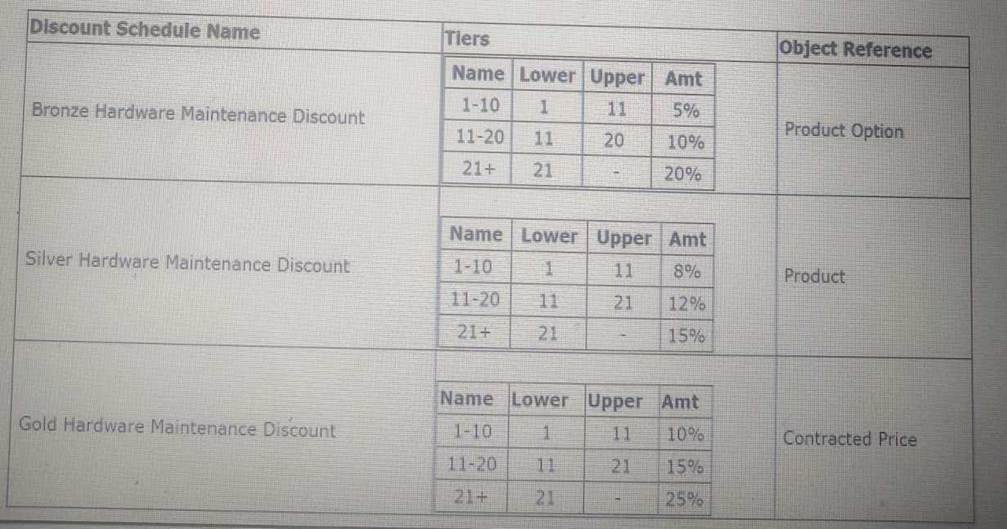
Given this scenario, what should the Net Total Price of Product A be if the user enters a Quantity of 15 on a quote where contracted pricing is applicable?
- A . $1,125.00
- B . $1,275.00
- C . $1,350.00
- D . $1,320.00
B
Explanation:
Scenario Breakdown:
Product A has a base list price of $100.
A quantity of 15 is entered on the quote.
Gold Hardware Maintenance Discount applies because contracted pricing is enabled.
Discount for the quantity range (11C20) is 15% (as shown in the table).
Net Price Calculation:
List Price = $100
Discount = 15%
Quantity = 15
Net Total Price = $100 × 15 × (1 – 0.15) = $1,275.
Justification for Selected Discount:According to Salesforce CPQ guidelines, when contracted pricing applies, it takes precedence over other Discount Schedules. The Gold Discount Schedule is therefore applied.
Testing and Validation:Test the configuration using a sample quote to ensure the correct schedule is applied and the net total price matches the expected value.
The Admin at Universal Containers wants to add Maintenance and Support products to the parent bundle. Maintenance and Support products should display in separate sections during configuration, with the Support products displaying above the Maintenance products.
How should the Admin set up the Product to meet both requirements?
- A . Create two Production Options Maintenance and Support. Maintenance will always display first, due to alphabetical ordering.
- B . Create two Product Features, Maintenance and Support. The Support feature should have a lower value in the “Number” filed.
- C . Create two Product Features, Maintenance and Support. Maintenance will always display first, due to alphabetical ordering.
- D . Create two Product Options, Maintenance and Support. The Support option should have a lower value in the “Number” field.
B
Explanation:
Requirement:
Maintenance and Support products must display in separate sections during configuration.
Support products should appear above Maintenance products.
Solution:
Product Features are used to organize Product Options into sections.
The Number field on Product Features determines the order in which the sections appear.
Support should have a lower Number value to appear above Maintenance.
Salesforce CPQ
Reference: The Product Features Configuration Guidelines explain how to use features and their ordering mechanisms .
Universal Containers (UC).utilizes bundles to sell hardware and related accessories together as a package. Several of the accessories are component-type Options, with quantities dependent on the hardware. UC wants to begin using split Orders to manage a fulfillment process, with Orders broken out based on when items are shipped to the customer. Whet should UC consider before implementing split Orders ?
- A . The hardware bundle and component-type Options can be spilt manually.
- B . The hardware bundle and component-type Options can be spilt Into separate Orders without preserving the bundle structure.
- C . The hardware bundle and component-type Options must be placed in the same Order together.
- D . The hardware bundle and component-type Options can be split using the Order By field.
B
Explanation:
Requirement Overview:
Universal Containers wants to use split Orders to manage fulfillment by separating items based on
their shipping schedules.
Key Considerations:
Component-type Options: When splitting Orders, component-type Options are treated independently and can be split into different Orders.
Bundle Structure: Splitting Orders does not maintain the bundle structure, meaning the parent-child relationships of the bundle are not preserved in the split Orders. Steps to Configure:
Ensure that the Order by Quote Line Group field or a custom grouping field is used to facilitate splitting the Orders based on shipment schedules. Validation:
Test the split Order functionality by creating a Quote with a hardware bundle and ensuring that the bundle and components can be split appropriately.
Universal Containers (UC) uses the Advanced Approvals package for its Approvals process on Quotes.
UC’s business model requires that Approval requests are assigned to the user’s direct manager.
How can the admin ensure that these Approval Rules assign generated Approvals to the user’s manager?
- A . Set Next Automated Approver Determined By to Manager on the Approval Process.
- B . Populate the Approver lookup on the Approval Rule with the Approver corresponding to the user’s
manager. - C . Let the user choose the Approver manually and create a Validation Rule to prevent the user from choosing a different Approver than the manager.
- D . Define the Approver Field on the Approval Rule as a custom Quote field which contains the user’s manager’s User ID.
A
Explanation:
Requirement Overview:
Assign generated Approval requests to the user’s direct manager.
Solution:
Salesforce CPQ’s Advanced Approvals package includes the setting Next Automated Approver Determined By, which allows Approvals to be routed automatically to the user’s manager. Steps to Configure:
Navigate to the Approval Process.
Set Next Automated Approver Determined By to Manager.
Save and test the Approval process to ensure it correctly assigns to the manager.