
Practice Free Sales-Admn-202 Exam Online Questions
Universal Containers (UC) defines a Warranty Period in a field on its Products and wants to ensure that this Warranty Period is correctly stored on the Asset record. A twin fleld has been created on the Asset record. UC contracts from the Order. When leveraging the twin field functionality to pass this
Informaticn to the Asset record, on which object should the admin create a twin field?
- A . Product Option
- B . Order Product
- C . Opportunity Product
- D . Quote Line
D
Explanation:
Requirement:
Ensure the Warranty Period from the Product is correctly transferred to the Asset record.
Solution:
Create a twin field on the Quote Line because:
The Quote Line stores product-specific information during quoting.
When the Quote is contracted, the twin field ensures the value is passed to the Order Product and then to the Asset record.
Why Other Options Are Incorrect:
A: The Product Option is used within bundles and does not directly transfer to the Asset.
B: The Order Product receives data from the Quote Line, so the twin field must originate there.
C: The Opportunity Product is not involved in the CPQ twin field data flow.
Salesforce CPQ
Reference: Twin fields and their data flow from Quote Line to Asset are detailed in CPQ Field Mapping Documentation .
What is the correct order of data import to load Products and Product bundles in CPQ?
- A . Product, Product Features, Product Options, Option Constraints, Configuration Attributes
- B . Product, Product Action, Product Rules, Error Conditions, Configuration Rules
- C . Product Option, Product Feature, Product, Option Constraints, Configuration Attributes
- D . Product Features, Product, Product Options, Configuration Attributes, Option Constraints
A
Explanation:
In Salesforce CPQ, importing data for products and bundles requires a specific order to ensure referential integrity, as certain objects depend on others being present. The correct sequence starts with the Product (the parent record), followed by Product Features (defining sections or categories within the bundle), Product Options (specific selectable items under features), Option Constraints (rules governing option selections), and finally Configuration Attributes (additional settings for dynamic configuration). Option A reflects this hierarchical dependency accurately. Option B includes unrelated objects like Product Action and Error Conditions, which pertain to rules rather than bundle structure. Option C starts with Product Option before Product, which violates dependency rules since options require a parent product. Option D begins with Product Features before Product, which is incorrect as features need a product to associate with. Salesforce CPQ documentation emphasizes
this order for successful data imports.
Reference: Salesforce CPQ Documentation – "Importing Product Data" and "Bundle Configuration Setup".
A customer is implementing CPQ to support two languages.
Which two portions of text can be translated using the Salesforce CPQ localization object? Choose 2 answers
- A . Picklist values in the Product Family field on the Product object
- B . Configuration Attribute picklist values
- C . The Feature Name field on the Configure Products page
- D . HTML Template Content in the Quote document
C,D
Explanation:
Issue:
Quote Lines on Quote A are grouped incorrectly in the output document.
Possible Causes:
C: Quote Line Groups: Existing Quote Line Groups on the Quote override the Group Field setting in the template.
D: Group Field in Template Section: The Group Field value in the Line Items template section may cause unexpected grouping.
Why Other Options Are Incorrect:
A: The Modified By field has no impact on template grouping.
B: Configuration Attributes like location affect product selection, not grouping in Quote templates. Salesforce CPQ
Reference: Grouping behavior is explained in the Quote Templates and Line Item Configuration documentation .
Northern Trail Outfitters has two products:
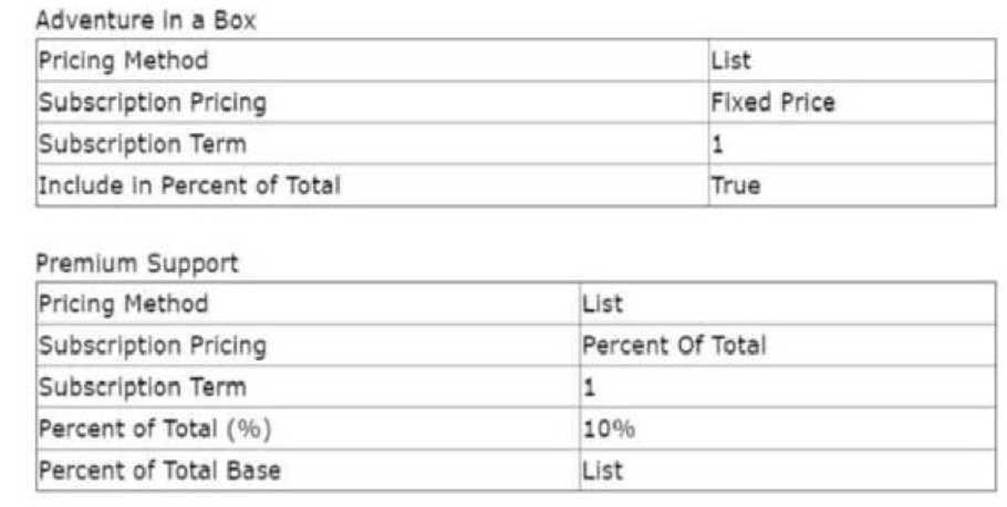
Both products are added to a one year quote. The Adventure in a Box product has a list price of $10 with a discount of 50%.
What Is the expected Net Total of Premium Support?
- A . $60.00
- B . $54.00
- C . $12.00
- D . $6.00
C
Explanation:
Scenario Breakdown:
Adventure in a Box:
List Price = $10
Discount = 50%
Net Price = $5 (after 50% discount).
Premium Support:
Percent of Total Base = List Price.
Percent of Total = 10%.
Calculation of Premium Support:
Percent of Total applies to the Net Price of Adventure in a Box.
Net Total of Premium Support = $5 × 10% = $0.50 per month.
For 12 months: $0.50 × 12 = $12.00.
A subscription product that was newly created fails to display In the Product Selection screen when users search for it.
What are three possible reasons for this behavior?
Choose 3 answers
- A . The Active checkbox is FALSE on the Product record.
- B . The Product is missing a related Cost record.
- C . The Optional checkbox is TRUE on the Product record.
- D . The Product is missing a Pricebook Entry for the Quote’s Pricebook,
- E . The Component checkbox is TRUE on the Product record.
A,D,E
Explanation:
Scenario:
A subscription product does not appear in the Product Selection screen during search.
Possible Causes:
A: The Active checkbox must be TRUE for the product to appear.
D: The product requires a Pricebook Entry in the corresponding Quote’s Pricebook.
E: If the Component checkbox is TRUE, the product is treated as a bundle component, not standalone, and will not appear in search results.
Why Other Options Are Incorrect:
B: Cost records are unrelated to product visibility.
C: The Optional checkbox determines bundling behavior, not search visibility. Salesforce CPQ
Reference: Product visibility settings are detailed in CPQ Product Selection Configuration .
Universal Containers restricts users from selling more than 10 different products within a specific Product feature at once.
What should the admin set up to satisfy this requirement?
- A . An Error Condition in a Product Rule should be set up to validate that all product Option’s Quantity field is less than or equal to 10.
- B . A value of 10 should be added to the Max Options field on the feature record.
- C . The Min Quantity and Max Quantity fields on each Option should be set to zero and 10, respectively.
- D . The summary Variable with Filter Fields should be used in an Error Condition of a Product Alert Rule.
B
Explanation:
Requirement Overview:
Limit users from selecting more than 10 product options within a specific Product Feature.
Key Mechanism:
The Max Options field on the Feature record limits the maximum number of product options that can
be selected for that feature.
Steps to Configure:
Navigate to the Feature Record associated with the Product Bundle.
Set the Max Options field to 10.
Save and test by adding the Product Bundle to a Quote.
Validation:
When a user attempts to select more than 10 product options within the feature, Salesforce CPQ will prevent further selections and display an appropriate message.
Universal Containers (UC) licenses shipping software that is sold for a fixed price based on each quantity tier as seen in the table below. For example, buying eight licenses would cost a total of $1,800 rather than multiplying unit price by quantity. Further discounts on this product are unavailable.
Licenses | Price
1-5 | $1,000
6-10 | $1,800
11-20 | $3,000
21-50 | $5,000
50+ | $8,000
Which three steps should the admin take to set up this pricing? (Choose 3 answers)
- A . Set Pricing Method to Block on the Product record.
- B . Set Non Discountable to True on the Product record.
- C . Set Pricing Method to Fixed Price on the Product record.
- D . Create a Slab Discount Schedule for the Product for each quantity tier with a different discount for each tier.
- E . Create Block Pricing records on the Product for each quantity tier with a different price for each tier.
A, B, E
Explanation:
Block pricing in Salesforce CPQ is used when a fixed price applies to a quantity range, as in this tiered pricing scenario (e.g., $1,800 for 6-10 licenses). Option A sets the Pricing Method to "Block" on the Product, enabling this model. Option E involves creating Block Pricing records for each tier (e.g., 1-5 = $1,000), defining the fixed prices. Option B (Non Discountable = True) ensures no further discounts apply, meeting the requirement. Option C (Fixed Price) applies a single price regardless of quantity, not tiered pricing. Option D (Slab Discount Schedule) is for percentage-based discounts, not fixed block prices. Salesforce CPQ documentation validates this setup for block pricing.
Reference: Salesforce CPQ Documentation – "Block Pricing" and "Pricing Methods".
Universal Containers sells a bundle with several pre-selected Product Options. Most of the time, sales reps leave the bundle configuration as- is, but want the ability to change the configuration if desired.
What should the Admin do to meet this requirement?
- A . Set the Configuration Type field of the bundle to a value of Allowed and the Configuration Event field to a value of Add.
- B . Set the Configuration Type field of the bundle to a value of Required and the Configuration Event field to a value of Always.
- C . Set the Configuration Type field of the bundle to a value of Allowed and the Configuration Event field to a value of Edit.
- D . Set the Configuration Type field of the bundle to a value of Disabled and the Configuration Event field to a value of Always.
C
Explanation:
Understanding the Requirement:
Universal Containers wants a bundle with pre-selected Product Options.
Sales reps should mostly leave the default configuration as-is but need the flexibility to make
changes when required.
Salesforce CPQ Feature Overview:
Configuration Type:
Determines whether sales reps can modify the configuration of a bundle product. Setting it to Allowed permits the flexibility to configure without mandating it. Configuration Event:
Defines when the bundle configurator is accessible.
Setting it to Edit prevents the configurator from opening automatically but allows sales reps to access
it by clicking the "Reconfigure" link.
Configuration Steps:
Navigate to the Bundle Product record in Salesforce CPQ.
Set the Configuration Type field to Allowed. This ensures the configurator is optional and not enforced.
Set the Configuration Event field to Edit. This enables the configurator to be accessible only upon
user action.
Key Behaviors:
With these settings, sales reps can use the default configuration but still make changes if needed by accessing the configurator manually.
The "Reconfigure" link in the quote line becomes available for editing.
Testing and Validation:
Add the bundle to a Quote.
Verify that the configurator does not open automatically.
Check that the "Reconfigure" link is accessible on the Quote Line for editing options.
Reference: This solution is aligned with Salesforce CPQ documentation on managing bundle configurations and providing sales reps with flexible configuration options.
Universal Containers sells a nonrenewable subscription Product that is priced on a yearly basis.
Which Subscription field values should the admin set to meet this requirement?
- A . • Subscription Term: 12• Subscription Type: One-Time• Subscription Pricing: Fixed Price
- B . • Subscription Term: 1• Subscription Type: One-Time• Subscription Pricing: Percent of Total
- C . • Subscription Term: 1• Subscription Type: Evergreen• Subscription Pricing: Percent of Total
- D . • Subscription Term: 12• Subscription Type: Evergreen• Subscription Pricing: Fixed Price
A
Explanation:
Requirement Overview:
A nonrenewable subscription Product priced annually.
Key Field Configurations:
Subscription Term = 12: Specifies an annual subscription.
Subscription Type = One-Time: Indicates that the Product is nonrenewable.
Subscription Pricing = Fixed Price: Defines a flat annual price.
Steps to Configure:
Navigate to the Product record.
Update the fields as specified above.
Save and test by adding the Product to a Quote.
Validation:
Confirm the subscription term and pricing are applied correctly and the product does not renew automatically.
"UC sells a product which must be priced as 10% of the total of all other fixed-priced products present on a quote.
Which two represent a valid configuration to meet this requirement? Choose 2 answers
- A . Pricing Method set to Percent of Total and Subscription Pricing blank
- B . Pricing Method set to Custom and Subscription Pricing set to Custom"
- C . Pricing Method set to Percent of Total and Subscription Pricing set to Custom
- D . Pricing Method set to List and Subscription Pricing set to Percent of Total
A,D
Explanation:
Requirement Overview:
A product must be priced as 10% of the total fixed-priced products on the Quote.
Solution Details:
Option A:
Setting the Pricing Method to Percent of Total ensures the price is calculated as a percentage of the total value of other products.
The Subscription Pricing is left blank since it is not a subscription product.
Option D:
Set the Pricing Method to List and Subscription Pricing to Percent of Total to achieve the same result with flexibility for subscription-based products.