
Practice Free Professional Cloud Security Engineer Exam Online Questions
Your organization has an application hosted in Cloud Run.
You must control access to the application by using Cloud Identity-Aware Proxy (IAP) with these requirements:
Only users from the AppDev group may have access.
Access must be restricted to internal network IP addresses.
What should you do?
- A . Configure IAP to enforce multi-factor authentication (MFA) for all users and use network intrusion detection systems (NIDS) to block unauthorized access attempts.
- B . Configure firewall rules to limit access to IAP based on the AppDev group and source IP addresses.
- C . Create an access level that includes conditions for internal IP address ranges and AppDev groups.
Apply this access level to the application’s IAP policy. - D . Deploy a VPN gateway and instruct the AppDev group to connect to the company network before accessing the application.
C
Explanation:
Identity-Aware Proxy (IAP) controls access to web resources based on user identity and context, not network firewalls (like Option B). The tool used to define the contextual requirements (IP range) and identity (group membership) is an Access Level within Access Context Manager.
Access Level: Defines the required context (e.g., source IP range of the internal network) and the required identity attributes (e.g., user is a member of the AppDev group).
IAP Policy: The IAP policy for the Cloud Run application is then configured to only allow access if the user meets the conditions defined in the Access Level.
Extracts:
"Identity-Aware Proxy works by verifying a user’s identity and context of the request to determine if the user should be allowed to access an application." (Source 3.1)
"When you set an IAP policy, you can define an Access Level from Context-Aware Access to enforce conditions based on user location (IP address), security status, and device policy, along with user identity/group membership." (Source 3.2)
"IAP with Context-Aware Access is the recommended zero-trust approach for enforcing both identity (AppDev group) and context (internal IP address) requirements." (Source 3.3)
Your organization recently activated the Security Command Center {SCO standard tier. There are a few Cloud Storage buckets that were accidentally made accessible to the public. You need to investigate the impact of the incident and remediate it.
What should you do?
- A . • 1 Remove the Identity and Access Management (IAM) granting access to allusers from the buckets
• 2 Apply the organization policy storage. unifromBucketLevelAccess to prevent regressions
• 3 Query the data access logs to report on unauthorized access - B . • 1 Change bucket permissions to limit access
• 2 Query the data access audit logs for any unauthorized access to the buckets
• 3 After the misconfiguration is corrected mute the finding in the Security Command Center - C . • 1 Change permissions to limit access for authorized users
• 2 Enforce a VPC Service Controls perimeter around all the production projects to immediately stop any unauthorized access
• 3 Review the administrator activity audit logs to report on any unauthorized access - D . • 1 Change the bucket permissions to limit access
• 2 Query the buckets usage logs to report on unauthorized access to the data
• 3 Enforce the organization policy storage.publicAccessPrevention to avoid regressions
B
Explanation:
To investigate and remediate the issue of public access to Cloud Storage buckets, you can follow these steps:
Change Bucket Permissions:
Navigate to the Cloud Storage section in the Google Cloud Console.
For each affected bucket, remove any public access permissions (e.g., removing allUsers or allAuthenticatedUsers from the IAM policy).
Ensure that only authorized users have the necessary permissions to access the buckets.
Query Data Access Audit Logs:
Go to the Logging section in the Google Cloud Console.
Query the audit logs for the affected buckets to identify any unauthorized access. You can use filters to search for access by unauthorized users.
Correct the Misconfiguration:
After correcting the permissions, mute the relevant findings in the Security Command Center to indicate that the issue has been resolved.
This helps in maintaining a clear view of ongoing security issues and ensures the findings are not flagged again unless there’s a new occurrence.
By following these steps, you ensure that the buckets are no longer publicly accessible, investigate any potential unauthorized access, and update the Security Command Center status to reflect the resolution of the issue.
Cloud Storage IAM Permissions
Viewing Audit Logs
Security Command Center Documentation
You have the following resource hierarchy. There is an organization policy at each node in the hierarchy as shown.
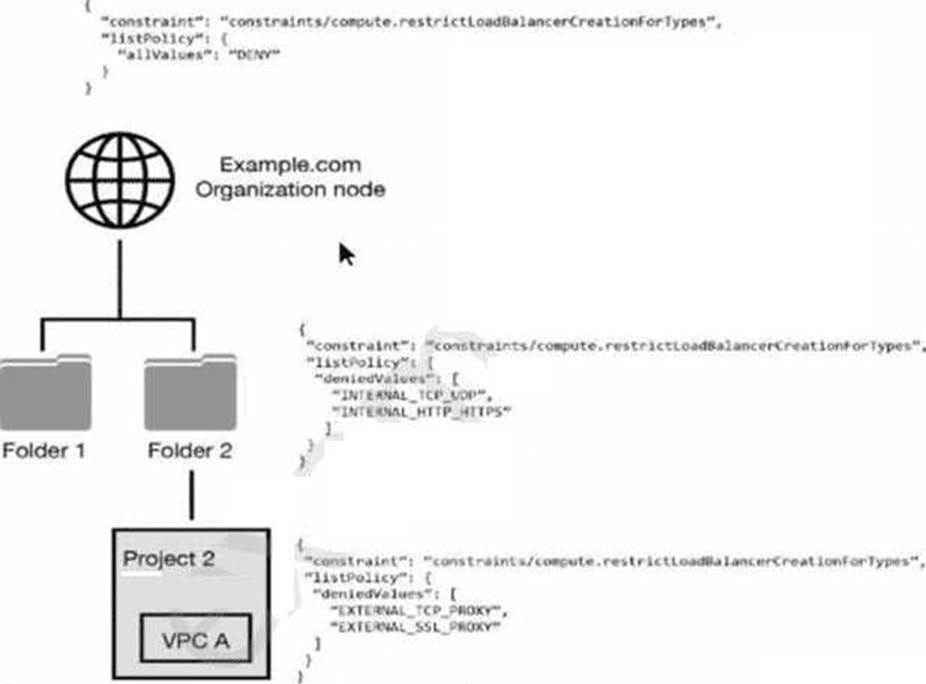
Which load balancer types are denied in VPC A?
- A . All load balancer types are denied in accordance with the global node’s policy.
- B . INTERNAL_TCP_UDP, INTERNAL_HTTP_HTTPS is denied in accordance with the folder’s policy.
- C . EXTERNAL_TCP_PROXY, EXTERNAL_SSL_PROXY are denied in accordance with the project’s policy.
- D . EXTERNAL_TCP_PROXY, EXTERNAL_SSL_PROXY, INTERNAL_TCP_UDP, and INTERNAL_HTTP_HTTPS are denied in accordance with the folder and project’s policies.
D
Explanation:
Understanding Organization Policies:
Organization policies are rules that can be set at different levels of the resource hierarchy in GCP to enforce governance and compliance.
These policies can be set at the organization node, folders, and projects, and they are inherited down the hierarchy unless explicitly overridden.
Hierarchy and Policy Inheritance:
The provided resource hierarchy has an organization node (Example.com), folders (Folder 1 and Folder 2), and a project (Project 2) under Folder 2 with a specific VPC (VPC A).
Each node in the hierarchy can have its own policies, and these policies are inherited by child nodes unless overridden.
Analyzing the Policies in the Hierarchy:
Organization Node Policy:
json
Copy code
{ "constraint": "constraints/compute.restrictLoadBalancerCreationForTypes", "listPolicy": {
"allValues": "DENY" } }
This policy at the organization node denies all load balancer types.
Folder 2 Policy:
json
Copy code
{ "constraint": "constraints/compute.restrictLoadBalancerCreationForTypes", "listPolicy": {
"deniedValues": ["INTERNAL_TCP_UDP", "INTERNAL_HTTP_HTTPS"] } }
This policy at Folder 2 denies the creation of INTERNAL_TCP_UDP and INTERNAL_HTTP_HTTPS load balancers.
Project 2 Policy:
json
Copy code
{ "constraint": "constraints/compute.restrictLoadBalancerCreationForTypes", "listPolicy": {
"deniedValues": ["EXTERNAL_TCP_PROXY", "EXTERNAL_SSL_PROXY"] } }
This policy at Project 2 denies the creation of EXTERNAL_TCP_PROXY and EXTERNAL_SSL_PROXY load balancers.
Policy Application to VPC A:
Since policies are inherited, VPC A (which is within Project 2 under Folder 2) will be affected by the policies of both Folder 2 and Project 2.
Combining the denied values from both Folder 2 and Project 2: From Folder 2: INTERNAL_TCP_UDP, INTERNAL_HTTP_HTTPS From Project 2: EXTERNAL_TCP_PROXY, EXTERNAL_SSL_PROXY Conclusion:
VPC A will have the following load balancer types denied: INTERNAL_TCP_UDP, INTERNAL_HTTP_HTTPS, EXTERNAL_TCP_PROXY, EXTERNAL_SSL_PROXY.
Reference: GCP Documentation on Organization Policies
GCP Documentation on Constraints and List Policies
Which Google Cloud service should you use to enforce access control policies for applications and resources?
- A . Identity-Aware Proxy
- B . Cloud NAT
- C . Google Cloud Armor
- D . Shielded VMs
A
Explanation:
To enforce access control policies for applications and resources in Google Cloud, the recommended service is Identity-Aware Proxy (IAP).
Identity-Aware Proxy (IAP):
IAP allows you to control access to your applications and resources based on the identity of the user and the context of the request. It integrates with IAM to provide fine-grained access control, ensuring that only authorized users can access specific resources.
IAP helps enforce security policies at the application layer, providing an additional layer of protection beyond traditional network-based security measures.
Reference
Identity-Aware Proxy documentation
Which Google Cloud service should you use to enforce access control policies for applications and resources?
- A . Identity-Aware Proxy
- B . Cloud NAT
- C . Google Cloud Armor
- D . Shielded VMs
A
Explanation:
To enforce access control policies for applications and resources in Google Cloud, the recommended service is Identity-Aware Proxy (IAP).
Identity-Aware Proxy (IAP):
IAP allows you to control access to your applications and resources based on the identity of the user and the context of the request. It integrates with IAM to provide fine-grained access control, ensuring that only authorized users can access specific resources.
IAP helps enforce security policies at the application layer, providing an additional layer of protection beyond traditional network-based security measures.
Reference
Identity-Aware Proxy documentation
An organization is starting to move its infrastructure from its on-premises environment to Google
Cloud Platform (GCP). The first step the organization wants to take is to migrate its current data backup and disaster recovery solutions to GCP for later analysis. The organization’s production environment will remain on- premises for an indefinite time. The organization wants a scalable and cost-efficient solution.
Which GCP solution should the organization use?
- A . BigQuery using a data pipeline job with continuous updates
- B . Cloud Storage using a scheduled task and gsutil
- C . Compute Engine Virtual Machines using Persistent Disk
- D . Cloud Datastore using regularly scheduled batch upload jobs
B
Explanation:
To migrate the current data backup and disaster recovery solutions to GCP while keeping the production environment on-premises, the most scalable and cost-efficient solution is using Google Cloud Storage with scheduled tasks and the gsutil command.
Setup Cloud Storage: Create a Cloud Storage bucket to store the backups.
Go to the Cloud Console and navigate to Cloud Storage.
Click "Create bucket" and follow the prompts to configure the storage bucket.
Install gsutil: Ensure gsutil is installed on the on-premises servers.
gsutil is a command-line tool for interacting with Cloud Storage.
Follow the installation guide here.
Create Backup Script: Write a script to upload data to Cloud Storage using gsutil.
#!/bin/bash gsutil -m cp -r /path/to/local/backup gs://your-bucket-name
Schedule Backup Task: Use a scheduling tool like cron on Linux to run the backup script at regular intervals.
Edit the crontab file with crontab -e and add an entry like:
Cloud Storage Documentation
gsutil Documentation
You manage your organization’s Security Operations Center (SOC). You currently monitor and detect network traffic anomalies in your VPCs based on network logs. However, you want to explore your environment using network payloads and headers.
Which Google Cloud product should you use?
- A . Cloud IDS
- B . VPC Service Controls logs
- C . VPC Flow Logs
- D . Google Cloud Armor
- E . Packet Mirroring
E
Explanation:
https://cloud.google.com/vpc/docs/packet-mirroring
Packet Mirroring clones the traffic of specified instances in your Virtual Private Cloud (VPC) network and forwards it for examination. Packet Mirroring captures all traffic and packet data, including payloads and headers.
You manage your organization’s Security Operations Center (SOC). You currently monitor and detect network traffic anomalies in your VPCs based on network logs. However, you want to explore your environment using network payloads and headers.
Which Google Cloud product should you use?
- A . Cloud IDS
- B . VPC Service Controls logs
- C . VPC Flow Logs
- D . Google Cloud Armor
- E . Packet Mirroring
E
Explanation:
https://cloud.google.com/vpc/docs/packet-mirroring
Packet Mirroring clones the traffic of specified instances in your Virtual Private Cloud (VPC) network and forwards it for examination. Packet Mirroring captures all traffic and packet data, including payloads and headers.
A customer terminates an engineer and needs to make sure the engineer’s Google account is automatically deprovisioned.
What should the customer do?
- A . Use the Cloud SDK with their directory service to remove their IAM permissions in Cloud Identity.
- B . Use the Cloud SDK with their directory service to provision and deprovision users from Cloud Identity.
- C . Configure Cloud Directory Sync with their directory service to provision and deprovision users from Cloud Identity.
- D . Configure Cloud Directory Sync with their directory service to remove their IAM permissions in Cloud Identity.
C
Explanation:
https://cloud.google.com/identity/solutions/automate-user-provisioning#cloud_identity_automated_provisioning
"Cloud Identity has a catalog of automated provisioning connectors, which act as a bridge between Cloud Identity and third-party cloud apps."
A customer terminates an engineer and needs to make sure the engineer’s Google account is automatically deprovisioned.
What should the customer do?
- A . Use the Cloud SDK with their directory service to remove their IAM permissions in Cloud Identity.
- B . Use the Cloud SDK with their directory service to provision and deprovision users from Cloud Identity.
- C . Configure Cloud Directory Sync with their directory service to provision and deprovision users from Cloud Identity.
- D . Configure Cloud Directory Sync with their directory service to remove their IAM permissions in Cloud Identity.
C
Explanation:
https://cloud.google.com/identity/solutions/automate-user-provisioning#cloud_identity_automated_provisioning
"Cloud Identity has a catalog of automated provisioning connectors, which act as a bridge between Cloud Identity and third-party cloud apps."