
Practice Free NSK101 Exam Online Questions
Click the Exhibit button.
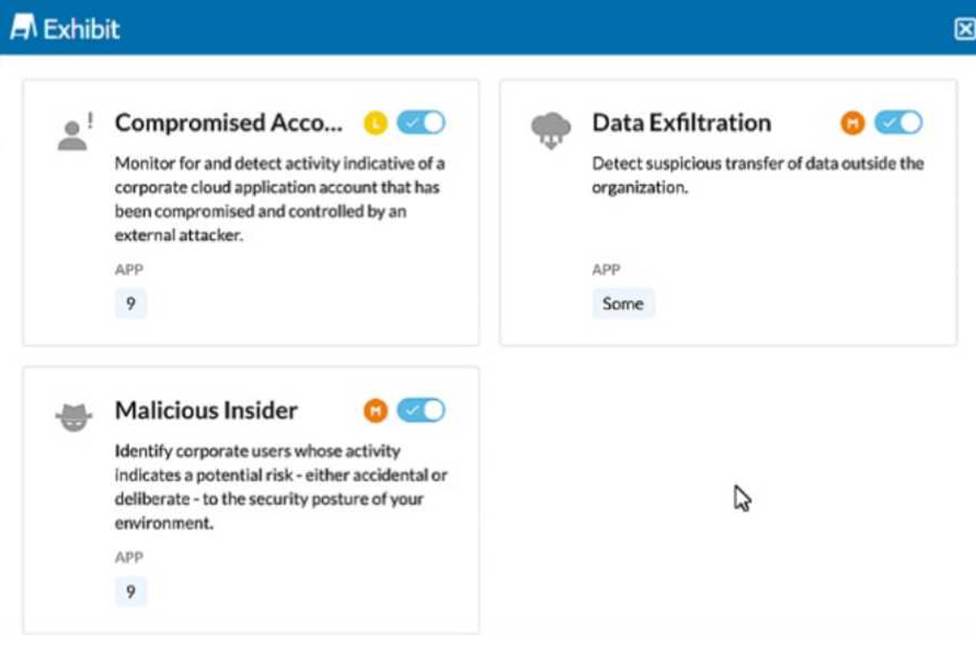
The exhibit shows security rules that are part of which component of the Netskope platform?
- A . Real-time Protection
- B . Advanced Malware Protection
- C . Security Posture
- D . Behavior Analytics
D
Explanation:
The exhibit displays rules related to detecting compromised accounts, data exfiltration, and malicious insiders. These types of activities are typically analyzed and detected through user behavior analytics, which involves monitoring and analyzing the behavior of users to identify anomalies that may indicate security incidents or threats.
Behavior Analytics is a component of the Netskope platform that focuses on identifying potential security risks based on user behavior. This includes monitoring for compromised accounts, data exfiltration, and identifying malicious insiders. These analytics help in proactively identifying and mitigating threats by analyzing patterns and anomalies in user activities.
Reference: The exhibit showing rules related to compromised accounts, data exfiltration, and malicious insiders aligns with the capabilities provided by Behavior Analytics.
Documentation from the Netskope Knowledge Portal on the behavior analytics capabilities supports this identification.
You want to take into account some recent adjustments to CCI scoring that were made in your Netskope tenant.
In this scenario, which two CCI attributes in the Ul would be used in a Real-time Protection policy? (Choose two.)
- A . Domains
- B . App Tag
- C . CCL Level
- D . GDPR Readiness
BC
Explanation:
When adjusting Cloud Confidence Index (CCI) scoring in your Netskope tenant, you can use the following two CCI attributes in a Real-time Protection policy:
App Tag:
App Tags are used to categorize and tag applications based on their functionality, risk level, or compliance requirements. By using App Tags in Real-time Protection policies, you can enforce security measures and monitor activities based on the specific tags assigned to applications.
CCL Level:
CCL (Cloud Confidence Level) is a score assigned to cloud applications based on their risk profile and compliance with security standards. By incorporating CCL Level into your Real-time Protection policies, you can ensure that actions are taken based on the risk level of the applications, such as blocking or monitoring high-risk applications.
Reference: Netskope Knowledge Portal: Cloud Confidence Index
Netskope Real-time Protection Policies
What is a benefit that Netskope instance awareness provides?
- A . It prevents movement of corporate sensitive data to a personal Dropbox account.
- B . It prevents the user from copying information from a corporate email and pasting the information into a GitHub repository.
- C . It differentiates between an IT managed Google Drive instance versus a personal Dropbox account.
- D . It differentiates between an IT managed Google Drive instance versus a personal Google Drive instance.
D
Explanation:
A benefit that Netskope instance awareness provides is that it differentiates between an IT managed Google Drive instance versus a personal Google Drive instance. Instance awareness is a feature in the Netskope platform that allows you to define and identify different instances of the same cloud application based on the domain name or URL. For example, you can define an instance for your IT managed Google Drive instance (such as drive.google.com/a/yourcompany.com) and another instance for your personal Google Drive instance (such as drive.google.com). This way, you can differentiate between them and apply different policies and actions based on the instance. This can help you prevent data leakage, enforce compliance, or improve visibility for your cloud application activities. Preventing movement of corporate sensitive data to a personal Dropbox account, preventing the user from copying information from a corporate email and pasting it into a GitHub repository, or differentiating between an IT managed Google Drive instance versus an IT managed Box instance are not benefits that Netskope instance awareness provides, as they are either unrelated or irrelevant to the instance awareness feature.
Reference: Netskope Security Cloud Operation & Administration (NSCO&A) – Classroom Course, Module 5: Real-Time Policies, Lesson 4: App Instances.
Your customer has cloud storage repositories containing sensitive files of their partners, including bank statements, consulting, and disclosure agreements.
In this scenario, which feature would help them control the flow of these types of documents?
- A . ZTNA
- B . Netskope Advanced Analytics
- C . DLP document classifiers
- D . Sandboxing
C
Explanation:
Data Loss Prevention (DLP) document classifiers are designed to identify and control the flow of sensitive information based on predefined patterns and criteria. In this scenario, where the customer has cloud storage repositories containing sensitive files such as bank statements, consulting agreements, and disclosure agreements, DLP document classifiers can help:
Identify sensitive documents: By scanning and classifying documents based on their content, DLP document classifiers ensure that sensitive files are recognized and handled appropriately.
Control data flow: Policies can be applied to prevent unauthorized access, sharing, or movement of sensitive files, thereby protecting the data from leakage or exposure.
Reference: Netskope DLP documentation, detailing how document classifiers work and how they can be configured to protect sensitive information.
Best practices for implementing DLP solutions to safeguard sensitive data in cloud storage environments.
You want to see the actual data that caused the policy violation within a DLP Incident view.
In this scenario, which profile must be set up?
- A . Quarantine Profile
- B . Forensics Profile
- C . Legal Hold Profile
- D . a GDPR DLP Profile
B
Explanation:
DLP Incident View:
To see the actual data that caused a policy violation within a DLP incident, detailed logging and data capture are required.
Forensics Profile:
A Forensics Profile in Netskope is designed to capture and store detailed information about policy violations, including the actual data that triggered the incident.
It provides a comprehensive view of the incident for investigation and compliance purposes.
Setup Process:
Navigate to the DLP settings in the Netskope admin console.
Configure a Forensics Profile to capture detailed logs and data for policy violations.
Ensure that this profile is associated with the relevant DLP policies.
Reference: For detailed configuration steps, refer to the Netskope documentation on setting up Forensics Profiles for DLP incidents.
Click the Exhibit button.

A customer has created a CASB API-enabled Protection policy to detect files containing sensitive data that are shared outside of their organization.
Referring to the exhibit, which statement is correct?
- A . The administrator needs to use Shared Externally as the only shared option.
- B . The administrator needs to use Shared Externally and Public as the shared options.
- C . The administrator must select Private as the only shared option.
- D . The administrator needs to use Public as the only shared option.
B
Explanation:
To detect files containing sensitive data that are shared outside of the organization, the administrator should select both "Shared Externally" and "Public" sharing options. These settings ensure that any files shared externally (outside the organization) or publicly are scanned for sensitive data. This comprehensive approach covers all potential scenarios where data could be exposed outside the organization.
Step-by-Step Configuration:
Select Specific Sharing Options:
Navigate to the CASB API-enabled Protection policy configuration page.
Choose the option for "Specific Sharing Options" to limit the scan to files shared under certain conditions.
Enable Shared Externally and Public:
Check both "Shared Externally" and "Public" options. This setting ensures that files shared either publicly or with external domains are included in the scan.
Configure Advanced Options:
For further granularity, configure the advanced options under each sharing type if needed (e.g., specifying particular external domains).
This configuration aligns with the best practices for CASB policies and ensures that all files potentially leaving the organization are scanned for sensitive data.
Reference: Netskope CASB Policy Configuration Documentation
Exhibit
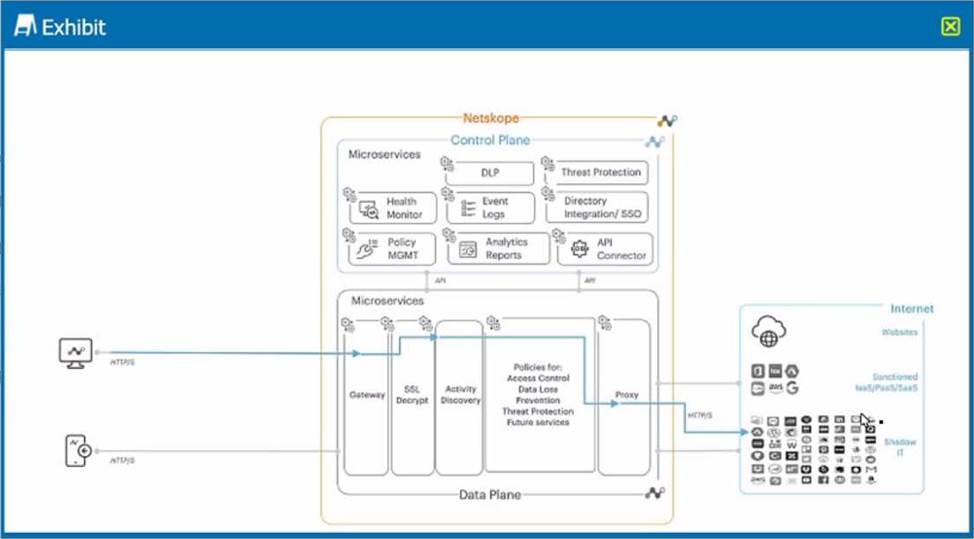
A user is connected to a cloud application through Netskope’s proxy.
In this scenario, what information is available at Skope IT? (Choose three.)
- A . username. device location
- B . destination IP. OS patch version
- C . account instance, URL category
- D . user activity, cloud app risk rating
- E . file version, shared folder
ACD
Explanation:
In this scenario, a user is connected to a cloud application through Netskope’s proxy, which is a deployment method that allows Netskope to intercept and inspect the traffic between the user and the cloud application in real time. In this case, Netskope can collect and display various information about the user and the cloud application at Skope IT, which is a feature in the Netskope platform that allows you to view and analyze all the activities performed by users on cloud applications. Some of the information that is available at Skope IT are: username, device location, account instance, URL
category, user activity, and cloud app risk rating. Username is the name or identifier of the user who is accessing the cloud application. Device location is the geographical location of the device that the user is using to access the cloud application. Account instance is the specific instance of the cloud application that the user is accessing, such as a personal or enterprise instance. URL category is the classification of the web page that the user is visiting within the cloud application, such as Business or Social Media. User activity is the action that the user is performing on the cloud application, such as Upload or Share. Cloud app risk rating is the score that Netskope assigns to the cloud application based on its security posture and compliance with best practices. Destination IP, OS patch version, file version, and shared folder are not information that is available at Skope IT in this scenario, as they are either unrelated or irrelevant to the proxy connection or the Skope IT feature.
Reference: [Netskope Inline CASB], [Netskope Skope IT].
The Netskope deployment for your organization is deployed in CASB-only mode. You want to view dropbox.com traffic but do not see it when using SkopeIT.
In this scenario, what are two reasons for this problem? (Choose two.)
- A . The Dropbox Web application is certificate pinned and cannot be steered to the Netskope tenant.
- B . The Dropbox domains have not been configured to steer to the Netskope tenant.
- C . The Dropbox desktop application is certificate pinned and cannot be steered to the Netskope tenant.
- D . The Dropbox domains are configured to steer to the Netskope tenant.
A, B
Explanation:
In a CASB-only deployment of Netskope, there could be several reasons why Dropbox.com traffic is not visible in SkopeIT:
Certificate Pinning:
The Dropbox Web application might be using certificate pinning, which means it only accepts specific certificates for its connections. This can prevent the traffic from being steered to the Netskope tenant because the proxy’s certificate might not match the pinned certificate.
Configuration of Dropbox Domains:
If the Dropbox domains are not properly configured to be steered to the Netskope tenant, then the traffic will bypass the Netskope inspection and will not be visible in SkopeIT. Ensuring that the domains are configured correctly is essential for the traffic to be captured and analyzed by Netskope.
Reference: "Certificate pinning prevents the interception of traffic by requiring that the presented certificate matches a known good certificate. This can interfere with traffic steering in CASB deployments.".
"Proper configuration of application domains is necessary to ensure traffic is steered to the Netskope tenant for inspection and visibility.".
What are two benefits of creating a policy group as a logical collection of Real-time Protection policies? (Choose two.)
- A . To split up policies by region or business unit.
- B . To enable Alert and Continue policies.
- C . To simplify workflow, allowing exact access to a specific set of policies.
- D . To provide additional actions based on policy match criteria.
AC
Explanation:
Creating a policy group as a logical collection of Real-time Protection policies provides several benefits:
To split up policies by region or business unit: This allows for more granular control and management of policies based on organizational structure. Each region or business unit can have its own set of policies tailored to its specific needs and compliance requirements.
To simplify workflow, allowing exact access to a specific set of policies: Policy groups help streamline the management process by grouping related policies together. This simplifies the workflow for administrators by providing them with access to only the relevant policies they need to manage, reducing complexity and potential for errors.
Reference: Netskope documentation on creating and managing policy groups.
Best practices for organizing policies to enhance manageability and operational efficiency.
You are required to provide an additional pop-up warning to users before allowing them to proceed to Web applications categorized as "low" or "poor" by Netskope’s Cloud Confidence Index.
Which action would allow you to accomplish this task?
- A . Enable RBI on the uncategorized domains
- B . Create a policy limiting usage of generative AI.
- C . Redirect the user to the company banner page for the Web usage policy.
- D . Enable real-time user coaching based on CCL.
D
Explanation:
To provide an additional pop-up warning to users before allowing them to proceed to web applications categorized as "low" or "poor" by Netskope’s Cloud Confidence Index (CCI), you can:
Enable real-time user coaching based on CCL: This feature allows administrators to create policies that provide real-time guidance and warnings to users when they attempt to access web applications with low or poor confidence levels. This helps in educating users about the potential risks and ensures that they proceed with caution.
Reference: Netskope documentation on configuring real-time user coaching and leveraging the Cloud Confidence Index for policy enforcement.
Best practices for using CCL to guide user behavior and enhance security awareness.