
Practice Free NSE7_SSE_AD-25 Exam Online Questions
To complete their day-to-day operations, remote users require access to a TCP-based application that is hosted on a private web server.
Which FortiSASE deployment use case provides the most efficient and secure method for meeting the remote users’ requirements?
- A . SD-WAN private access
- B . inline-CASB
- C . zero trust network access (ZTNA) private access
- D . next generation firewall (NGFW)
C
Explanation:
Zero Trust Network Access (ZTNA) private access provides the most efficient and secure method for remote users to access a TCP-based application hosted on a private web server. ZTNA ensures that only authenticated and authorized users can access specific applications based on predefined policies, enhancing security and access control.
Zero Trust Network Access (ZTNA):
ZTNA operates on the principle of "never trust, always verify," continuously verifying user identity and device security posture before granting access.
It provides secure and granular access to specific applications, ensuring that remote users can securely access the TCP-based application hosted on the private web server.
Secure and Efficient Access:
ZTNA private access allows remote users to connect directly to the application without needing a full VPN tunnel, reducing latency and improving performance.
It ensures that only authorized users can access the application, providing robust security controls.
Reference: FortiOS 7.6 Administration Guide: Provides detailed information on ZTNA and its deployment use cases.
FortiSASE 23.2 Documentation: Explains how ZTNA can be used to provide secure access to private applications for remote users.
One user has reported connectivity issues; no other users have reported problems.
Which tool can the administrator use to identify the problem? (Choose one answer)
- A . Mobile device management (MDM) service to troubleshoot the connectivity issue.
- B . Digital experience monitoring (DEM) to evaluate the performance metrics of the remote computer.
- C . Forensics service to obtain detailed information about the user’s remote computer performance.
- D . SOC-as-a-Service (SOCaaS) to get information about the user’s remote computer.
B
Explanation:
In a FortiSASE deployment, Digital Experience Monitoring (DEM) is the primary diagnostic tool used to troubleshoot connectivity and performance issues specifically for a single user or endpoint.
End-to-End Visibility: DEM provides real-time, end-to-end visibility into the network path between the end-user’s device and the application they are trying to reach. This is critical when only one user reports an issue, as it allows administrators to pinpoint whether the problem resides on the local device, the local ISP, the SASE backbone, or the destination application.
Performance Metrics: The DEM agent (often integrated with the FortiMonitor agent on the endpoint) collects granular performance metrics such as latency, jitter, packet loss, and RTT (Round Trip Time). It also provides device-specific health data, including CPU and memory usage, to determine if the connectivity issue is actually caused by the remote computer’s performance.
Hop-by-Hop Analysis: Unlike standard monitoring, DEM offers End-to-End Continuous Hop Analytics. This path monitoring visualizes every "hop" in the traffic route and highlights exactly where degraded service is occurring. For a single user experiencing issues while everyone else is fine, this tool immediately triangulates if a specific "problem hop" in their unique connection path is the cause.
Operational Comparison: * MDM (A) is used for managing device configurations and software distribution, not for real-time network performance troubleshooting.
Forensics (C) is a security-focused service used for investigating malware incidents or data breaches, not for measuring network latency.
SOCaaS (D) is a managed security service for threat monitoring and event triage; while it handles "security" connectivity issues (like a blocked IP), it is not a tool for performance metric evaluation.
What are two benefits of deploying secure private access (SPA) with SD-WAN? (Choose two answers)
- A . ZTNA posture check performed by the hub FortiGate
- B . Support of both TCP and UDP applications
- C . A direct access proxy tunnel from FortiClient to the on-premises FortiGate
- D . Inline security inspection by FortiSASE
B, D
Explanation:
According to the NSE7 SASE Enterprise Guide (Pages 46 & 61), deploying Secure Private Access (SPA) with SD-WAN provides advanced security and networking capabilities by routing traffic through global Points of Presence (PoPs).
Inline Security Inspection (D): A major advantage of this approach is that traffic is routed through FortiSASE PoPs before it reaches private applications. This enables inline security inspection, providing robust protection against threats by applying the full SASE security stack―including antivirus, intrusion prevention, and deep packet inspection―to private access traffic.
Support for TCP and UDP (B): Organizations with existing FortiGate SD-WAN deployments benefit from broader and seamless access to privately hosted applications. The SD-WAN SPA use case explicitly supports both TCP- and UDP-based applications, ensuring that legacy or specialized services that rely on UDP function correctly over the secure tunnel.
SD-WAN Optimization: This method leverages the benefits of SD-WAN to optimize traffic flow between the SASE PoP and the corporate SD-WAN hub or data center FortiGate. It is particularly useful for mission-critical applications that require an extra layer of security combined with path optimization.
Architecture: In this configuration, the FortiSASE Security PoPs act as spokes in the organization’s SD-WAN network, relying on IPsec VPN overlays and BGP for secure dynamic routing.
While ZTNA posture checks are a feature of the broader ecosystem, the NSE7 Guide specifically highlights inline inspection and application support (TCP/UDP) as primary advantages of the SD-WAN
integrated SPA approach.
Refer to the exhibits.

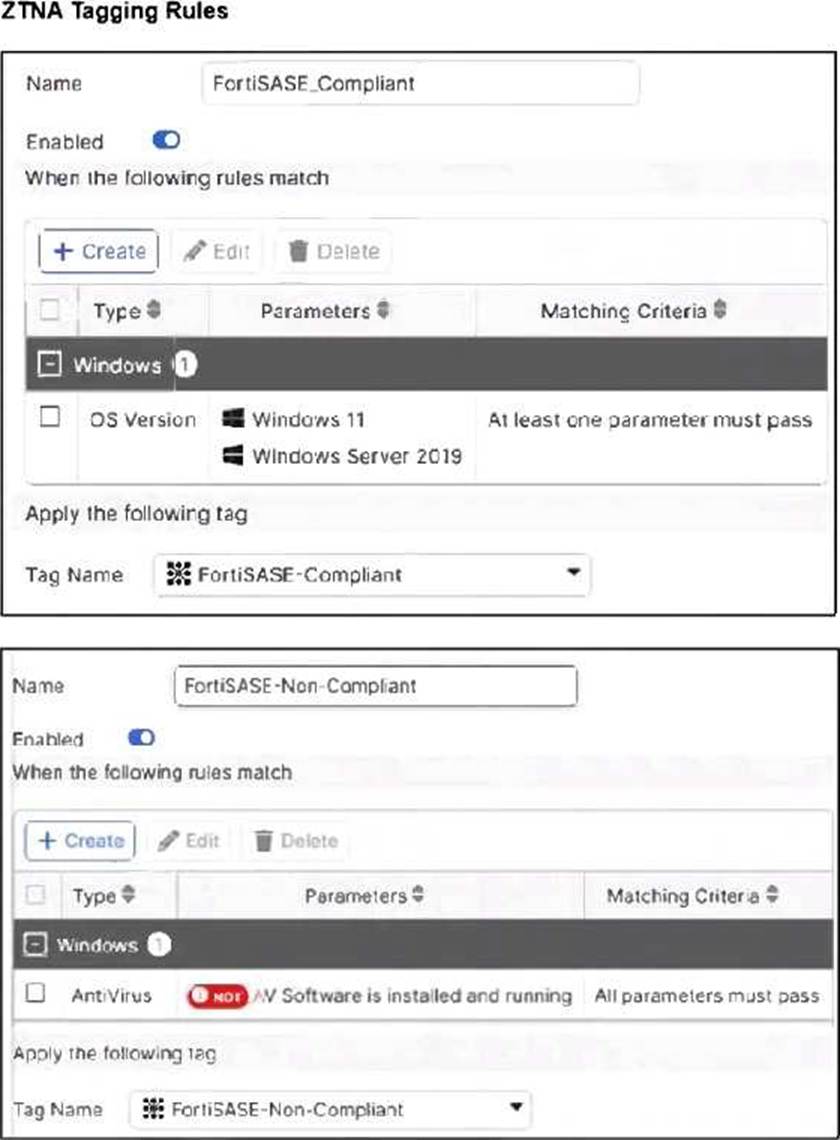
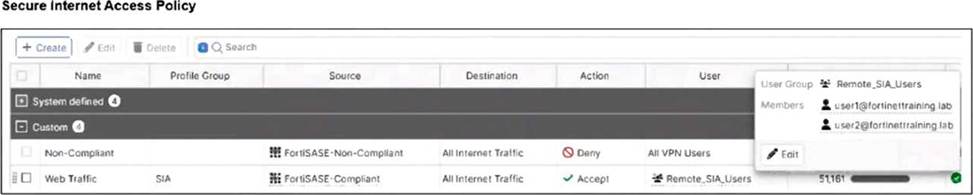
Jumpbox and Windows-AD are endpoints from the same remote location. Jumpbox can access the internet through FortiSASE, while Windows-AD can no longer access the internet.
Based on the information in the exhibits, which reason explains the outage on Windows-AD? (Choose one answer)
- A . The device security posture for Windows-AD has changed.
- B . The FortiClient version installed on Windows-AD does not match the expected version on FortiSASE.
- C . Windows-AD is excluded from FortiSASE management.
- D . The remote VPN user on Windows-AD no longer matches any VPN policy.
A
Explanation:
In FortiSASE, Zero Trust Network Access (ZTNA) tags―also known as security posture tags―are used to dynamically grant or deny access based on the real-time security state of an endpoint. This mechanism ensures that only devices meeting specific compliance requirements can access protected resources or the internet.
Endpoint Analysis: The Managed Endpoints exhibit shows that while Jumpbox only has the FortiSASE-Compliant tag, the Windows-AD endpoint has been assigned both FortiSASE-Compliant and FortiSASE-Non-Compliant tags. This indicates that a security posture check on the Windows-AD device has failed, triggering a rule that applies the non-compliant tag.
Policy Evaluation: The Secure Internet Access Policy table shows two custom policies. The first policy, named Non-compliant, uses the FortiSASE-Non-Compliant tag as its source and has the action set to Deny. The second policy, Web Traffic, allows access for FortiSASE-Compliant users.
Root Cause of Outage: Because FortiSASE (powered by FortiOS) processes security policies in a top-down sequence, the "Non-compliant" policy is evaluated first. Since Windows-AD matches the source criteria for this "Deny" policy, its traffic is blocked before it can reach the "Accept" policy.
Although the exhibit shows a warning icon for the FortiClient version on Windows-AD, the direct cause of the internet outage is the explicit Deny policy triggered by the change in the device’s security posture (the application of the Non-Compliant tag).
When you configure FortiSASE Secure Private Access (SPA) with SD-WAN integration, you must establish a routing adjacency between FortiSASE and the FortiGate SD-WAN hub.
Which routing protocol must you use?
- A . BGP
- B . IS-IS
- C . OSPF
- D . EIGRP
A
Explanation:
When configuring FortiSASE Secure Private Access (SPA) with SD-WAN integration, establishing a routing adjacency between FortiSASE and the FortiGate SD-WAN hub requires the use of the Border Gateway Protocol (BGP).
BGP (Border Gateway Protocol):
BGP is widely used for establishing routing adjacencies between different networks, particularly in SD-WAN environments.
It provides scalability and flexibility in managing dynamic routing between FortiSASE and the FortiGate SD-WAN hub.
Routing Adjacency:
BGP enables the exchange of routing information between FortiSASE and the FortiGate SD-WAN hub. This ensures optimal routing paths and efficient traffic management across the hybrid network.
Reference: FortiOS 7.6 Administration Guide: Provides information on configuring BGP for SD-WAN integration.
FortiSASE 23.2 Documentation: Details on setting up routing adjacencies using BGP for Secure Private Access with SD-WAN.
A customer configured the On/off-net detection rule to disable FortiSASE VPN auto-connect when users are inside the corporate network. The rule is set to Connects with a known public IP using the company’s public IP address. However, when the users are on the corporate network, the FortiSASE VPN still auto-connects. The customer has confirmed that traffic is going to the internet with the correct IP address.
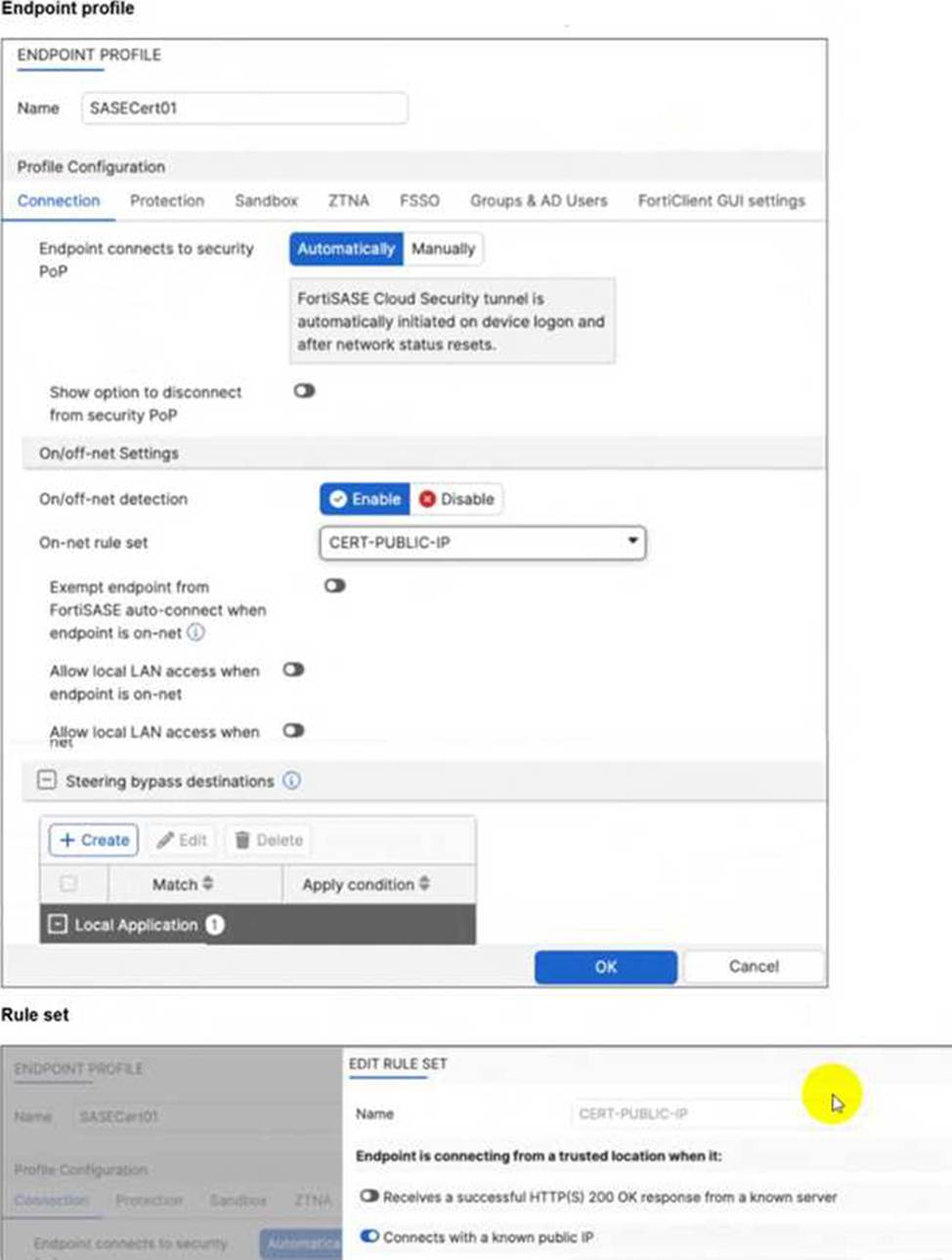
Which configuration is causing the issue? (Choose one answer)
- A . The On-net rule set configuration is incorrect.
- B . Allow local LAN access when endpoint is on-net is disabled when it should be enabled.
- C . Exempt endpoint from FortiSASE auto-connect is disabled when it should be enabled.
- D . Is connected to a known DNS server should be enabled and configured.
C
Explanation:
The FortiSASE On/off-net detection feature is a two-part configuration designed to optimize bandwidth and user experience by determining when a device is in a trusted environment.
Rule Set Definition: The first part involves defining what constitutes an "on-net" or "on-fabric" status. In this scenario, the customer successfully configured a rule set named CERT-PUBLIC-IP using the Connects with a known public IP detection type. This tells FortiSASE that if the endpoint’s public WAN IP matches the corporate gateway, it is considered to be on the corporate network.
Profile Exemption Logic: Defining the rule set is not enough to stop the VPN connection. Within the Endpoint Profile (under the Connection tab > On/off-net Settings), there is a specific toggle labeled Exempt endpoint from FortiSASE auto-connect when endpoint is on-net (or in some versions, Bypass FortiSASE when endpoint is on-net).
Exhibit Analysis: Looking at the provided exhibit (image_57097d.jpg), the "Exempt endpoint from FortiSASE auto-connect…" toggle is clearly disabled (switched to the left).
Root Cause: Because this toggle is disabled, FortiClient identifies that it is "on-net" based on the IP rule, but it has no instruction to skip the VPN connection. Consequently, the "Automatically" initiate tunnel setting remains the dominant instruction, causing the VPN to connect regardless of the network location.
To resolve the issue, the administrator must enable the Exempt endpoint from FortiSASE auto-connect when endpoint is on-net option in the SASECert01 profile.