
Practice Free NSE7_SSE_AD-25 Exam Online Questions
Refer to the exhibits.
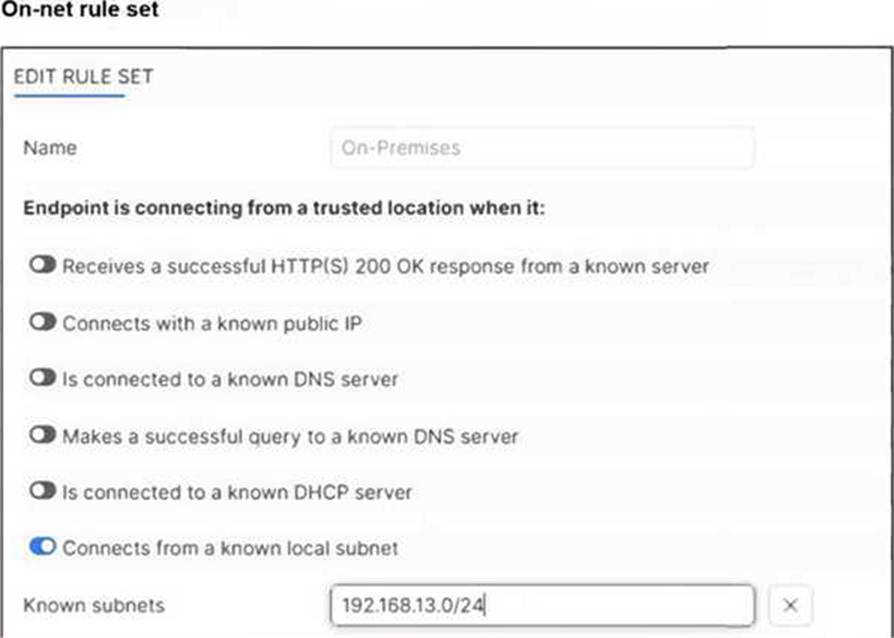
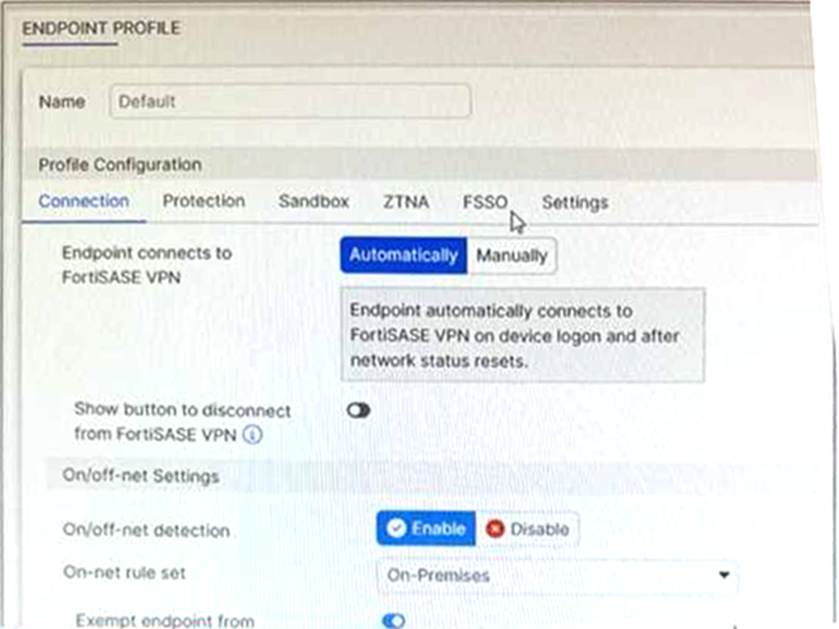
An endpoint is assigned an IP address of 192.168.13.101/24.
Which action will be run on the endpoint? (Choose one answer)
- A . The endpoint will be able to bypass the on-net rule because it is connecting from a known subnet.
- B . The endpoint will be detected as off-net.
- C . The endpoint will be exempted from auto-connect to the FortiSASE tunnel.
- D . The endpoint will automatically connect to the FortiSASE tunnel.
C
Explanation:
Based on the provided exhibits and the logic of FortiSASE On/off-net detection, the endpoint’s behavior is determined by its network environment relative to the configured rules.
Subnet Matching and Detection: The On-net rule set (named "On-Premises") is configured to identify a trusted location when the endpoint "Connects from a known local subnet". The administrator has defined the known subnet as $192.168.13.0/24$. Since the endpoint’s IP address is $192.168.13.101$, it falls within this range. Consequently, FortiClient detects the endpoint as being on-net (on-fabric).
Action Logic (Exemption): In a FortiSASE Endpoint Profile, when On/off-net detection is enabled and an endpoint matches an "On-net" rule, the standard behavior is to exempt the endpoint from auto-connecting to the FortiSASE VPN tunnel. This design assumes the endpoint is already in a secured office environment where the corporate firewall (FortiGate) provides the necessary protection, making the SASE tunnel redundant.
Comparison of Other Options:
Option B: Incorrect, because the IP matches the defined "known local subnet" rule for on-net detection.
Option D: Incorrect, as auto-connect only triggers when the endpoint is detected as off-net to ensure remote security.
During FortiSASE provisioning, how many security points of presence (POPs) need to be configured by the FortiSASE administrator?
- A . 3
- B . 4
- C . 2
- D . 1
D
Explanation:
During FortiSASE provisioning, the FortiSASE administrator needs to configure at least one security point of presence (PoP). A single PoP is sufficient to get started with FortiSASE, providing the necessary security services and connectivity for users.
Security Point of Presence (PoP):
A PoP is a strategically located data center that provides security services such as secure web gateway, firewall, and VPN termination.
Configuring at least one PoP ensures that users can connect to FortiSASE and benefit from its security features.
Scalability:
While only one PoP is required to start, additional PoPs can be added as needed to enhance redundancy, load balancing, and performance.
Reference: FortiOS 7.6 Administration Guide: Provides details on the provisioning process for FortiSASE.
FortiSASE 23.2 Documentation: Explains the configuration and role of security PoPs in the FortiSASE architecture.
An administrator must restrict endpoints from certain countries from connecting to FortiSASE.
Which configuration can achieve this? (Choose one answer)
- A . A network lockdown policy on the endpoint profiles
- B . Source IP anchoring to restrict access from the specified countries
- C . A geography address object as the source for a deny policy
- D . Geofencing to restrict access from the required countries
D
Explanation:
To restrict endpoints from certain countries from connecting to FortiSASE, the administrator should configure Geofencing. This feature provides granular control over which geographic locations are permitted or denied access to the SASE infrastructure.
Geofencing in FortiSASE
Geofencing is the primary mechanism for controlling remote user connectivity based on their origin.
Functionality: It uses a geography-to-IP mapping database to identify the location of incoming connection requests.
Access Modes: Administrators can choose between two main modes:
Allow: Only users from specified countries can connect; all others are blocked.
Deny: Users from specified countries are blocked; all others are allowed.
Configuration Path: In the FortiSASE GUI, navigate to Configuration > Geofencing to enable the feature and add the relevant countries.
Enforcement: Once enabled, the system automatically creates "local-in" policies to drop or permit traffic at the edge of the SASE PoPs before it can consume resources or attempt authentication.
Your FortiSASE customer has a small branch office in which ten users will be using their personal laptops and mobile devices to access the internet.
Which deployment should they use to secure their internet access with minimal configuration? (Choose one answer)
- A . FortiClient endpoint agent to secure internet access
- B . FortiAP to secure internet access
- C . SD-WAN on-ramp to secure internet access
- D . FortiGate as a LAN extension to secure internet access
B
Explanation:
For small branch offices (thin edges) where users utilize unmanaged personal devices (BYOD) like laptops and mobile phones, the most efficient way to provide Secure Internet Access (SIA) with minimal configuration is by deploying a FortiAP.
Thin Edge Integration: FortiSASE includes expanded integrations with the Fortinet WLAN portfolio, allowing FortiAP wireless access points to function as "thin edge" devices. These access points intelligently offload and steer traffic from the branch directly to the nearest FortiSASE Security Point of Presence (PoP).
No Endpoint Agents Required: Because the devices are personal and unmanaged, installing the FortiClient agent (Option A) is often not feasible or desirable. The FortiAP deployment secures all client devices at the location without requiring any endpoint agents.
Minimal Configuration & Zero-Touch: This solution is specifically designed for small office locations with limited budgets and no local IT staff. FortiSASE offers cloud-delivered management with zero-touch provisioning for FortiAP. Once the AP is connected, it automatically establishes a secure CAPWAP or IPsec tunnel to FortiSASE, ensuring all connected users are protected by the cloud security stack (Antivirus, Web Filtering, etc.) with almost no manual setup on the end-user side.
Why other options are less ideal:
Option C and D: SD-WAN on-ramp and FortiGate LAN extensions typically require a physical FortiGate appliance at the branch. For a small office with only ten users and personal devices, this adds unnecessary hardware costs and configuration complexity compared to a simple, cloud-managed FortiAP.
Refer to the exhibit.
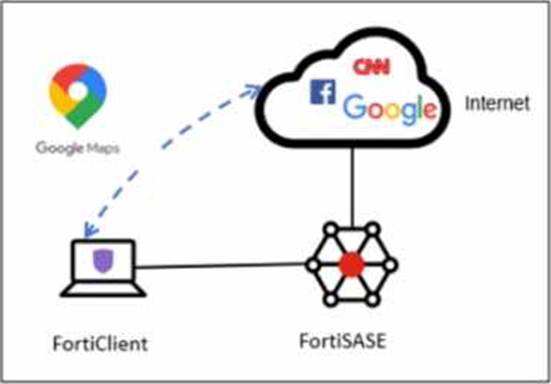
A company has a requirement to inspect all the endpoint internet traffic on FortiSASE, and exclude Google Maps traffic from the FortiSASE VPN tunnel and redirect it to the endpoint physical Interface.
Which configuration must you apply to achieve this requirement?
- A . Exempt the Google Maps FQDN from the endpoint system proxy settings.
- B . Configure a static route with the Google Maps FQDN on the endpoint to redirect traffic
- C . Configure the Google Maps FQDN as a split tunneling destination on the FortiSASE endpoint profile.
- D . Change the default DNS server configuration on FortiSASE to use the endpoint system DNS.
C
Explanation:
To meet the requirement of inspecting all endpoint internet traffic on FortiSASE while excluding Google Maps traffic from the FortiSASE VPN tunnel and redirecting it to the endpoint’s physical interface, you should configure split tunneling. Split tunneling allows specific traffic to bypass the VPN tunnel and be routed directly through the endpoint’s local interface.
Split Tunneling Configuration:
Split tunneling enables selective traffic to be routed outside the VPN tunnel.
By configuring the Google Maps Fully Qualified Domain Name (FQDN) as a split tunneling destination, you ensure that traffic to Google Maps bypasses the VPN tunnel and uses the endpoint’s local interface instead.
Implementation Steps:
Access the FortiSASE endpoint profile configuration.
Add the Google Maps FQDN to the split tunneling destinations list.
This configuration directs traffic intended for Google Maps to bypass the VPN tunnel and be routed directly through the endpoint’s physical network interface.
Reference: FortiOS 7.6 Administration Guide: Provides details on split tunneling configuration.
FortiSASE 23.2 Documentation: Explains how to set up and manage split tunneling for specific destinations.
Which two additional components does FortiSASE use for application control to act as an inline-CASB? (Choose two.)
- A . intrusion prevention system (IPS)
- B . SSL deep inspection
- C . DNS filter
- D . Web filter with inline-CASB
B, D
Explanation:
FortiSASE uses the following components for application control to act as an inline-CASB (Cloud Access Security Broker):
SSL Deep Inspection:
SSL deep inspection is essential for decrypting and inspecting HTTPS traffic to identify and control applications and data transfers within encrypted traffic.
This allows FortiSASE to enforce security policies on SSL/TLS encrypted traffic, providing visibility and control over cloud applications.
Web Filter with Inline-CASB:
The web filter component integrates with inline-CASB to monitor and control access to cloud applications based on predefined security policies.
This combination provides granular control over cloud application usage, ensuring compliance with security policies and preventing unauthorized data transfers.
Reference: FortiOS 7.6 Administration Guide: Details on SSL deep inspection and web filtering configurations.
FortiSASE 23.2 Documentation: Explains how FortiSASE acts as an inline-CASB using SSL deep inspection and web filtering.
Which two advantages does FortiSASE bring to businesses with multiple branch offices? (Choose two.)
- A . It offers centralized management for simplified administration.
- B . It enables seamless integration with third-party firewalls.
- C . it offers customizable dashboard views for each branch location
- D . It eliminates the need to have an on-premises firewall for each branch.
A, D
Explanation:
FortiSASE brings the following advantages to businesses with multiple branch offices:
Centralized Management for Simplified Administration:
FortiSASE provides a centralized management platform that allows administrators to manage security policies, configurations, and monitoring from a single interface.
This simplifies the administration and reduces the complexity of managing multiple branch offices.
Eliminates the Need for On-Premises Firewalls:
FortiSASE enables secure access to the internet and cloud applications without requiring dedicated on-premises firewalls at each branch office.
This reduces hardware costs and simplifies network architecture, as security functions are handled by the cloud-based FortiSASE solution.
Reference: FortiOS 7.6 Administration Guide: Provides information on the benefits of centralized management and cloud-based security solutions.
FortiSASE 23.2 Documentation: Explains the advantages of using FortiSASE for businesses with multiple branch offices, including reduced need for on-premises firewalls.
Which two advantages does FortiSASE bring to businesses with multiple branch offices? (Choose two.)
- A . It offers centralized management for simplified administration.
- B . It enables seamless integration with third-party firewalls.
- C . it offers customizable dashboard views for each branch location
- D . It eliminates the need to have an on-premises firewall for each branch.
A, D
Explanation:
FortiSASE brings the following advantages to businesses with multiple branch offices:
Centralized Management for Simplified Administration:
FortiSASE provides a centralized management platform that allows administrators to manage security policies, configurations, and monitoring from a single interface.
This simplifies the administration and reduces the complexity of managing multiple branch offices.
Eliminates the Need for On-Premises Firewalls:
FortiSASE enables secure access to the internet and cloud applications without requiring dedicated on-premises firewalls at each branch office.
This reduces hardware costs and simplifies network architecture, as security functions are handled by the cloud-based FortiSASE solution.
Reference: FortiOS 7.6 Administration Guide: Provides information on the benefits of centralized management and cloud-based security solutions.
FortiSASE 23.2 Documentation: Explains the advantages of using FortiSASE for businesses with multiple branch offices, including reduced need for on-premises firewalls.
Your organization is currently using FortiSASE for its cybersecurity. They have recently hired a contractor who will work from the HQ office and who needs temporary internet access in order to set up a web-based point of sale (POS) system.
How can you provide secure internet access to the contractor using FortiSASE? (Choose one answer)
- A . Use a proxy auto-configuration (PAC) file and provide secure web gateway (SWG) service as an explicit web proxy.
- B . Use a tunnel policy with a contractors user group as the source on FortiSASE to provide internet access.
- C . Use zero trust network access (ZTNA) and tag the client as an unmanaged endpoint.
- D . Use the self-registration portal on FortiSASE to grant internet access.
A
Explanation:
In the FortiSASE architecture, there are two primary methods for delivering Secure Internet Access (SIA): Agent-based (using FortiClient) and Agentless (using Secure Web Gateway/SWG).
Use Case Analysis: The scenario describes a contractor―an unmanaged user―who requires temporary access for a web-based application (the POS system). For contractors or guests using personal/non-corporate devices where installing the FortiClient agent is either not feasible or not desired, FortiSASE provides the SIA Agentless deployment model.
Mechanism (SWG & PAC): In this mode, FortiSASE functions as an explicit web proxy. To steer the contractor’s web traffic (HTTP/HTTPS) to the SASE cloud for inspection, the administrator provides the user with a proxy auto-configuration (PAC) file. The contractor simply configures their browser or operating system to point to the URL of this PAC file.
Security Enforcement: Once the PAC file is applied, all web traffic from the contractor’s device is redirected to the FortiSASE SWG PoP. Here, the traffic is subject to the organization’s full security stack, including SSL deep inspection, Antivirus, Web Filtering, and Application Control, ensuring that even temporary contractor access is fully secured and logged.
Why other options are incorrect:
Option B (Tunnel Policy): This refers to agent-based access where a VPN tunnel is established. This requires FortiClient, which is generally not used for temporary contractors on unmanaged devices.
Option C (ZTNA Unmanaged): While ZTNA supports agentless access to private applications (SPA), providing internet access (SIA) to an unmanaged endpoint is specifically the role of the SWG/Proxy service.
Option D (Self-registration): While FortiSASE has a User Portal for onboarding, it is a method for user registration/credential management, not the technical traffic-steering mechanism used to provide internet connectivity.
According to the FortiSASE 25 Secure Internet Access Architecture Guide, the SWG (Agentless) approach is the recommended best practice for securing web-only traffic from unmanaged endpoints and third-party contractors.
Refer to the exhibits.
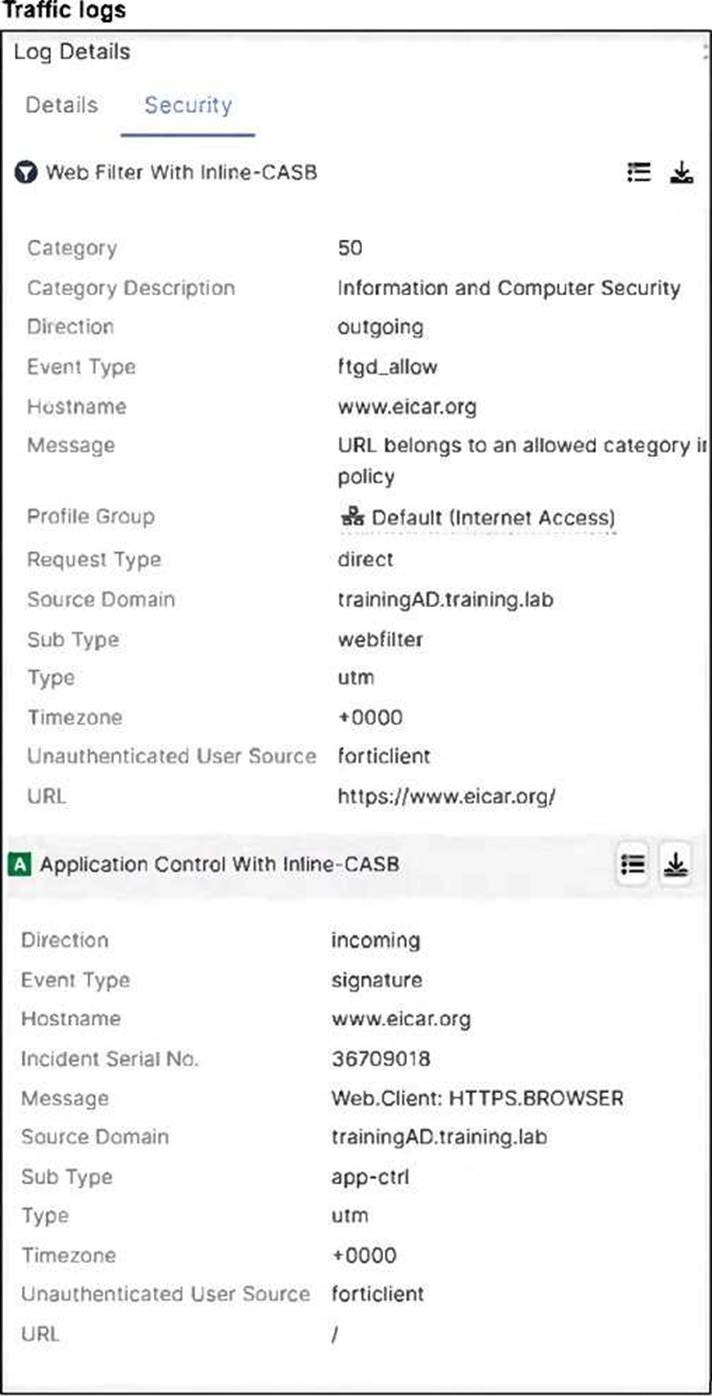
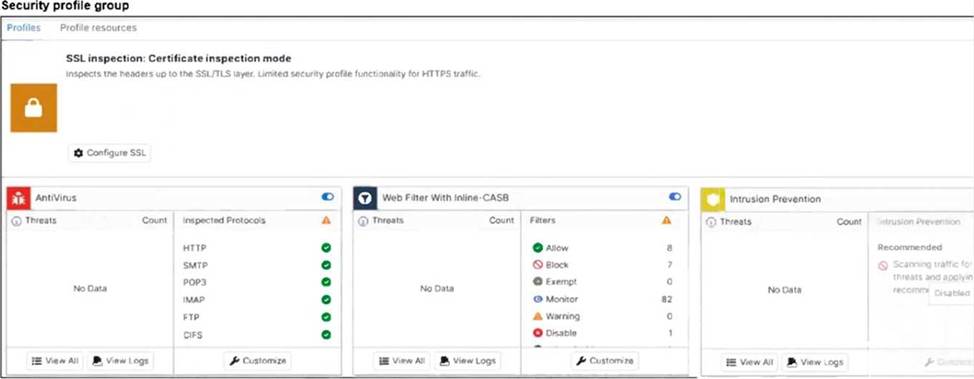
A FortiSASE administrator has configured an antivirus profile in the security profile group and applied
it to the internet access policy. Remote users are still able to download the eicar.com-zip file from https://eicar.org.
Which configuration on FortiSASE is allowing users to perform the download? (Choose one answer)
- A . Deep inspection is not enabled.
- B . Application control is exempting all the browser traffic.
- C . Web filter is allowing the URL.
- D . Intrusion prevention is disabled.
A
Explanation:
The core of the issue shown in the exhibits is the lack of visibility into encrypted traffic.
HTTPS Encryption: The eicar.org website uses the HTTPS protocol for its downloads. This means the data payload, including the test malware file, is encrypted as it traverses the network.
SSL Inspection Modes: As seen in the Security profile group exhibit (image_5705fc.jpg), the SSL inspection mode is explicitly set to Certificate inspection mode.
Visibility Gap: Certificate inspection only analyzes the initial SSL handshake, such as the server certificate and SNI (Server Name Indication). It does not decrypt the traffic payload. Consequently, the antivirus engine in FortiSASE cannot "see" or scan the eicar.com-zip file hidden within the encrypted session.
Resolution Requirement: To detect and block malicious files over HTTPS, SSL Deep Inspection must be enabled. Deep inspection allows FortiSASE to act as a proxy, decrypting the traffic for full content scanning by the antivirus and IPS engines before re-encrypting it for the endpoint.
Log Analysis: While the web filtering logs (image_5704e5.jpg) show the traffic is "Allowed" because the URL is not blocked by a web filter category, this is only the first step of inspection. The antivirus engine is present but ineffective because it is blind to the encrypted content due to the lack of deep inspection.