
Practice Free NSE5_FSW_AD-7.6 Exam Online Questions
Refer to the exhibit.
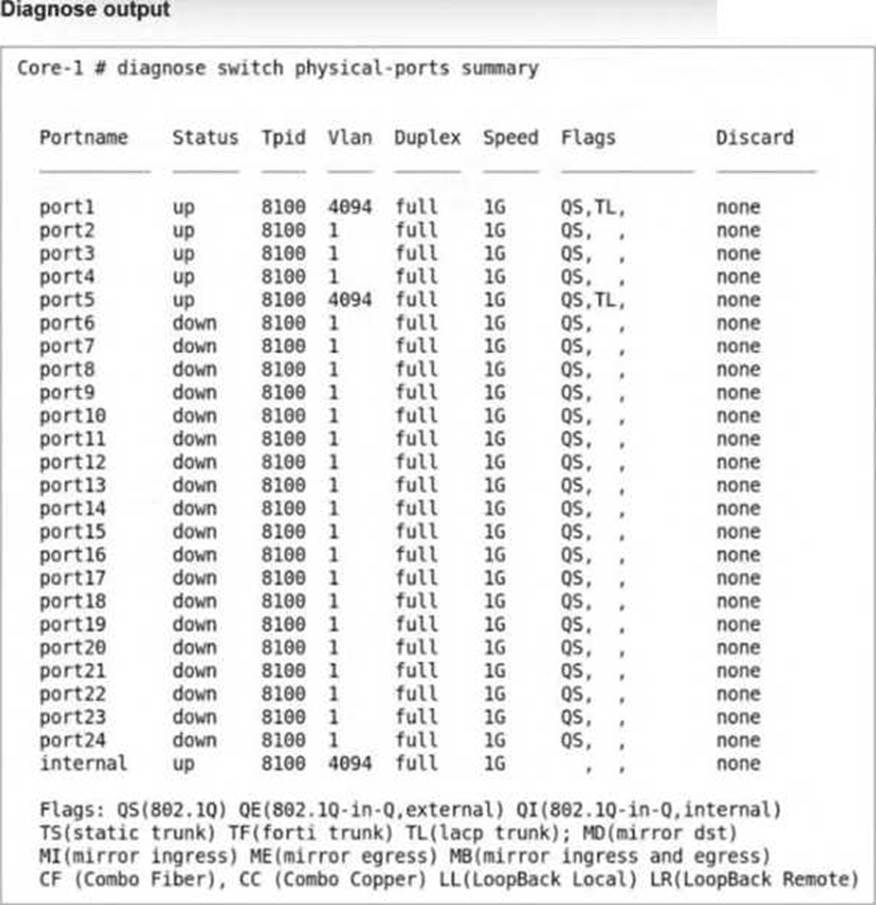
The command diagnose switch physical-ports summary is executed on FortiSwitch.
Based on the VLAN assignments shown in the output, what is the most likely management configuration of this FortiSwitch? (Choose one answer)
- A . FortiSwitch is managed by FortiSwitch Cloud.
- B . FortiSwitch is managed by FortiGate.
- C . FortiSwitch is operating in standalone mode.
- D . FortiSwitch is operating in local mode.
B
Explanation:
The output of the diagnose switch physical-ports summary command provides critical insight into how a FortiSwitch is being managed by examiningVLAN assignments, tag protocol identifiers (TPID), andinternal port behavior. In the provided exhibit, several ports―includingport1, port5, and theinternalport―are assigned toVLAN 4094.
According to the FortiSwitchOS 7.6 Administrator Guide, VLAN 4094 is reserved for FortiLink management trafficwhen a FortiSwitch is managed by a FortiGate. FortiLink uses this dedicated VLAN to carry control-plane traffic such as configuration synchronization, monitoring data, LLDP-based discovery, and keepalive messages between the FortiGate and FortiSwitch. The presence of VLAN 4094 on physical interfaces is a strong and explicit indicator ofFortiGate-managed mode.
In standalone or local management mode, FortiSwitch ports typically default toVLAN 1or administrator-defined VLANs, andVLAN 4094 is not automatically assigned. Similarly, FortiSwitch CloudCmanaged devices do not use VLAN 4094 in this manner, as cloud management relies on IP connectivity to FortiEdge Cloud rather than FortiLink encapsulation.
Additionally, the internal port showing VLAN 4094 further confirms FortiLink operation, as this internal interface is used by the switch ASIC to communicate with the FortiGate over the FortiLink tunnel. This behavior is documented in FortiOS 7.6 and FortiSwitchOS 7.6 design guides as characteristic of FortiGate-managed FortiSwitch deployments.
Therefore, based on the VLAN assignments shown―specifically the use ofVLAN 4094―the most accurate and fully verified conclusion is thatthe FortiSwitch is managed by FortiGate, makingOption Bthe correct answer.
Refer to the diagnostic output:
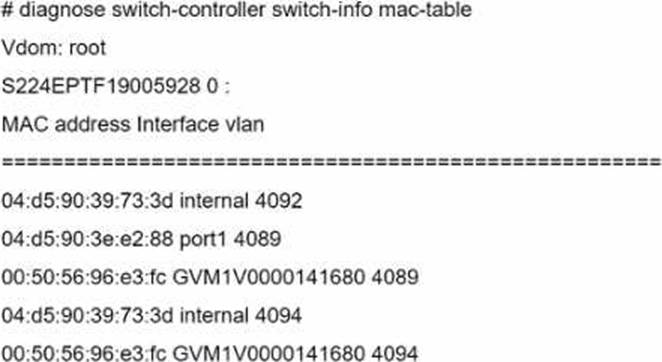
Two entries in the exhibit show that the same MAC address has been used in two different VLANs.
Which MAC address is shown in the above output?
- A . It is a MAC address of FortiLink interface on FortiGate.
- B . It is a MAC address of a switch that accepts multiple VLANs.
- C . It is a MAC address of an upstream FortiSwitch.
- D . It is a MAC address of FortiGate in HA configuration.
B
Explanation:
The MAC address "00: 50: 56: 96: e3: fc" appearing in two different VLANs (4089 and 4094) in the diagnostic output indicates it is a MAC address associated with a device that supports traffic from multiple VLANs. Such a behavior is typical of network infrastructure devices like switches or routers, which are configured to allow traffic from various VLANs to pass through a single physical or logical interface. This is essential in network designs that utilize VLANs to segregate network traffic for different departments or use cases while using the same physical infrastructure.
Reference: For more detailed information on MAC table diagnostics and VLAN configurations in FortiGate
devices, refer to the official Fortinet documentation: Fortinet Product Documentation.
Refer to the exhibit.
What two conclusions can be made regarding DHCP snooping configuration? (Choose two.)
- A . Maximum value to accept clients DHCP request is configured as per DHCP server range.
- B . FortiSwitch is configured to trust DHCP replies coming on FortiLink interface.
- C . DHCP clients that are trusted by DHCP snooping configured is only one.
- D . Global configuration for DHCP snooping is set to forward DHCP client requests on all ports in the VLAN.
B, D
Explanation:
Based on the DHCP snooping configuration details provided in the exhibit:
B. FortiSwitch is configured to trust DHCP replies coming on FortiLink interface. The configuration segment shows "trusted ports: port2 FlInK1 MLAG0, " indicating that the FortiSwitch is configured to trust DHCP replies coming from the specified ports, including the FortiLink interface labeled FlInK1. This setup is critical in environments where the FortiLink interface connects directly to a trusted device, such as a FortiGate appliance, ensuring that DHCP traffic on these ports is considered legitimate.
D. Global configuration for DHCP snooping is set to forward DHCP client requests on all ports in the VLAN. The "DHCP Broadcast Mode" set to ‘All’ under the DHCP Global Configuration indicates that DHCP client requests are allowed to broadcast across all ports within the VLAN. This setting is essential for environments needing broad DHCP client servicing across multiple access ports without restriction, facilitating network connectivity and management.
Exhibit.
The exhibit shows the current status of the ports on the managed FortiSwitch.
Access-1.
Why would FortiGate display a serial number in the Native VLAN column associated with the port23 entry?
- A . Port23 is a member of a trunk that uses the Access-1 FortiSwitch senal number as the name of the trunk.
- B . Port23 is configured as the dedicated management interface.
- C . A standalone switch with the showm serial number is connected on por123.
- D . Ports connect to adjacent FortiSwitch devices will show their.serial number as the na-tive VLAN
C
Explanation:
The appearance of a serial number in the Native VLAN column for port23 suggests that the switch connected to this port is identified uniquely in the network.Given the options provided:
A standalone switch with the shown serial number is connected on port23 (Option C): This is the most plausible explanation. The FortiSwitch configuration interface is displaying the serial number of a standalone switch that is directly connected to port23. This kind of display helps in identifying and managing individual devices in a network setup, especially in environments with multiple switches.
Refer to the exhibit.
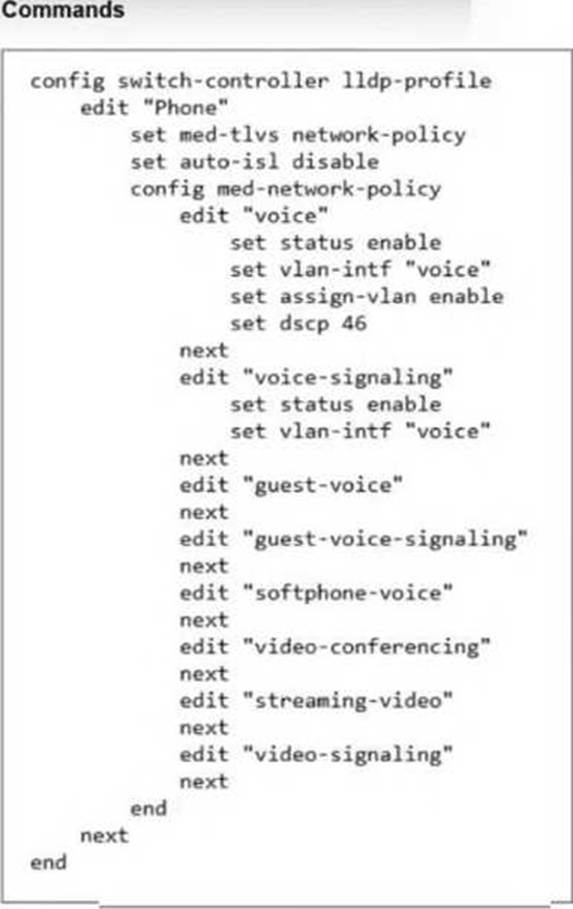
The LLDP profile shown in the exhibit was configured to detect IP phones and automatically assign them to the appropriate VLAN. You apply this LLDP profile on a FortiSwitch port.
Which configuration should you enable on the FortiSwitch profile to collect detailed information about all the connected IP phones? (Choose one answer)
- A . Create a new LLDP profile to handle different LLDP-MED TLVs.
- B . Configure a dedicated voice VLAN with DSCP 46.
- C . Enable LLDP-MED inventory management TLVs.
- D . Enable auto-isl.
C
Explanation:
According to theFortiSwitchOS 7.6 Administration Guideand theFortiSwitch 7.6 Study Guide, Link Layer Discovery Protocol-Media Endpoint Discovery (LLDP-MED) is an enhancement to standard LLDP that provides advanced discovery and configuration for endpoints li1ke IP phones. While the current configuration in the exhibit correctly handlesNetwork Policy TLVsto advertise QoS2and VLAN settings to the phones, it is missing the specific component required for data collection.34
To coll5ect detail6ed information such as themanufacturer, software version, hardware version, and serial or asset numbers, you mustEnable LLDP-MED inventory management TLVs (Option C). The documentation specifies that when the inventory-management TLV is active, the switch can retrieve these extensive device characteristics from the connected Media Endpoints. This information is then visible to the administrator through the FortiGate or FortiSwitch monitoring tools, providing a complete hardware inventory of the voice network.
Regarding the other options:
Option A is unnecessary because a single LLDP profile can support multiple TLV types simultaneously by adding them to the med-tlvs string.
Option B is already partially implemented in the exhibit’s network policy but does not contribute to device detection or data collection.
Option D is used for automatic trunking between FortiSwitches and is unrelated to endpoint device information. Therefore, the addition of the inventory-management TLV is the specific requirement to fulfill the goal of collecting detailed IP phone data.
Which statement about the configuration of VLANs on a managed FortiSwitch port is true?
- A . Untagged VLANs must be part of the allowed VLANs: ingress and egress.
- B . FortiSwitch VLAN interfaces are created only when FortiSwitch is managed by Forti-Gate.
- C . The native VLAN is implicitly part of the allowed VLAN on the port.
- D . Allowed VLANS expand the collision domain to the port.
C
Explanation:
The native VLAN is implicitly part of the allowed VLAN on the port (C): On a managed FortiSwitch port, the native VLAN, which is the VLAN assigned to untagged traffic, is implicitly included in the list of allowed VLANs. This means it does not need to be explicitly specified when configuring VLAN settings on the port. This configuration simplifies VLAN management and ensures that untagged traffic is handled correctly without additional configuration steps.
What can an administrator do to maintain a FortiGate-compatible FortiSwitch configuration when changing the management mode from standalone to FortiLinK?
- A . Use a migration tool based on Python script to convert the configuration.
- B . Enable the FortiLink setting on FortiSwitch before the authorization process.
- C . FortiGate automatically saves the existing FortiSwitch configuration during the FortiLink management process.
- D . Register FortiSwitch to FortiSwitch Cloud to save a copy before managing with FortiGate.
C
Explanation:
When transitioning the management of a FortiSwitch from standalone mode to being managed by FortiGate via FortiLink, it is critical to ensure that the existing configurations are preserved.
The best practice involves:
FortiGate’s Role in Configuration Preservation: FortiGate has the capability to automatically preserve the existing configuration of a FortiSwitch when it is integrated into the network via FortiLink. This feature helps ensure that the transition does not disrupt the network’s operational settings.
Configuration Integration: As FortiSwitch is integrated into FortiGate’s management via FortiLink, FortiGate captures and integrates the existing switch configuration, enabling a seamless transition. This process involves FortiGate recognizing the FortiSwitch and its current setup, then incorporating these settings into the centralized management interface without the need for manual reconfiguration or the use of additional tools.
Reference: For further details on managing FortiSwitch with FortiGate and the capabilities of FortiLink, consult the FortiSwitch and FortiGate integration guide available on: Fortinet Product Documentation
Which feature should you enable to reduce the number or unwanted IGMP reports processed by the IGMP querier?
- A . Enable the IGMP flood setting on the static port for all multicast groups.
- B . Enable the IGMP flood reports setting on the mRouter port.
- C . Enable IGMP snooping proxy.
- D . Enable IGMP flood unknown multicast traffic on the global setting.
C
Explanation:
Enable IGMP snooping proxy (C): To reduce the number of unwanted IGMP reports processed by the IGMP querier, enabling IGMP snooping proxy is effective. This feature acts as an intermediary between multicast routers and hosts, optimizing the management of IGMP messages by handling report messages locally and reducing unnecessary IGMP traffic across the network. This minimizes the processing load on the IGMP querier and improves overall network efficiency.
Refer to the exhibit.
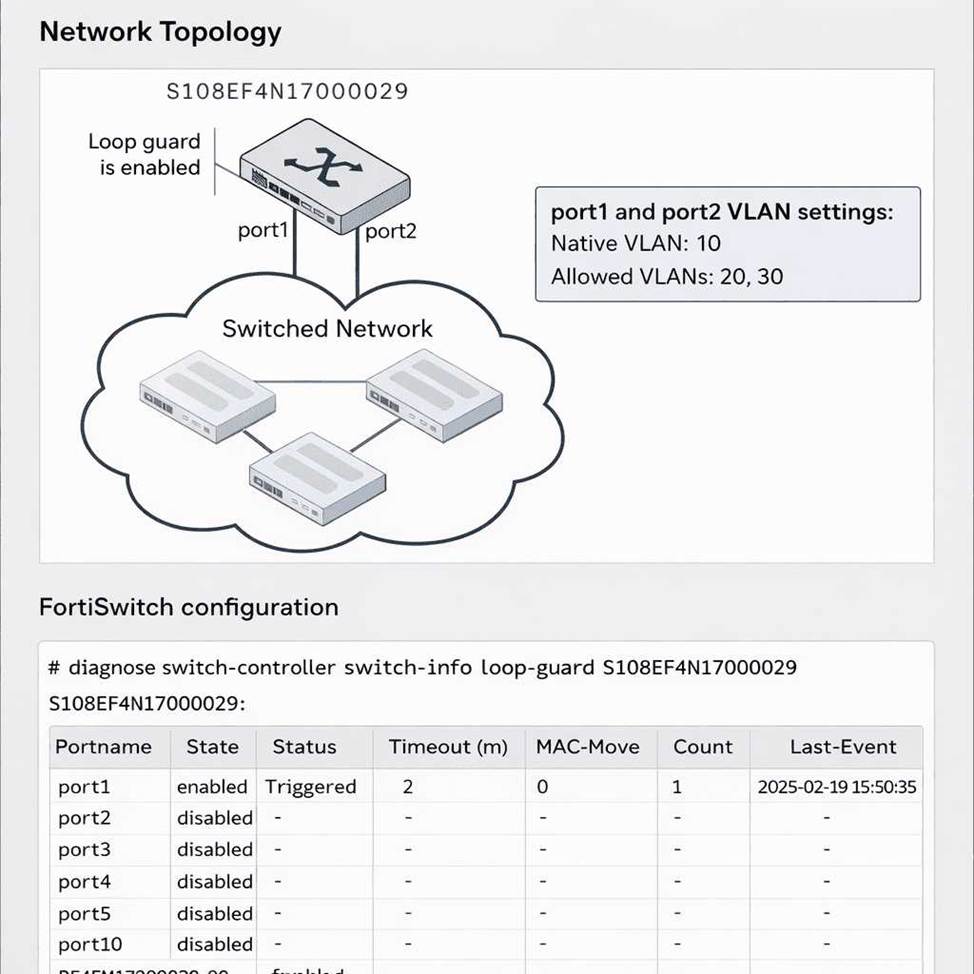
You run the command diagnose switch-controller switch-info loopguard access-1 and see that the MAC-Movecolumn displays a value of0forport1.
What does this indicate? (Choose one answer)
- A . Loop guard is disabled on port1.
- B . Port1 is not being monitored by loop guard.
- C . The MAC move feature is not enabled.
- D . Port1 will shut down if a loop occurs on any VLAN.
C
Explanation:
In FortiSwitchOS 7.6, Loop Guardis a Layer 2 loop detection mechanism primarily designed to protect access ports from unintended network loops. In itsoriginal implementation, Loop Guard only detected loops on thenative VLAN, which limited its effectiveness in environments using multiple tagged VLANs. To address this limitation, Fortinet enhanced Loop Guard by introducing theMAC move detection feature, as documented in the FortiSwitchOS 7.6 Administrator Guide.
The MAC move optioninstructs the FortiSwitch to monitor for repeated MAC address flapping events across ports or VLANs. Such MAC movement is a strong indicator of a Layer 2 loop. However, this enhanced detection mechanism isdisabled by defaultand must be explicitly enabled by configuring aMAC move threshold greater than zero.
According to the FortiSwitchOS 7.6 Administrator Guide (page 164), enabling MAC move allows Loop Guard to detect loops beyond the native VLAN. Furthermore, the guide explicitly states (page 166) thata MAC-Move value of 0 indicates that the MAC move feature is not enabled. This means the switch is not monitoring MAC address movement as part of its loop detection logic, even though Loop Guard itself may still be enabled on the port.
Therefore, a MAC-Move value of 0 does not indicate that Loop Guard is disabled or inactive, nor does it imply VLAN-wide port shutdown behavior. It strictly confirms that MAC move detection has not been enabled, making Option C the correct and fully verified answer based on FortiSwitchOS 7.6 documentation.
You are deploying a FortiSwitch virtual stack in a network that contains Cisco devices. You want the Cisco devices toautomatically discover the FortiSwitch devices and exchange device information.
Which two protocols must be enabled on the FortiSwitch devices to achieve this? (Choose two answers)
- A . Unidirectional Link Detection
- B . Cisco Discovery Protocol
- C . Link Layer Discovery Protocol
- D . LLDP C Media Endpoint Discovery
B, C
Explanation:
In mixed-vendor network environments, such as deployments that include bothFortiSwitchandCiscodevices, properLayer 2 discovery protocolsmust be enabled to allow devices to automatically discover neighbors and exchange essential device and interface information. FortiSwitchOS 7.6 supports bothCisco Discovery Protocol (CDP) andLink Layer Discovery Protocol (LLDP) to ensure interoperability.
Cisco Discovery Protocol (CDP) is a Cisco-proprietary Layer 2 discovery protocol widely used by Cisco switches, routers, and IP phones. When CDP is enabled on FortiSwitch interfaces, Cisco devices can discover FortiSwitch neighbors and receive information such as device ID, port ID, platform, and capabilities. This is particularly important in Cisco-centric networks where CDP is the primary discovery mechanism.
Link Layer Discovery Protocol (LLDP), defined by IEEE 802.1AB, is a vendor-neutral discovery protocol supported by both Fortinet and Cisco devices. Enabling LLDP allows FortiSwitch and Cisco devices to exchange standardized information including system name, port description, VLAN information, and management address. LLDP is essential for cross-vendor compatibility and is commonly enabled by default in modern enterprise networks.
The remaining options are incorrect.Unidirectional Link Detection (UDLD) is used to detect unidirectional fiber or copper link failures and does not provide device discovery or information exchange. LLDP-MEDis an extension of LLDP specifically designed for media endpoints such as IP phones and is not required for general switch-to-switch discovery.
Therefore, to ensure automatic discovery and information exchange between FortiSwitch and Cisco devices, both CDP and LLDP must be enabled, making
Options B and C the correct and fully verified answers based on FortiSwitchOS 7.6 documentation.