
Practice Free NCP-AII Exam Online Questions
You are validating the environment of an NVIDIA GPU-accelerated data center during post-deployment checks.
Which one action is essential to confirm that power and cooling are sufficient for the stable operation of NVIDIA DGX H100 systems?
- A . Confirm the system fans are running at 100% under all workloads to prevent overheating.
- B . Review the system BIOS to ensure GPU overclocking is enabled for maximum performance.
- C . Use NVSM to disable unused PCIe devices to reduce overall system heat output.
- D . Verify that each DGX system is connected to redundant, properly rated PDUs and that all power supplies are reporting nominal input.
D
Explanation:
Stable operation of high-density AI infrastructure like the DGX H100 requires strict adherence to power and thermal specifications. A single DGX H100 system can draw up to 10.2kW under peak load. Therefore, the most essential validation step is ensuring the electrical "infrastructure-to-server" handoff is healthy. This involves verifying that the system is connected to redundant PDUs (Power Distribution Units) capable of handling the amperage requirements without tripping breakers. Using NVSM (NVIDIA System Management), an administrator must check that all six power supplies (PSUs) are functional and receiving nominal input voltage (typically 200V-240V). If a PSU reports sub-optimal input or a "Loss of Redundancy," the system may throttle performance or shut down unexpectedly during a heavy training run. Fans running at 100% (Option A) at all times would actually indicate an inefficient or failed cooling policy, as fans should dynamically scale based on thermals. Overclocking (Option B) is not supported or recommended for enterprise DGX systems, as they are already factory-tuned for the highest stable performance.
You’re deploying a BlueField-2 DPU in a cloud environment and need to ensure the integrity of the DPU’s firmware. You want to verify that the firmware hasn’t been tampered with.
Which of the following methods provides the strongest level of assurance for firmware integrity?
- A . Checking the MD5 checksum of the firmware image against a known good value.
- B . Verifying the SHA256 checksum of the firmware image against a known good value provided by NVIDIA.
- C . Comparing the firmware version reported by the DPU with the version listed in the NVIDIA release notes.
- D . Using a digitally signed firmware image and verifying the signature using NVIDIA’s public key.
- E . Checking the file size of the firmware image against a known good value.
D
Explanation:
Digitally signed firmware provides the strongest guarantee of integrity. The signature verifies that the firmware hasn’t been tampered with since it was signed by NVIDIA. SHA256 checksums are good, but digital signatures are cryptographically stronger. MD5 checksums are considered weak and easily compromised. Firmware version and file size offer minimal assurance against sophisticated attacks.
You are deploying an NVIDIA-Certified A1 server. The documentation specifies a minimum airflow requirement for the GPUs.
How would you BEST monitor the GPU temperatures and ensure the airflow is adequate during a stress test?
- A . Use ‘nvidia-smi’ to monitor GPU temperature and visually inspect the fans.
- B . Use IPMI sensors to monitor GPU temperature and fan speeds.
- C . Use a thermal camera to measure the GPU heatsink temperature.
- D . Use a software utility like ‘psensor’ to monitor GPU temperature.
- E . Measure the ambient temperature around the server.
B
Explanation:
IPMI provides remote monitoring of hardware sensors, including GPU temperature and fan speeds, allowing you to ensure the cooling system is working correctly during a stress test. ‘nvidia-smi’ gives the GPU temp but not the fan speed. Ambient temperature isn’t an accurate reflection of the GPU’s actual temperature.
What is the primary function of the NVIDIA Container Toolkit, and how does it facilitate the use of GPUs within containerized environments? (Multiple Answers)
- A . It provides a set of command-line tools for managing NVIDIA drivers on the host system.
- B . It automatically installs the necessary NVIDIA drivers inside the container.
- C . It allows containers to access and utilize NVIDIA GPUs by injecting the necessary drivers and libraries into the container runtime environment.
- D . It enables monitoring of GPU utilization within containers.
- E . It manages the lifecycle of containers running GPU-accelerated workloads.
C,D
Explanation:
The NVIDIA Container Toolkit allows containers to access and utilize NVIDIA GPUs by injecting the necessary drivers and libraries into the container runtime environment and It enables monitoring of GPU utilization within containers. While it requires proper drivers to be installed, the toolkit does not manage host drivers directly. The NVIDIA container toolkit relies on container runtimes, and container runtimes manage the container lifecycle. The container toolkit does not automatically install drivers inside containers.
What is the primary function of the NVIDIA Container Toolkit, and how does it facilitate the use of GPUs within containerized environments? (Multiple Answers)
- A . It provides a set of command-line tools for managing NVIDIA drivers on the host system.
- B . It automatically installs the necessary NVIDIA drivers inside the container.
- C . It allows containers to access and utilize NVIDIA GPUs by injecting the necessary drivers and libraries into the container runtime environment.
- D . It enables monitoring of GPU utilization within containers.
- E . It manages the lifecycle of containers running GPU-accelerated workloads.
C,D
Explanation:
The NVIDIA Container Toolkit allows containers to access and utilize NVIDIA GPUs by injecting the necessary drivers and libraries into the container runtime environment and It enables monitoring of GPU utilization within containers. While it requires proper drivers to be installed, the toolkit does not manage host drivers directly. The NVIDIA container toolkit relies on container runtimes, and container runtimes manage the container lifecycle. The container toolkit does not automatically install drivers inside containers.
A distributed training job using multiple nodes, each with eight NVIDIA GPUs, experiences significant performance degradation. You notice that the network bandwidth between nodes is consistently near its maximum capacity. However, ‘nvidia-smi’ shows low GPU utilization on some nodes.
What is the MOST likely cause?
- A . The GPUs are overheating, causing thermal throttling.
- B . Data is not being distributed evenly across the nodes; some nodes are waiting for data from others.
- C . The NVIDIA drivers are outdated, causing communication bottlenecks.
- D . The network interface cards (NICs) are faulty, causing packet loss and retransmissions.
- E . The CPU is heavily loaded, causing contention for network resources.
B
Explanation:
High network bandwidth utilization combined with low GPU utilization on some nodes strongly suggests a data imbalance. Some nodes are likely waiting for data from other nodes, causing them to be idle while the network is saturated. This is a common problem in distributed training and requires addressing the data distribution strategy. While other factors (overheating, outdated drivers, faulty NICs, CPU load) could contribute, they are less likely to be the primary cause given the observed symptoms.
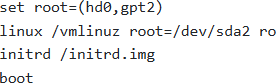
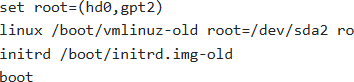
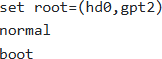
You have a BlueField-2 DPU running Ubuntu. After upgrading the MLNX OFED drivers, the DPU fails to boot properly. You are presented with a GRUB prompt.
Which sequence of commands is most likely to help you boot into a working kernel?
A )

B )
C )
D )

E )
- A . Option A
- B . Option B
- C . Option C
- D . Option D
- E . Option E
C
Explanation:
When a boot fails after a driver upgrade, it’s often because the new kernel/initrd is faulty. The most likely solution is to boot into the previous, known-good kernel.
Option C attempts this by specifying ‘-old’ in the kernel and initrd filenames, attempting to load the older, hopefully functional, kernel. It assumes the root partition is /dev/sda2 but is booting an older kernel.
Option A uses ‘$(uname -r)’ which likely resolves to the problematic kernel that caused the failure.
Option B lacks version information and may also load a broken kernel.
Option D uses /dev/nvme0n1p2, which might be incorrect for the root partition on the BlueField.
Option E will try to load grub normally, which might fail again.
You are deploying a multi-GPU server for deep learning training. After installing the GPUs, the system boots, but ‘nvidia-smi’ only detects one GPU. The motherboard has multiple PCle slots, all of which are physically capable of supporting GPUs.
What is the most probable cause?
- A . The other GPUs are not properly seated in their PCle slots. Reseat the GPUs and ensure they are securely connected.
- B . The other GPUs are faulty and need to be replaced. Test each GPU individually to confirm their functionality.
- C . The system BIOS/UEFI is not configured to enable all PCle slots or the PCle lanes are not allocated correctly. Check the BIOS/IJEFI settings to enable all slots and configure the PCle lane allocation (e.g., x16/x8/x8).
- D . The NVIDIA drivers are not installed correctly or are incompatible with the GPUs. Reinstall the drivers and ensure they are compatible with the specific GPU model and CUDA version.
- E . The power supply is not providing enough power to all GPIJs. Upgrade to a higher wattage power supply.
C
Explanation:
Incorrect BIOS/UEFI settings are the most likely cause when GPUs are physically present but not detected. The BIOS controls PCle lane allocation and slot enabling. Reseating GPUs is a good first step, but if the BIOS is misconfigured, it won’t resolve the issue. Insufficient power is also a possibility, but BIOS configuration is more common in initial setup.
An administrator installs NVIDIA GPU drivers on a DGX H100 system with UEFI Secure Boot enabled. After reboot, the drivers fail to load.
What is the first action to resolve this issue?
- A . Disable Secure Boot permanently in BIOS/UEFI settings.
- B . Delete /etc/X11/xorg.conf to force driver reconfiguration.
- C . Enroll the Machine Owner Key (MOK) during system reboot and enter the recorded password.
- D . Reinstall drivers using apt-get install nvidia-driver-550 without rebooting.
C
Explanation:
UEFI Secure Boot is a security standard that ensures only digitally signed code is allowed to execute during the boot process. Since NVIDIA GPU drivers include kernel modules (nvidia.ko), they must be signed by a key trusted by the system’s firmware. When drivers are installed on a DGX system with Secure Boot active, the installation process generates a unique Machine Owner Key (MOK). However, the Linux kernel will not trust this key until the user manually authenticates it at the "Shim" level before the OS loads. Upon the first reboot after installation, the system enters the "MOK Management" blue screen. The administrator must select "Enroll MOK" and enter the temporary password created during the driver installation. Failing to do this results in the kernel rejecting the nvidia module, leading to an "Unable to determine the device handle for GPU" error in nvidia-smi. Disabling Secure Boot (Option A) would resolve the symptom but violates the security posture of the AI infrastructure.
You are deploying BlueField OS in a highly secure environment.
Which of the following security measures are MOST important to consider during and after the OS deployment?
- A . Enabling secure boot to ensure only trusted code is executed during the boot process.
- B . Configuring a strong firewall to restrict network access to only necessary services.
- C . Regularly updating the BlueField OS and all installed software to patch security vulnerabilities.
- D . Disabling unnecessary services and ports to reduce the attack surface.
- E . Implementing a strict password policy for all user accounts.
A,B,C,D,E
Explanation:
All listed options contribute significantly to the security posture. Secure boot ensures boot integrity, a firewall restricts unauthorized network access, regular updates patch vulnerabilities, disabling unnecessary services minimizes the attack surface, and a strong password policy protects user accounts. All these are critical in a secure environment.