
Practice Free MB-310 Exam Online Questions
A company uses Microsoft Dynamics 365 Finance. The company purchases, creates, and acquires fixed assets by using purchase orders.
The system must acquire the fixed asset when a vendor invoice is posted.
You need to process the transaction.
What should you do?
- A . Run a fixed asset acquisition proposal before a fixed asset number can be added to a purchase order.
- B . Manually create a fixed asset before the fixed asset number is added to the purchase order.
- C . Select a procurement category in a purchase order line and leave the fixed asset group blank.
- D . Leave the fixed asset number blank on the purchase order.
DRAG DROP
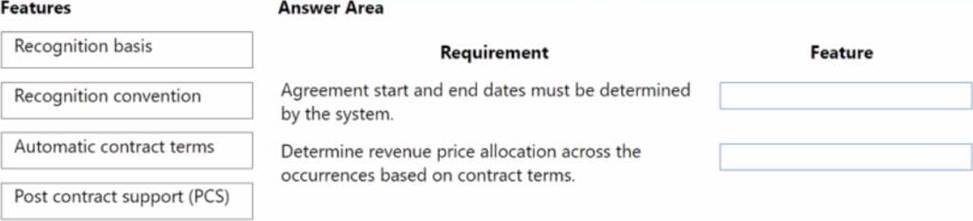
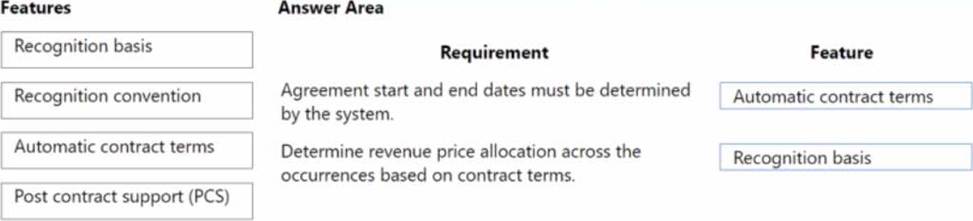
You are implementing revenue recognition functionality in Microsoft Dynamics 365 Finance.
You need to configure revenue schedules to meet the following requirements:
• Agreement start and end dates must be determined by the system.
• Determine revenue price allocation across the occurrences based on contract terms.
Which feature should you use? To answer, drag the appropriate features to the correct requirements. Each feature may be used once, more than once, or not at all. You may need to drag the split bar between panes or scroll to view content
HOTSPOT
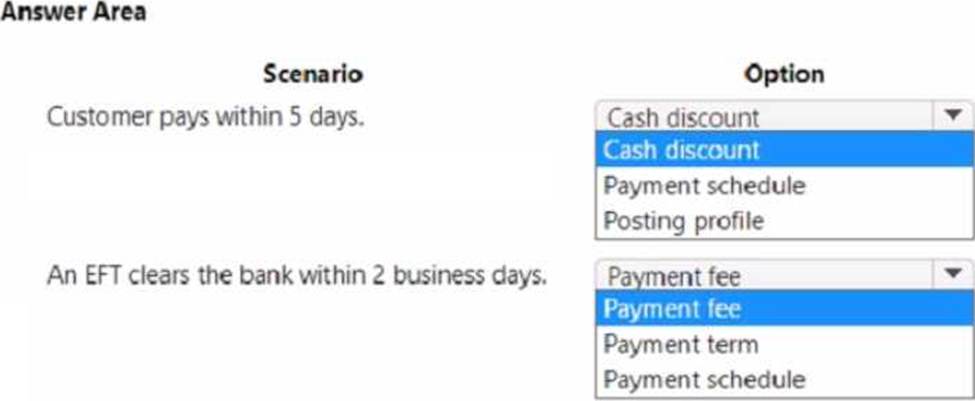
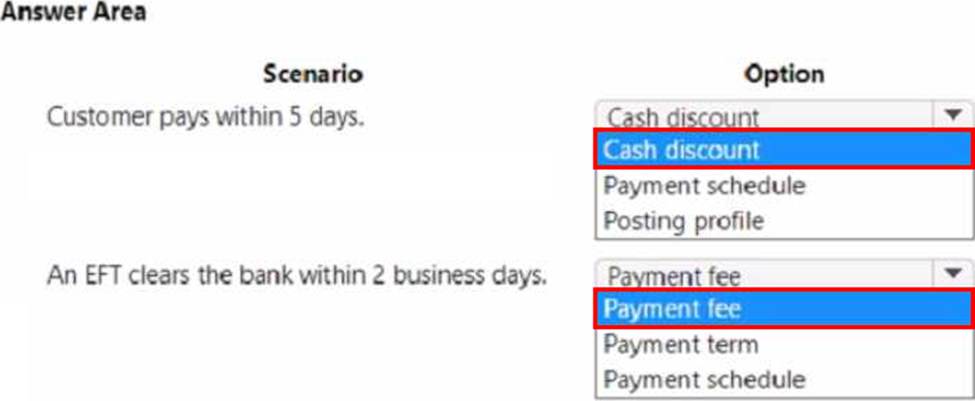
A company manufactures air filtering units for industrial manufacturing plants.
The company offers specific incentives if customers pay within a certain number of days to include:
• 10 percent off if paid in full within 5 days
• 5 percent off if paid in full within 10 days
Customers who pay by electronic funds transfer (EFT) will be charged $15 per transfer. You need to configure the system.
Which option should you use? To answer, select the appropriate options in the answer area. NOTE:
Each correct selection is worth one point.
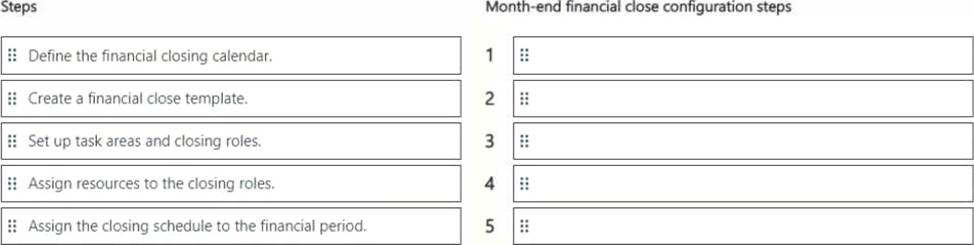
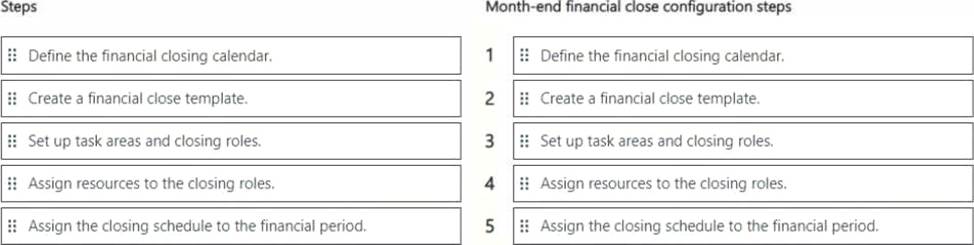
DRAG DROP
You use Dynamics 365 Finance to manage the financial operations of a company.
You need to configure the financial period close workspace for the month-end financial close.
In which order should you perform the actions? To answer, move all actions from the list of actions to the answer area and arrange them in the correct order. NOTE: More than one order of answer choices is correct. You will receive credit for any of the correct orders you select.
HOTSPOT
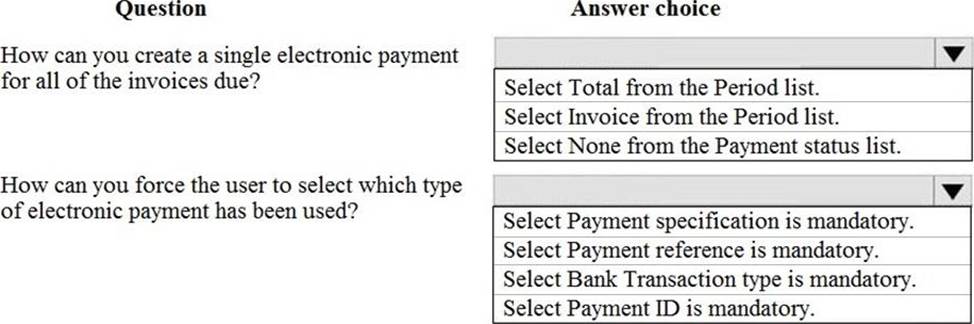
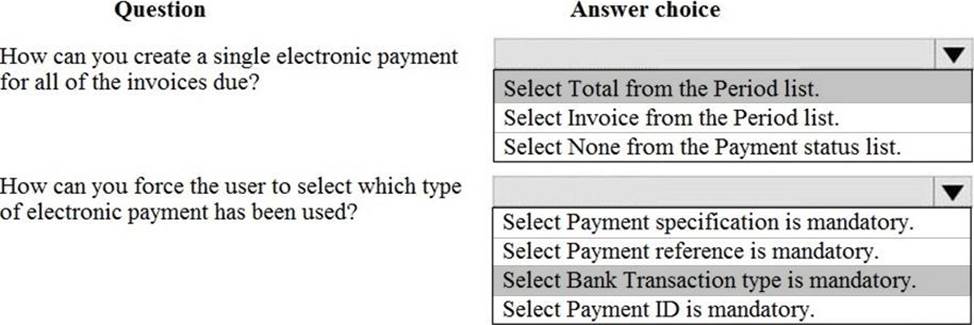
A client needs to configure Accounts payment vendor methods of payment to meet the following business requirements:
Configure the electronic method of payment to create one electronic payment for all of the invoices due.
Configure the system to ensure that all payments made with an electronic method of payment also forces the user to select which payment has been used.
You display the Methods of payment setup screen.
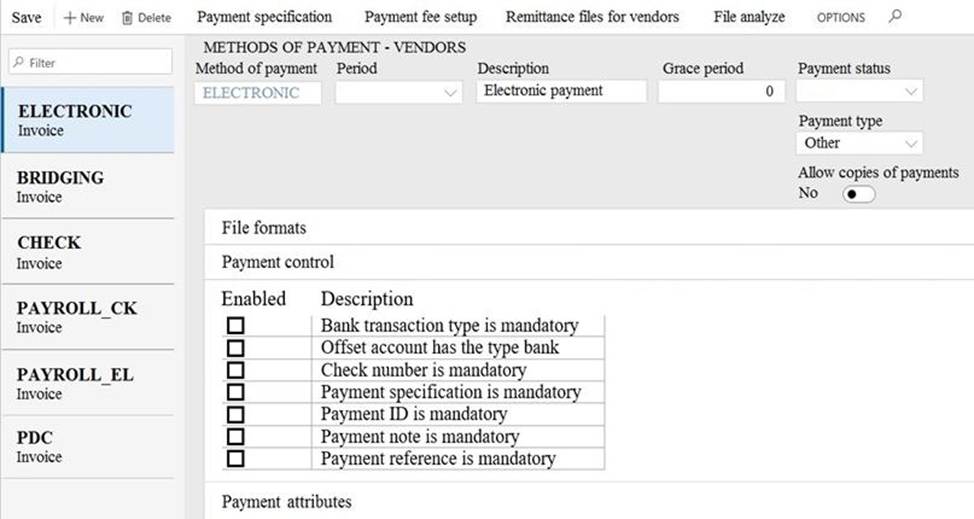
Use the drop-down menus to select the answer choice that answers each question based on the information presented in the graphic. NOTE: Each correct selection is worth one point.
HOTSPOT
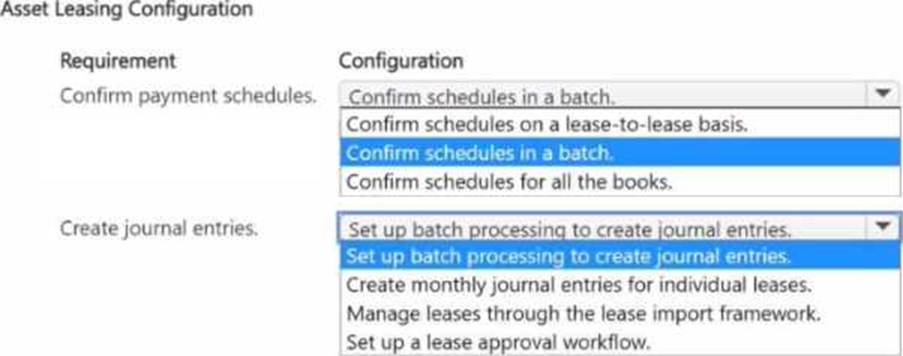
You need to resolve the issue related to monthly lease expenses.
How should you configure asset leasing? To answer, select the appropriate options in the answer area. NOTE: Each correct selection is worth one point.
Explanation:
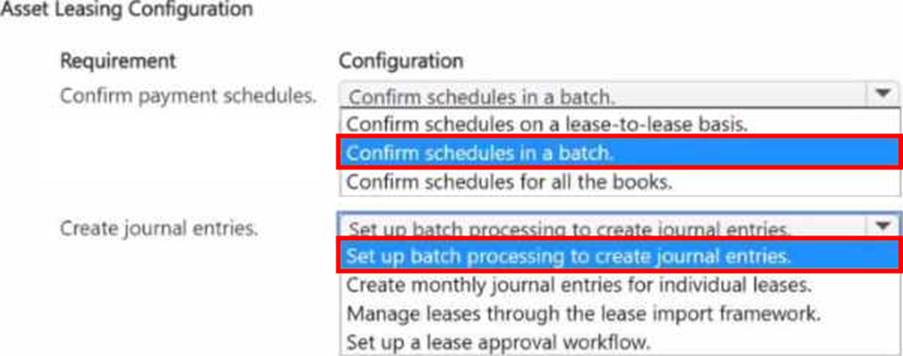
To resolve the issue related to monthly lease expenses in Dynamics 365 Finance, you should configure the asset leasing settings as follows:
Requirement: Confirm payment schedules.
Configuration: Confirm schedules in a batch.
This option ensures that the payment schedules for all leases are confirmed at once, simplifying the process of managing multiple leases.
Requirement: Create journal entries.
Configuration: Set up batch processing to create journal entries.
This setting automates the creation of journal entries for lease payments, which is essential for handling monthly lease expenses consistently.
Confirm Payment Schedules in a Batch:
Go to Asset leasing > Periodic tasks > Confirm lease payment schedules.
Select Batch processing to confirm schedules for all leases at once. This option streamlines the confirmation process, ensuring that all lease payment schedules are up-to-date.
Reference: Microsoft documentation on batch processing for lease payment confirmations in Dynamics 365 Finance.
Set Up Batch Processing for Journal Entries:
Navigate to Asset leasing > Lease transactions > Create journal entries.
Choose Set up batch processing to automatically generate journal entries for lease payments. This process enables consistent tracking of monthly lease expenses and aligns with standard accounting practices for asset leasing.
Reference: Dynamics 365 Finance documentation on automating lease journal entries with batch processing.
By configuring these options, you ensure that payment schedules and journal entries are managed effectively through batch processing, which is critical for managing monthly lease expenses in Dynamics 365 Finance.
Note: This question is part of a series of questions that present the same scenario. Each question in the series contains a unique solution that might meet the stated goals. Some question sets might have more than one correct solution, while others might not have a correct solution.
After you answer a question in this section, you will NOT be able to return to it. As a result, these questions will not appear in the review screen.
You are managing credit and collections
You need to set up mandatory credit limits for all customer documents
Solution: Select None as the credit type in the Accounts receivable parameters form. Select the Mandatory credit limit check box in the Customers form.
Does the solution meet the goal?
- A . Yes
- B . No
A company implements baste budgeting functionality in Dynamics 365 Finance in multiple departments that belong to the same legal entity. Managers must be able to identify and track budgets by department You need to configure the system.
What should you configure?
- A . Budget transfer rules
- B . Budget model with sub-model
- C . Budget entries workflows
- D . Budget codes and budget types
HOTSPOT
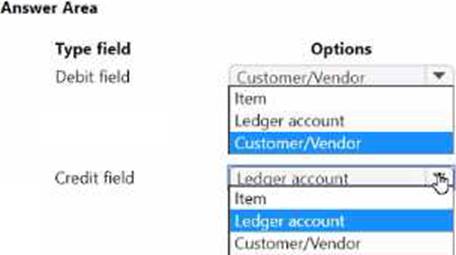
A company charges customers for freight costs. These charges are not added to the items on the order.
You need to configure the charge code for Accounts receivable.
What should you configure? To answer, select the appropriate options in the answer area. NOTE: Each correct selection is worth one point.
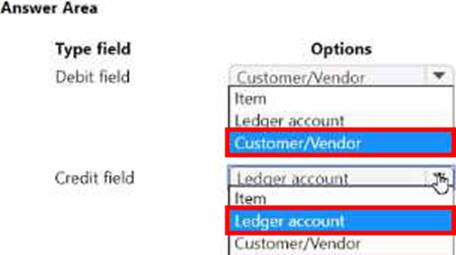
A client wants general journals to be used only to post ledger-type transactions.
You need to set up journal configuration to achieve the requirement.
Solution: Set up posting restrictions on the general journal.
Does the solution meet the goal?
- A . Yes
- B . No