
Practice Free FCSS_SASE_AD-24 Exam Online Questions
When accessing the FortiSASE portal for the first time, an administrator must select data center locations for which three FortiSASE components? (Choose three.)
- A . Endpoint management
- B . Points of presence
- C . SD-WAN hub
- D . Logging
- E . Authentication
A,B,D
Explanation:
When accessing the FortiSASE portal for the first time, an administrator must select data center locations for the following FortiSASE components:
Endpoint Management:
The data center location for endpoint management ensures that endpoint data and policies are managed and stored within the chosen geographical region. Points of Presence (PoPs):
Points of Presence (PoPs) are the locations where FortiSASE services are delivered to users. Selecting PoP locations ensures optimal performance and connectivity for users based on their geographical distribution.
Logging:
The data center location for logging determines where log data is stored and managed. This is crucial for compliance and regulatory requirements, as well as for efficient log analysis and reporting.
Reference: FortiOS 7.2 Administration Guide: Details on initial setup and configuration steps for FortiSASE. FortiSASE 23.2 Documentation: Explains the importance of selecting data center locations for various FortiSASE components.
Your organization is currently using FortiSASE for its cybersecurity. They have recently hired a contractor who will work from the HQ office and who needs temporary internet access in order to set up a web-based point of sale (POS) system.
What is the recommended way to provide internet access to the contractor?
- A . Use FortiClient on the endpoint to manage internet access.
- B . Use a proxy auto-configuration (PAC) file and provide secure web gateway (SWG) service as an explicit web proxy.
- C . Use zero trust network access (ZTNA) and tag the client as an unmanaged endpoint.
- D . Configure a VPN policy on FortiSASE to provide access to the internet.
B
Explanation:
Reference: Fortinet FCSS FortiSASE Documentation – Zero Trust Network Access (ZTNA) Use Cases FortiSASE Administration Guide – Managing Unmanaged Endpoints
Which two advantages does FortiSASE bring to businesses with multiple branch offices? (Choose two.)
- A . It offers centralized management for simplified administration.
- B . It enables seamless integration with third-party firewalls.
- C . it offers customizable dashboard views for each branch location
- D . It eliminates the need to have an on-premises firewall for each branch.
A,D
Explanation:
FortiSASE brings the following advantages to businesses with multiple branch offices:
Centralized Management for Simplified Administration:
FortiSASE provides a centralized management platform that allows administrators to manage security policies, configurations, and monitoring from a single interface.
This simplifies the administration and reduces the complexity of managing multiple branch offices.
Eliminates the Need for On-Premises Firewalls:
FortiSASE enables secure access to the internet and cloud applications without requiring dedicated on-premises firewalls at each branch office.
This reduces hardware costs and simplifies network architecture, as security functions are handled by the cloud-based FortiSASE solution.
Reference: FortiOS 7.2 Administration Guide: Provides information on the benefits of centralized management and cloud-based security solutions.
FortiSASE 23.2 Documentation: Explains the advantages of using FortiSASE for businesses with multiple branch offices, including reduced need for on-premises firewalls.
When viewing the daily summary report generated by FortiSASE. the administrator notices that the report contains very little data.
What is a possible explanation for this almost empty report?
- A . Digital experience monitoring is not configured.
- B . Log allowed traffic is set to Security Events for all policies.
- C . The web filter security profile is not set to Monitor
- D . There are no security profile group applied to all policies.
B
Explanation:
If the daily summary report generated by FortiSASE contains very little data, one possible explanation is that the "Log allowed traffic" setting is configured to log only "Security Events" for all policies. This configuration limits the amount of data logged, as it only includes security events and excludes normal allowed traffic.
Log Allowed Traffic Setting:
The "Log allowed traffic" setting determines which types of traffic are logged.
When set to "Security Events," only traffic that triggers a security event (such as a threat detection or policy violation) is logged.
Impact on Report Data:
If the log setting excludes regular allowed traffic, the amount of data captured and reported is significantly reduced.
This results in reports with minimal data, as only security-related events are included.
Reference: FortiOS 7.2 Administration Guide: Provides details on configuring logging settings for traffic policies. FortiSASE 23.2 Documentation: Explains the impact of logging configurations on report generation and data visibility.
What are two requirements to enable the MSSP feature on FortiSASE? (Choose two.)
- A . Add FortiCloud premium subscription on the root FortiCloud account.
- B . Configure MSSP user accounts and permissions on the FortiSASE portal.
- C . Assign role-based access control (RBAC) to IAM users using FortiCloud IAM portal.
- D . Enable multi-tenancy on the FortiSASE portal.
Which two settings are automatically pushed from FortiSASE to FortiClient in a FortiSASE deployment with default settings? (Choose two.)
- A . ZTNA tags
- B . Real-time protection
- C . SSL VPN profile
- D . FortiSASE CA certificate
Refer to the exhibit.
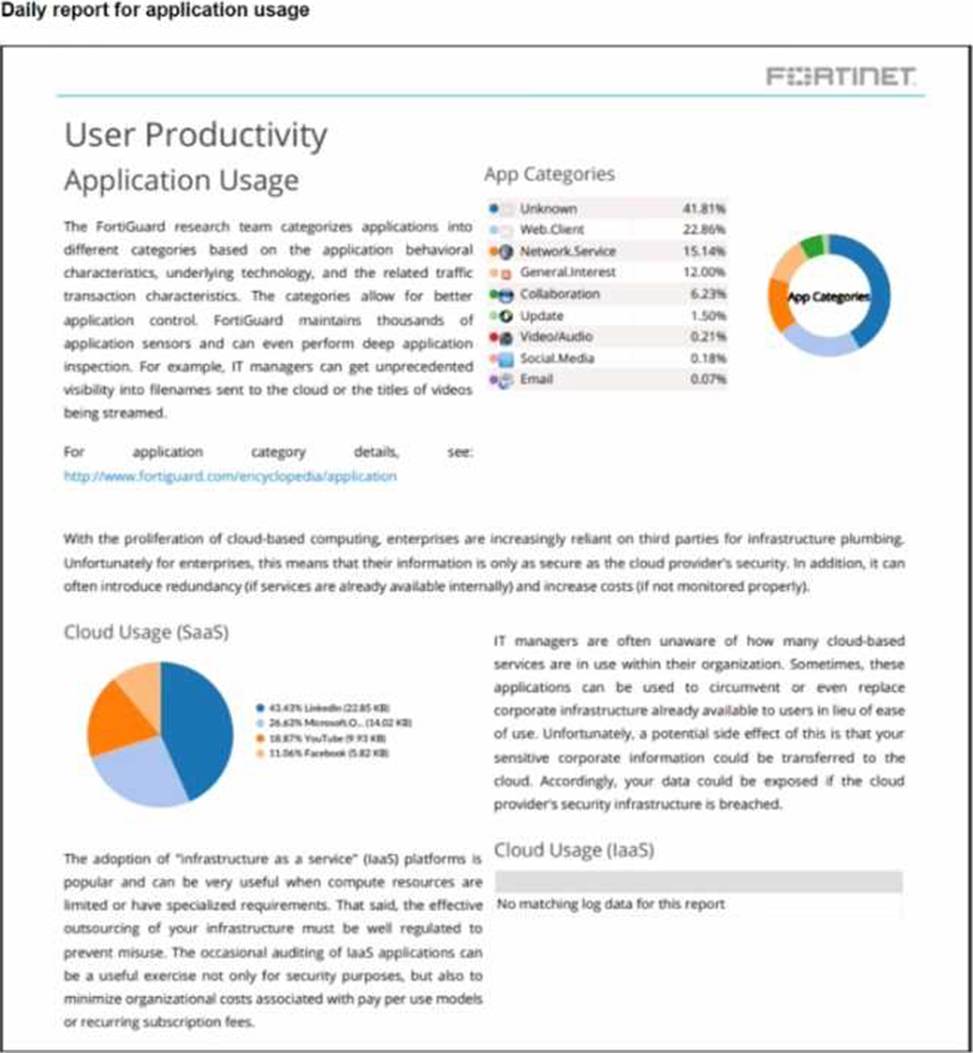
The daily report for application usage shows an unusually high number of unknown applications by category.
What are two possible explanations for this? (Choose two.)
- A . Certificate inspection is not being used to scan application traffic.
- B . The inline-CASB application control profile does not have application categories set to Monitor
- C . Zero trust network access (ZTNA) tags are not being used to tag the correct users.
- D . Deep inspection is not being used to scan traffic.