
Practice Free FCSS_NST_SE-7.6 Exam Online Questions
Refer to the exhibit.
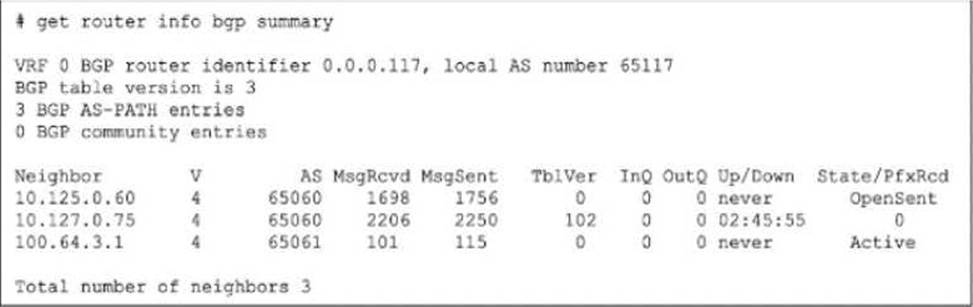
The output of a BGO debug command is shown.
What is the most likely reason that the local FortiGate is not receiving any prefixes from its neighbors?
- A . The local router is waiting for the keepalive message from the router 10.125.0.60.
- B . None of the three neighbors has successfully established the TCP three-way handshake with the local router.
- C . The router 100.64.3.1 is waiting for the OPEN message from the local router.
- D . The RIB-OUT configuration for router 10.127.0.75 prevents any route advertisement to the local router.
D
Explanation:
To identify the reason for the lack of prefixes, we must interpret the State/PfxRcd and Up/Down columns in the get router info bgp summary exhibit. Analyze Neighbor Status:
Neighbor 10.125.0.60: State is OpenSent. This session is not established. It is stuck in the negotiation phase.
Neighbor 100.64.3.1: State is Active. This session is not established. The router is actively trying to initiate a TCP connection.
Neighbor 10.127.0.75:
Up/Down: 02:45:55. This indicates the BGP session has been Up (Established) for almost 3 hours.
State/PfxRcd: 0. This number represents the count of prefixes received. The session is fully established, but the neighbor has sent zero routes. Determine the Cause:
Since the session with 10.127.0.75 is established, connectivity and handshakes (Options A, B, C) are not the issue for this neighbor.
The fact that it is Up but sending 0 prefixes strongly implies that the neighbor is configured to filter out its routes before sending them to the local FortiGate.
Option D correctly identifies this as a RIB-OUT (Routing Information Base – Outbound)
configuration issue on the neighbor (Router 10.127.0.75), which prevents it from advertising
its routes.
Reference: FortiGate Security 7.6 Study Guide (BGP): "In the BGP summary, if the State/PfxRcd shows a number (e.g., 0), the session is Established. A value of 0 means the peering is up, but no routes have been received, often due to route-map or prefix-list filtering on the remote peer."
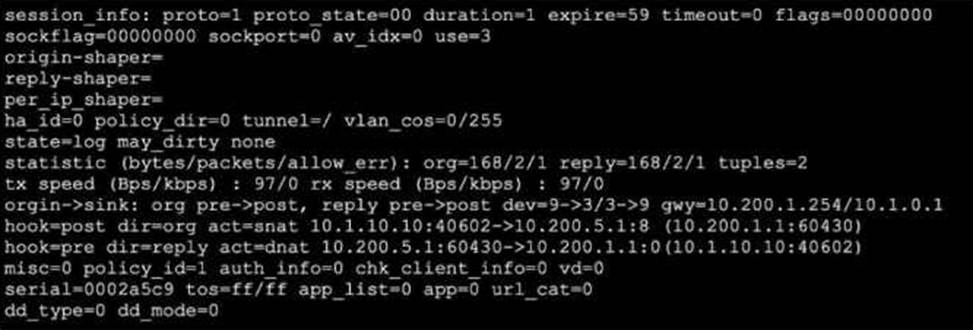
Refer to the exhibit, which shows a session entry.
Which statement about this session is true?
- A . Return traffic to the initiator is sent to 10.1.0.1.
- B . Return traffic to the initiator is sent lo 10.200.1.254.
- C . It is an ICMP session from 10.1.10.10 to 10.200.1.1.
- D . It is an ICMP session from 10.1.10.1 to 10.200.5.1.
B
Explanation:
The session output reveals a session with proto=1 (ICMP) and the origin and reply directions show address and NAT translations. Specifically, the hook=post dir=org act=snat shows that source NAT is performed for outgoing packets, where the source 10.1.10.10:40602 is translated to 10.200.5.1:8 (likely ICMP id 8, not a TCP/UDP port). The reply direction, hook=pre dir=reply act=dnat, indicates destination NAT for incoming packets: packets incoming for 10.200.5.1:60430 are destination-NATed to 10.1.10.10:40602. The gateway (gwy) is listed as 10.200.1.254/10.1.0.1, which for outgoing traffic means that return traffic is directed to the gateway (10.200.1.254), per the NAT policy. This is confirmed by the FortiOS Session Table Guide, which explains that the returned ICMP reply will be routed out to this NAT gateway. The session statistics and logical flow (SNAT out, matching DNAT in) reinforce that reply traffic to the initiator traverses via 10.200.1.254.
Reference: FortiOS Administration Guide: Session Table, NAT, and Route Interaction
Fortinet Technical Note: Diagnose sys session list, Direction and NAT Analysis
What are two functions of automation stitches? (Choose two.)
- A . You can configure automation stitches on any FortiGate device in a Security Fabric environment.
- B . You can configure automation stitches to execute actions sequentially by taking parameters from previous actions as input for the current action.
- C . You can set an automation stitch configured to execute actions in parallel to insert a specific delay between actions.
- D . You can create automation stitches to run diagnostic commands and attach the results to an email message when CPU or memory usage exceeds specified thresholds.
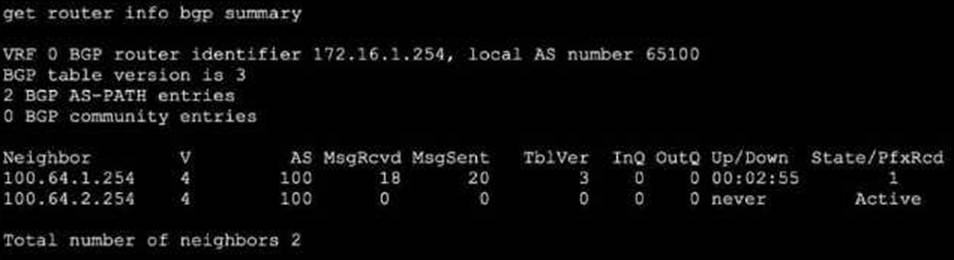
Refer to the exhibit, which shows the output of get router info bgp summary.
Which two statements are true? (Choose two.)
- A . The local ForliGate has received one prefix from BGP neighbor 100.64.1.254.
- B . The TCP connection with BGP neighbor 100.64.2.254 was successful.
- C . The local FortiGate has received 18 packets from a BGP neighbor.
- D . The local FortiGate is still calculating the prefixes received from BGP neighbor 100.64.2.264
A,C
Explanation:
The get router info bgp summary output lists BGP neighbor status:
Prefix Reception: The "State/PfxRcd" column shows the number of prefixes received from the neighbor―neighbor 100.64.1.254 has "1", confirming option A.
Received Message Count: Under "MsgRcvd", 18 packets have been received from neighbor 100.64.1.254. This matches option C.
The second neighbor 100.64.2.254 is in "Active" state and has received/sent 0 packets, indicating that its TCP connection is NOT established, disproving option B.
There is no indication anywhere that the router is "still calculating" prefixes; "Active" just means no session is established, so option D is incorrect.
Reference: FortiOS BGP Command
Reference: BGP Neighbor States, PfxRcd, and Counters
During which phase of IKEv2 does the Diffie-Helman key exchange take place?
- A . IKE_Req_INIT
- B . Create_CHILD_SA
- C . IKE_Auth
- D . IKE_SA_INIT
Which Iwo actions does FortiGate take after an administrator enables the auxiliary session selling? (Choose two.)
- A . FortiGate only offloads auxiliary sessions.
- B . FortiGate accelerates all ECMP traffic to the NP6 processor
- C . FortiGates creates a now auxiliary session for each packet it receives.
- D . FortiGate creates two sessions in case of a routing change.
B,D
Explanation:
When the "auxiliary session" setting is enabled (typically via config system npu or implicitly for ECMP on NP6/NP7 processors), the FortiGate alters how it manages sessions to support hardware offloading for traffic that might switch interfaces (like ECMP or SD-WAN). B. FortiGate accelerates all ECMP traffic to the NP6 processor:
The primary purpose of enabling auxiliary sessions is to ensure that ECMP traffic can be fully offloaded (accelerated) by the NPU. Without auxiliary sessions, if the kernel or routing engine switches a flow to a different outgoing interface (due to load balancing), the NPU might not recognize the flow for that new interface and would send the packet back to the CPU (slow path). Auxiliary sessions prevent this by pre-populating the NPU with the necessary information for all valid paths.
D. FortiGate creates two sessions in case of a routing change:
Technically, the FortiGate creates the primary session (for the currently selected path) and an auxiliary session (for the alternative path). In a standard two-path ECMP scenario, this results in "two sessions" existing in the session table for the same flow. This ensures that if a routing change occurs (e.g., the flow shifts to the second path), the traffic continues to be processed by the NPU without interruption or re-evaluation by the CPU.
Which three common FortiGate-to-collector-agent connectivity issues can you identify using the FSSO real-time debug? (Choose three.)
- A . The SSL certificate used for FSSO over SSL has expired.
- B . The connection was refused. There may be a mismatch of the TCP port.
- C . FortiGate cannot reach the IP address of the collector agent.
- D . The pro-shared key does not match
- E . The group filters do not match.
B,C,D
Explanation:
The diagnose debug authd fsso server command is the primary tool for troubleshooting communication between the FortiGate and the FSSO Collector Agent. This debug output reveals the status of the connection and the reasons for failure.
The three most common connectivity issues identified by this debug are:
FortiGate cannot reach the IP address of the collector agent (Option C): The debug will show connection timeouts or "host unreachable" errors if the Layer 3 connectivity is missing.
The connection was refused / Port mismatch (Option B): If the FortiGate can reach the IP but the Collector Agent is not listening on the specified port (default 8000), the debug will display "Connection refused." This often happens if the port configured on the FortiGate does not match the listening port on the agent.
The pre-shared key does not match (Option D): If the IP and Port are correct, the next step is authentication. If the password configured on the FortiGate does not match the one on the Collector Agent, the debug will explicitly show an "Authentication failed" or "password mismatch" error during the handshake.
Note on other options: Option A (SSL) is less common than basic connectivity/auth mismatches.
Option E (Group filters) relates to user processing logic, which occurs after connectivity is established.
Reference: FortiGate Security 7.6 Study Guide (FSSO Troubleshooting): "Troubleshooting FSSO… Check connectivity (IP/Port) and authentication (Password)."
The output of a policy route table entry is shown.

Which type of policy route does the output show?
- A . A regular policy route, which is not associated with an active static route in the FIB
- B . An ISDB route
- C . An SD-WAN rule
- D . A regular policy route, which is associated with an active static route in the FIB
C
Explanation:
To determine the type of policy route, we must interpret the specific flags and fields visible in the diagnose firewall proute list (or similar kernel table) output provided in the exhibit Identify Key Indicators:
The most critical field in the output is vwl_service=1(test123).
It also lists vwl_mbr_seq=1 5.
Decode the Terminology:
vwl: This stands for Virtual WAN Link. In FortiOS, "Virtual WAN Link" is the legacy internal name for the SD-WAN feature. Even in newer firmware versions (7.x), the kernel and CLI debugs often still refer to SD-WAN objects as vwl.
vwl_service: This specifically refers to an SD-WAN Rule (also known as an SD-WAN Service). The name (test123) is the name given to that specific SD-WAN rule by the administrator.
Evaluate the Options:
A & D (Regular Policy Route): Standard policy routes (configured under config router policy) do not carry the vwl_service tag. They are typically identified by simple gateway or interface instructions without the SD-WAN service abstraction.
B (ISDB Route): While SD-WAN rules can use the Internet Service Database (ISDB) as a destination, the structure of the route entry shown here―specifically defined by a vwl_service ID―classifies it fundamentally as an SD-WAN rule, regardless of the destination object.
C (An SD-WAN rule): The presence of vwl_service and vwl_mbr_seq (SD-WAN member sequence) definitively identifies this entry as a rule generated by the SD-WAN subsystem.
Conclusion: The output shows a route controlled by the SD-WAN engine (vwl), confirming it is an SD-WAN rule.
Reference: FortiGate Security 7.6 Study Guide (SD-WAN): "In the kernel routing table and debugs, SD-WAN rules are often referenced as vwl (Virtual WAN Link) services. The vwl_service field indicates the specific SD-WAN rule ID and name."
Refer to the exhibit.
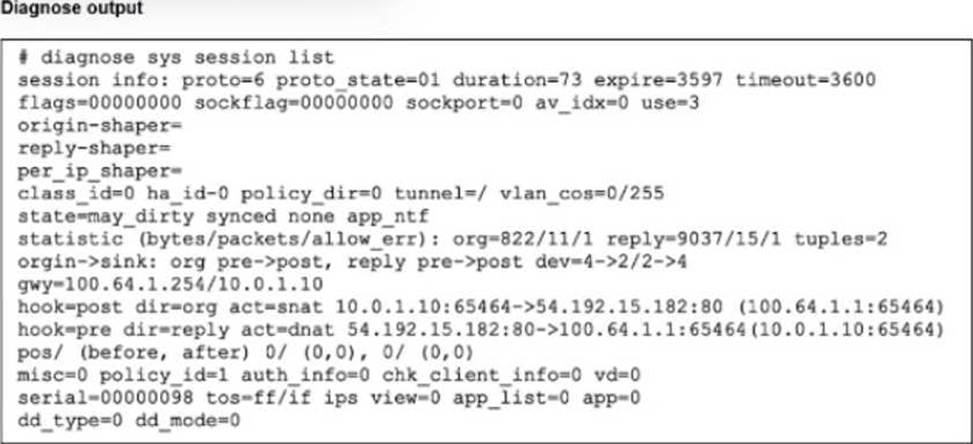
The output of diagnose sys session list command is shown.
If the HA ID for the primary device is 9, what happens if the primary fails and the secondary becomes the primary?
- A . The session is synchronized with the secondary device, however, because application control is applied. the session is marked dirty and has to be reevaluated after failover.
- B . The session will be removed from the session table of the secondary device because the TCP session is not yet fully established.
- C . The session continues to permit traffic on the new primary device after failover. without requiring the client to restart the session with the server.
- D . The session state is preserved but the kernel will re-evaluate the session because the routing information will be flushed
C
Explanation:
The output of the diagnose sys session list command provides the critical evidence needed to determine the behavior during a failover:
Session Synchronization (synced):
The most important indicator in the exhibit is the synced flag located in the state= line (state=may_dirty synced none app_ntf).
In FortiOS HA (High Availability), the synced flag confirms that this specific session has been successfully synchronized from the primary device to the secondary (backup) device. Session synchronization (Session Pickup) ensures that if the primary unit fails, the secondary unit already has the session in its table and can resume traffic processing immediately. TCP State (proto_state=01):
The output shows proto=6 (TCP) and proto_state=01.
In the FortiGate session table, proto_state=01 for TCP indicates that the session is in the ESTABLISHED state (post-three-way handshake).
This invalidates Option B, which claims the TCP session is not fully established.
Failover Outcome:
Because the session is ESTABLISHED and SYNCED, the secondary device will seamlessly take over the session upon primary failure.
The traffic continues to flow through the new primary without requiring the user/client to restart the connection. This is the primary function of HA Session Pickup.
Why other options are incorrect:
A: While the output shows app_ntf (Application Control notification) and may_dirty, the presence of the synced flag overrides this concern regarding failover. If the session type were not supported for failover (e.g., certain proxy sessions in older versions), it would not be marked as synced. Since it is synced, it persists.
B: As noted, proto_state=01 means established, not "not fully established".
D: While the kernel updates routing tables, the purpose of syncing the session is to preserve the state so it does not need to be re-evaluated as a new packet would, preventing traffic drops.
Reference: FortiGate Security 7.6 Study Guide (High Availability): "If session pickup is enabled, the primary unit synchronizes its session table… to the backup unit. If the primary unit fails, the backup unit… continues to process the sessions with no interruption."
Refer to the exhibit.
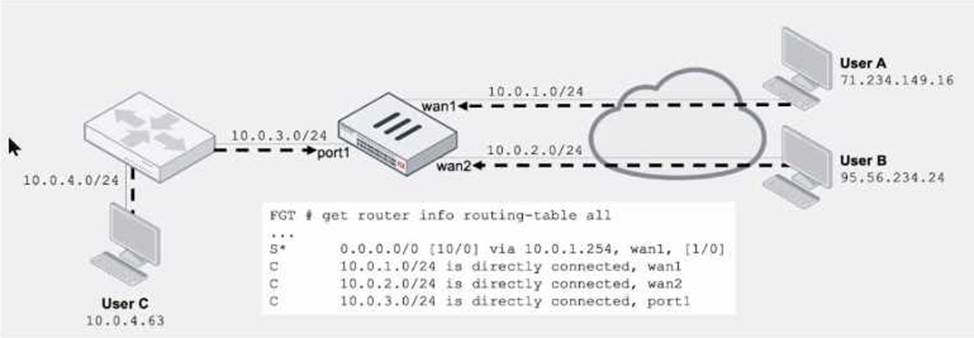
Assuming a default configuration, which three statements are true? (Choose three.)
- A . Strict RPF is enabled by default.
- B . User B: Fail. There is no route to 95.56.234.24 using wan2 in the routing table.
- C . User A: Pass. The default static route through wan1 passes the RPF check regardless of the source IP address.
- D . User B: Pass. FortiGate will use asymmetric routing using wan1 to reply to traffic for 95.56.234.24.
- E . User C: Fail. There is no route to 10.0.4.63 using port1 in the touting table.
B,C,E
Explanation:
Reference: Fortinet Technical Note: RPF Default Configuration and Routing Table Matching
FortiGate Administration Guide: Routing and Asymmetric Routing Controls
Community Knowledgebase: Route Lookups and RPF Enforcement on FortiOS