
Practice Free FCSS_EFW_AD-7.6 Exam Online Questions
Question #21
Refer to the exhibit, which shows an OSPF network.
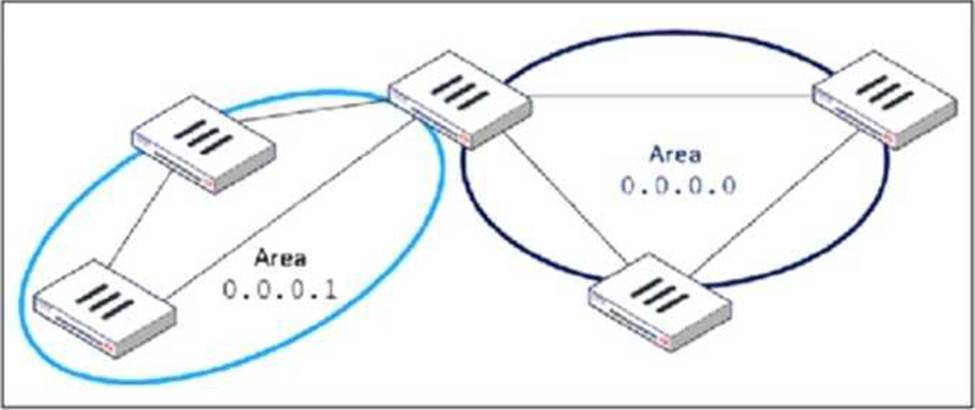
Which configuration must the administrator apply to optimize the OSPF database?
- A . Set a route map in the AS boundary FortiGate.
- B . Set the area 0.0.0.1 to the type STUB in the area border FortiGate.
- C . Set an access list in the AS boundary FortiGate.
- D . Set the area 0.0.0.1 to the type NSSA in the area border FortiGate.
Correct Answer: B
B
Explanation:
The OSPF database optimization is necessary to reduce unnecessary routing information and improve network performance. In the given topology, Area 0.0.0.1 is a non-backbone area connected to Area 0.0.0.0 (the backbone area) through an Area Border Router (ABR).
To optimize OSPF in this scenario, configuring Area 0.0.0.1 as a Stub Area will:
● Reduce the size of the OSPF database by preventing external routes (from outside OSPF) from being injected into Area 0.0.0.1.
● Allow only intra-area and inter-area routes, meaning routers in Area 0.0.0.1 will rely on a default route for external destinations.
● Improve convergence time and reduce router processing load since fewer LSAs (Link-State Advertisements) are exchanged.
B
Explanation:
The OSPF database optimization is necessary to reduce unnecessary routing information and improve network performance. In the given topology, Area 0.0.0.1 is a non-backbone area connected to Area 0.0.0.0 (the backbone area) through an Area Border Router (ABR).
To optimize OSPF in this scenario, configuring Area 0.0.0.1 as a Stub Area will:
● Reduce the size of the OSPF database by preventing external routes (from outside OSPF) from being injected into Area 0.0.0.1.
● Allow only intra-area and inter-area routes, meaning routers in Area 0.0.0.1 will rely on a default route for external destinations.
● Improve convergence time and reduce router processing load since fewer LSAs (Link-State Advertisements) are exchanged.
Question #22
Refer to the exhibit, which shows a physical topology and a traffic log.
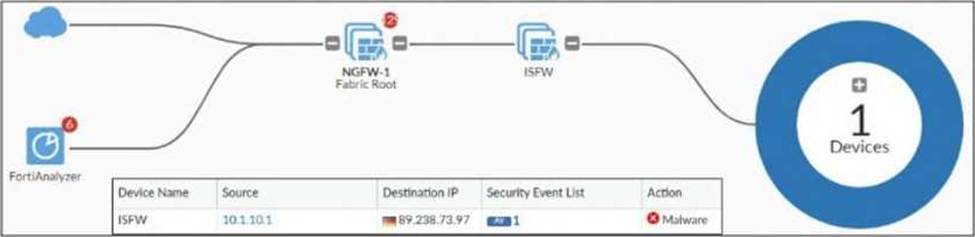
The administrator is checking on FortiAnalyzer traffic from the device with IP address 10.1.10.1,
located behind the FortiGate ISFW device.
The firewall policy in on the ISFW device does not have UTM enabled and the administrator is surprised to see a log with the action Malware, as shown in the exhibit.
What are the two reasons FortiAnalyzer would display this log? (Choose two.)
- A . Security rating is enabled in ISFW.
- B . ISFW is in a Security Fabric environment.
- C . ISFW is not connected to FortiAnalyzer and must go through NGFW-1.
- D . The firewall policy in NGFW-1 has UTM enabled.
Correct Answer: B, D
B, D
Explanation:
From the exhibit, ISFW is part of a Security Fabric environment with NGFW-1 as the Fabric Root. In this architecture, FortiGate devices share security intelligence, including logs and detected threats.
ISFW is in a Security Fabric environment:
● Security Fabric allows devices like ISFW to receive threat intelligence from NGFW-1, even if UTM is not enabled locally.
● If NGFW-1 detects malware from IP 10.1.10.1 to 89.238.73.97, this information can be propagated to ISFW and FortiAnalyzer.
The firewall policy in NGFW-1 has UTM enabled:
● Even though ISFW does not have UTM enabled, NGFW-1 (which sits between ISFW and the external network) does have UTM enabled and is scanning traffic.
● Since NGFW-1 detects malware in the session, it logs the event, which is then sent to FortiAnalyzer.
B, D
Explanation:
From the exhibit, ISFW is part of a Security Fabric environment with NGFW-1 as the Fabric Root. In this architecture, FortiGate devices share security intelligence, including logs and detected threats.
ISFW is in a Security Fabric environment:
● Security Fabric allows devices like ISFW to receive threat intelligence from NGFW-1, even if UTM is not enabled locally.
● If NGFW-1 detects malware from IP 10.1.10.1 to 89.238.73.97, this information can be propagated to ISFW and FortiAnalyzer.
The firewall policy in NGFW-1 has UTM enabled:
● Even though ISFW does not have UTM enabled, NGFW-1 (which sits between ISFW and the external network) does have UTM enabled and is scanning traffic.
● Since NGFW-1 detects malware in the session, it logs the event, which is then sent to FortiAnalyzer.