
Practice Free FC0-U71 Exam Online Questions
Question #41
Which of the following is the most important consideration when opening a file on an OS GUI?
- A . File extension
- B . Default permissions
- C . Backup policy
- D . Data compression
Correct Answer: A
A
Explanation:
The most important consideration when opening a file on an Operating System Graphical User Interface (OS GUI) is the file extension. A file extension identifies the type of file and determines which software application can open it.
In the official CompTIA ITF+ Student Guide, it is stated that:
“The last part of the file name represents an extension, which describes what type of file it is and is used by Windows to associate the file with an application.”
“Files are usually opened by double-clicking them. You may want to open a file in a software product other than the default, however. When you right-click a file, the shortcut menu displays a list of suitable choices, or you can choose Open With and browse for a different application. You can also use the Default Programs applet to configure file associations.”
“Do not change a file’s extension if it is shown. If you delete or change the extension, the file will not be associated with the correct program for opening it.”
This means the OS uses the file extension to decide which application to use to open a file. Changing or deleting the extension can result in the file not opening properly because it no longer matches the program expected to open it.
Reference: Official CompTIA ITF+ Student Guide Book (Page 299-300, 301)
A
Explanation:
The most important consideration when opening a file on an Operating System Graphical User Interface (OS GUI) is the file extension. A file extension identifies the type of file and determines which software application can open it.
In the official CompTIA ITF+ Student Guide, it is stated that:
“The last part of the file name represents an extension, which describes what type of file it is and is used by Windows to associate the file with an application.”
“Files are usually opened by double-clicking them. You may want to open a file in a software product other than the default, however. When you right-click a file, the shortcut menu displays a list of suitable choices, or you can choose Open With and browse for a different application. You can also use the Default Programs applet to configure file associations.”
“Do not change a file’s extension if it is shown. If you delete or change the extension, the file will not be associated with the correct program for opening it.”
This means the OS uses the file extension to decide which application to use to open a file. Changing or deleting the extension can result in the file not opening properly because it no longer matches the program expected to open it.
Reference: Official CompTIA ITF+ Student Guide Book (Page 299-300, 301)
Question #42
A programmer creates an object to retrieve customer names from a database.
Which of the following best describes the object that is retrieving the names?
- A . Variable
- B . Attribute
- C . Method
- D . Looping
Correct Answer: C
C
Explanation:
In object-oriented programming, methods are functions or procedures associated with an object that perform actions such as retrieving data:
“Methods are actions that an object can perform. They typically manipulate or retrieve data stored within the object.”
Variables store data, attributes define properties, and loops control repetition but do not directly handle data retrieval within objects.
Reference: CompTIA ITF+ FC0-U71 Official Study Guide, Chapter 8 C Programming Concepts.
C
Explanation:
In object-oriented programming, methods are functions or procedures associated with an object that perform actions such as retrieving data:
“Methods are actions that an object can perform. They typically manipulate or retrieve data stored within the object.”
Variables store data, attributes define properties, and loops control repetition but do not directly handle data retrieval within objects.
Reference: CompTIA ITF+ FC0-U71 Official Study Guide, Chapter 8 C Programming Concepts.
Question #43
Given the following table:
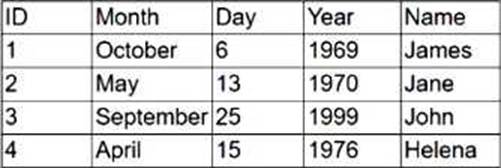
Which of the following fields best represents a primary key?
- A . ID
- B . Month
- C . Day
- D . Year
- E . Name
Correct Answer: A
A
Explanation:
A primary key is a unique identifier for each record in a database table. It must be unique and not null across all rows. In this table, the field ID is the only column that uniquely identifies each row and does not repeat.
“A primary key is a field (or a set of fields) that uniquely identifies a record in a table. It ensures that each record can be uniquely retrieved.” ― CompTIA ITF+ Official Study Guide
Analysis of other options:
Month, Day, Year, and Name can have duplicate values across multiple records and therefore do not serve as unique identifiers.
Correct answer: A
The ID field contains unique values for each record and is typically used as a primary key in a database. A primary key uniquely identifies each row in a table.
Month, Day, Year, and Name may have duplicates and do not guarantee uniqueness.
A
Explanation:
A primary key is a unique identifier for each record in a database table. It must be unique and not null across all rows. In this table, the field ID is the only column that uniquely identifies each row and does not repeat.
“A primary key is a field (or a set of fields) that uniquely identifies a record in a table. It ensures that each record can be uniquely retrieved.” ― CompTIA ITF+ Official Study Guide
Analysis of other options:
Month, Day, Year, and Name can have duplicate values across multiple records and therefore do not serve as unique identifiers.
Correct answer: A
The ID field contains unique values for each record and is typically used as a primary key in a database. A primary key uniquely identifies each row in a table.
Month, Day, Year, and Name may have duplicates and do not guarantee uniqueness.
Question #44
Which of the following features of an OS prioritizes a program’s use of resources?
- A . Application management
- B . Process management
- C . Access management
- D . Device management
Correct Answer: B
B
Explanation:
Process management in an operating system is responsible for controlling the execution of applications, assigning CPU time, and prioritizing active processes to optimize performance.
“Process management allocates resources, prioritizes applications, and ensures multitasking is efficiently handled by the OS.” ― CompTIA ITF+ Operating Systems Guide
Correct answer: B
B
Explanation:
Process management in an operating system is responsible for controlling the execution of applications, assigning CPU time, and prioritizing active processes to optimize performance.
“Process management allocates resources, prioritizes applications, and ensures multitasking is efficiently handled by the OS.” ― CompTIA ITF+ Operating Systems Guide
Correct answer: B