
Practice Free D-PE-OE-01 Exam Online Questions
SIMULATION
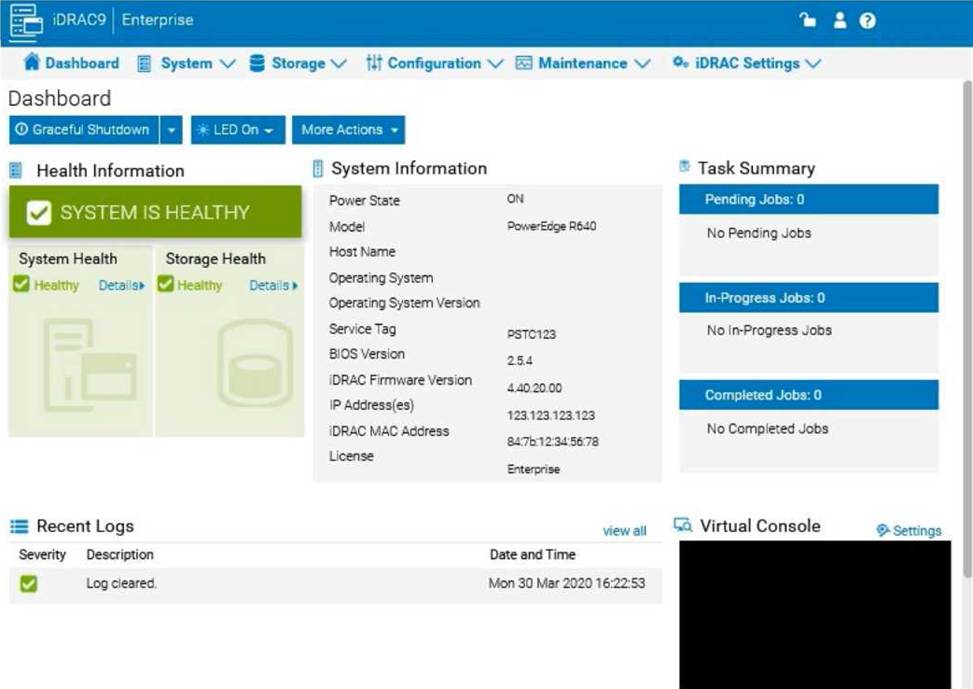
The system administrator cannot boot their R660 server. To help troubleshooting, use the iDRAC Ul to enable capturing the full POST sequence for the next time it attempts to boot.
Step-by-Step Guide:
Log into the iDRAC Interface:
Access the iDRAC UI using the server’s IP address from a web browser.
Enter your credentials to log in.
Navigate to System BIOS Settings:
Go to the Configuration tab on the top menu.
Select BIOS Settings from the dropdown menu. This will take you to the settings where you can
manage BIOS-related configurations.
Enable POST Sequence Logging:
In the BIOS Settings, look for an option related to POST Behavior or Boot Sequence Capture. Enable Verbose Mode or Capture Full POST Sequence. This setting ensures that the entire POST process is logged in detail during the next boot attempt.
Alternatively, if there is a specific setting for Capture System Boot Logs, enable it to ensure detailed
logging during POST.
Apply the Changes:
After enabling the POST capture option, click Apply or Save.
iDRAC may prompt for confirmation or inform you that changes will take effect upon the next reboot.
Confirm any prompts as required.
Restart the Server (if necessary):
If the server is currently off, attempt to power it on. If it’s on, you may need to perform a Graceful Shutdown followed by a restart to initiate the POST sequence.
Review POST Logs After Reboot:
Once the server attempts to boot, return to the iDRAC Logs section to review the captured POST logs. Go to Maintenance > System Event Log or Lifecycle Log to view the detailed logs from the POST sequence. This can help diagnose why the server is failing to boot.
By enabling this setting, you will capture detailed information during the POST process, which can then be reviewed to identify any hardware or configuration issues preventing the server from booting successfully.
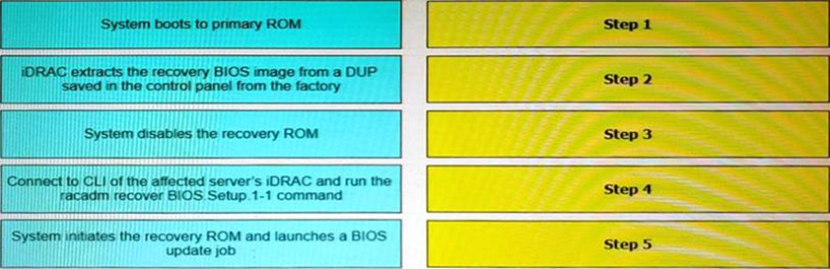
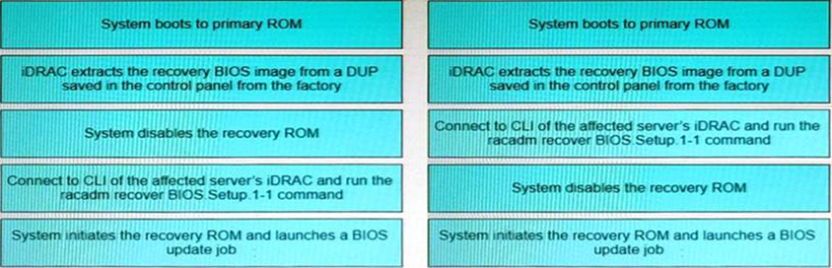
What is the correct order of steps taken during the BIOS/UEFI Recovery process?
What is the drive characteristic of a BOSS M.2 drive in a Dell EMC PowerEdge server?
- A . Single-level cell
- B . Write Intensive
- C . Quad-level cell
- D . Read Intensive
What is the drive characteristic of a BOSS M.2 drive in a Dell EMC PowerEdge server?
- A . Single-level cell
- B . Write Intensive
- C . Quad-level cell
- D . Read Intensive
A system administrator needs to install OpenManage Server Administrator on 200 servers.
What is the quickest way to meet this requirement?
- A . Use the Lifecycle Controller to install OpenManage Server Administrator on each server.
- B . Install OME and push OpenManage Server Administrator to all 200 servers.
- C . Use Microsoft utilities to automate the deployment of OpenManage Server Administrator.
- D . Download OpenManage Server Administrator from Dell.com and install on each server.
An engineer must install a new GPU card in a Dell PowerEdge 15G server. They discover the server has two 570W PSU, but the new configuration requires 900W of power. More powerful PSUs are ordered.
What can be done for the system to support the GPU card before replacing the PSUs?
- A . Enable Power Capping and set a limit of 150%.
- B . Change the redundancy configuration to 2+0.
- C . Disable Power Capping and remove any limit.
What is a requirement to operate GPUs in a Dell EMC PowerEdge R740 server?
- A . All GPU cards must be installed at the same time
- B . All GPU cards must be of the same type but can be a different model
- C . All GPU cards must be of the same type and model
- D . All GPU cards must be installed on the same riser card
Case Study 3
A financial services company has file sharing workflows and 2000 home directories which include 70% Microsoft Windows and 30% Linux. The Security team is also interested in credit card usage data analytics such as point of sale, geolocation, and authorization and transaction data. Home directories and file shares do not require D@RE or SEC compliance.
However, due to the sensitivity of the credit card data, the company requires D@RE for credit card information and must adhere to the U.S. SEC 17a-4(f) compliance standards. Additionally, they are interested in auditing user access and anti-virus features.
The compute and storage environment consists of the following:
– 200 TB of Fibre Channel drives on NetApp ONTAP 7
– Environment is expected to grow 200 TB over the next three years
In order to remove the encryption key on the SED drives, which steps are required?
- A . SmartFail the cluster and then remove the drive
- B . Suspend the cluster and then SmartFail the drive
- C . SmartFail and then remove the drive
- D . Suspend the node and then remove the drive
What could cause a PowerEdge server power supply LED to blink amber for two seconds and off for one second?
- A . Faulted state
- B . Firmware update
- C . Mismatch voltage
C
Explanation:
Interpreting Power Supply LED Indicators on Dell PowerEdge Servers Server Troubleshooting (32%) Analyze the visual indicators on server components – system ID, PSU, and BLINK Understanding PSU LED Blink Patterns
The Power Supply Unit (PSU) on Dell PowerEdge servers uses LED indicators to communicate status information. The color and blinking pattern of the LED signify different conditions:
Solid Green Light PSU is functioning normally.
Blinking Amber Light
Indicates a warning or fault condition.
Specific Blink Pattern:
Blinking Amber for Two Seconds On, One Second Off
Indicates a Mismatch Voltage Condition.
Explanation of Options
Option A: Faulted state
A faulted PSU typically shows a solid amber light, not a blinking pattern.
Conclusion: Incorrect.
Option B: Firmware update
During a firmware update, the PSU LED may blink, but usually with a different pattern or color (often green).
Conclusion: Unlikely to cause the specified blink pattern.
Option C: Mismatch voltage
The blinking amber pattern of two seconds on and one second off indicates that there is a voltage mismatch between redundant power supplies or an input voltage issue.
Possible Causes:
PSUs of different wattages installed.
PSUs connected to power sources with different voltages.
One PSU not receiving power or connected to an incompatible power source.
Conclusion: Correct Answer.
Dell Operate Reference
Server Troubleshooting (32%)
Analyze the visual indicators on server components: Understanding PSU LED indicators is essential for diagnosing power-related issues.
System Administration (18%)
Verify health status: Regular monitoring of server components ensures timely identification and resolution of issues.
Conclusion
A blinking amber PSU LED with a pattern of two seconds on and one second off signifies a mismatch voltage condition. This requires checking the power supplies to ensure they are identical and connected to compatible power sources.
Exhibit.
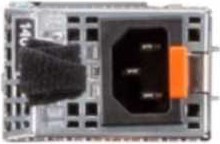
What does the black strap on the power supply handle specify?
- A . PSU
- B . NAF
- C . RAF
- D . Spare PSU
B
Explanation:
Understanding the Black Strap on the Power Supply Handle Server Components (26%)
Identify power options and redundancy features, thermal features, and liquid cooling
Explanation of Power Supply Straps
Dell PowerEdge servers often use black straps on power supply units (PSUs) to indicate certain attributes of the PSU. The color of the strap can help identify specific features or categories of the power supply.
What Does "NAF" Mean?
NAF stands for Non-Redundant, Auto Failover.
This indicates that the PSU is part of a non-redundant configuration, but it is capable of automatic failover in the case of power loss.
This is typical in systems with multiple PSUs, where each PSU can take over if the other fails.
Why Not Other Options?
Option A: PSU
The strap does not indicate that the device is just a PSU; rather, it indicates a specific feature of the PSU.
Option C: RAF
RAF stands for Redundant Auto Failover, which is not the correct feature indicated by the black strap.
Option D: Spare PSU
The strap does not indicate that the PSU is a spare unit.
Conclusion
The black strap on the power supply handle indicates that the PSU is NAF (Non-Redundant, Auto Failover). This means it is part of a non-redundant system but capable of automatic failover.