
Practice Free D-PE-OE-01 Exam Online Questions
A technician needs to add a device to SupportAssist for Servers. Policy requires that NO additional software be installed on the server OS.
What information is required to add the device?
- A . Username, Password, and IP address or hostname for the server OS
- B . Username, Password, and IP address or hostname for the iDRAC
- C . Username, Password, and IP address for Dell TechDirect
- D . Username, Password, and IP address for OpenManage Server Administrator
A technician deploy a new server in a datacenter and must install Microsoft Windows Server 2012 R2.
Which two steps are required to install the OS using the Lifecycle Controller? (Choose two.)
- A . Configure storage
- B . Configure Lifecycle Controller network settings
- C . Place OS media in DVD attached to server
- D . Restore server profile
- E . Disable iDRAC virtual media
SIMULATION
An administrator has been tasked to create and save replacement of a server configuration with the file
name of "PE-server".
The profile must include the configuration for only the following components:
. NIC
. RAID
. iDRAC
Using the simulator, create and save the replacement with these components.
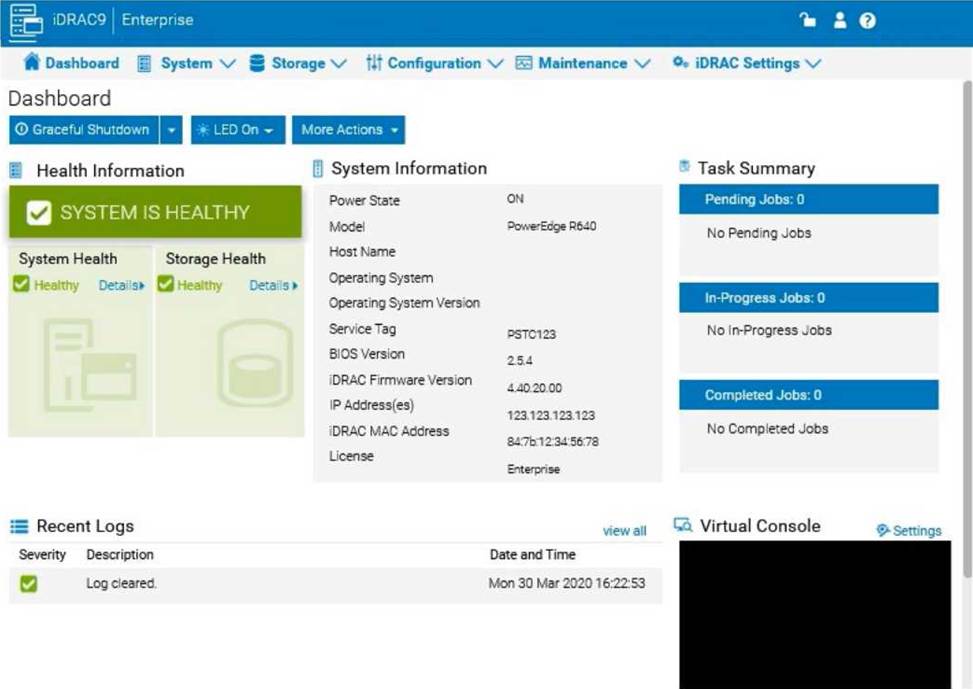
Step-by-Step Guide:
Access Configuration Profiles:
Go to the "Configuration" tab on the top menu bar.
From the dropdown options, select "Server Configuration Profile."
Create a New Profile:
Within the Server Configuration Profile section, choose the option to Create a New Profile. You will likely see options to specify which components to include in the configuration profile. Select Components:
When prompted, select only the components required for the configuration:
NIC: Network Interface Card settings.
RAID: Storage controller and RAID configuration.
iDRAC: iDRAC management settings.
Ensure that other components are not selected to meet the requirement.
Save the Configuration:
Enter the file name "PE-server" for the profile.
Choose the option to Save or Export the configuration profile. This should save the configuration to the specified name, typically on the server or local storage available through iDRAC. Verify the Profile Creation:
After saving, verify that the profile appears in the list of server configuration profiles with the name "PE-server."
Confirm that it includes only the selected components.
By following these steps, you should successfully create and save the configuration profile with the specified components.
A company needs a server that meets these requirements:
– Support workloads that are accelerated and computational-heavy
– Has cyber resilient architecture and Root of Trust
– Supports HPR fans
– Supports OCP 3.0 technology
Which Dell PowerEdge server model meets these requirements?
- A . R960
- B . XE9680
- C . MX760c
What operating system supports the last crash tool in iDRAC?
- A . MS Windows
- B . ESXi
- C . SUSE Linux
- D . Unix
C
Explanation:
Understanding the Last Crash Tool in iDRAC
Server Troubleshooting (32%)
Explain Configuration Validation, crash capture, and minimum to POST
What is the Last Crash Tool in iDRAC?
Last Crash Screen: A feature in iDRAC that captures the last crash screen output from the operating system before a system crash or unexpected reboot.
Purpose: Provides valuable information for diagnosing the cause of a system crash, aiding in troubleshooting efforts.
Operating System Support
The Last Crash Screen feature is dependent on the operating system’s ability to output crash information to the VGA console, which iDRAC can then capture. Explanation of Options
Option A: MS Windows
While Windows systems do produce crash screens (Blue Screen of Death), capturing this screen via iDRAC requires specific configurations and may not be fully supported. Conclusion: Less likely to be the correct answer.
Option B: ESXi
VMware ESXi can produce Purple Screen of Death (PSOD), but capturing this via iDRAC’s Last Crash Screen feature is not typically supported without additional configuration. Conclusion: Less likely to be the correct answer.
Option C: SUSE Linux
SUSE Linux supports kernel crash dumps and can output crash information to the console, which iDRAC can capture using the Last Crash Screen feature.
Conclusion: Correct Answer.
Option D: Unix
"Unix" is a broad term encompassing various operating systems. Without specifying, it’s unclear which Unix variant is being referred to, and support may vary. Conclusion: Less specific; not the best answer.
Dell Operate Reference
Server Troubleshooting (32%)
Explain Configuration Validation, crash capture, and minimum to POST: Emphasizes the importance of understanding features like the Last Crash Screen for troubleshooting. System Administration (18%)
Verify health status and iDRAC license: Ensuring that the necessary features are enabled and supported on the operating system in use.
Conclusion
SUSE Linux supports the Last Crash Screen tool in iDRAC, allowing for the capture and analysis of crash information directly from the server’s console output.
A technician needs to change the iDRAC password on a Dell EMC PowerEdge 14G server in a lights-out datacenter. The be rebooted because it is in production. The iDRAC is configured with the default credentials.
How could the technician change the iDRAC password?
- A . SupportAssist Enterprise
- B . iDRAC Web GUI
- C . OpenManage Server Administrator
- D . Virtual Console; press F2 after rebooting system
A technician needs to use the iDRAC GUI to update the server using a custom repository hosted on an internal anonymous FTP. The technician receives an error message when trying to update. Catalog.xml not found.
What should the technician do to run updates?
- A . Verify that the FTP service is running on the iDRAC
- B . Enable FTP protocol in the Lifecycle Controller
- C . Update the catalog filename m the System Setup > iDRAC Settings
- D . Specify the catalog name in Catalog Filename
A technician needs to use the iDRAC GUI to update the server using a custom repository hosted on an internal anonymous FTP. The technician receives an error message when trying to update. Catalog.xml not found.
What should the technician do to run updates?
- A . Verify that the FTP service is running on the iDRAC
- B . Enable FTP protocol in the Lifecycle Controller
- C . Update the catalog filename m the System Setup > iDRAC Settings
- D . Specify the catalog name in Catalog Filename
An existing server is transferred to a new location. The technician is directed to change the information displayed on the LCD located on the front bezel to show the ambient temperature.
What is a consideration for the technician?
- A . LCD information can be configured for displaying ambient temperature using the iDRAC GUI.
- B . iDRAC Enterprise license must be installed to allow the LCD information to be changed.
- C . Ambient temperature information cannot be displayed on the LCD.
- D . LCD information can only be configured to display the Service Tag and any errors that occur.
The iDRAC is listening for its IP address on its dedicated network port which was configured.
Which connection method(s) can a server administrator use to remotely log in to the iDRAC, even while the server is powered off?
- A . Dell Tools via REPOMAN
- B . Web GUI and SSH CLI
- C . Web GUI and DRM
- D . Dell Tools via DRM