
Practice Free D-PE-OE-01 Exam Online Questions
Refer to the exhibit.
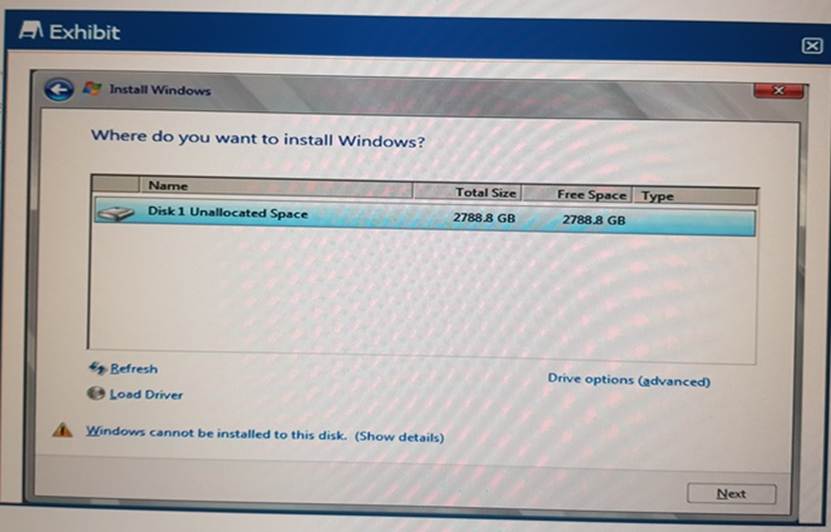
A technician it installing an OS to a server. The OS array is 2.8TBs. The OS install is unable to start.
What should the technician do to install the OS?
- A . Switch the boot settings to UEFI
- B . Use USB to load Storage Drivers
- C . Use LC to install the OS
- D . Switch the Hard Drive boot sequence so that C: is first
A technician is experiencing a compatibility issue that causes network disconnects between the iDRAC firmware and an application that is running.
The iDRAC must be rolled back to the last working version. The Enterprise licensed server cannot be rebooted outside scheduled maintenance windows. The next scheduled window is one month away.
Where should the technician perform the Firmware Rollback?
- A . Dell System Update Utility
- B . iDRAC GUI
- C . Repository Manager
- D . Lifecycle Controller
A technician is experiencing a compatibility issue that causes network disconnects between the iDRAC firmware and an application that is running.
The iDRAC must be rolled back to the last working version. The Enterprise licensed server cannot be rebooted outside scheduled maintenance windows. The next scheduled window is one month away.
Where should the technician perform the Firmware Rollback?
- A . Dell System Update Utility
- B . iDRAC GUI
- C . Repository Manager
- D . Lifecycle Controller
A system engineer tried to remotely update the firmware of the PSUs on a PowerEdge 15G server, but the update failed.
An error message is received:
– PSU0006: Power supply X is incorrectly configured
What is the reason for the failure?
- A . A mixed PSU configuration exists.
- B . PSUs are connected to different voltages.
- C . The firmware is incompatible.
- D . The server has only one PSU.
You must configure a BOSS card with 2 x 120GB drives for a Dell EMC PowerEdge server.
What is the only supported mode?
- A . RAID 1
- B . Non-RAID Mirroring
- C . RAID 5
- D . RAID 0
A technician receives a new server with five drives.
They need to configure the drives based on the following requirements received from the administrator:
– Drive 0 as a single disk with no RAID
– Drives 1-3 as a RAID 5 with drive 4 as a hot spare just for this newly created RAID 5
The administrator plans to add more disks as separate RAID arrays at a later date but only wants drive 4 to be available for this first RAID 5 set.
How should the technician configure the drives?
- A . Set drive 0 to Ready; set drives 1-3 as RAID 5; set drive 4 as a Global Hot Spare
- B . Set drive 0 to Non-Raid; set drives 1-3 as RAID 5; set drive 4 as a Dedicated Hot Spare
- C . Set drive 0 to Non-Raid; set drives 1-3 as RAID 5; set drive 4 as a Global Hot Spare
- D . Set drive 0 to Ready; set drives 1-3 as RAID 5; set drive 4 as a Dedicated Hot Spare
A technician installs a PCIe card into a server, but the card does not appear in the OS. The server does not have an LCD to display errors, but a light is flashing on the front of the server.
What actions can the technician take to troubleshoot the issue?
- A . Initiate Hardware Stress Test from iDRAC GUI
Check PCIe Bus Log for errors - B . Run Hardware Diagnostics from Lifecycle Controller
Review the Lifecycle Controller log for errors - C . Run Hardware Diagnostics from Lifecycle Controller
Initiate Hardware Stress Test from iDRAC GUI - D . Review the Lifecycle Controller log for errors
Check PCIe Bus Log for errors
Which AMD powered server supports dual CPU. 16G, and iDRAC Express?
- A . R7625
- B . R7525
- C . R960
- D . R6615
A
Explanation:
Identifying the AMD-Powered Server that Supports Dual CPU, 16G, and iDRAC Express Server Portfolio and Features (10%)
Define chassis form factors and numbering nomenclature Identify server features and specifications Server Components (26%)
Define the different processor, memory options, and memory configurations
Understanding the Server Models
Option A: R7625
Features:
Processor: AMD EPYC processors
CPU Support: Dual-socket (supports two CPUs)
Generation: 16th Generation (16G)
Management: Comes with iDRAC9, supporting iDRAC Express
Analysis:
Meets all the specified criteria:
AMD-powered
Supports dual CPUs
Is a 16G server
Supports iDRAC Express
Conclusion: Correct Answer
Explanation of Other Options
Option B: R7525
Features:
Processor: AMD EPYC processors
CPU Support: Dual-socket
Generation: 15th Generation (15G)
Management: Supports iDRAC9
Analysis:
Does not meet the 16G requirement (it’s a 15G server)
Option C: R960
Features:
Processor: Typically Intel Xeon processors
CPU Support: Quad-socket (supports up to four CPUs)
Generation: 14th or 15th Generation
Analysis:
Not AMD-powered
Does not meet the dual CPU and 16G requirements
Option D: R6615
Features:
Processor: AMD EPYC processors
CPU Support: Single-socket (supports one CPU)
Generation: 16th Generation (16G)
Analysis:
Does not support dual CPUs (only supports a single CPU)
Dell Operate Reference
Server Portfolio and Features (10%)
Identify server features and specifications: Knowing the specifications of each server model is crucial
for matching customer requirements.
Server Components (26%)
Define the different processor, memory options, and memory configurations: Understanding CPU support and generation compatibility.
Conclusion
The Dell PowerEdge R7625 is the AMD-powered server that supports dual CPUs, is part of the 16th Generation, and comes with iDRAC Express. It aligns perfectly with the specified requirements.
A technician needs to view the health status of the server and components.
Which Dell management tool should the technician install in the OS?
- A . Open Manage Server Administrator
- B . Open Manage Integrations
- C . Open Manage Health Status
- D . Open Manage PowerEdge Components
A technician deploys a server. The iDRAC was configured with a static IP address and hostname. The technician can NOT ping the iDRAC from the workstation when using the hostname. The technician can ping the iDRAC with the IP address.
Which setting should the technician configure to fix the deployment?
- A . In the Lifecycle Controller, update the DNS Server value
- B . In the iDRAC GUI, select the Reset DNS Cache option.
- C . In the iDRAC GUI, select the Register DRAC on DNS option.
- D . In the Lifecycle Controller, update the DNS Server Name