
Practice Free AZ-900 Exam Online Questions
HOTSPOT
How should you calculate the monthly uptime percentage? To answer, select the appropriate options in the answer area. NOTE: Each correct selection is worth one point.


Explanation:
"Maximum Available Minutes" is the total accumulated minutes during a billing month .
"Downtime" is the total accumulated minutes that are part of Maximum Available Minutes where a system is unavailable.
"Monthly Uptime Percentage" for a service is calculated as Maximum Available Minutes less Downtime divided by Maximum Available Minutes x 100.
Monthly Uptime Percentage is represented by the following formula:
Monthly Uptime % = (Maximum Available Minutes-Downtime) / Maximum Available Minutes x 100.
Reference: https://azure.microsoft.com/en-au/support/legal/sla/cloud-services/v1_0/
Your company has an Azure subscription and three business units.
You plan to deploy new resources for each business unit
You need to ensure that the new resources are deployed by using a repeatable and reliable method that applies the same configurations to each resource.
What should you use?
- A . Azure Arc
- B . a resource group
- C . Azure Resource Manager (ARM) templates
- D . Azure Policy
HOTSPOT
For each of the following statements, select Yes if the statement is true. Otherwise, select No. NOTE: Each correct selection is worth one point.
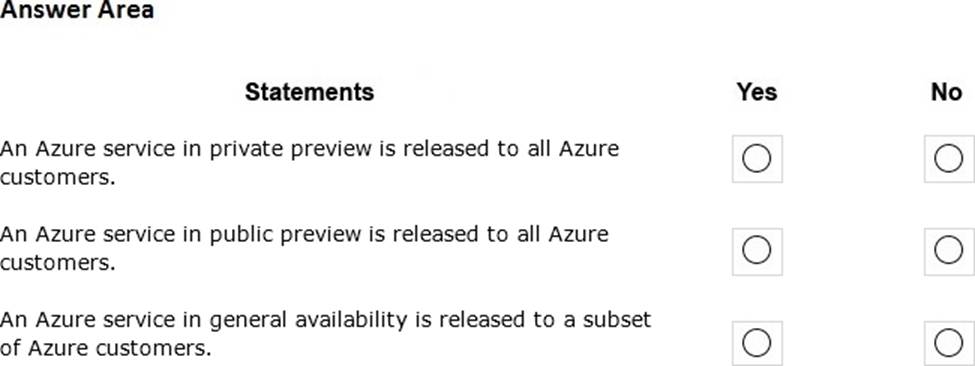
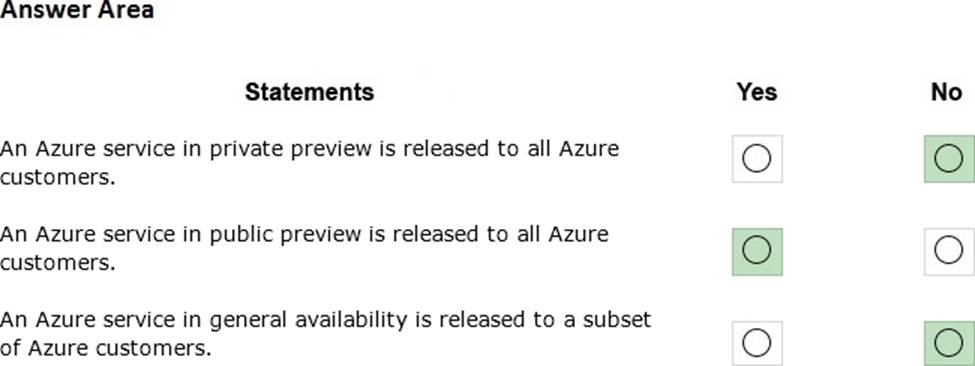
Explanation:
Section: Understand Azure Pricing and Support


In the software as a service (SaaS) cloud service, which responsibility is shared between Microsoft and the customer?
- A . identity and directory infrastructure management
- B . application management
- C . information and data management
- D . operating system updates
You plan to deploy several Azure virtual machines.
You need to ensure that the services running on the virtual machines are available if a single data center fails.
Solution: You deploy the virtual machines to a scale set.
Does this meet the goal?
- A . Yes
- B . No
B
Explanation:
Azure virtual machine scale sets let you create and manage a group of load balanced VMs. The number of VM instances can automatically increase or decrease in response to demand or a defined schedule. Scale sets provide high availability to your applications, and allow you to centrally manage, configure, and update many VMs.
Virtual machines in a scale set can be deployed across multiple update domains and fault domains to maximize availability and resilience to outages due to data center outages, and planned or unplanned maintenance events.
https://docs.microsoft.com/en-us/azure/virtual-machine-scale-sets/availability
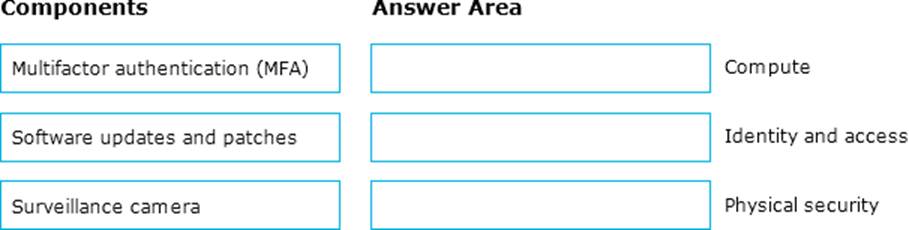
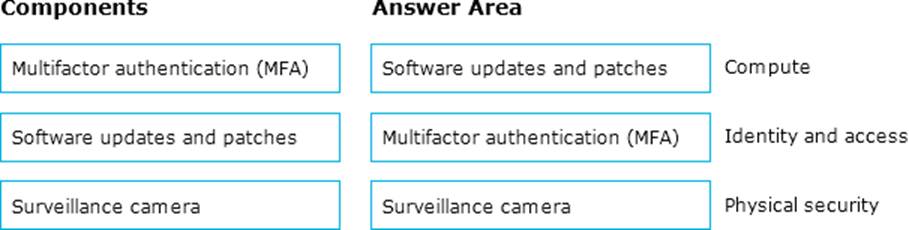
DRAG DROP
Match the security components to the appropriate defense in depth layers.
To answer, drag the appropriate service from the column on the left to its description on the right. Each service may be used once, more than once, or not at all. NOTE: Each correct match is worth one point
HOTSPOT
For each of the following statements, select Yes if the statement is true. Otherwise, select No. NOTE: Each correct selection is worth one point.
HOTSPOT
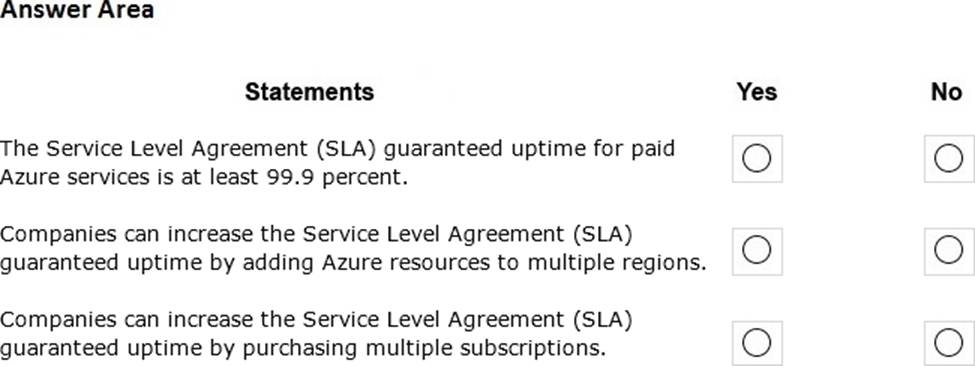
For each of the following statements, select Yes if the statement is true. Otherwise, select No. NOTE: Each correct selection is worth one point.
Explanation:
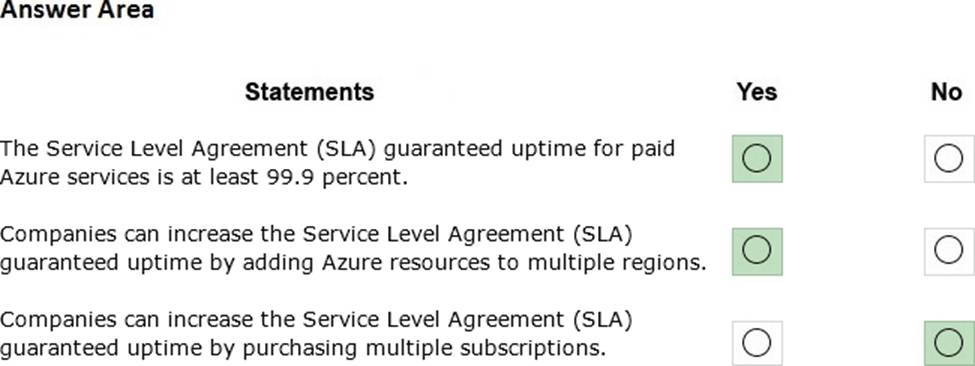
Box 1: Yes
SLA’s vary based on the resource type and the location distribution of the resource. However, the minimum uptime for all Azure services is 99.9 percent.
Box 2: Yes
The SLA guaranteed uptime is increased (usually to 99.95 percent) when resources are deployed across multiple regions.
Box 3: No
The number of subscriptions is unrelated to uptime SLA’s. You can deploy resources to multiple regions under a single subscription or you can have multiple subscriptions with resources deployed to the same region.
Reference: https://azure.microsoft.com/en-us/support/legal/sla/summary/
You attempt to create several managed Microsoft SQL Server instances in an Azure environment and receive a message that you must increase your Azure subscription limits.
What should you do to increase the limits?
- A . Create a service health alert
- B . Upgrade your support plan
- C . Modify an Azure policy
- D . Create a new support request
D
Explanation:
Reference: https://docs.microsoft.com/en-us/azure/sql-database/sql-database-managed-instance-resource-limits#obtaining-a-larger-quota-for-sql-managed-instance
Many Azure resource have quote limits. The purpose of the quota limits is to help you control your Azure costs. However, it is common to require an increase to the default quota.
You can request a quota limit increase by opening a support request. In the support request, select ‘Service and subscription limits (quotas)’ for the Issue type, select your subscription and the service you want to increase the quota for. For this question, you would select ‘SQL Database Managed Instance’ as the quote type.
Reference: https://docs.microsoft.com/en-us/azure/sql-database/sql-database-managed-instance-resource-limits#obtaining-a-larger-quota-for-sql-managed-instance