
Practice Free AZ-801 Exam Online Questions
Your network contains an Active Directory Domain Services (AD DS) domain named contoso.com.
Contoso.com contains a member server named Server1.contoso.com.
You cannot resolve the FQDN of server1.contoso.com.
You verify that Windows Defender Firewall is configured correctly and that you can ping server1.contoso.com successfully by using the server’s IP address.
You need to validate that the DNS record for server1.contoso.com exists.
Which command should you run?
- A . tracert
- B . ipconfig
- C . pathping
- D . nslookup
You deploy Azure Migrate to an on-premises network.
You have an on-premises physical server named Server1 that runs Windows Server and has the following configuration.
Operating system disk 600 GB
Data disic 3 TB
NIC Teaming: Enabled
Mobility service: installed
Windows Firewall: Enabled
Microsoft Defender Antivirus: Enabled
You need to ensure that you can use Azure Migrate to migrate Server1.
Solution: You disable Microsoft Defender Antivirus on Server1.
Does this meet the goal?
- A . Yes
- B . No
You have an Azure subscription that contains the virtual machines shown in the following table.
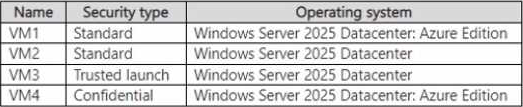
You plan to use Azure Site Recovery to replicate supported virtual machines to a secondary Azure region.
Which virtual machines can be replicated by using Azure Site Recovery?
- A . VM1 only
- B . VM1 and VM2 only
- C . VM1 and VM4 only
- D . VM1.VM2, and VM4 only
- E . VM1, VM2, VM3, and VM4
You have an on-premises Active Directory Domain Services (AD DS) domain that syncs with an Azure Active Directory (Azure AD) tenant by using password hash synchronization.
You have a Microsoft 365 subscription.
All devices are hybrid Azure AD-joined.
Users report that they must enter their password manually when accessing Microsoft 365 applications.
You need to reduce the number of times the users are prompted for their password when they access Microsoft 365 and Azure services.
What should you do?
- A . In Azure AD. configure a Conditional Access policy for the Microsoft Office 365 applications.
- B . In the DNS zone of the AD DS domain, create an autodiscover record.
- C . From Azure AD Connect, enable single sign-on (SSO).
- D . From Azure AD Connect, configure pass-through authentication.
Note: This question is part of a series of questions that present the same scenario. Each question in the series contains a unique solution that might meet the stated goals. Some question sets might have more than one correct solution, while others might not have a correct solution.
After you answer a question in this section, you will NOT be able to return to it. As a result, these questions will not appear in the review screen.
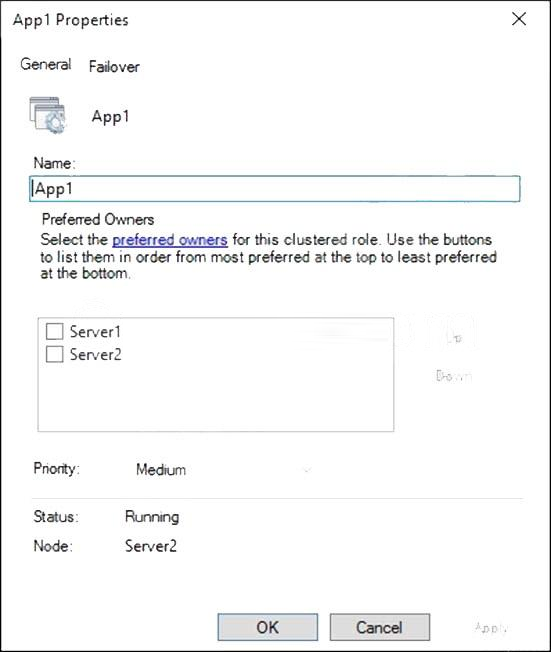
You have a failover cluster named Cluster1 that hosts an application named App1.
The General tab in App1 Properties is shown in the General exhibit. (Click the General tab.)
The Failover tab in App1 Properties is shown in the Failover exhibit. (Click the Failover tab.)
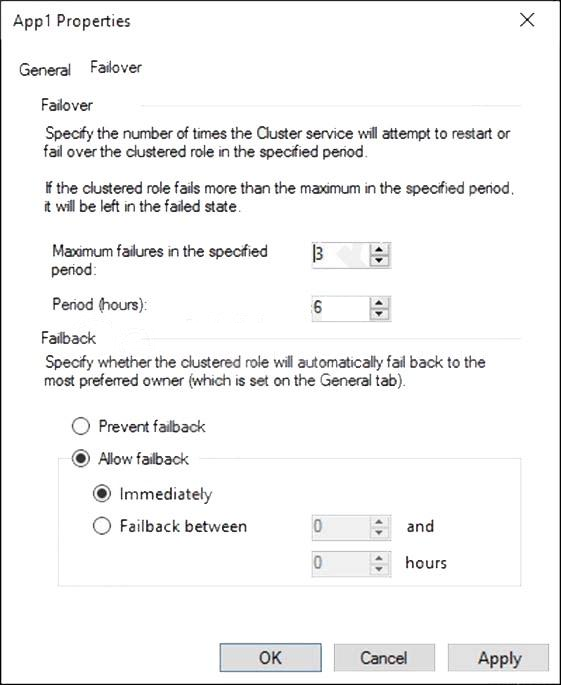
Server1 shuts down unexpectedly.
You need to ensure that when you start Server1, App1 continues to run on Server2.
Solution: From the Failover settings, you select Prevent failback.
Does this meet the goal?
- A . Yes
- B . No
HOTSPOT
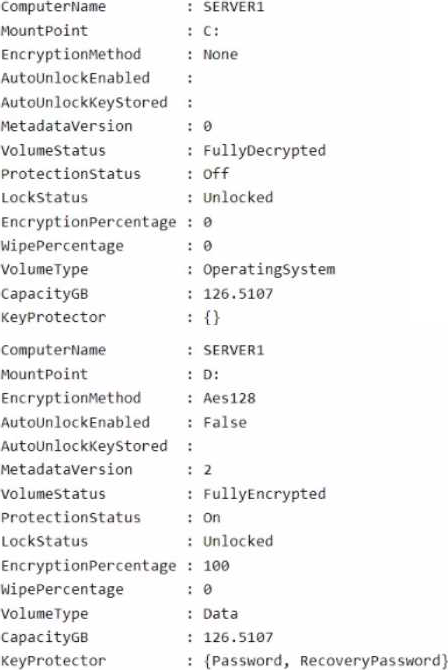
Your network contains an Active Directory Domain Services (AD DS) domain. The domain contains a server named Server1 that runs Windows Server.


You have three servers named Server 1. Servers and Server3 that run Windows Server. The servers have the Hyper-V server rote installed and are configured in a Storage Spaces Deed cluster named Cluster1.
Cluster1 hosts a virtual machine named VM1 that has Windows Admin Center Installed.
You manage all servers and clusters by using Windows Admin Center.
You purchase an Azure subscription.
You need to configure email alerts in Azure Monitor for the following:
• Disk Capacity Utilization Over 80% for 10 Minutes
• Any critical alert in the cluster system event log
• Memory Utilization over 95% for 10 minutes
• Heartbeat fewer than 5 beats for 5 Minutes.
• CPU Utilization over 85 % for 10 Minutes.
• Any hearth service faults for the cluster
The solution must use the minimum amount of administrative effort.
What should you do?
- A . From Windows Admin Center, configure Azure Monitor and onboard clustered.
- B . From Azure portal, configure Azure Monitor and onboard Cluster1 by using Azure Arc.
- C . Configure Azure Monitor and manually install the Microsoft Monitoring Agent on Server1, Server2 and Server3
You have an Azure subscription. The subscription contains a virtual machine named VM1 that runs Windows Server. You enable Microsoft Defender for Servers Plan 2. You need to implement File Integrity Monitoring (FIM).
What should you create first?
- A . a data collection rule (DCR)
- B . a private endpoint
- C . a Log Analytics workspace
- D . a storage account
You have two file servers named Server1 and Server2 that run Windows Server. Server1 contains a shared folder named Dat a. Data contains 10 TB of data.
You plan to decommission Server1.
You need to migrate the files from Data to a new shared folder on Server2.
The solution must meet the following requirements:
✑ Ensure that share, file, and folder permissions are copied.
✑ After the initial copy occurs, ensure that changes in \Server1Data can be synced to the destination without initiating a full copy.
✑ Minimize administrative effort.
What should you use?
- A . xcopy
- B . Storage Replica
- C . Storage Migration Service
- D . azcopy
Your network contains an Active Directory Domain Service (AD DS) domain named contoso.com. The domain contains three domain controllers named DC1, DC2, and DC3. You connect a Microsoft Defender or identity instances to the domain.
You need to onboard all the domain controllers to Defender for identity.
What should you run the domain controllers?
- A . AzureConnectedMachineAgent, wsl
- B . MARAgentInstaller, exe
- C . Azure ATP Sensor setup, exe
- D . MASetup-AMD64, exe