
Practice Free AZ-305 Exam Online Questions
Your company has an on-premises Hyper-V cluster that contains 20 virtual machines. Some of the virtual machines are based on Windows and some in Linux. You have to migrate the virtual machines onto Azure.
You have to recommend a solution that would be used to replicate the disks of the virtual machines to Azure. The solution needs to ensure that the virtual machines remain available when the migration of the disks is in progress.
You decide to create an Azure storage account and then run AzCopy Would this fulfill the requirement?
- A . Yes
- B . No
You have an on-premises network and an Azure subscription. The on-premises network has several branch offices.
A branch office in Toronto contains a virtual machine named VM1 that is configured as a file server.
Users access the shared files on VM1 from all the offices.
You need to recommend a solution to ensure that the users can access the shares files as quickly as possible if the Toronto branch office is inaccessible.
What should you include in the recommendation?
- A . a Recovery Services vault and Azure Backup
- B . an Azure file share and Azure File Sync
- C . Azure blob containers and Azure File Sync
- D . a Recovery Services vault and Windows Server Backup
B
Explanation:
Use Azure File Sync to centralize your organization’s file shares in Azure Files, while keeping the flexibility, performance, and compatibility of an on-premises file server. Azure File Sync transforms Windows Server into a quick cache of your Azure file share.
You need an Azure file share in the same region that you want to deploy Azure File Sync.
Reference: https://docs.microsoft.com/en-us/azure/storage/files/storage-sync-files-deployment-guide
Note: This question is part of a series of questions that present the same scenario. Each question in the series contains a unique solution that might meet the stated goals. Some question sets might have more than one correct solution, while others might not have a correct solution.
After you answer a question in this section, you will NOT be able to return to it. As a result, these questions will not appear in the review screen.
Your company has deployed several virtual machines (VMs) on-premises and to Azure. Azure ExpressRoute has been deployed and configured for on-premises to Azure connectivity.
Several VMs are exhibiting network connectivity issues.
You need to analyze the network traffic to determine whether packets are being allowed or denied to the VMs.
Solution: Use the Azure Advisor to analyze the network traffic.
Does the solution meet the goal?
- A . Yes
- B . No
B
Explanation:
Instead use Azure Network Watcher to run IP flow verify to analyze the network traffic.
Note: Advisor is a personalized cloud consultant that helps you follow best practices to optimize your Azure deployments. It analyzes your resource configuration and usage telemetry and then recommends solutions that can help you improve the cost effectiveness, performance, high availability, and security of your Azure resources.
With Advisor, you can:
Get proactive, actionable, and personalized best practices recommendations.
Improve the performance, security, and high availability of your resources, as you identify opportunities to reduce your overall Azure spend.
Get recommendations with proposed actions inline.
Reference: https://docs.microsoft.com/en-us/azure/advisor/advisor-overview
Note: This question is part of a series of questions that present the same scenario. Each question in the series contains a unique solution that might meet the stated goals. Some question sets might have more than one correct solution, while others might not have a correct solution.
After you answer a question in this section, you will NOT be able to return to it. As a result, these questions will not appear in the review screen.
Your company has deployed several virtual machines (VMs) on-premises and to Azure. Azure ExpressRoute has been deployed and configured for on-premises to Azure connectivity.
Several VMs are exhibiting network connectivity issues.
You need to analyze the network traffic to determine whether packets are being allowed or denied to the VMs.
Solution: Use Azure Network Watcher to run IP flow verify to analyze the network traffic.
Does the solution meet the goal?
- A . Yes
- B . No
A
Explanation:
The Network Watcher Network performance monitor is a cloud-based hybrid network monitoring solution that helps you monitor network performance between various points in your network infrastructure. It also helps you monitor network connectivity to service and application endpoints and monitor the performance of Azure ExpressRoute.
Note:
IP flow verify checks if a packet is allowed or denied to or from a virtual machine. The information consists of direction, protocol, local IP, remote IP, local port, and remote port. If the packet is denied by a security group, the name of the rule that denied the packet is returned. While any source or destination IP can be chosen, IP flow verify helps administrators quickly diagnose connectivity issues from or to the internet and from or to the on-premises environment.
IP flow verify looks at the rules for all Network Security Groups (NSGs) applied to the network interface, such as a subnet or virtual machine NIC. Traffic flow is then verified based on the configured settings to or from that network interface. IP flow verify is useful in confirming if a rule in a Network Security Group is blocking ingress or egress traffic to or from a virtual machine.
Reference:
https://docs.microsoft.com/en-us/azure/network-watcher/network-watcher-monitoring-overview
https://docs.microsoft.com/en-us/azure/network-watcher/network-watcher-ip-flow-verify-overview
You need to recommend a solution to generate a monthly report of all the new Azure Resource Manager resource deployment in your subscription.
What should you include in the recommendation?
- A . Azure Analysis Services
- B . Application Insights
- C . Azure Monitor action groups
- D . Azure Log Analytics
D
Explanation:
Activity logs are kept for 90 days. You can query for any range of dates, as long as the starting date isn’t more than 90 days in the past.
Through activity logs, you can determine:
what operations were taken on the resources in your subscription who started the operation when the operation occurred the status of the operation the values of other properties that might help you research the operation
Reference:
https://docs.microsoft.com/en-us/azure/azure-resource-manager/management/view-activity-logs
https://docs.microsoft.com/en-us/azure/automation/change-tracking
Note: This question is part of a series of questions that present the same scenario. Each question in the series contains a unique solution that might meet the stated goals. Some question sets might have more than one correct solution, while others might not have a correct solution.
After you answer a question in this section, you will NOT be able to return to it. As a result, these questions will not appear in the review screen.
You plan to deploy multiple instances of an Azure web app across several Azure regions.
You need to design an access solution for the app.
The solution must meet the following replication requirements:
✑ Support rate limiting.
✑ Balance requests between all instances.
✑ Ensure that users can access the app in the event of a regional outage.
Solution: You use Azure Application Gateway to provide access to the app.
Does this meet the goal?
- A . Yes
- B . No
You have an Azure subscription that contains 1,000 virtual machines and a Log Analytics workspace named Workspace 1.
You plan to collect custom JSON logs from the virtual machines and store the logs in a custom table in Workspace 1.
You need to ensure that the logs are collected by using the Logs Ingestion API. The solution must prevent access to Workspace1 from the internet.
What should you include in the solution?
- A . an Azure Monitor Private Link Scope (AMPLS)
- B . the linked storage account of Workspace1
- C . an Azure Peering Service connection
- D . Service Connector
HOTSPOT
You have the Azure resources shown in the following table.
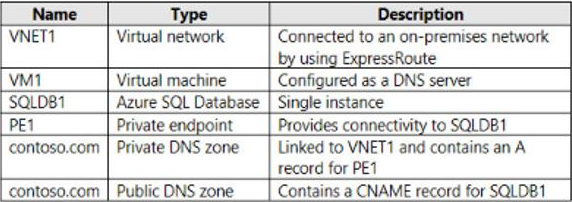
You need to design a solution that provides on-premises network connectivity to SQLDB1 through PE1.
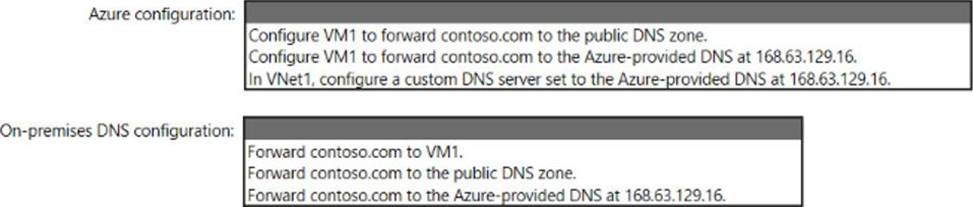
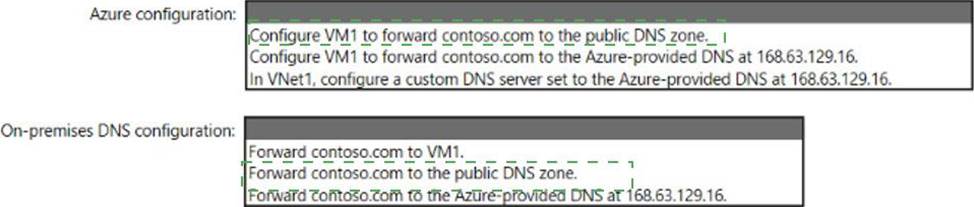
How should you configure name resolution? To answer, select the appropriate options in the answer area.
HOTSPOT
You are planning an Azure Storage solution for sensitive data. The data will be accessed daily. The data set is less than 10 GB.
You need to recommend a storage solution that meets the following requirements:
• All the data written to storage must be retained for five years.
• Once the data is written, the data can only be read. Modifications and deletion must be prevented.
• After five years, the data can be deleted, but never modified.
• Data access charges must be minimized
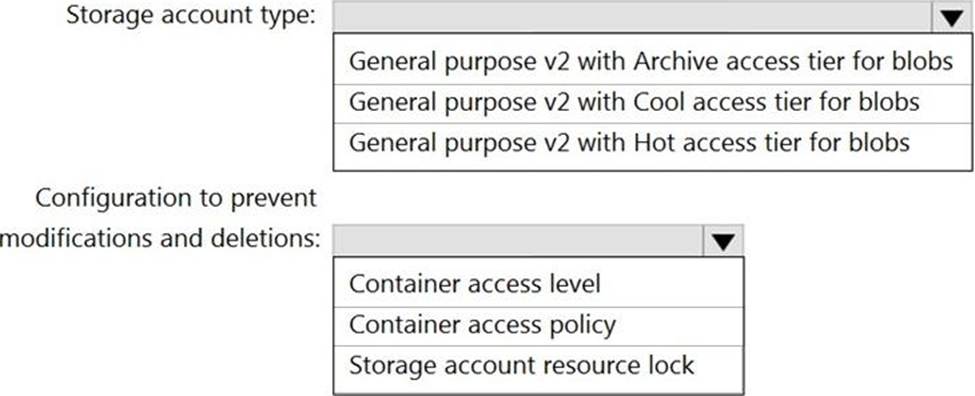
What should you recommend? To answer, select the appropriate options in the answer area. NOTE: Each correct selection is worth one point.
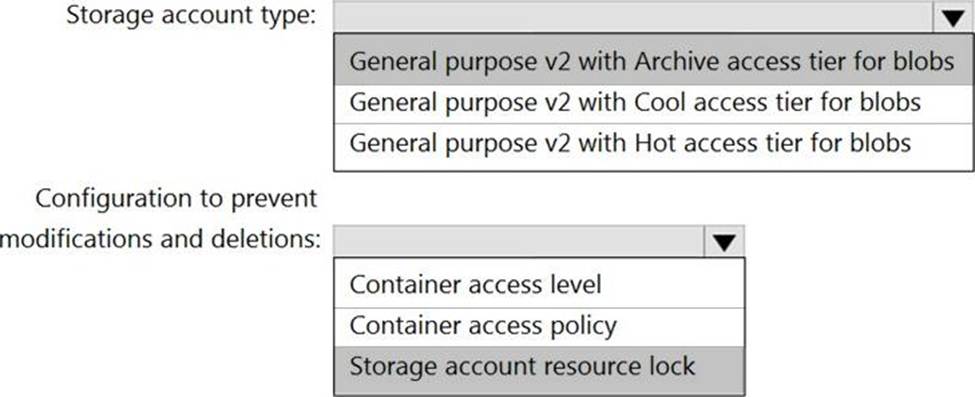
Explanation:
Box 1: General purpose v2 with Archive acce3ss tier for blobs
Archive – Optimized for storing data that is rarely accessed and stored for at least 180 days with flexible latency requirements, on the order of hours.
Cool – Optimized for storing data that is infrequently accessed and stored for at least 30 days.
Hot – Optimized for storing data that is accessed frequently.
Box 2: Storage account resource lock
As an administrator, you can lock a subscription, resource group, or resource to prevent other users in your organization from accidentally deleting or modifying critical resources.
The lock overrides any permissions the user might have.
Note: You can set the lock level to CanNotDelete or ReadOnly. In the portal, the locks are called Delete and Read-only respectively.
✑ CanNotDelete means authorized users can still read and modify a resource, but they can’t delete the resource.
✑ ReadOnly means authorized users can read a resource, but they can’t delete or update the resource. Applying this lock is similar to restricting all authorized users to the permissions granted by the Reader role.
Reference: https://docs.microsoft.com/en-us/azure/storage/blobs/storage-blob-storage-tiers
HOTSPOT
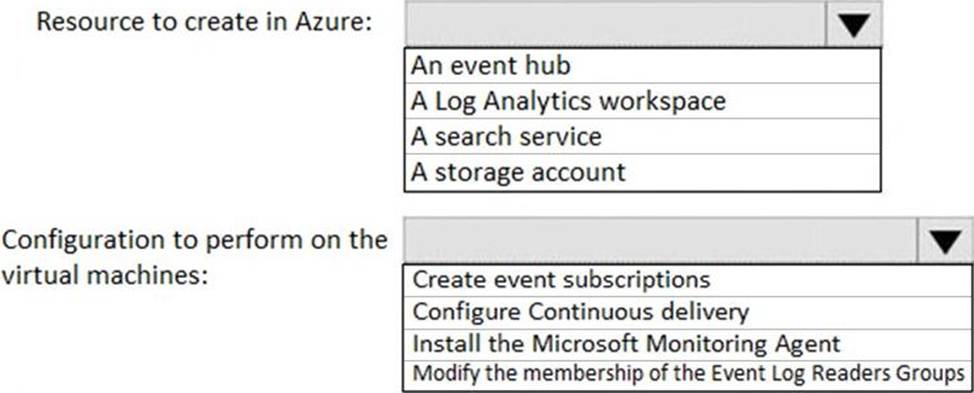
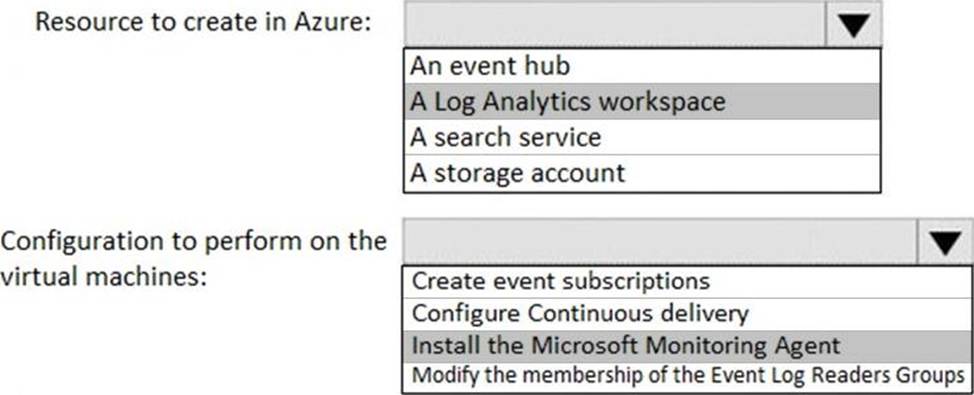
You have an Azure subscription that contains 300 Azure virtual machines that run Windows Server 2016.
You need to centrally monitor all warning events in the System logs of the virtual machines.
What should you include in the solutions? To answer, select the appropriate options in the answer area. NOTE: Each correct selection is worth one point.
Explanation:
Reference:
https://docs.microsoft.com/en-us/azure/azure-monitor/platform/data-sources-windows-events
https://docs.microsoft.com/en-us/azure/azure-monitor/platform/agent-windows