
Practice Free AZ-204 Exam Online Questions
HOTSPOT
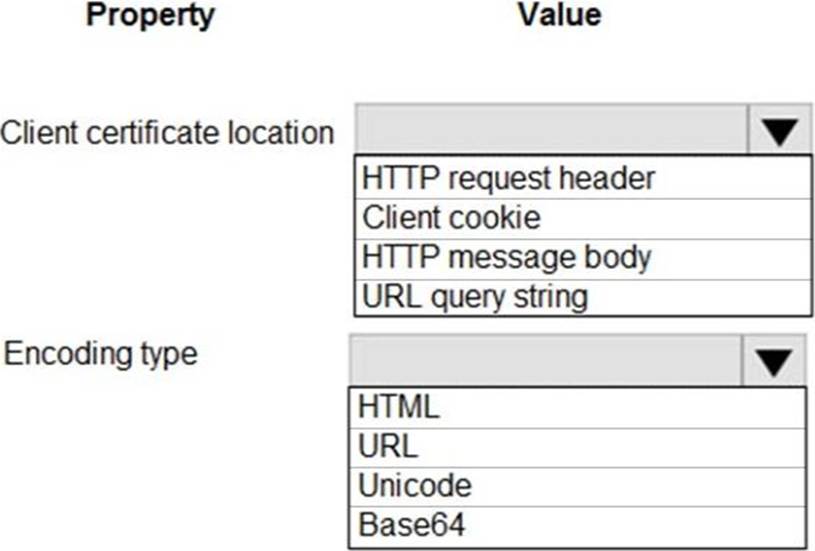
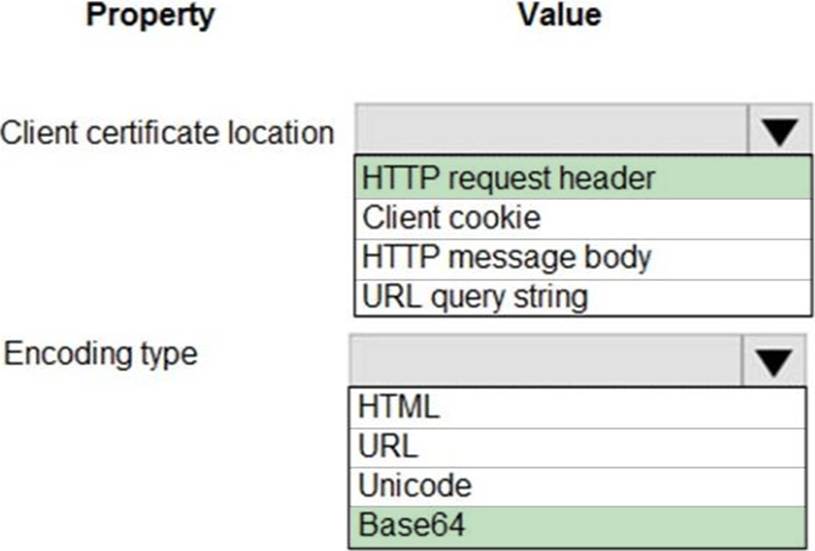
You are developing an Azure Web App. You configure TLS mutual authentication for the web app.
You need to validate the client certificate in the web app. To answer, select the appropriate options in the answer area. NOTE: Each correct selection is worth one point.
Explanation:
Accessing the client certificate from App Service.
If you are using ASP.NET and configure your app to use client certificate authentication, the certificate will be available through the HttpRequest.ClientCertificate property. For other application stacks, the client cert will be available in your app through a base64 encoded value in the "X-ARR-ClientCert" request header. Your application can create a certificate from this value and then use it for authentication and authorization purposes in your application.
Reference: https://docs.microsoft.com/en-us/azure/app-service/app-service-web-configure-tls-mutual-auth
HOTSPOT
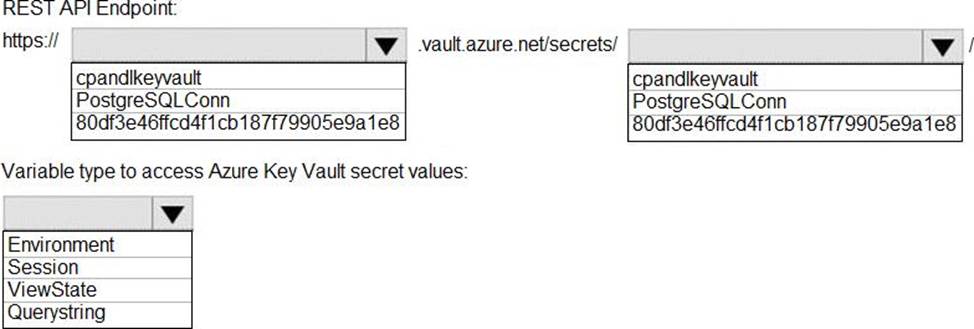
You need to retrieve the database connection string.
Which values should you use? To answer, select the appropriate options in the answer area. NOTE: Each correct selection is worth one point.
Explanation:
Azure database connection string retrieve REST API vault.azure.net/secrets/
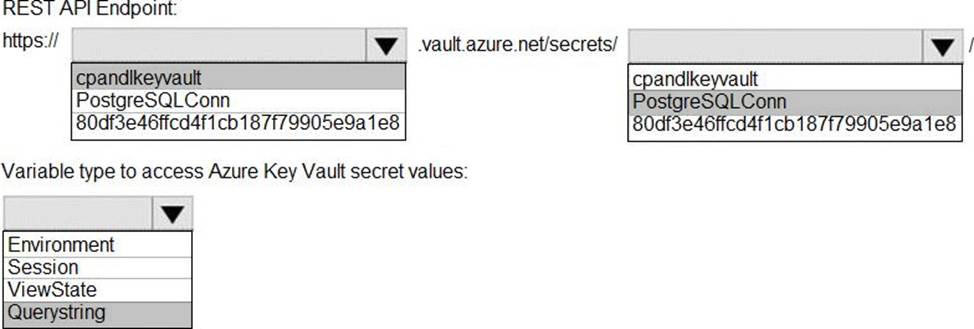
Box 1: cpandlkeyvault
We specify the key vault, cpandlkeyvault.
Scenario: The database connection string is stored in Azure Key Vault with the following attributes:
Azure Key Vault name: cpandlkeyvault
Secret name: PostgreSQLConn
Id: 80df3e46ffcd4f1cb187f79905e9a1e8
Box 2: PostgreSQLConn
We specify the secret, PostgreSQLConn
Example, sample request:
https://myvault.vault.azure.net//secrets/mysecretname/4387e9f3d6e14c459867679a90fd0f79?api-version=7.1
Box 3: Querystring
Reference: https://docs.microsoft.com/en-us/rest/api/keyvault/getsecret/getsecret
HOTSPOT
You need to retrieve the database connection string.
Which values should you use? To answer, select the appropriate options in the answer area. NOTE: Each correct selection is worth one point.
Explanation:
Azure database connection string retrieve REST API vault.azure.net/secrets/
Box 1: cpandlkeyvault
We specify the key vault, cpandlkeyvault.
Scenario: The database connection string is stored in Azure Key Vault with the following attributes:
Azure Key Vault name: cpandlkeyvault
Secret name: PostgreSQLConn
Id: 80df3e46ffcd4f1cb187f79905e9a1e8
Box 2: PostgreSQLConn
We specify the secret, PostgreSQLConn
Example, sample request:
https://myvault.vault.azure.net//secrets/mysecretname/4387e9f3d6e14c459867679a90fd0f79?api-version=7.1
Box 3: Querystring
Reference: https://docs.microsoft.com/en-us/rest/api/keyvault/getsecret/getsecret
Note: This question is part of a series of questions that present the same scenario. Each question in the series contains a unique solution that might meet the stated goals. Some question sets might have more than one correct solution, while others might not have a correct solution.
After you answer a question in this section, you will NOT be able to return to it. As a result, these questions will not appear in the review screen.
You develop Azure solutions.
You must grant a virtual machine (VM) access to specific resource groups in Azure Resource Manager.
You need to obtain an Azure Resource Manager access token.
Solution: Use the Reader role-based access control (RBAC) role to authenticate the VM with Azure Resource Manager.
Does the solution meet the goal?
- A . Yes
- B . No
B
Explanation:
Instead run the Invoke-RestMethod cmdlet to make a request to the local managed identity for Azure resources endpoint.
Reference: https://docs.microsoft.com/en-us/azure/active-directory/managed-identities-azure-resources/tutorial-windows-vm-access-arm
You need to monitor ContentUploadService accourding to the requirements.
Which command should you use?
- A . az monitor metrics alert create Cn alert Cg … – -scopes … – -condition "avgPercentage CPU > 8"
- B . az monitor metrics alert create Cn alert Cg … – -scopes … – -condition "avgPercentage CPU > 800"
- C . az monitor metrics alert create Cn alert Cg … – -scopes … – -condition "CPUUsage > 800"
- D . az monitor metrics alert create Cn alert Cg … – -scopes … – -condition "CPUUsage > 8"
B
Explanation:
Scenario: An alert must be raised if the ContentUploadService uses more than 80 percent of available CPU-cores
Reference: https://docs.microsoft.com/sv-se/cli/azure/monitor/metrics/alert
You are developing an application to manage shipping information for cargo ships. The application will use Azure Cosmos D8 for storage.
The application must run offline when ships are at sea The application must be connected to Azure when ships are in port.
Which Azure Cosmos D8 API should you use for the application?
- A . Core
- B . MongoDe
- C . Cassandra
- D . Gremlin
HOTSPOT
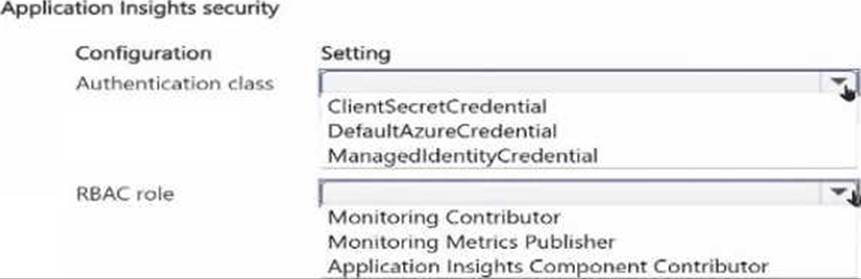
You have an Azure subscription that hosts an Application Insights workspace named Workspace1.
You plan to aulhoi.Net-based code and deploy it to an App Service Web App named App1. Telemetry generated by Appl will be ingested into Workspace1. You intend to use Microsoft Entra ID authentication and Azure role-based access control (RBAC) to prevent unauthorized telemetry from being ingested into Workspace1.
You need to configure the Entra ID credential class and the RBAC role for App1.
What should you configure? To answer, select the appropriate options in the answer area. NOTE: Each correct selection Is worth one point.

You need to investigate the Azure Function app error message in the development environment.
What should you do?
- A . Connect Live Metrics Stream from Application Insights to the Azure Function app and filter the metrics.
- B . Create a new Azure Log Analytics workspace and instrument the Azure Function app with
Application Insights. - C . Update the Azure Function app with extension methods from Microsoft.Extensions.Logging to log events by using the log instance.
- D . Add a new diagnostic setting to the Azure Function app to send logs to Log Analytics.
A
Explanation:
Azure Functions offers built-in integration with Azure Application Insights to monitor functions.
The following areas of Application Insights can be helpful when evaluating the behavior, performance, and errors in your functions:
Live Metrics: View metrics data as it’s created in near real-time.
Failures
Performance
Metrics
Reference: https://docs.microsoft.com/en-us/azure/azure-functions/functions-monitoring
You need to secure the corporate website to meet the security requirements.
What should you do?
- A . Create an App Service instance with a standard plan. Configure the custom domain with a TLS/SSL certificate.
- B . Create an Azure Application Gateway with a Web Application Firewall (WAF). Configure end-to-end TLS encryption and the WAF.
- C . Create an Azure Cache for Radis instance. Update the code to support the cache.
- D . Create an Azure Content Delivery Network profile and endpoint. Configure the endpoint.
Note: This question is part of a series of questions that present the same scenario. Each question in the series contains a unique solution that might meet the stated goals. Some question sets might have more than one correct solution, while others might not have a correct solution.
After you answer a question in this section, you will NOT be able to return to it. As a result, these questions will not appear on the review screen.
You have an Azure App Service web app named WebApp1 and an Azure Functions app named Function 1. WebApp1 is associated with an Application Insights instance named appinsights1.
You configure a web test and a corresponding alert for WebApp1 in appinsights1. Each alert triggers a delivery of email to your mailbox.
You need to ensure that each alert also triggers execution of Function1.
Solution: Configure an Azure Monitor Insights workbook.
Does the solution meet the goal?
- A . Yes
- B . No