
Practice Free AZ-204 Exam Online Questions
You have a Linux container-based console application that uploads image files from customer sites all over the world. A back-end system that runs on Azure virtual machines processes the images by using the Azure Blobs API.
You are not permitted to make changes to the application.
Some customer sites only have phone-based internet connections.
You need to configure the console application to access the images.
What should you use?
- A . Azure Disks
- B . Azure Storage Network File System (NFS) 3.0 support
- C . Azure BlobFuse
- D . Azure Files
DRAG DROP
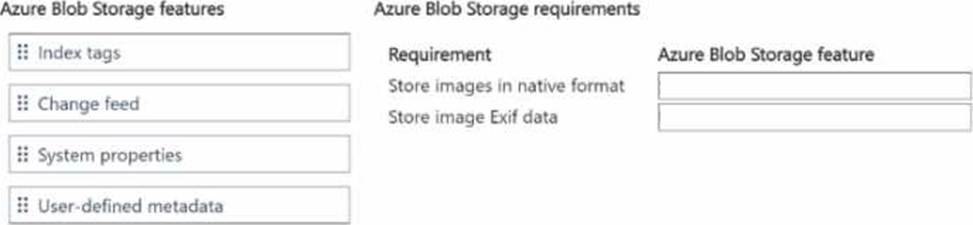
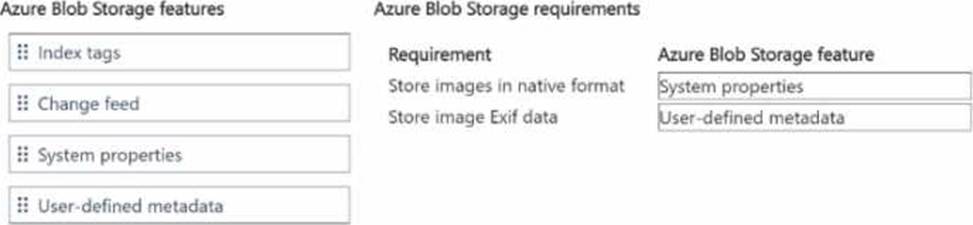
You need to store inventory item images.
Which Azure Blob Storage feature should you use? To answer, move the appropriate Azure Blob Storage features to the correct requirements. You may use each Azure Blob Storage feature once, more than once, or not at all. You may need to move the split bar between panes or scroll to view content. NOTE: Each correct selection is worth one point.
DRAG DROP
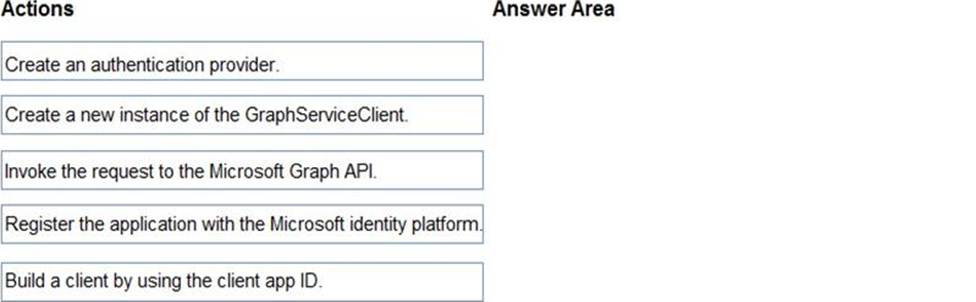
You are developing an application to retrieve user profile information. The application will use the Microsoft Graph SDK.
The app must retrieve user profile information by using a Microsoft Graph API call.
You need to call the Microsoft Graph API from the application.
In which order should you perform the actions? To answer, move all actions from the list of actions to the answer area and arrange them in the correct order.
Explanation:
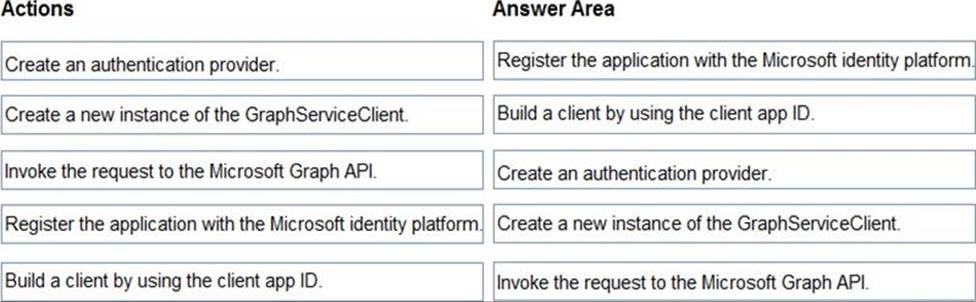
Step 1: Register the application with the Microsoft identity platform.
To authenticate with the Microsoft identity platform endpoint, you must first register your app at the Azure app registration portal
Step 2: Build a client by using the client app ID
Step 3: Create an authentication provider
Create an authentication provider by passing in a client application and graph scopes.
Code example:
DeviceCodeProvider authProvider = new DeviceCodeProvider(publicClientApplication, graphScopes);
// Create a new instance of GraphServiceClient with the authentication provider. GraphServiceClient graphClient = new GraphServiceClient(authProvider);
Step 4: Create a new instance of the GraphServiceClient
Step 5: Invoke the request to the Microsoft Graph API
Reference:
https://docs.microsoft.com/en-us/graph/auth-v2-service
https://docs.microsoft.com/en-us/graph/sdks/create-client
HOTSPOT
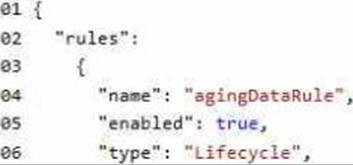
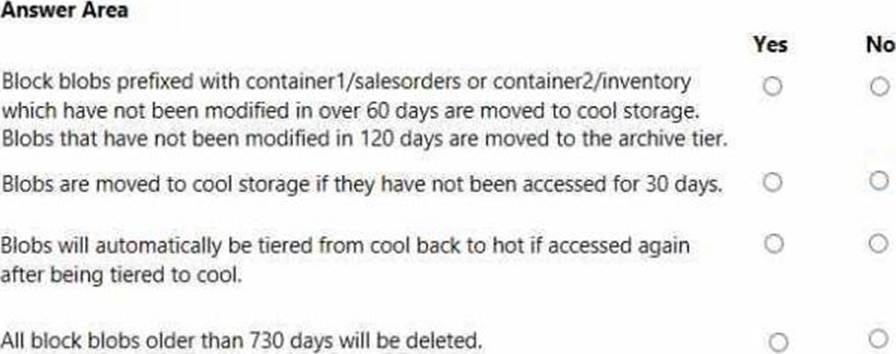
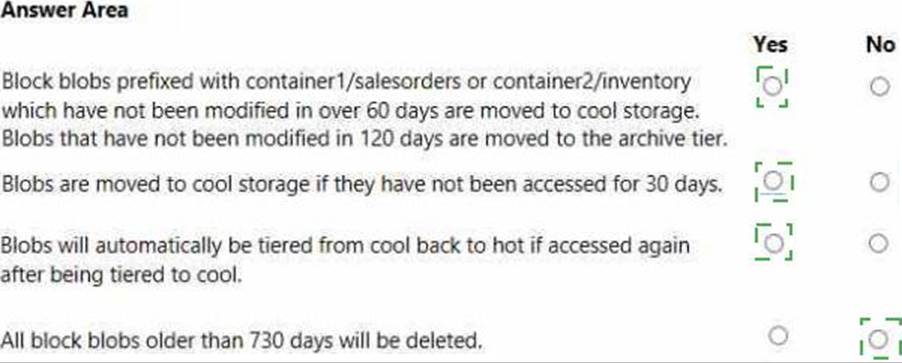
You are developing an application that uses a premium block blob storage account. You are optimizing costs by automating Azure Blob Storage access tiers.
You apply the following policy rules to the storage account.
You must determine the implications of applying the rules to the data. (Line numbers are included for reference only.)
Explanation:
Note: This question is part of a series of questions that present the same scenario. Each question in the series contains a unique solution that might meet the stated goals. Some question sets might have more than one correct solution, while others might not have a correct solution.
After you answer a question in this section, you will NOT be able to return to it. As a result, these questions will not appear in the review screen.
You develop a software as a service (SaaS) offering to manage photographs. Users upload photos to a web service which then stores the photos in Azure Storage Blob storage. The storage account type is General-purpose V2.
When photos are uploaded, they must be processed to produce and save a mobile-friendly version of the image. The process to produce a mobile-friendly version of the image must start in less than one minute.
You need to design the process that starts the photo processing.
Solution: Create an Azure Function app that uses the Consumption hosting model and that is triggered from the blob upload.
Does the solution meet the goal?
- A . Yes
- B . No
A
Explanation:
In the Consumption hosting plan, resources are added dynamically as required by your functions.
Reference: https://docs.microsoft.com/en-us/azure/azure-functions/functions-create-storage-blob-triggered-function
HOTSPOT
You are using Azure Front Door Service.
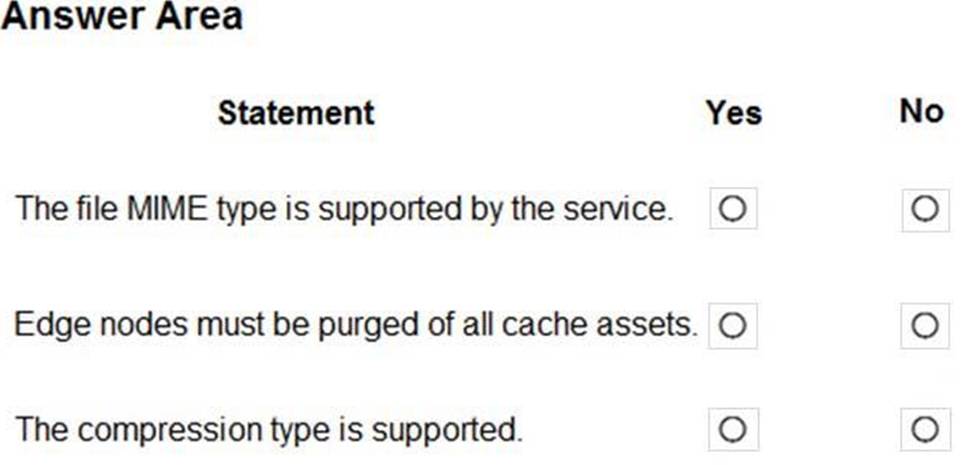
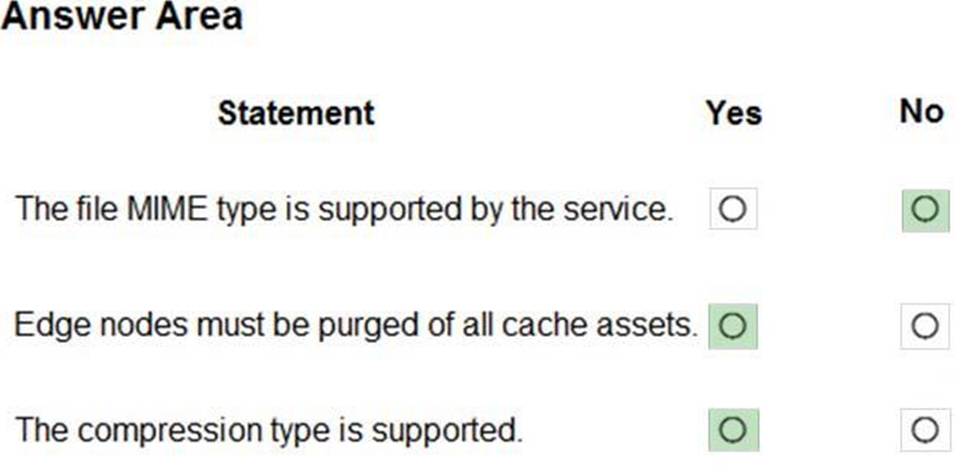
You are expecting inbound files to be compressed by using Brotli compression. You discover that inbound XML files are not compressed. The files are 9 megabytes (MB) in size.
You need to determine the root cause for the issue.
To answer, select the appropriate options in the answer area. NOTE: Each correct selection is worth one point.
Explanation:
Box 1: No
Front Door can dynamically compress content on the edge, resulting in a smaller and faster response to your clients. All files are eligible for compression. However, a file must be of a MIME type that is eligible for compression list.
Box 2: No
Sometimes you may wish to purge cached content from all edge nodes and force them all to retrieve new updated assets. This might be due to updates to your web application, or to quickly update assets that contain incorrect information.
Box 3: Yes
These profiles support the following compression encodings: Gzip (GNU zip), Brotli
Reference: https://docs.microsoft.com/en-us/azure/frontdoor/front-door-caching
HOTSPOT
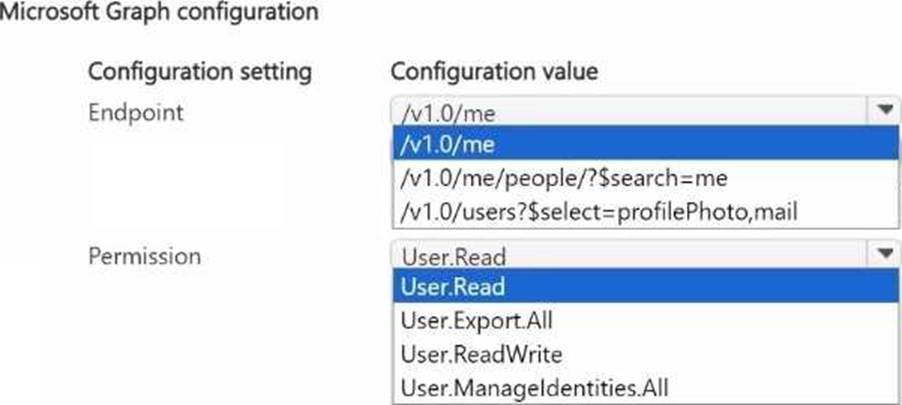
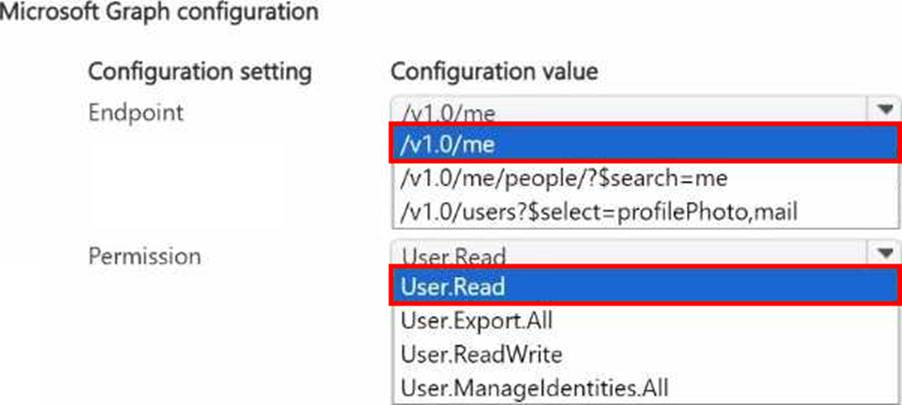
You need to display the profile photo and email for signed-in internal staff on the website.
Which Microsoft Graph configuration should you use? To answer, select the appropriate options in the answer area. NOTE: Each correct selection is worth one point.
DRAG DROP
You are deploying an Azure Kubernetes Services (AKS) cluster that will use multiple containers.
You need to create the cluster and verify that the services for the containers are configured correctly and available.
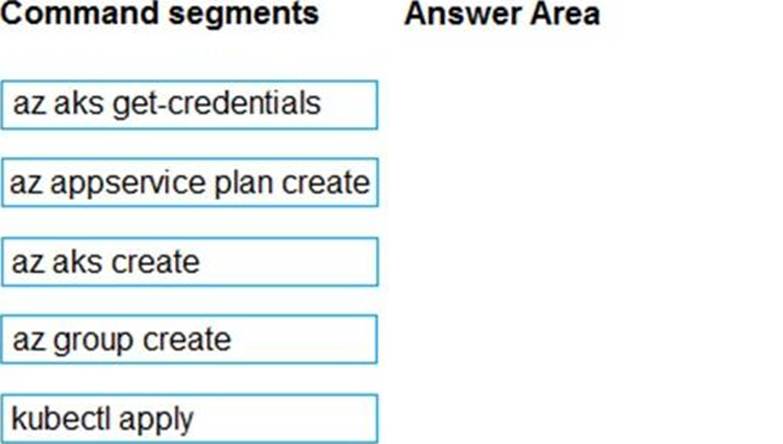
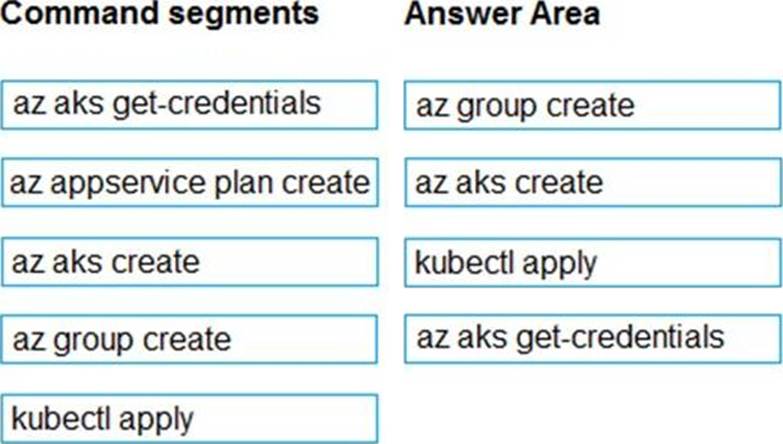
Which four commands should you use to develop the solution? To answer, move the appropriate command segments from the list of command segments to the answer area and arrange them in the correct order.
Explanation:
Step 1: az group create
Create a resource group with the az group create command. An Azure resource group is a logical group in which Azure resources are deployed and managed.
Example: The following example creates a resource group named myAKSCluster in the eastus location.
az group create –name myAKSCluster –location eastus
Step 2: az aks create
Use the az aks create command to create an AKS cluster.
Step 3: kubectl apply
To deploy your application, use the kubectl apply command. This command parses the manifest file and creates the defined Kubernetes objects.
Step 4: az aks get-credentials
Configure it with the credentials for the new AKS cluster. Example:
az aks get-credentials –name aks-cluster –resource-group aks-resource-group
Reference: https://docs.bitnami.com/azure/get-started-aks/
DRAG DROP
You are deploying an Azure Kubernetes Services (AKS) cluster that will use multiple containers.
You need to create the cluster and verify that the services for the containers are configured correctly and available.
Which four commands should you use to develop the solution? To answer, move the appropriate command segments from the list of command segments to the answer area and arrange them in the correct order.
Explanation:
Step 1: az group create
Create a resource group with the az group create command. An Azure resource group is a logical group in which Azure resources are deployed and managed.
Example: The following example creates a resource group named myAKSCluster in the eastus location.
az group create –name myAKSCluster –location eastus
Step 2: az aks create
Use the az aks create command to create an AKS cluster.
Step 3: kubectl apply
To deploy your application, use the kubectl apply command. This command parses the manifest file and creates the defined Kubernetes objects.
Step 4: az aks get-credentials
Configure it with the credentials for the new AKS cluster. Example:
az aks get-credentials –name aks-cluster –resource-group aks-resource-group
Reference: https://docs.bitnami.com/azure/get-started-aks/
HOTSPOT
You need to configure Azure Cosmos DB.
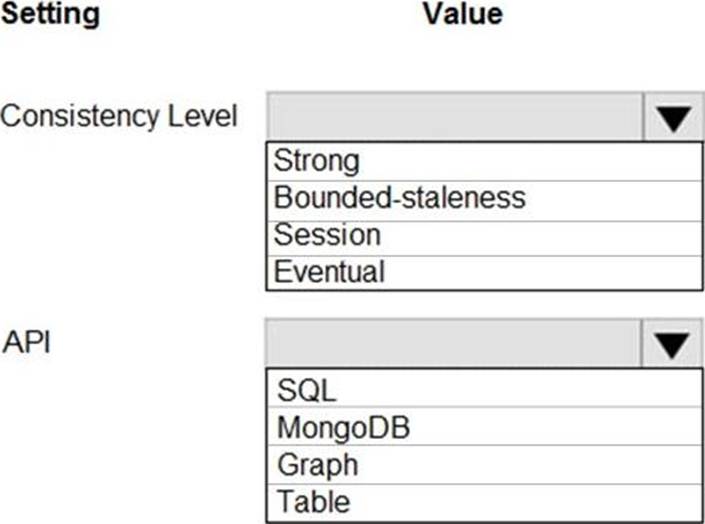
Which settings should you use? To answer, select the appropriate options in the answer area. NOTE: Each correct selection is worth one point.
Explanation:
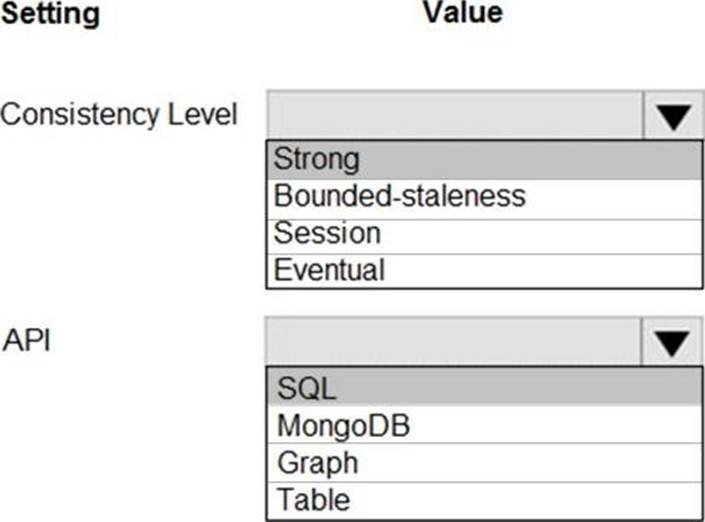
Box 1: Strong
When the consistency level is set to strong, the staleness window is equivalent to zero, and the clients are guaranteed to read the latest committed value of the write operation.
Scenario: Changes to the Order data must reflect immediately across all partitions. All reads to the Order data must fetch the most recent writes.
Note: You can choose from five well-defined models on the consistency spectrum. From strongest to weakest, the models are: Strong, Bounded staleness, Session, Consistent prefix, Eventual
Box 2: SQL
Scenario: You identify the following requirements for data management and manipulation:
Order data is stored as nonrelational JSON and must be queried using Structured Query Language (SQL).