
Practice Free AZ-204 Exam Online Questions
You are developing several Azure API Management (APIM) hosted APIs.
You must inspect request processing of the APIs in APIM. Requests to APIM by using a REST client must also be included.
The request inspection must include the following information:
• requests APIM sent to the API backend and the response it received
• policies applied to the response before sending back to the caller
• errors that occurred during the processing of the request and the policies applied to the errors
• original request APIM received from the caller and the policies applied to the request You need to inspect the APIs.
Which three actions should you do? Each correct answer presents part of the solution. NOTE: Each correct selection is worth one point.
- A . Enable the Allow tracing setting for the subscription used to inspect the API.
- B . Add the Ocp-Apim-Trace header value to the API call with a value set to true
- C . Add the Ocp-Apim-Subscription-Key header value to the key for a subscription that allows access to the API.
- D . Create and configure a custom policy. Apply the policy to the outbound policy section with an API scope.
- E . Create and configure a custom policy. Apply the policy to the inbound policy section with a global scope.
A,B,D
Explanation:
The correct answer is A, B, and C.
To inspect request processing of the APIs in APIM, you need to do the following three actions:
Enable the Allow tracing setting for the subscription used to inspect the API. This setting allows you to trace request processing in APIM using the test console, a REST client, or a client app. You can enable this setting in the portal by selecting Subscriptions and then selecting the subscription you want to use for debugging1.
Add the Ocp-Apim-Trace header value to the API call with a value set to true. This header triggers tracing when making requests to APIM using a REST client or a client app. You also need to add the Ocp-Apim-Subscription-Key header value to the key for a subscription that allows access to the API1.
Add the Ocp-Apim-Subscription-Key header value to the key for a subscription that allows access to the API. This header authenticates your request and grants you access to the API. You can find the key for your subscription in the portal by selecting Subscriptions and then selecting Show/hide keys1.
You do not need to create and configure a custom policy for tracing request processing. The trace policy is used to add a custom trace into the request tracing output, Application Insights telemetries, and/or resource logs2. It is not required for inspecting the APIs.
DRAG DROP
You are developing an application to securely transfer data between on-premises file systems and Azure Blob storage. The application stores keys, secrets, and certificates in Azure Key Vault. The application uses the Azure Key Vault APIs.
The application must allow recovery of an accidental deletion of the key vault or key vault objects.
Key vault objects must be retained for 90 days after deletion.
You need to protect the key vault and key vault objects.
Which Azure Key Vault feature should you use? To answer, drag the appropriate features to the correct actions. Each feature may be used once, more than once, or not at all. You may need to drag the split bar between panes or scroll to view content. NOTE: Each correct selection is worth one point.


Explanation:
Box 1: Soft delete
When soft-delete is enabled, resources marked as deleted resources are retained for a specified period (90 days by default). The service further provides a mechanism for recovering the deleted object, essentially undoing the deletion.
Box 2: Purge protection
Purge protection is an optional Key Vault behavior and is not enabled by default. Purge protection can only be enabled once soft-delete is enabled.
When purge protection is on, a vault or an object in the deleted state cannot be purged until the retention period has passed. Soft-deleted vaults and objects can still be recovered, ensuring that the retention policy will be followed.
Reference: https://docs.microsoft.com/en-us/azure/key-vault/general/soft-delete-overview
You need to ensure the security policies are met.
What code do you add at line CS07 of ConfigureSSE.ps1?
- A . CPermissionsToKeys create, encrypt, decrypt
- B . CPermissionsToCertificates create, encrypt, decrypt
- C . CPermissionsToCertificates wrapkey, unwrapkey, get
- D . CPermissionsToKeys wrapkey, unwrapkey, get
B
Explanation:
Scenario: All certificates and secrets used to secure data must be stored in Azure Key Vault. You must adhere to the principle of least privilege and provide privileges which are essential to perform the intended function.
The Set-AzureRmKeyValutAccessPolicy parameter -PermissionsToKeys specifies an array of key operation permissions to grant to a user or service principal. The acceptable values for this parameter: decrypt, encrypt, unwrapKey, wrapKey, verify, sign, get, list, update, create, import, delete, backup, restore, recover, purge
Reference: https://docs.microsoft.com/en-us/powershell/module/azurerm.keyvault/set-azurermkeyvaultaccesspolicy
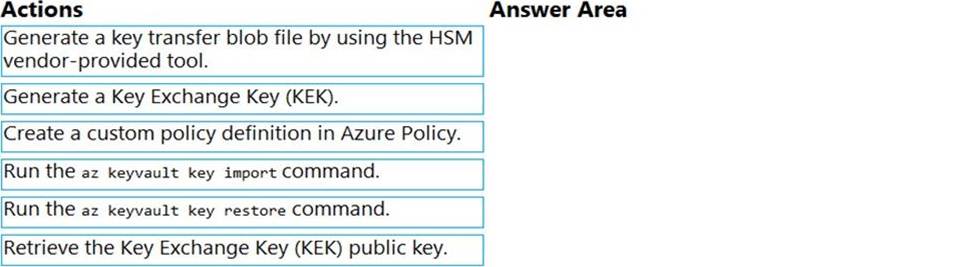
DRAG DROP
You are developing an Azure-hosted application that must use an on-premises hardware security module (HSM) key.
The key must be transferred to your existing Azure Key Vault by using the Bring Your Own Key (BYOK) process.
You need to securely transfer the key to Azure Key Vault.
Which four actions should you perform in sequence? To answer, move the appropriate actions from the list of actions to the answer area and arrange them in the correct order.
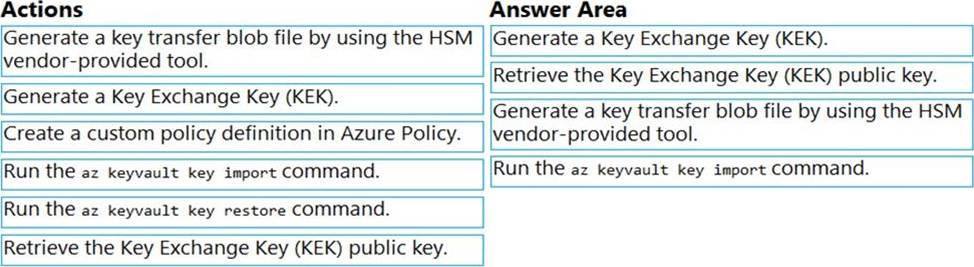
Explanation:
To perform a key transfer, a user performs following steps:
✑ Generate KEK.
✑ Retrieve the public key of the KEK.
✑ Using HSM vendor provided BYOK tool – Import the KEK into the target HSM and exports the Target Key protected by the KEK.
✑ Import the protected Target Key to Azure Key Vault.
Step 1: Generate a Key Exchange Key (KEK).
Step 2: Retrieve the Key Exchange Key (KEK) public key.
Step 3: Generate a key transfer blob file by using the HSM vendor-provided tool. Generate key transfer blob using HSM vendor provided BYOK tool
Step 4: Run the az keyvault key import command Upload key transfer blob to import HSM-key.
Customer will transfer the Key Transfer Blob (".byok" file) to an online workstation and then run a az keyvault key import command to import this blob as a new HSM-backed key into Key Vault.
To import an RSA key use this command:
az keyvault key import
Reference: https://docs.microsoft.com/en-us/azure/key-vault/keys/byok-specification
You are developing an e-commerce solution that uses a microservice architecture.
You need to design a communication backplane for communicating transactional messages between various parts of the solution. Messages must be communicated in first-in-first-out (FIFO) order.
What should you use?
- A . Azure Storage Queue
- B . Azure Event Hub
- C . Azure Service Bus
- D . Azure Event Grid
A
Explanation:
As a solution architect/developer, you should consider using Service Bus queues when:
Your solution requires the queue to provide a guaranteed first-in-first-out (FIFO) ordered delivery.
Reference: https://docs.microsoft.com/en-us/azure/service-bus-messaging/service-bus-azure-and-service-bus-queues-compared-contrasted
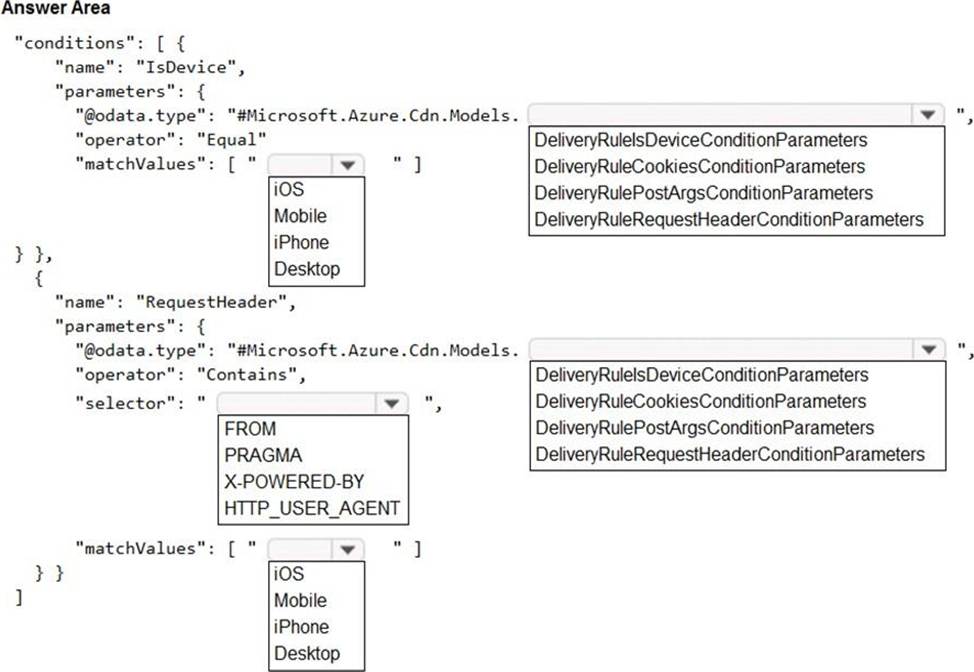
HOTSPOT
You are building a website that is used to review restaurants. The website will use an Azure CDN to improve performance and add functionality to requests.
You build and deploy a mobile app for Apple iPhones. Whenever a user accesses the website from an iPhone, the user must be redirected to the app store.
You need to implement an Azure CDN rule that ensures that iPhone users are redirected to the app store.
How should you complete the Azure Resource Manager template? To answer, select the appropriate options in the answer area. NOTE: Each correct selection is worth one point.
Explanation:
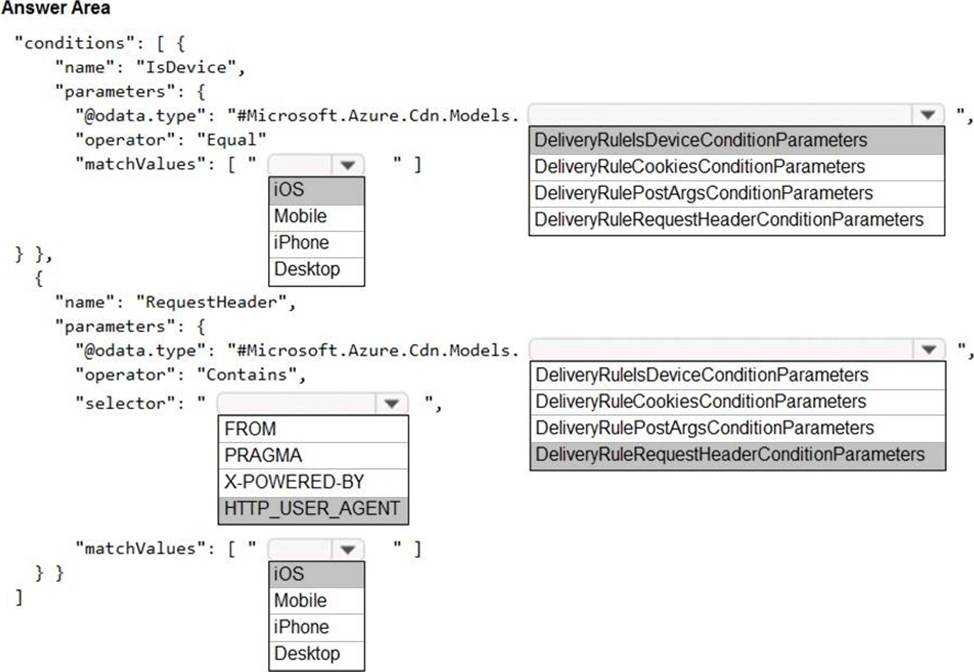
Box 1: iOS
Azure AD Conditional Access supports the following device platforms:
✑ Android
✑ iOS
✑ Windows Phone
✑ Windows
✑ macOS
Box 2: DeliveryRuleIsDeviceConditionParameters
The DeliveryRuleIsDeviceCondition defines the IsDevice condition for the delivery rule.
parameters defines the parameters for the condition.
Box 3: HTTP_USER_AGENT
Box 4: DeliveryRuleRequestHeaderConditionParameters DeliveryRuleRequestHeaderCondition defines the RequestHeader condition for the delivery rule. parameters defines the parameters for the condition.
Box 5: iOS
The Require approved client app requirement only supports the iOS and Android for device platform condition.
Reference:
https://docs.microsoft.com/en-us/azure/active-directory/conditional-access/concept-conditional-access-conditions
https://docs.microsoft.com/en-us/azure/active-directory/conditional-access/concept-conditional-access-grant
You are developing a medical records document management website. The website is used to store scanned copies of patient intake forms. If the stored intake forms are downloaded from storage by a third party, the content of the forms must not be compromised.
You need to store the intake forms according to the requirements.
Solution:
Create an Azure Cosmos DB database with Storage Service Encryption enabled.
Store the intake forms in the Azure Cosmos DB database.
Does the solution meet the goal?
- A . Yes
- B . No
B
Explanation:
Instead use an Azure Key vault and public key encryption. Store the encrypted from in Azure Storage Blob storage.
HOTSPOT
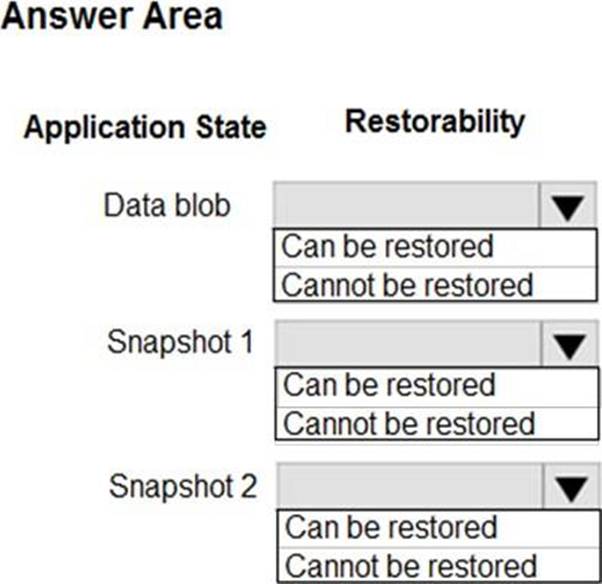
You are developing an application that use an Azure blob named data to store application data. The application creates blob snapshots to allow application state to be reverted to an earlier state. The Azure storage account has soft deleted enabled.
The system performs the following operations in order:
• The blob is updated
• Snapshot 1 is created.
• Snapshot 2 is created.
• Snapshot 1 is deleted.
A system error then deletes the data blob and all snapshots.
You need to determine which application states can be restored.
What is the restorability of the application data? To answer, select the appropriate options in the answer area. NOTE: Each correct selection is worth one point.
Explanation:
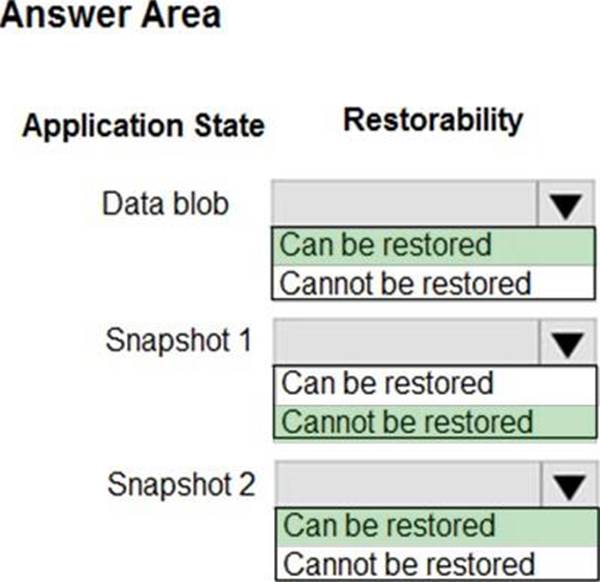
Box 1: Can be restored
When enabled, soft delete enables you to save and recover your data when blobs or blob snapshots are deleted. This protection extends to blob data that is erased as the result of an overwrite.
Box 2: Cannot be restored
It has been deleted.
Box 3: Can be restored
It has not been deleted.
Reference: https://docs.microsoft.com/en-us/azure/storage/blobs/storage-blob-soft-delete
HOTSPOT
You are developing an application that use an Azure blob named data to store application data. The application creates blob snapshots to allow application state to be reverted to an earlier state. The Azure storage account has soft deleted enabled.
The system performs the following operations in order:
• The blob is updated
• Snapshot 1 is created.
• Snapshot 2 is created.
• Snapshot 1 is deleted.
A system error then deletes the data blob and all snapshots.
You need to determine which application states can be restored.
What is the restorability of the application data? To answer, select the appropriate options in the answer area. NOTE: Each correct selection is worth one point.
Explanation:
Box 1: Can be restored
When enabled, soft delete enables you to save and recover your data when blobs or blob snapshots are deleted. This protection extends to blob data that is erased as the result of an overwrite.
Box 2: Cannot be restored
It has been deleted.
Box 3: Can be restored
It has not been deleted.
Reference: https://docs.microsoft.com/en-us/azure/storage/blobs/storage-blob-soft-delete
You are a developing a SaaS application that stores data as key value pairs.
You must make multiple editions of the application available. In the lowest cost edition, the performance must be best-effort, and there is no regional failover.
In higher cos! editions customers must be able to select guaranteed performance and support for multiple regions. Azure costs must be minimized.
Which Azure Cosmos OB API should you use for the application?
- A . Core
- B . MongoDB
- C . Cassandra
- D . Table API