
Practice Free AZ-204 Exam Online Questions
You are developing an Azure Function App that generates end of day reports (or retail stores. All stores dose at 11 PM each day. Reports must be run one hour after dosing. You configure the function to use a Timer trigger that runs at midnight Customers in the Western United States Pacific Time zone (UTC – 8) report that the Azure Function runs before the stores dose. You need to ensure that the Azure Function runs at midnight in the Pacific Time zone.
What should you do?
- A . Configure the Azure Function to run in the West US region.
- B . Add an app setting named WEBSITE_TIME_ZONE that uses the value Pacific Standard Time
- C . Change the Timer trigger to run at 7 AM
- D . Update the Azure Function to a Premium plan.
You are developing a software solution for an autonomous transportation system. The solution uses large data sets and Azure Batch processing to simulate navigation sets for entire fleets of vehicles.
You need to create compute nodes for the solution on Azure Batch.
What should you do?
- A . In the Azure portal, create a Batch account.
- B . In a .NET method, call the method: BatchClient.PoolOperations.CreatePool
- C . In Python, implement the class: JobAddParameter
- D . In Python, implement the class: TaskAddParameter
B
Explanation:
A Batch job is a logical grouping of one or more tasks. A job includes settings common to the tasks, such as priority and the pool to run tasks on. The app uses the BatchClient.JobOperations.CreateJob method to create a job on your pool.
Incorrect Answers:
C, D: To create a Batch pool in Python, the app uses the PoolAddParameter class to set the number of nodes, VM size, and a pool configuration.
Reference:
https://docs.microsoft.com/en-us/azure/batch/quick-run-dotnet
https://docs.microsoft.com/en-us/azure/batch/quick-run-python
You are developing a project management service by using ASP.NET. The service hosts conversations, files, to-do lists, and a calendar that users can interact with at any time.
The application uses Azure Search for allowing users to search for keywords in the project data.
You need to implement code that creates the object which is used to create indexes in the Azure Search service.
Which two objects should you use? Each correct answer presents part of the solution. NOTE: Each correct selection is worth one point.
- A . SearchService
- B . SearchlndexCIient
- C . SearchServiceClient
- D . SearchCredentials
B,C
Explanation:
The various client libraries define classes like Index, Field, and Document, as well as operations like Indexes.Create and Documents.Search on the SearchServiceClient and SearchIndexClient classes.
Example:
The sample application we’ll be exploring creates a new index named "hotels", populates it with a few documents, then executes some search queries. Here is the main program, showing the overall flow:
/ This sample shows how to delete, create, upload documents and query an index static void Main(string[] args)
{
IConfigurationBuilder builder = new ConfigurationBuilder().AddJsonFile("appsettings.json"); IConfigurationRoot configuration = builder.Build();
SearchServiceClient serviceClient = CreateSearchServiceClient(configuration);
Console.WriteLine("{0}", "Deleting index…n");
DeleteHotelsIndexIfExists(serviceClient);
Console.WriteLine("{0}", "Creating index…n");
CreateHotelsIndex(serviceClient);
ISearchIndexClient indexClient = serviceClient.Indexes.GetClient("hotels");
Reference: https://docs.microsoft.com/en-us/azure/search/search-howto-dotnet-sdk
You are developing several Azure API Management (APIM) hosted APIs.
The APIs have the following requirements:
Require a subscription key to access all APIs.
• Include terms of use that subscribers must accept to use the APIs.
• Administrators must review and accept or reject subscription attempts.
• Limit the count of multiple simultaneous subscriptions.
You need to implement the APIs.
What should you do?
- A . Create and publish a product.
- B . Configure and apply query string-based versioning.
- C . Configure and apply header-based versioning.
- D . Add a new revision to all APIs. Make the revisions current and add a change log entry.
Note: This question is part of a series of questions that present the same scenario. Each question in
the series contains a unique solution that might meet the stated goals. Some question sets might have more than one correct solution, while others might not have a correct solution.
After you answer a question in this section, you will NOT be able to return to it. As a result, these questions will not appear on the review screen.
You are implementing an application by using Azure Event Grid to push near-real-time information to customers.
You have the following requirements:
• You must send events to thousands of customers that include hundreds of various event types.
• The events must be filtered by event type before processing.
• Authentication and authorization must be handled by using Microsoft Entra ID.
• The events must be published to a single endpoint.
You need to implement Azure Event Gnd.
Solution: Publish events to a custom topic. Create an event subscription for each customer.
Does the solution meet the goal?
- A . Yes
- B . No
You need to authenticate the user to the corporate website as indicated by the architectural diagram.
Which two values should you use? Each correct answer presents part of the solution. NOTE: Each correct selection is worth one point.
- A . ID token signature
- B . ID token claims
- C . HTTP response code
- D . Azure AD endpoint URI
- E . Azure AD tenant ID
A,D
Explanation:
Claims in access tokens
JWTs (JSON Web Tokens) are split into three pieces:
✑ Header – Provides information about how to validate the token including information about the type of token and how it was signed.
✑ Payload – Contains all of the important data about the user or app that is attempting to call your service.
✑ Signature – Is the raw material used to validate the token.
Your client can get an access token from either the v1.0 endpoint or the v2.0 endpoint using a variety of protocols.
Scenario: User authentication (see step 5 below)
The following steps detail the user authentication process:
✑ The user selects Sign in in the website.
✑ The browser redirects the user to the Azure Active Directory (Azure AD) sign in page.
✑ The user signs in.
✑ Azure AD redirects the user’s session back to the web application. The URL
includes an access token.
✑ The web application calls an API and includes the access token in the authentication header. The application ID is sent as the audience (‘aud’) claim in the access token.
✑ The back-end API validates the access token.
Reference: https://docs.microsoft.com/en-us/azure/api-management/api-management-access-restriction-policies
DRAG DROP
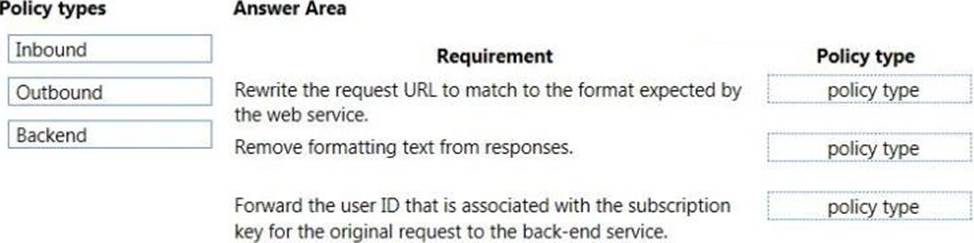
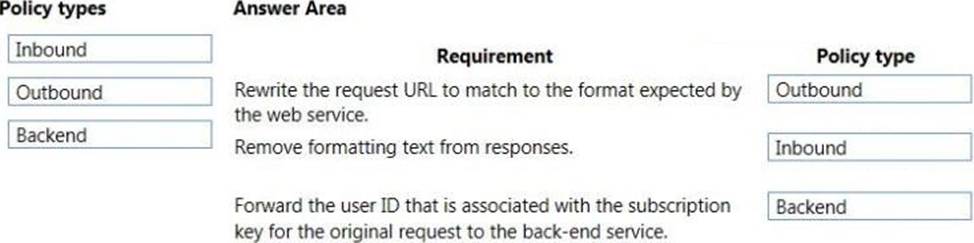
You have an application that provides weather forecasting data to external partners. You use Azure API Management to publish APIs.
You must change the behavior of the API to meet the following requirements:
• Support alternative input parameters.
• Remove formatting text from responses.
• Provide additional context to back-end services.
Which types of policies should you implement? To answer, drag the policy types to the correct scenarios. Each policy type may be used once, more than once, or not at all. You may need to drag the split bar between panes or scroll to view content. NOTE: Each correct selection is worth one point.
DRAG DROP
You have an application that provides weather forecasting data to external partners. You use Azure API Management to publish APIs.
You must change the behavior of the API to meet the following requirements:
• Support alternative input parameters.
• Remove formatting text from responses.
• Provide additional context to back-end services.
Which types of policies should you implement? To answer, drag the policy types to the correct scenarios. Each policy type may be used once, more than once, or not at all. You may need to drag the split bar between panes or scroll to view content. NOTE: Each correct selection is worth one point.
HOTSPOT
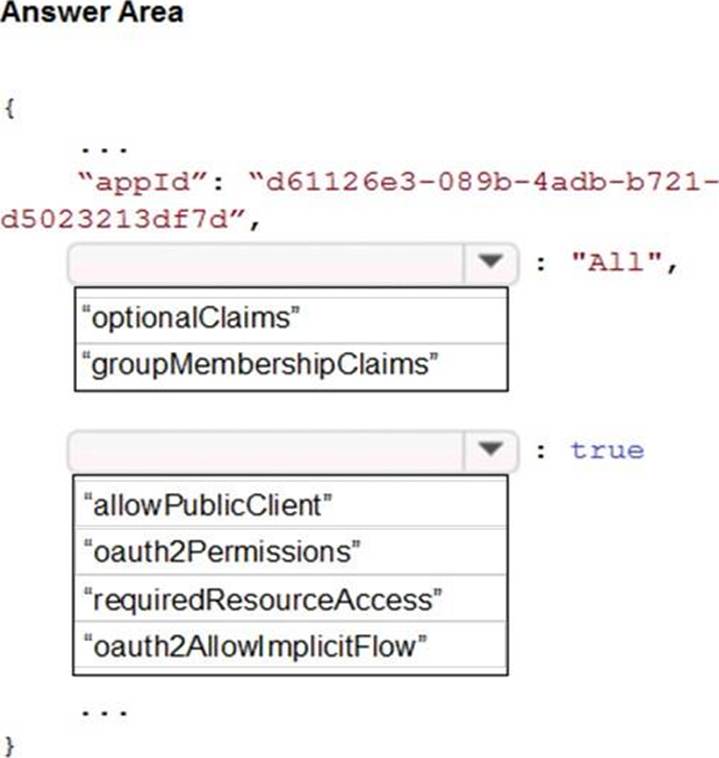
You are building a website to access project data related to terms within your organization. The website does not allow anonymous access. Authentication performed using an Azure Active Directory (Azure AD) app named internal.
The website has the following authentication requirements:
• Azure AD users must be able to login to the website.
• Personalization of the website must be based on membership in Active Directory groups.
You need to configure the application’s manifest to meet the authentication requirements.
How should you configure the manifest? To answer, select the appropriate options in the answer area. NOTE: Each correct selection is worth one point.
Explanation:
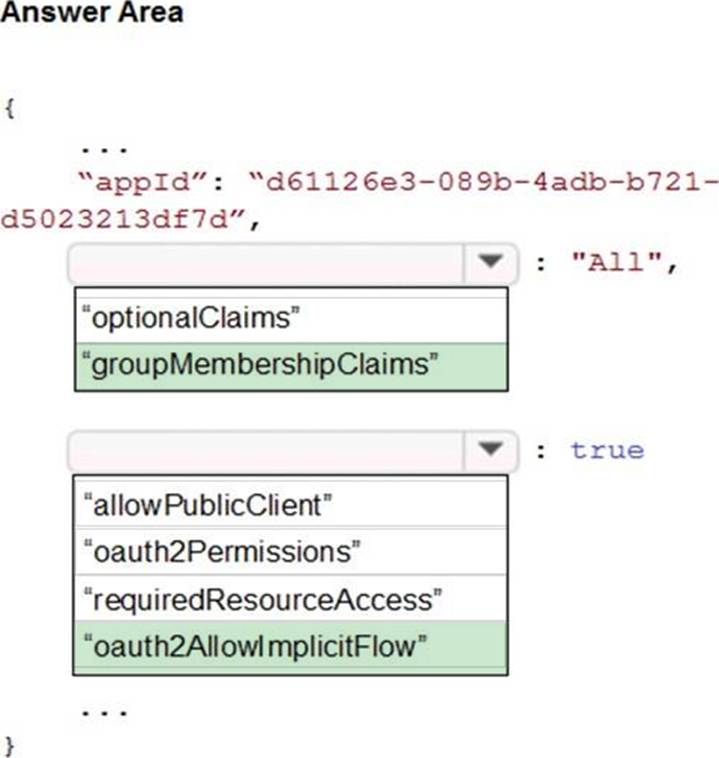
Box 1: groupMembershipClaims
Personalization of the website must be based on membership in Active Directory groups.
Group claims can also be configured in the Optional Claims section of the Application Manifest. Enable group membership claims by changing the groupMembershipClaim
The valid values are:
– "All"
– "SecurityGroup"
– "DistributionList"
– "DirectoryRole"
Here we need to mention that we want to get the groups for the users. Hence we need to mention to set the groupMembershipClaims property to All.
Box 2: oauth2AllowImplicitFlow
Azure AD users must be able to login to the website.
auth2Permissions can only accept collections value like an array, not a boolean.
oauth2AllowImplicitFlow accepts boolean value.
Here from the list of options given, if we want the application to fetch the required tokens, we would need to allow Implicit Flow.
HOTSPOT
You are building a website to access project data related to terms within your organization. The website does not allow anonymous access. Authentication performed using an Azure Active Directory (Azure AD) app named internal.
The website has the following authentication requirements:
• Azure AD users must be able to login to the website.
• Personalization of the website must be based on membership in Active Directory groups.
You need to configure the application’s manifest to meet the authentication requirements.
How should you configure the manifest? To answer, select the appropriate options in the answer area. NOTE: Each correct selection is worth one point.
Explanation:
Box 1: groupMembershipClaims
Personalization of the website must be based on membership in Active Directory groups.
Group claims can also be configured in the Optional Claims section of the Application Manifest. Enable group membership claims by changing the groupMembershipClaim
The valid values are:
– "All"
– "SecurityGroup"
– "DistributionList"
– "DirectoryRole"
Here we need to mention that we want to get the groups for the users. Hence we need to mention to set the groupMembershipClaims property to All.
Box 2: oauth2AllowImplicitFlow
Azure AD users must be able to login to the website.
auth2Permissions can only accept collections value like an array, not a boolean.
oauth2AllowImplicitFlow accepts boolean value.
Here from the list of options given, if we want the application to fetch the required tokens, we would need to allow Implicit Flow.