
Practice Free AZ-204 Exam Online Questions
You create an Azure Cosmos DB for NoSQL database.
You plan to use the Azure Cosmos DB .NET SDK v3 API for NoSQL to upload the following files:
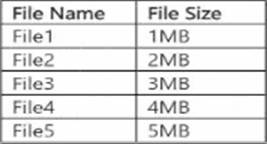
You receive the following error message when uploading the files: "413 Entity too large". You need to determine which files you can upload to the Azure Cosmos DB for NoSQL database.
Which files can you upload?
- A . File1, File2. File3. and File4 only
- B . File1 and File2 only
- C . File1, File2. and File3 only
- D . File1. File2. File3. File4, and File5
You create an Azure Cosmos DB for NoSQL database.
You plan to use the Azure Cosmos DB .NET SDK v3 API for NoSQL to upload the following files:
You receive the following error message when uploading the files: "413 Entity too large". You need to determine which files you can upload to the Azure Cosmos DB for NoSQL database.
Which files can you upload?
- A . File1, File2. File3. and File4 only
- B . File1 and File2 only
- C . File1, File2. and File3 only
- D . File1. File2. File3. File4, and File5
You create an Azure Cosmos DB for NoSQL database.
You plan to use the Azure Cosmos DB .NET SDK v3 API for NoSQL to upload the following files:
You receive the following error message when uploading the files: "413 Entity too large". You need to determine which files you can upload to the Azure Cosmos DB for NoSQL database.
Which files can you upload?
- A . File1, File2. File3. and File4 only
- B . File1 and File2 only
- C . File1, File2. and File3 only
- D . File1. File2. File3. File4, and File5
HOTSPOT
You have a single page application (SPA) web application that manages information based on data returned by Microsoft Graph from another company’s Azure Active Directory (Azure AD) instance.
Users must be able to authenticate and access Microsoft Graph by using their own company’s Azure AD instance.
You need to configure the application manifest for the app registration.
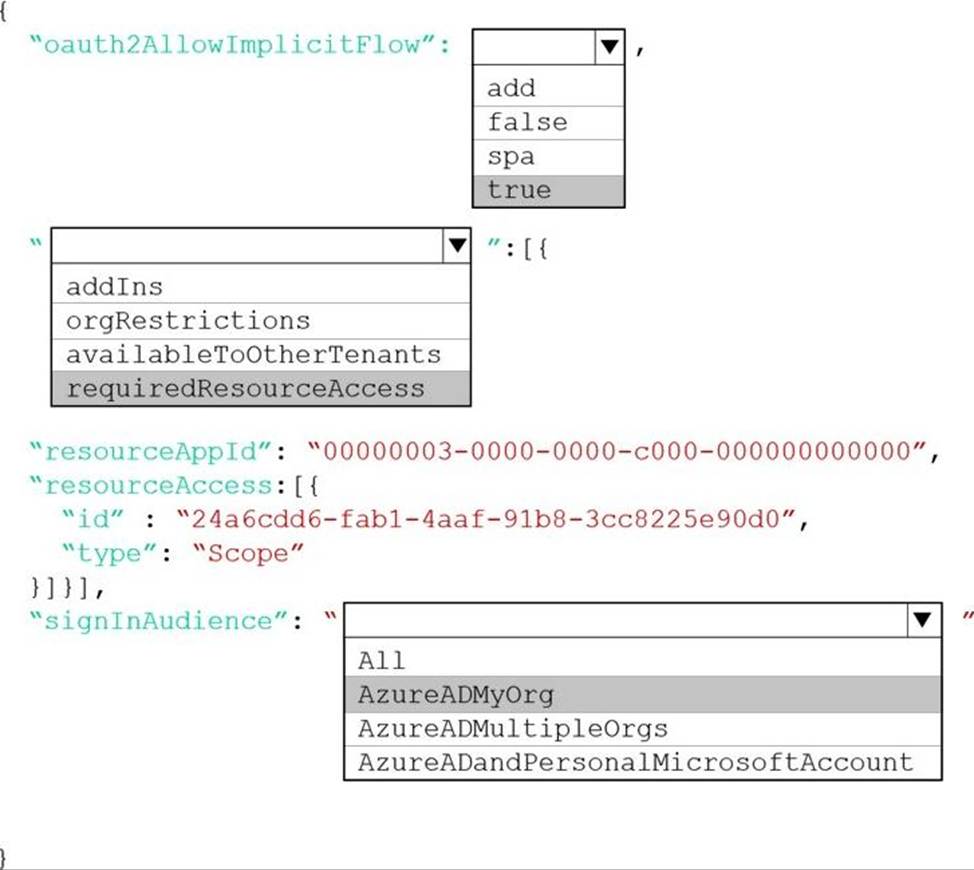
How should you complete the manifest? To answer, select the appropriate options in the answer area. NOTE: Each correct selection is worth one point.
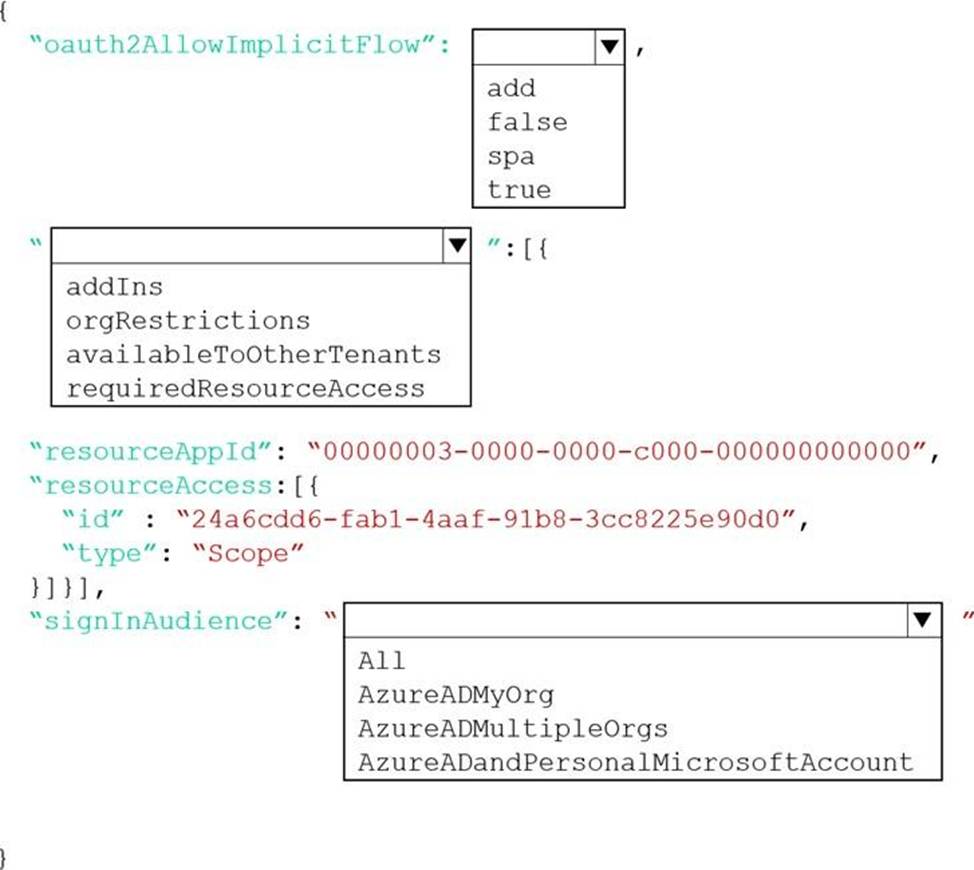
Explanation:
Box 1: true
The oauth2AllowImplicitFlow attribute Specifies whether this web app can request OAuth2.0 implicit flow access tokens. The default is false. This flag is used for browser-based apps, like JavaScript single-page apps.
In implicit flow, the app receives tokens directly from the Azure Active Directory (Azure AD) authorize endpoint, without any server-to-server exchange. All authentication logic and session handling is done entirely in the JavaScript client with either a page redirect or a pop-up box.
Box 2: requiredResourceAccess
With dynamic consent, requiredResourceAccess drives the admin consent experience and the user consent experience for users who are using static consent. However, this parameter doesn’t drive the user consent experience for the general case.
resourceAppId is the unique identifier for the resource that the app requires access to. This value should be equal to the appId declared on the target resource app.
resourceAccess is an array that lists the OAuth2.0 permission scopes and app roles that the app requires from the specified resource. Contains the id and type values of the specified resources.
Example:
"requiredResourceAccess": [
{
"resourceAppId": "00000002-0000-0000-c000-000000000000",
"resourceAccess": [
{
"id": "311a71cc-e848-46a1-bdf8-97ff7156d8e6",
"type": "Scope"
}
]
}
],
Box 3: AzureADMyOrg
The signInAudience attribute specifies what Microsoft accounts are supported for the current application. Supported values are:
AzureADMyOrg – Users with a Microsoft work or school account in my organization’s Azure AD tenant (for example, single tenant)
AzureADMultipleOrgs – Users with a Microsoft work or school account in any organization’s Azure AD tenant (for example, multi-tenant)
AzureADandPersonalMicrosoftAccount – Users with a personal Microsoft account, or a work or school account in any organization’s Azure AD tenant
Reference: https://docs.microsoft.com/en-us/azure/active-directory/develop/reference-app-manifest
https://docs.microsoft.com/en-us/azure/active-directory/develop/v2-oauth2-implicit-grant-flow
DRAG DROP
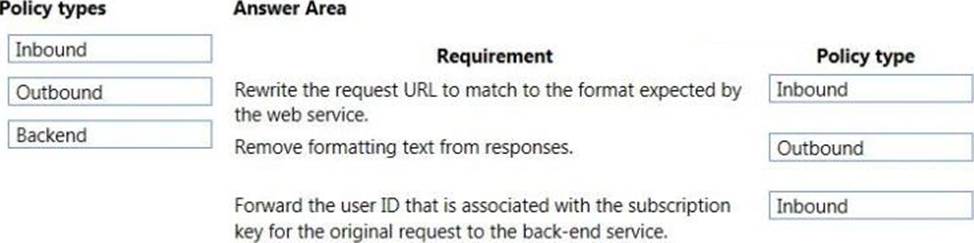
You have an application that provides weather forecasting data to external partners. You use Azure API Management to publish APIs.
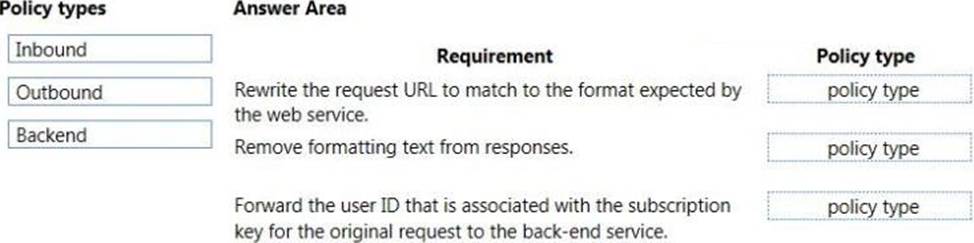
You must change the behavior of the API to meet the following requirements:
• Support alternative input parameters.
• Remove formatting text from responses.
• Provide additional context to back-end services.
Which types of policies should you implement? To answer, drag the policy types to the correct scenarios. Each policy type may be used once, more than once, or not at all. You may need to drag the split bar between panes or scroll to view content. NOTE: Each correct selection is worth one point.
You are developing an application to store business-critical data in Azure Blob storage.
The application must meet the following requirements:
• Data must not be modified or deleted for a user-specified interval.
• Data must be protected from overwntes and deletes.
• Data must be written once and allowed to be read many times. You need to protect the data fen the Azure Blob storage account.
Which two actions should you perform? Each correct answer presents part of the solution. NOTE: Each correct selection is worth one point.
- A . Enable version-level immutability support for the storage account.
- B . Create an account shared-access signature (SAS).
- C . Enable point-in-time restore for containers in the storage account.
- D . Create a service shared-access signature (SAS).
- E . Enable the blob change feed for the storage account.
- F . Configure a time-based retention policy for the storage account.
You are developing an application to store business-critical data in Azure Blob storage.
The application must meet the following requirements:
• Data must not be modified or deleted for a user-specified interval.
• Data must be protected from overwntes and deletes.
• Data must be written once and allowed to be read many times. You need to protect the data fen the Azure Blob storage account.
Which two actions should you perform? Each correct answer presents part of the solution. NOTE: Each correct selection is worth one point.
- A . Enable version-level immutability support for the storage account.
- B . Create an account shared-access signature (SAS).
- C . Enable point-in-time restore for containers in the storage account.
- D . Create a service shared-access signature (SAS).
- E . Enable the blob change feed for the storage account.
- F . Configure a time-based retention policy for the storage account.
SQL Database query results are cached in Azure Cache for Redis to improve performance.
The application consists of the following Azure services:
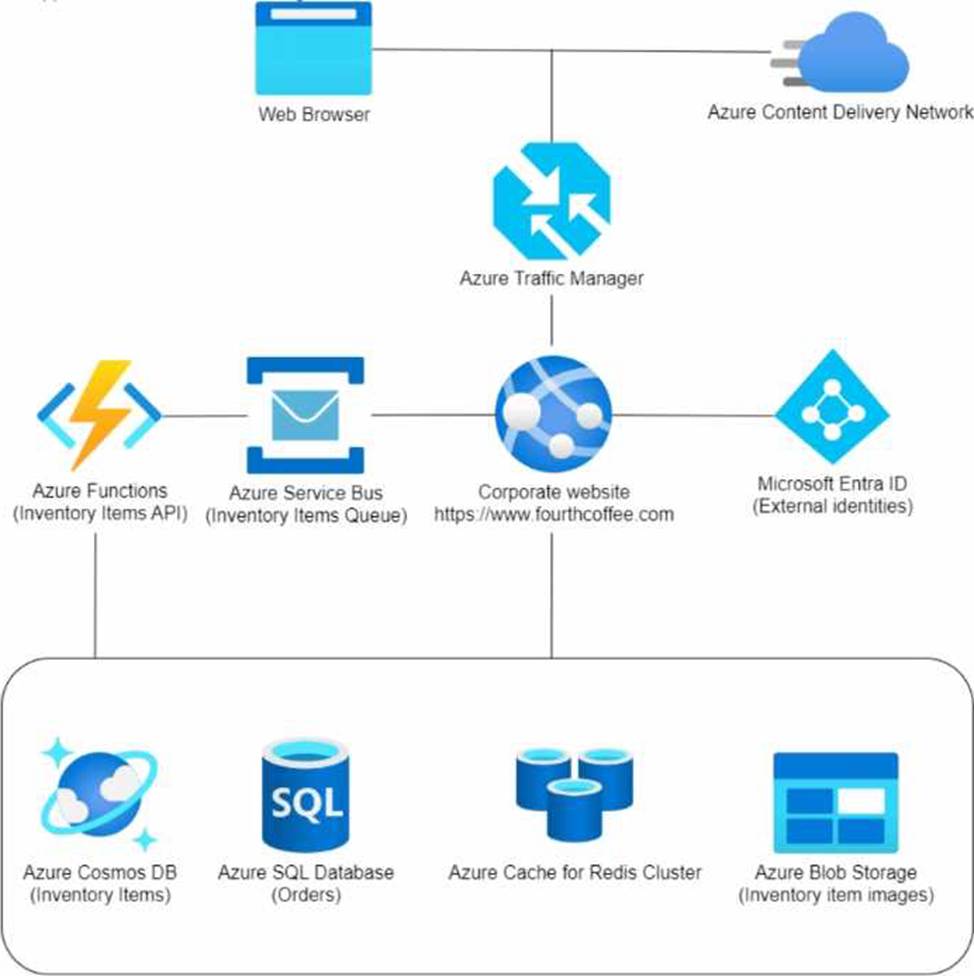
Requirements
The application components must meet the following requirements:
• Azure Cosmos DB development must use a native API that receives the latest updates and stores data in a document format.
• Costs must be minimized for all Azure services.
• Developers must test Azure Blob Storage integrations locally before deployment to Azure Testing must support the latest versions of the Azure Storage APIs.
Corporate website
• User authentication and authorization must allow one-time passcode sign-in methods and social identity providers (Google or Facebook).
• Static web content must be stored closest to end users to reduce network latency.
Inventory items
• Customized items read from Azure Cosmos DB must maximize throughput while ensuring data is accurate for the current user on the website.
• Processing of inventory item updates must automatically scale and enable updates across an entire Azure Cosmos DB container.
• Inventory items must be processed in the order they were placed in the queue.
• Inventory item images must be stored as JPEG files in their native format to include exchangeable image file format (data) stored with the blob data upon upload of the image file.
• The Inventory Items API must securely access the Azure Cosmos DB data.
Orders
• Orders must receive inventory item changes automatically after inventory items are updated or saved.
Issues
• Developers are storing the Azure Cosmos DB credentials in an insecure clear text manner within the Inventory Items API code.
• Production Azure Cache for Redis maintenance has negatively affected application performance.
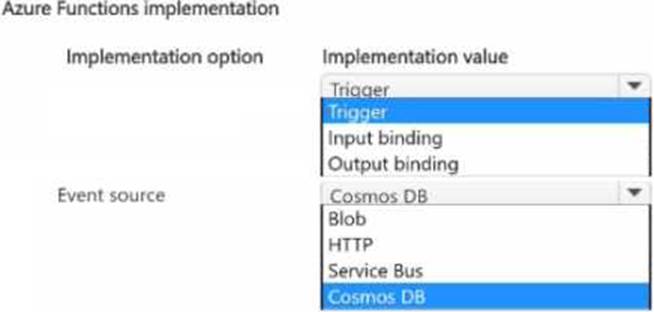
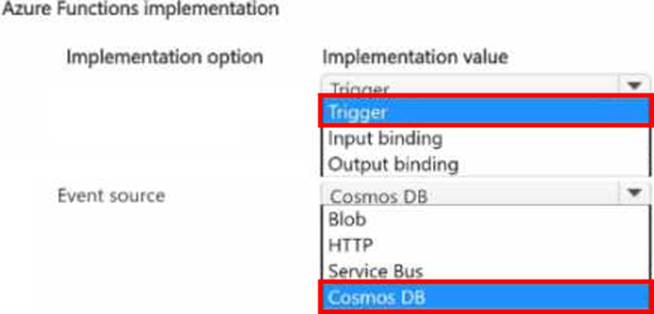
HOTSPOT
You need to implement a function by using Azure Functions to process customized items.
How should you implement the function? To answer, select the appropriate options in the answer area. NOTE: Each correct selection is worth one point.
DRAG DROP
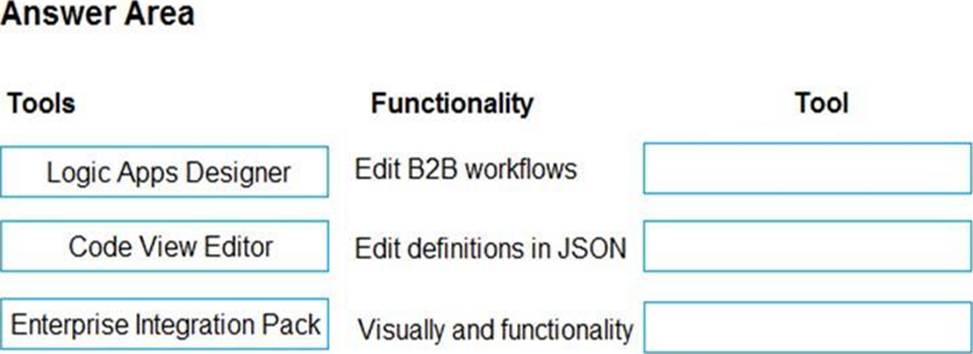
You manage several existing Logic Apps.
You need to change definitions, add new logic, and optimize these apps on a regular basis.
What should you use? To answer, drag the appropriate tools to the correct functionalities. Each tool may be used once, more than once, or not at all. You may need to drag the split bar between panes or scroll to view content. NOTE: Each correct selection is worth one point.
Explanation:
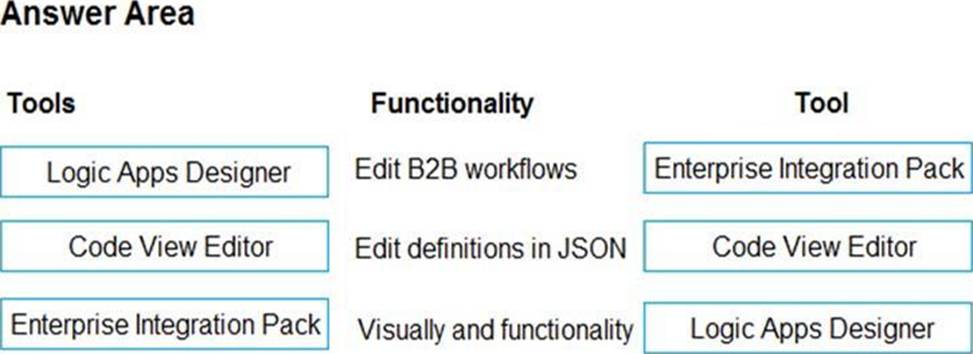
Box 1: Enterprise Integration Pack
After you create an integration account that has partners and agreements, you are ready to create a business to business (B2B) workflow for your logic app with the Enterprise Integration Pack.
Box 2: Code View Editor
To work with logic app definitions in JSON, open the Code View editor when working in the Azure portal or in Visual Studio, or copy the definition into any editor that you want.
Box 3: Logical Apps Designer
You can build your logic apps visually with the Logic Apps Designer, which is available in the Azure portal through your browser and in Visual Studio.
Reference:
https://docs.microsoft.com/en-us/azure/logic-apps/logic-apps-enterprise-integration-b2b
https://docs.microsoft.com/en-us/azure/logic-apps/logic-apps-author-definitions
https://docs.microsoft.com/en-us/azure/logic-apps/logic-apps-overview
You are developing an Azure function that connects to an Azure SQL Database instance. The function is triggered by an Azure Storage queue.
You receive reports of numerous System.InvalidOperationExceptions with the following message: “Timeout expired. The timeout period elapsed prior to obtaining a connection from the pool. This may have occurred because all pooled connections were in use and max pool size was reached.”
You need to prevent the exception.
What should you do?
- A . In the host.json file, decrease the value of the batchSize option
- B . Convert the trigger to Azure Event Hub
- C . Convert the Azure Function to the Premium plan
- D . In the function.json file, change the value of the type option to queueScaling
A
Explanation:
With the Premium plan the max outbound connections per instance is unbounded compared to the 600 active (1200 total) in a Consumption plan.
Note: The number of available connections is limited partly because a function app runs in a sandbox environment. One of the restrictions that the sandbox imposes on your code is a limit on the number of outbound connections, which is currently 600 active (1,200 total) connections per instance. When you reach this limit, the functions runtime writes the following message to the logs: Host thresholds exceeded: Connections.
Reference:
https://docs.microsoft.com/en-us/azure/azure-functions/manage-connections
https://docs.microsoft.com/en-us/azure/azure-functions/functions-scale#service-limits