
Practice Free Amazon DEA-C01 Exam Online Questions
A company needs to build an extract, transform, and load (ETL) pipeline that has separate stages for batch data ingestion, transformation, and storage. The pipeline must store the transformed data in an Amazon S3 bucket. Each stage must automatically retry failures. The pipeline must provide visibility into the success or failure of individual stages.
Which solution will meet these requirements with the LEAST operational overhead?
- A . Chain AWS Glue jobs that perform each stage together by using job triggers. Set the MaxRetries field to 0.
- B . Deploy AWS Step Functions workflows to orchestrate AWS Lambda functions that ingest data. Use AWS Glue jobs to transform the data and store the data in the S3 bucket.
- C . Build an Amazon EventBridgeCbased pipeline that invokes AWS Lambda functions to perform each stage.
- D . Schedule Apache Airflow directed acyclic graphs (DAGs) on Amazon Managed Workflows for Apache Airflow (Amazon MWAA) to orchestrate pipeline steps. Use Amazon Simple Queue Service (Amazon SQS) to ingest data. Use AWS Glue jobs to transform data and store the data in the S3 bucket.
B
Explanation:
Comprehensive and Detailed Explanation (150C250 words)
AWS Step Functions is a fully managed, serverless orchestration service designed to coordinate multiple AWS services into reliable workflows. Step Functions natively provide automatic retries, error handling, state-level visibility, and execution history, which directly satisfy the requirements for retry logic and monitoring individual pipeline stages.
In this solution, AWS Lambda functions are used for batch data ingestion, AWS Glue jobs handle transformation, and Amazon S3 is used for storage. Step Functions orchestrate these stages while maintaining clear separation of responsibilities. Each step can be configured with retry and catch policies, allowing the workflow to automatically recover from transient failures without manual intervention.
Chaining AWS Glue jobs alone does not provide detailed stage-level visibility or flexible retry control, and setting MaxRetries to 0 contradicts the retry requirement. EventBridge-based pipelines lack native workflow state tracking. Amazon MWAA introduces unnecessary operational overhead, including environment management and Airflow maintenance.
Therefore, using AWS Step Functions to orchestrate Lambda and Glue provides the most scalable, observable, and low-maintenance solution.
A company is building a data lake for a new analytics team. The company is using Amazon S3 for storage and Amazon Athena for query analysis. All data that is in Amazon S3 is in Apache Parquet format.
The company is running a new Oracle database as a source system in the company’s data center. The company has 70 tables in the Oracle database. All the tables have primary keys. Data can occasionally
change in the source system. The company wants to ingest the tables every day into the data lake.
Which solution will meet this requirement with the LEAST effort?
- A . Create an Apache Sqoop job in Amazon EMR to read the data from the Oracle database. Configure the Sqoop job to write the data to Amazon S3 in Parquet format.
- B . Create an AWS Glue connection to the Oracle database. Create an AWS Glue bookmark job to ingest the data incrementally and to write the data to Amazon S3 in Parquet format.
- C . Create an AWS Database Migration Service (AWS DMS) task for ongoing replication. Set the Oracle database as the source. Set Amazon S3 as the target. Configure the task to write the data in Parquet format.
- D . Create an Oracle database in Amazon RDS. Use AWS Database Migration Service (AWS DMS) to migrate the on-premises Oracle database to Amazon RDS. Configure triggers on the tables to invoke AWS Lambda functions to write changed records to Amazon S3 in Parquet format.
C
Explanation:
The company needs to ingest tables from an on-premises Oracle database into a data lake on Amazon S3 in Apache Parquet format. The most efficient solution, requiring the least manual effort, would be to use AWS Database Migration Service (DMS) for continuous data replication.
Option C: Create an AWS Database Migration Service (AWS DMS) task for ongoing replication. Set the Oracle database as the source. Set Amazon S3 as the target. Configure the task to write the data in Parquet format. AWS DMS can continuously replicate data from the Oracle database into Amazon S3, transforming it into Parquet format as it ingests the data. DMS simplifies the process by providing ongoing replication with minimal setup, and it automatically handles the conversion to Parquet format without requiring manual transformations or separate jobs. This option is the least effort solution since it automates both the ingestion and transformation processes.
Other options:
Option A (Apache Sqoop on EMR) involves more manual configuration and management, including setting up EMR clusters and writing Sqoop jobs.
Option B (AWS Glue bookmark job) involves configuring Glue jobs, which adds complexity. While Glue supports data transformations, DMS offers a more seamless solution for database replication.
Option D (RDS and Lambda triggers) introduces unnecessary complexity by involving RDS and Lambda for a task that DMS can handle more efficiently.
Reference: AWS Database Migration Service (DMS)
DMS S3 Target Documentation
A data engineer needs to create an AWS Lambda function that converts the format of data from .csv to Apache Parquet. The Lambda function must run only if a user uploads a .csv file to an Amazon S3 bucket.
Which solution will meet these requirements with the LEAST operational overhead?
- A . Create an S3 event notification that has an event type of s3:ObjectCreated:*. Use a filter rule to generate notifications only when the suffix includes .csv. Set the Amazon Resource Name (ARN) of the Lambda function as the destination for the event notification.
- B . Create an S3 event notification that has an event type of s3:ObjectTagging:* for objects that have a tag set to .csv. Set the Amazon Resource Name (ARN) of the Lambda function as the destination for the event notification.
- C . Create an S3 event notification that has an event type of s3:*. Use a filter rule to generate notifications only when the suffix includes .csv. Set the Amazon Resource Name (ARN) of the Lambda function as the destination for the event notification.
- D . Create an S3 event notification that has an event type of s3:ObjectCreated:*. Use a filter rule to generate notifications only when the suffix includes .csv. Set an Amazon Simple Notification Service (Amazon SNS) topic as the destination for the event notification. Subscribe the Lambda function to the SNS topic.
A
Explanation:
Option A is the correct answer because it meets the requirements with the least operational overhead. Creating an S3 event notification that has an event type of s3:ObjectCreated:* will trigger the Lambda function whenever a new object is created in the S3 bucket. Using a filter rule to generate notifications only when the suffix includes .csv will ensure that the Lambda function only runs for .csv files. Setting the ARN of the Lambda function as the destination for the event notification will directly invoke the Lambda function without any additional steps.
Option B is incorrect because it requires the user to tag the objects with .csv, which adds an extra step and increases the operational overhead.
Option C is incorrect because it uses an event type of s3:*, which will trigger the Lambda function for any S3 event, not just object creation. This could result in unnecessary invocations and increased costs.
Option D is incorrect because it involves creating and subscribing to an SNS topic, which adds an extra layer of complexity and operational overhead.
AWS Certified Data Engineer – Associate DEA-C01 Complete Study Guide, Chapter 3: Data Ingestion
and Transformation, Section 3.2: S3 Event Notifications and Lambda Functions, Pages 67-69
Building Batch Data Analytics Solutions on AWS, Module 4: Data Transformation, Lesson 4.2: AWS Lambda, Pages 4-8
AWS Documentation Overview, AWS Lambda Developer Guide, Working with AWS Lambda Functions, Configuring Function Triggers, Using AWS Lambda with Amazon S3, Pages 1-5
A data engineer has two datasets that contain sales information for multiple cities and states. One dataset is named reference, and the other dataset is named primary.
The data engineer needs a solution to determine whether a specific set of values in the city and state columns of the primary dataset exactly match the same specific values in the reference dataset. The data engineer wants to use Data Quality Definition Language (DQDL) rules in an AWS Glue Data Quality job.
Which rule will meet these requirements?
- A . DatasetMatch "reference" "city->ref_city, state->ref_state" = 1.0
- B . ReferentialIntegrity "city,state" "reference.{ref_city,ref_state}" = 1.0
- C . DatasetMatch "reference" "city->ref_city, state->ref_state" = 100
- D . ReferentialIntegrity "city,state" "reference.{ref_city,ref_state}" = 100
A
Explanation:
The DatasetMatch rule in DQDL checks for full value equivalence between mapped fields. A value of 1.0 indicates a 100% match. The correct syntax and metric for an exact match scenario are:
“Use DatasetMatch when comparing mapped fields between two datasets. The comparison score of 1.0 confirms a perfect match.”
C Ace the AWS Certified Data Engineer – Associate Certification – version 2 – apple.pdf
Options with “100” use incorrect syntax since DQDL uses floating-point scores (e.g., 1.0, 0.95), not percentages.
A data engineer needs to create an Amazon Athena table based on a subset of data from an existing Athena table named cities_world. The cities_world table contains cities that are located around the world. The data engineer must create a new table named cities_us to contain only the cities from cities_world that are located in the US.
Which SQL statement should the data engineer use to meet this requirement?
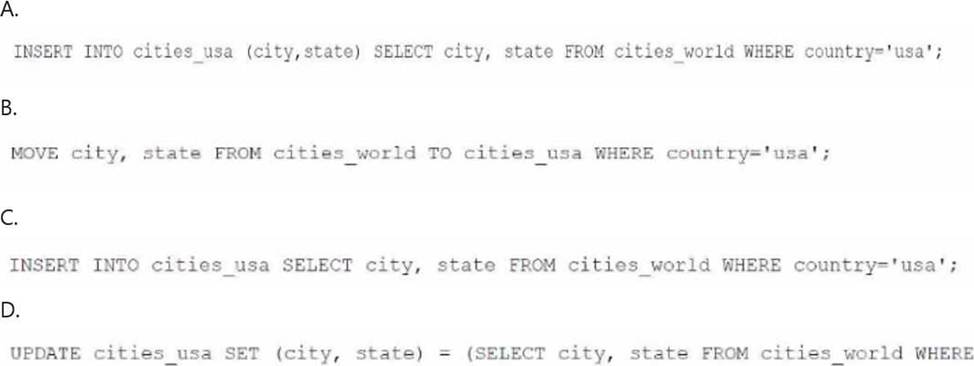
- A . Option A
- B . Option B
- C . Option C
- D . Option D
A
Explanation:
To create a new table named cities_usa in Amazon Athena based on a subset of data from the existing cities_world table, you should use an INSERT INTO statement combined with a SELECT statement to filter only the records where the country is ‘usa’.
The correct SQL syntax would be:
Option A: INSERT INTO cities_usa (city, state) SELECT city, state FROM cities_world WHERE country=’usa’;This statement inserts only the cities and states where the country column has a value of ‘usa’ from the cities_world table into the cities_usa table. This is a correct approach to create a new table with data filtered from an existing table in Athena.
Options B, C, and D are incorrect due to syntax errors or incorrect SQL usage (e.g., the MOVE command or the use of UPDATE in a non-relevant context).
Reference: Amazon Athena SQL Reference
Creating Tables in Athena
A data engineer must orchestrate a data pipeline that consists of one AWS Lambda function and one AWS Glue job. The solution must integrate with AWS services.
Which solution will meet these requirements with the LEAST management overhead?
- A . Use an AWS Step Functions workflow that includes a state machine. Configure the state machine to run the Lambda function and then the AWS Glue job.
- B . Use an Apache Airflow workflow that is deployed on an Amazon EC2 instance. Define a directed acyclic graph (DAG) in which the first task is to call the Lambda function and the second task is to call the AWS Glue job.
- C . Use an AWS Glue workflow to run the Lambda function and then the AWS Glue job.
- D . Use an Apache Airflow workflow that is deployed on Amazon Elastic Kubernetes Service (Amazon EKS). Define a directed acyclic graph (DAG) in which the first task is to call the Lambda function and
the second task is to call the AWS Glue job.
A
Explanation:
AWS Step Functions is a service that allows you to coordinate multiple AWS services into serverless workflows. You can use Step Functions to create state machines that define the sequence and logic of the tasks in your workflow. Step Functions supports various types of tasks, such as Lambda functions, AWS Glue jobs, Amazon EMR clusters, Amazon ECS tasks, etc. You can use Step Functions to monitor and troubleshoot your workflows, as well as to handle errors and retries.
Using an AWS Step Functions workflow that includes a state machine to run the Lambda function and then the AWS Glue job will meet the requirements with the least management overhead, as it leverages the serverless and managed capabilities of Step Functions. You do not need to write any code to orchestrate the tasks in your workflow, as you can use the Step Functions console or the AWS Serverless Application Model (AWS SAM) to define and deploy your state machine. You also do not need to provision or manage any servers or clusters, as Step Functions scales automatically based on the demand.
The other options are not as efficient as using an AWS Step Functions workflow. Using an Apache Airflow workflow that is deployed on an Amazon EC2 instance or on Amazon Elastic Kubernetes Service (Amazon EKS) will require more management overhead, as you will need to provision, configure, and maintain the EC2 instance or the EKS cluster, as well as the Airflow components. You will also need to write and maintain the Airflow DAGs to orchestrate the tasks in your workflow. Using an AWS Glue workflow to run the Lambda function and then the AWS Glue job will not work, as AWS Glue workflows only support AWS Glue jobs and crawlers as tasks, not Lambda functions.
Reference: AWS Step Functions
AWS Glue
AWS Certified Data Engineer – Associate DEA-C01 Complete Study Guide, Chapter 6: Data Integration
and Transformation, Section 6.3: AWS Step Functions
A company uses Amazon RDS for MySQL as the database for a critical application. The database workload is mostly writes, with a small number of reads.
A data engineer notices that the CPU utilization of the DB instance is very high. The high CPU utilization is slowing down the application. The data engineer must reduce the CPU utilization of the DB Instance.
Which actions should the data engineer take to meet this requirement? (Choose two.)
- A . Use the Performance Insights feature of Amazon RDS to identify queries that have high CPU utilization. Optimize the problematic queries.
- B . Modify the database schema to include additional tables and indexes.
- C . Reboot the RDS DB instance once each week.
- D . Upgrade to a larger instance size.
- E . Implement caching to reduce the database query load.
A,E
Explanation:
Amazon RDS is a fully managed service that provides relational databases in the cloud. Amazon RDS for MySQL is one of the supported database engines that you can use to run your applications. Amazon RDS provides various features and tools to monitor and optimize the performance of your DB instances, such as Performance Insights, Enhanced Monitoring, CloudWatch metrics and alarms, etc.
Using the Performance Insights feature of Amazon RDS to identify queries that have high CPU utilization and optimizing the problematic queries will help reduce the CPU utilization of the DB instance. Performance Insights is a feature that allows you to analyze the load on your DB instance and determine what is causing performance issues. Performance Insights collects, analyzes, and displays database performance data using an interactive dashboard. You can use Performance Insights to identify the top SQL statements, hosts, users, or processes that are consuming the most CPU resources. You can also drill down into the details of each query and see the execution plan, wait events, locks, etc. By using Performance Insights, you can pinpoint the root cause of the high CPU utilization and optimize the queries accordingly. For example, you can rewrite the queries to make them more efficient, add or remove indexes, use prepared statements, etc.
Implementing caching to reduce the database query load will also help reduce the CPU utilization of the DB instance. Caching is a technique that allows you to store frequently accessed data in a fast and
scalable storage layer, such as Amazon ElastiCache. By using caching, you can reduce the number of requests that hit your database, which in turn reduces the CPU load on your DB instance. Caching also improves the performance and availability of your application, as it reduces the latency and increases the throughput of your data access. You can use caching for various scenarios, such as storing session data, user preferences, application configuration, etc. You can also use caching for read-heavy workloads, such as displaying product details, recommendations, reviews, etc.
The other options are not as effective as using Performance Insights and caching. Modifying the database schema to include additional tables and indexes may or may not improve the CPU utilization, depending on the nature of the workload and the queries. Adding more tables and indexes may increase the complexity and overhead of the database, which may negatively affect the performance. Rebooting the RDS DB instance once each week will not reduce the CPU utilization, as it will not address the underlying cause of the high CPU load. Rebooting may also cause downtime and disruption to your application. Upgrading to a larger instance size may reduce the CPU utilization, but it will also increase the cost and complexity of your solution. Upgrading may also not be necessary if you can optimize the queries and reduce the database load by using caching.
Reference: Amazon RDS
Performance Insights
Amazon ElastiCache
[AWS Certified Data Engineer – Associate DEA-C01 Complete Study Guide], Chapter 3: Data Storage
and Management, Section 3.1: Amazon RDS
A company wants to ingest streaming data into an Amazon Redshift data warehouse from an Amazon Managed Streaming for Apache Kafka (Amazon MSK) cluster. A data engineer needs to develop a solution that provides low data access time and that optimizes storage costs.
Which solution will meet these requirements with the LEAST operational overhead?
- A . Create an external schema that maps to the MSK cluster. Create a materialized view that references the external schema to consume the streaming data from the MSK topic.
- B . Develop an AWS Glue streaming extract, transform, and load (ETL) job to process the incoming data from Amazon MSK. Load the data into Amazon S3. Use Amazon Redshift Spectrum to read the data from Amazon S3.
- C . Create an external schema that maps to the streaming data source. Create a new Amazon Redshift table that references the external schema.
- D . Create an Amazon S3 bucket. Ingest the data from Amazon MSK. Create an event-driven AWS Lambda function to load the data from the S3 bucket to a new Amazon Redshift table.
B
Explanation:
According to the guide:
“For integrating streaming data from Amazon MSK into Amazon Redshift efficiently and cost-effectively, AWS Glue streaming jobs can process and transform the data, storing it in Amazon S3. Amazon Redshift Spectrum can then directly query the data from S3, minimizing operational overhead and reducing storage costs.”
C Ace the AWS Certified Data Engineer – Associate Certification – version 2 – apple.pdf This setup offers:
Low latency via Glue streaming.
Low storage cost by using Parquet/ORC on S3.
Minimal operational overhead by avoiding complex pipelines or constantly updated materialized views.
A company uses Amazon S3 as a data lake. The company sets up a data warehouse by using a multi-node Amazon Redshift cluster. The company organizes the data files in the data lake based on the data source of each data file.
The company loads all the data files into one table in the Redshift cluster by using a separate COPY command for each data file location. This approach takes a long time to load all the data files into the table. The company must increase the speed of the data ingestion. The company does not want to increase the cost of the process.
Which solution will meet these requirements?
- A . Use a provisioned Amazon EMR cluster to copy all the data files into one folder. Use a COPY command to load the data into Amazon Redshift.
- B . Load all the data files in parallel into Amazon Aurora. Run an AWS Glue job to load the data into Amazon Redshift.
- C . Use an AWS Glue job to copy all the data files into one folder. Use a COPY command to load the data into Amazon Redshift.
- D . Create a manifest file that contains the data file locations. Use a COPY command to load the data into Amazon Redshift.
D
Explanation:
The company is facing performance issues loading data into Amazon Redshift because it is issuing separate COPY commands for each data file location. The most efficient way to increase the speed of data ingestion into Redshift without increasing the cost is to use a manifest file.
Option D: Create a manifest file that contains the data file locations. Use a COPY command to load the data into Amazon Redshift. A manifest file provides a list of all the data files, allowing the COPY command to load all files in parallel from different locations in Amazon S3. This significantly improves the loading speed without adding costs, as it optimizes the data loading process in a single COPY operation.
Other options (A, B, C) involve additional steps that would either increase the cost (provisioning clusters, using Glue, etc.) or do not address the core issue of needing a unified and efficient COPY process.
Reference: Amazon Redshift COPY Command
Redshift Manifest File Documentation
A data engineer needs to optimize the performance of a data pipeline that handles retail orders. Data about the orders is ingested daily into an Amazon S3 bucket.
The data engineer runs queries once each week to extract metrics from the orders data based on the order date for multiple date ranges. The data engineer needs an optimization solution that ensures the query performance will not degrade when the volume of data increases.
- A . Partition the data based on order date. Use Amazon Athena to query the data.
- B . Partition the data based on order date. Use Amazon Redshift to query the data.
- C . Partition the data based on load date. Use Amazon EMR to query the data.
- D . Partition the data based on load date. Use Amazon Aurora to query the data.
A
Explanation:
For query workloads on S3 data that depend on date-based filters, partitioning by order date optimizes performance and cost because Athena reads only the relevant partitions.
Athena scales automatically and doesn’t degrade with increasing data size when partitions are managed efficiently.
“Partitioning data in Amazon S3 based on query predicates such as order date improves Athena query performance and reduces scanned data volume.”
C Ace the AWS Certified Data Engineer – Associate Certification – version 2 – apple.pdf This is the most cost-effective and scalable option for date-based queries.