
Practice Free 3V0-24.25 Exam Online Questions
An administrator is maintaining several Kubernetes clusters deployed through a Supervisor Namespace in a vSphere Kubernetes Service environment. One of the micro-services (a containerized API gateway) is failing intermittently after a recent configuration update. The pod is entering aCrashLoopBackOffstate. The administrator needs to collect detailed runtime information directly from the pod, including both the standard output (STDOUT) and standard error (STDERR)streams, to analyze the application’s behavior before the crash.
Which command produces the required output?
- A . kubectl describe
- B . kubectl get all
- C . kubectl events
- D . kubectl logs
D
Explanation:
When a container repeatedly crashes (CrashLoopBackOff), the most direct way to capture what the application emitted right before termination is to retrieve the container logs. In Kubernetes, application output written toSTDOUTandSTDERRis captured by the container runtime logging mechanism and exposed through the Kubernetes API for retrieval. The kubectl logs command is designed specifically for this purpose: it fetches the log stream for a pod (and container, if multiple exist), allowing administrators to review the runtime messages that typically explain configuration errors, missing dependencies, failed probes, authentication problems, or other causes of the crash loop. This aligns with VMware operational guidance that uses kubectl to retrieve pod-level operational information and logs as part of troubleshooting Kubernetes functionality running on vSphere.
An architect is working on the data protection design for a VMware Cloud Foundation (VCF) solution. The solution consists of a single Workload Domain that has vSphere Supervisor activated. During a customer workshop, the customer requested that vSphere Pods must be used for a number of third-party applications that have to be protected via backup.
Which backup method or tool should be proposed by the architect to satisfy this requirement?
- A . Standalone Velero with Restic.
- B . vCenter file-based backup.
- C . Velero Plugin for vSphere.
- D . vSAN Snapshots.
C
Explanation:
VCF 9.0 distinguishes between backing up the Supervisor control plane and backing up workloads that run on the Supervisor, including vSphere Pods. In the “Considerations for Backing Up and Restoring Workload Management” table, the scenario “Backup and restore vSphere Pods” explicitly lists the required tool as “Velero Plugin for vSphere”, with the guidance to “Install and configure the plug-in on the Supervisor.”
The same document is explicit that standalone Velero with Restic is not valid for vSphere Pods, stating: “You cannot use Velero standalone with Restic to backup and restore vSphere Pods. You must use the Velero Plugin for vSphere installed on the Supervisor.”
vCenter file-based backup is documented for restoring the Supervisor control plane state, not for backing up and restoring vSphere Pod workloads themselves. Therefore, to meet the requirement to protect third-party applications running as vSphere Pods, the architect should propose the Velero Plugin for vSphere.
Which two types of Kubernetes member objects can be used when creating groups to collect and manage objects for service-level networking/security policies (for example, in a service mesh or Kubernetes-aware policy model)? (Choose two.)
- A . Node
- B . Cluster
- C . Service
- D . Security
- E . API
A C
Explanation:
When you build Kubernetes-aware policy constructs, “groups” are commonly used to collect objects so you can apply consistent controls (security posture, traffic rules, observability scope, etc.) to a set of endpoints. In VCF 9.0 documentation, the Kubernetes member types that can be used for group-based collection includeKubernetes NodeandKubernetes Serviceas supported member object categories. Nodes represent the worker compute endpoints that run workloads, while Services represent stable networking front-ends for sets of pods (and are often the anchoring object for policy and routing decisions at the Kubernetes layer). Using Node-based grouping helps apply policies to the infrastructure execution points where workloads run, and Service-based grouping helps apply policies consistently to application entry points and east-west communication targets, regardless of pod churn. This combination is especially useful in Kubernetes-centric operational models because it aligns policy scope with both (1) where workloads execute (nodes) and (2) how workloads are exposed and discovered (services).
An administrator runs several critical workloads on vSphere Kubernetes Service (VKS). An audit identified an outdated container image with a known CVE that exposed internal APIs to unauthorized access. To mitigate this risk and enhance image security, the administrator enabled Harbor as a Supervisor Service.
Which two Harbor registry capabilities help the organization prevent a recurrence of this type of security incident? (Choose two.)
- A . Image signing
- B . Automatic image update
- C . Deploy both container and virtual machine images
- D . Automatic image validation
- E . Vulnerability scanning
A E
Explanation:
Harbor reduces the risk of running vulnerable or tampered images primarily through vulnerability scanningandimage signing. Vulnerability scanning (E)detects known CVEs in image layers (OS packages and application dependencies, depending on the scanner configuration). This allows teams to identify―and gate the use of―images that contain high/critical vulnerabilities before those images are deployed to Kubernetes clusters. Enforcing scanning as part of the image promotion process helps prevent outdated images with known CVEs from being pulled into production. Image signing (A)provides integrity and provenance controls by enabling consumers to verify that an image was produced and approved by a trusted publisher and has not been altered. When combined with admission controls/policies (for example, only allowing signed images from specific projects), signing helps block unauthorized or unapproved images from being deployed, which is critical when the incident involves exposed internal APIs and supply-chain risk.
The other choices do not directly prevent recurrence: automatic image update (B)is not a core Harbor registry control, deploy both container and VM images (C)is a content capability rather than a security control, and automatic image validation (D)is not a standard Harbor registry capability distinct from signing/scanning.
An administrator is tasked with enabling a Supervisor cluster in VMware Cloud Foundation (VCF).
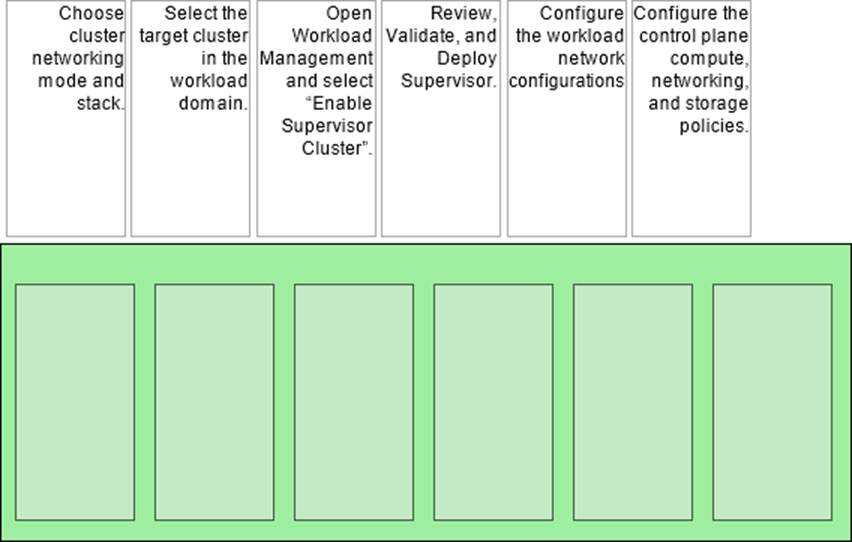
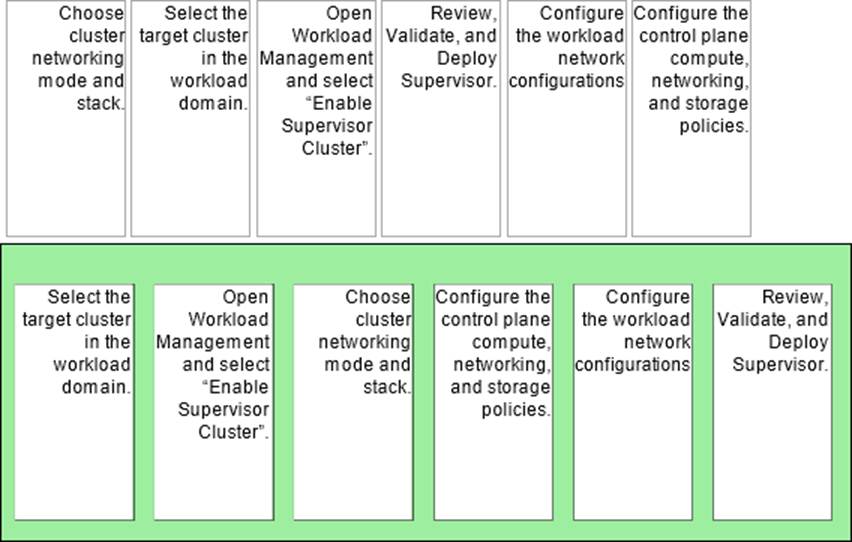
Arrange the steps below In the correct order to complete the process of enabling a Supervisor In the environment.
Explanation:
Answer (Correct Order):
Select the target cluster in the workload domain.
Open Workload Management and select “Enable Supervisor Cluster”.
Choose cluster networking mode and stack.
Configure the control plane compute, networking, and storage policies.
Configure the workload network configurations.
Review, Validate, and Deploy Supervisor.
You start by selecting the exact vSphere cluster (in the workload domain) that will host the Supervisor, because Supervisor enablement is performed against a specific cluster. From there you launch the enablement workflow inWorkload Management (“Enable Supervisor Cluster”). Early in the wizard you must decide the networking mode (for example, VDS-based vs NSX-backed) and the IP stack, because those choices drive the remaining configuration screens and what inputs are required. Next you define the Supervisor control plane settings―compute sizing and the core policies the Supervisor will use (including storage policy selections and related defaults). After the control plane foundation is defined, you configure theworkload networkingused by namespaces and Kubernetes workloads (IP ranges, routing/LB integration depending on the selected mode). Finally, youreview/validateall inputs anddeployso the platform can create and configure the Supervisor control plane and supporting components.
An administrator is tasked with making an existing vSphere Supervisor highly available by adding two additional vSphere Zones.
How should the administrator perform this task?
- A . You cannot add an existing Supervisor to a new vSphere Zone.
- B . Create a new multi-zone deployment and assign an existing vSphere cluster to it.
- C . Create a new vSphere Zone and add the Supervisor to the new vSphere Zone.
- D . Select Configure, select vSphere Zones, and click Add New vSphere Zone.
A
Explanation:
In VMware Cloud Foundation 9.0 and vSphere Supervisor architectures, the decision to deploy a Single-Zone or a Multi-Zone Supervisor is made at the time of initial enablement. A Single-Zone Supervisor is tied to a specific vSphere Cluster. A Multi-Zone Supervisor requires a minimum of three vSphere Zones (each mapped to a cluster) to be defined before the Supervisor is deployed so that the Control Plane VMs can be distributed for high availability.
Currently, there is no supported "in-place" migration path to convert a deployed Single-Zone Supervisor into a Multi-Zone Supervisor by simply adding zones later. If an organization requires the high availability provided by a three-zone architecture, the administrator must decommission the existing Single-Zone Supervisor and then re-enable the Supervisor Service using the Multi-Zone configuration wizard. This design ensures that the underlying Kubernetes Control Plane components are correctly instantiated with the necessary quorum and anti-affinity rules that can only be established during the initial "Workload Management" setup phase.
What are three benefits of VMware vSphere Kubernetes Service (VKS)? (Choose three.)
- A . Simplifies Kubernetes management and operations.
- B . Provides consistent Kubernetes deployment on vSphere.
- C . Manages any Kubernetes distribution.
- D . Leverages open-source technologies.
- E . Enables pods to run directly on ESXi.
A B D
Explanation:
VCF 9.0 defines VKS as an upstream Kubernetes offering that isbuilt for vSphereand delivered with “well-thought-out defaults” to reduce operational burden. It states VKS provides an“opinionated installation of Kubernetes”with defaults “optimized for vSphere,” which “reduce[s] the amount of time and effort” typically spent deploying and running an enterprise Kubernetes cluster―this directly supportssimplified management and operations (A).
VCF 9.0 also emphasizes VKS is“integrated with the vSphere infrastructure” (storage, networking, authentication) and is built on a Supervisor that maps to vSphere clusters, creating a “unified product experience.” This supportsconsistent Kubernetes deployment on vSphere (B)because clusters are provisioned and operated in a standardized, vSphere-native way.
Finally, VCF 9.0 states VKS clusters “use open source Linux-based” components from VMware by Broadcom and notes key integrations (for example, CNI options) are open source―supportingleveraging open-source technologies (D).
OptionsCandEare not VKS benefits as stated: VKS targets VKS-provisioned upstream Kubernetes clusters (not “any distribution”), and “pods directly on ESXi” is described asvSphere Pods(Workload Management), not a defining benefit of VKS clusters.
An administrator is configuring the Supervisor Service in vCenter.
Click the option an administrator uses to begin creating a vSphere Supervisor Zone.


Explanation:
Hosts and Clusters
To create avSphere Zone (used as a Supervisor Management Zone and/or Workload Zone), the administrator must start from the vSphere Client inventory wherevCenterand its clusters are managed. That’s why the correct starting point in the “Inventories” toolbar isHosts and Clusters―it is the entry point used to select the vCenter object and the target clusters.
VCF 9.0 documents the zone-creation workflow as:navigate to vCenter, thenSelect Configure, thenselect vSphere Zones, and finally clickAdd New vSphere Zone. After naming the zone, youselect a vSphere cluster to add to the zoneand finish the wizard.
This sequence matches the intent of the hotspot: you must first open the inventory view that exposes vCenter and clusters (Hosts and Clusters), then perform the configuration steps under vCenter to define vSphere Zones. Once created, these zones can later be selected during Supervisor deployment (for multi-zone placement) or assigned to namespaces for workload placement.
The DevOps engineer deployed a new application to a vSphere Kubernetes Service (VKS) cluster in a vSphere Namespace and then determined that a newer Kubernetes version was required. The vSphere administrator verified compatibility between the Supervisor and all running VKS clusters and successfully updated the vSphere Supervisor to the latest version. After the Supervisor update, the DevOps engineer still could not get the application to work.
What caused the application to fail?
- A . The vSphere administrator updated the Supervisor control plane.
- B . The vSphere administrator failed to complete all the pre-checks before the update.
- C . The vSphere administrator did everything correctly and the DevOps engineer deployed the application incorrectly.
- D . The vSphere administrator pulled the wrong version of the Supervisor.
A
Explanation:
In Workload Management, updating the Supervisor and updating VKS clusters are related but distinct lifecycle operations. The Supervisor runs its own Kubernetes distribution, while VKS clusters consume vSphere Kubernetes releases (VKrs). These are “delivered differently,” with Supervisor Kubernetes releases and VKrs each having their own release cadence and compatibility constraints. As a result, successfully updating the Supervisor control plane does not automatically change the Kubernetes version running inside an existing VKS workload cluster; the VKS cluster must be updated to a compatible VKr separately. This mismatch is exactly why an application can still fail after a Supervisor update: the DevOps engineer is still deploying onto a cluster that hasn’t been updated to the Kubernetes version required by the application (or by the API versions/features it depends on). Additionally, Workload Management enforces sequential minor-version updates and compatibility checks between Supervisor and VKrs, so the correct remediation is to update the VKS cluster to an appropriate VKr that satisfies both application needs and Supervisor compatibility.