Practice Free 3V0-21.25 Exam Online Questions
HOTSPOT
An administrator clicks on Orchestrator to create a workflow in a VM Apps organization as shown.
Where would the administrator go next to enable Orchestrator?

Infrastructure (tab)
In VMware Cloud Foundation (VCF) 9.0, the VCF Operations Orchestrator (formerly vRealize Orchestrator) is a separate functional engine that must be explicitly integrated into the automation framework. When an administrator selects the Orchestrator tab and encounters the warning message "No VCF Operations Orchestrator integration available," it indicates that the logical link between the Automation service and the Orchestrator appliance has not yet been established for that specific organization.
The standard administrative workflow to resolve this and enable extensibility is to move from the consumption/design view into the foundational infrastructure configuration. By clicking on the Infrastructure tab, the administrator gains access to global settings. From there, the administrator must navigate to Connections and then Integrations. Within the Integrations menu, the administrator can select "Add Integration" and specifically choose VCF Operations Orchestrator. This process requires providing the FQDN of the orchestrator server and appropriate service account credentials. Once the integration is finalized and a successful data collection occurs, the portal’s Orchestrator interface becomes functional, allowing users to build, run, and manage multi-cloud automation workflows across the VCF 9.0 fleet.
An administrator is responsible for managing a VMware Cloud Foundation (VCF) fleet and the administrator has been tasked with the following:
• Create DNS records before each virtual machine (VM) is deployed using VCF Automation. The administrator has already completed the following tasks:
• Created two VCF Operations Orchestrator Workflows with corresponding Event Subscriptions: Create DNS Record Delete DNS Record
• Created a new blueprint to deploy a VM:
Added two string inputs, hostname and domainName
Added hostname: ‘${input.hostname}’ as a custom property of the Virtual Machine resource.
Added domainName: ‘${input.domainName}’ as a custom property of the Virtual Machine resource.
What should the administrator configure within the Event subscription to ensure that the DNS record is only created when the hostname is provided?
- A . Add the Delete DNS Record workflow as the Recovery Workflow of the Create DNS Record subscription.
- B . Add the event.data.customproperties[‘domainName’] != null condition to the Create DNS Record and Delete DNS Record subscriptions.
- C . Add the event.data.customproperties[‘hostname’] != null condition to the Create DNS Record and Delete DNS Record subscriptions.
- D . Enable the Block execution of events in topic option in the Create DNS Record and Delete DNS Record subscriptions.
C
Explanation:
VCF Automation 9.0 utilizes an Event Broker Service (EBS) to trigger extensibility workflows during the lifecycle of a deployment. For a DNS integration to function correctly and reliably, the event subscription must be "scoped" to prevent it from firing when essential metadata is missing. In this scenario, the administrator has mapped the user input hostname to a custom property of the virtual machine. By adding the condition event.data.customproperties[‘hostname’] != null to the subscription, the platform evaluates the payload before invoking the Operations Orchestrator workflow. If the consumer leaves the hostname field empty (assuming it is not marked as mandatory in the blueprint), the condition will evaluate to false, and the DNS creation workflow will not be triggered, preventing "empty" or invalid records from being sent to the DNS provider. This logic must be applied to both the creation and deletion subscriptions to maintain parity throughout the VM’s lifecycle. Using the customproperties array within the event.data payload is the standard method for referencing blueprint-specific inputs within the VCF 9.0 extensibility framework.
An organization uses a centralized external Configuration Management Database (CMDB) to track all infrastructure assets. Currently, when a new virtual machine (VM) is provisioned through VMware Cloud Foundation (VCF) Automation, operations teams are required to manually input associated metadata into the CMDB.
An administrator is tasked with reducing the manual effort and increasing efficiency of this process using VCF Automation.
Which three of the following can VCF Automation perform? (Choose three.)
- A . Create a new event topic that creates a notification upon successful VM provisioning.
- B . Create a webhook endpoint on VCF with payload containing the required metadata.
- C . Call a webhook endpoint on the CMDB API with payload containing the required metadata.
- D . Configure a subscription that reacts to VM provisioning requests.
- E . Request additional metadata as input during the deployment of the blueprint.
C, D, E
Explanation:
To automate CMDB updates in VCF 9.0, administrators leverage the Event Broker Service (EBS) and Custom Forms. First, the administrator can Request additional metadata as input during the blueprint request. This ensures that unique information, such as "Cost Center" or "Application ID," is captured directly from the user at request time. Second, the admin must Configure a subscription that specifically listens for the "Post-Provisioning" event topic. This subscription acts as the trigger for the automation logic. Finally, the subscription invokes an ABX action or Orchestrator workflow that is programmed to Call a webhook endpoint on the CMDB API. This call sends a JSON payload containing both the system-generated metadata (e.g., VM UUID, IP address) and the user-provided inputs directly to the CMDB. This "closed-loop" automation eliminates manual data entry, reduces human error, and ensures that the asset repository is updated in real-time as soon as the infrastructure is live.
The administrator is tasked with configuring hard tenancy in VMware Cloud Foundation (VCF) Automation.
Which statement reflects how multi-tenancy is configured?
- A . VMApps organizations enable hard tenancy within VCF Automation.
- B . VCF Automation 9 does not support multi-tenancy. That’s on the roadmap for VCFA 10.
- C . Namespaces enable hard tenancy within VCF Automation.
- D . Namespace Classes enable hard tenancy construct within VCF Automation.
- E . AIIApps organizations enable hard tenancy within VCF Automation.
E
Explanation:
In VMware Cloud Foundation 9.0, the "AllApps" (often noted as AIIApps) organization model is the definitive architectural construct for implementing hard tenancy. While the platform supports several organization types, including the "classic" VMApps model, the AIIApps organization leverages the deeper integration of the vSphere Supervisor and NSX Virtual Private Clouds (VPCs) to provide true logical and administrative isolation. This hard tenancy model allows a provider to carve out specific regions of infrastructure where the tenant has a completely isolated control plane, private networking via VPCs, and dedicated resource quotas. Unlike shared namespace models, an AIIApps organization acts as a self-contained "cloud" for the consumer, ensuring that developer activities, network policies, and resource consumption in one organization cannot impact another. This is critical for regulated industries or large enterprises requiring strict segregation between business units. The configuration is managed through the Provider Management Portal, where the provider administrator maps physical infrastructure (via Regions) to these tenant organizations, establishing the "hard" boundary that defines the tenancy.
The administrator is tasked with configuring hard tenancy in VMware Cloud Foundation (VCF) Automation.
Which statement reflects how multi-tenancy is configured?
- A . VMApps organizations enable hard tenancy within VCF Automation.
- B . VCF Automation 9 does not support multi-tenancy. That’s on the roadmap for VCFA 10.
- C . Namespaces enable hard tenancy within VCF Automation.
- D . Namespace Classes enable hard tenancy construct within VCF Automation.
- E . AIIApps organizations enable hard tenancy within VCF Automation.
E
Explanation:
In VMware Cloud Foundation 9.0, the "AllApps" (often noted as AIIApps) organization model is the definitive architectural construct for implementing hard tenancy. While the platform supports several organization types, including the "classic" VMApps model, the AIIApps organization leverages the deeper integration of the vSphere Supervisor and NSX Virtual Private Clouds (VPCs) to provide true logical and administrative isolation. This hard tenancy model allows a provider to carve out specific regions of infrastructure where the tenant has a completely isolated control plane, private networking via VPCs, and dedicated resource quotas. Unlike shared namespace models, an AIIApps organization acts as a self-contained "cloud" for the consumer, ensuring that developer activities, network policies, and resource consumption in one organization cannot impact another. This is critical for regulated industries or large enterprises requiring strict segregation between business units. The configuration is managed through the Provider Management Portal, where the provider administrator maps physical infrastructure (via Regions) to these tenant organizations, establishing the "hard" boundary that defines the tenancy.
An organization uses VMware Cloud Foundation (VCF) and requires the following across the private cloud environment:
• monitor IP space utilization.
• detect network anomalies.
• enforce consistent network policies.
What three capabilities are required? (Choose three.)
- A . NSX Traceflows
- B . Integrated Security with VCF Operations
- C . vDefend
- D . VCF Operations lifecycle management
- E . NSX Subnetting
A, B, C
Explanation:
To meet the comprehensive requirements of monitoring, anomaly detection, and policy enforcement in VCF 9.0, a combination of integrated networking and security tools is used. NSX Traceflows provide the deep visibility needed to monitor IP space utilization and troubleshoot connectivity at the packet level, allowing administrators to visualize the path traffic takes through the virtual and physical fabric. Integrated Security with VCF Operations (formerly part of the Aria suite) provides the management dashboard for detecting network anomalies by correlating flow data and identifying traffic patterns that deviate from established baselines. Finally, vDefend (the integrated NSX security stack) is essential for enforcing consistent network policies through distributed firewalls (DFW), gateway firewalls, and IDS/IPS capabilities. Together, these three capabilities ensure that the VCF environment remains secure, transparent, and compliant with corporate governance standards, providing the "closed-loop" operational model required for modern private clouds.
An administrator has been tasked to provide workload storage that remains available even if one zone in a three-zone Supervisor cluster fails.
Which action must the VMware Cloud Foundation (VCF) Automation administrator take to meet this requirement?
- A . Attach a Supervisor-based, topology-aware Storage Class to the organization.
- B . Create a new Cloud Zone that uses a RAID 1-enabled vSphere storage policy and assign it to the
organization. - C . Export the Supervisor configuration from another region that utilizes vSAN-backed replicated storage.
- D . Increase the organization’s storage quota so that workloads can use additional capacity for replicas.
A
Explanation:
In a multi-zone Supervisor cluster environment in VCF 9.0, achieving high availability across zone failures requires the use of topology-aware storage. Standard storage classes do not inherently understand the physical boundaries of vSphere zones. By attaching a Supervisor-based, topology-aware Storage Class to the organization, the administrator enables the underlying vSAN or SPBM (Storage Policy Based Management) to intelligently replicate data across those zones. When a workload is deployed using this storage class, the system ensures that components (such as vSphere Pod disks or VMDKs) are distributed such that at least one copy of the data remains accessible in a surviving zone if another zone goes offline. This is a critical design element for maintaining the "Three-Tier" architecture’s stateful components, as it prevents a single-zone failure from causing a total data loss or application outage. While RAID policies (Option B) handle disk or host failures, only topology-awareness at the Storage Class level can properly mitigate a complete zone-level failure within the VCF Automation framework.
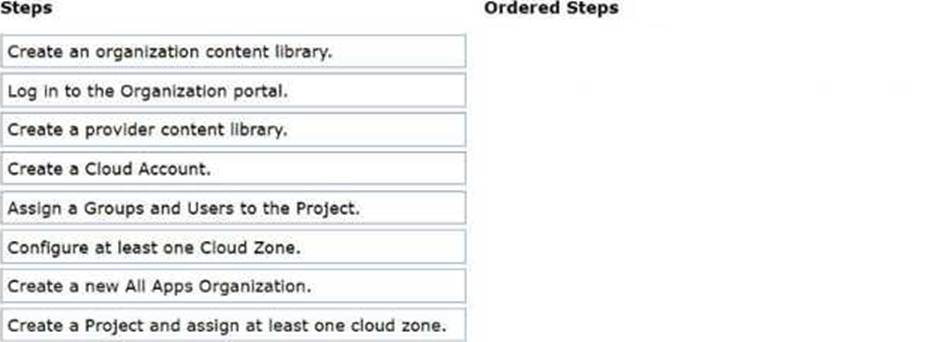
DRAG DROP
An administrator has been tasked with creating a provider content library.
The following requirements must be satisfied:
The content library must be configured as a local content library.
The content library must be associated with the region called West.
Select the four steps involved in configuring the provider content library. (Choose four.)

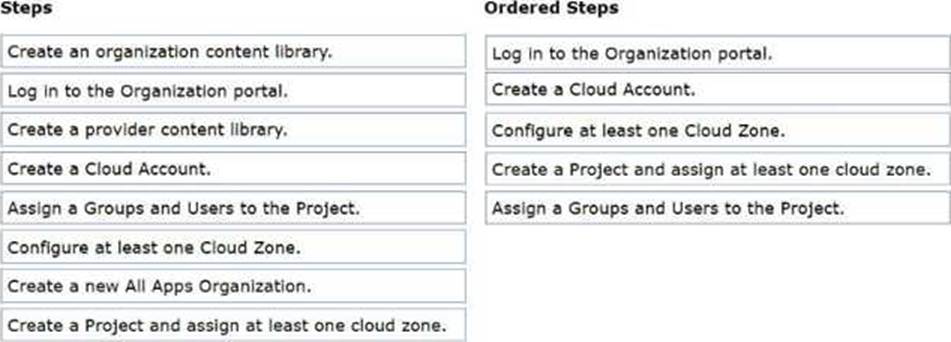
Explanation:
Log into the Provider Management Portal.
Click CREATE CONTENT LIBRARY.
Specify the region called West.
Ensure Subscribe to an external library is disabled.
In VMware Cloud Foundation (VCF) 9.0, the Provider Management Portal is the centralized interface used by cloud providers to manage global infrastructure and shared resources across the entire fleet.
To satisfy the requirements:
Administrative Context: The task of creating global resources like a provider-level content library is a "Day 0/1" infrastructure task, which must be performed in the Provider Management Portal rather than a tenant-specific Organization Portal.
Regional Association: VCF 9.0 uses Regions to logically group underlying vSphere and NSX resources. Associating the library with the West region ensures that the templates and ISOs within that library are specifically available for workloads deployed into that regional infrastructure.
Local vs. Subscribed: A Local Content Library is one where the provider directly uploads and manages the content. The requirement specifies a local configuration; therefore, the option to Subscribe to an external library must be disabled. If it were enabled, the library would instead attempt to synchronize content from a remote URL (such as a public VMware repository or another VCF instance).
Once created, this library acts as a "golden repository" that the provider can then share with multiple tenant organizations, ensuring consistency across the private cloud fleet.
DRAG DROP
An administrator has been tasked with creating a provider content library.
The following requirements must be satisfied:
The content library must be configured as a local content library.
The content library must be associated with the region called West.
Select the four steps involved in configuring the provider content library. (Choose four.)

Explanation:
Log into the Provider Management Portal.
Click CREATE CONTENT LIBRARY.
Specify the region called West.
Ensure Subscribe to an external library is disabled.
In VMware Cloud Foundation (VCF) 9.0, the Provider Management Portal is the centralized interface used by cloud providers to manage global infrastructure and shared resources across the entire fleet.
To satisfy the requirements:
Administrative Context: The task of creating global resources like a provider-level content library is a "Day 0/1" infrastructure task, which must be performed in the Provider Management Portal rather than a tenant-specific Organization Portal.
Regional Association: VCF 9.0 uses Regions to logically group underlying vSphere and NSX resources. Associating the library with the West region ensures that the templates and ISOs within that library are specifically available for workloads deployed into that regional infrastructure.
Local vs. Subscribed: A Local Content Library is one where the provider directly uploads and manages the content. The requirement specifies a local configuration; therefore, the option to Subscribe to an external library must be disabled. If it were enabled, the library would instead attempt to synchronize content from a remote URL (such as a public VMware repository or another VCF instance).
Once created, this library acts as a "golden repository" that the provider can then share with multiple tenant organizations, ensuring consistency across the private cloud fleet.
A Provider administrator received a technical requirement mandating the use of Identity Providers (IdP) in place of local accounts.
The following requirements were defined:
• The source directory service must be different between the Provider Management Portal and Organizations.
• The Organization administrators cannot modify the identity provider configuration.
What two requirements should the administrator configure? (Choose two.)
- A . Deploy an Identity Broker cluster per organization.
- B . Setup custom LDAP service configuration per organization.
- C . Push the VCF Automation system LDAP service to all organizations.
- D . Configure and publish a custom organization role for all organizations.
- E . Ensure that "Do not use LDAP" is configured for each organization’s SSO.
A, E
Explanation:
VCF 9.0 Automation uses a decentralized identity architecture to support complex multi-tenant requirements. To ensure that the Provider Management Portal and Organizations use different source directories (e.g., the provider uses a management AD while tenants use their own OIDC/SAML IdPs), the administrator must Deploy an Identity Broker cluster per organization. The Identity Broker acts as the localized gateway for authentication for that specific tenant. To prevent Organization administrators from modifying these settings―satisfying the second requirement―the provider must Ensure that "Do not use LDAP" is configured for the organization’s standard SSO settings. This configuration forces the organization to rely exclusively on the broker-mediated IdP managed at the provider level, effectively "locking" the identity configuration and preventing local tenant admins from reverting to a manual LDAP setup that might bypass corporate security policies or the centralized identity strategy.