
Practice Free 305-300 Exam Online Questions
In which scenarios would Vagrant be most beneficial for developers?
- A . When managing network infrastructure
- B . When deploying applications to the cloud
- C . When working on large-scale production environments
- D . When developing and testing applications locally
D
Explanation:
Vagrant is a tool designed to simplify the creation and management of reproducible development environments. According to virtualization and containerization documentation, Vagrant is most beneficial when developing and testing applications locally. It allows developers to define virtual machine configurations using a declarative configuration file, ensuring consistent environments across development teams.
Vagrant integrates with virtualization providers such as VirtualBox, KVM, and VMware, enabling developers to spin up lightweight, disposable virtual machines that closely mirror production environments. This reduces the common “works on my machine” problem by standardizing development setups.
Vagrant is not intended for managing network infrastructure, large-scale production environments, or direct cloud deployments. While it can interface with cloud providers, its primary use case remains local development and testing, not production operations.
Virtualization notes emphasize that Vagrant is a developer-focused tool that complements infrastructure automation tools rather than replacing them. Therefore, option D accurately reflects Vagrant’s most appropriate and documented use case.
What is libvirt?
- A . A virtualization management API.
- B . A Linux distribution
- C . A virtualization technology
- D . A hardware virtualization platform
A
Explanation:
Libvirt is a virtualization management API, toolkit, and set of command-line utilities designed to manage virtualization platforms in a consistent and secure manner. According to official virtualization and containerization documentation, libvirt provides a common interface for interacting with multiple hypervisors such as KVM, QEMU, Xen, VMware ESXi, and Hyper-V, abstracting their underlying differences.
Libvirt itself is not a virtualization technology or hypervisor; rather, it acts as a management layer between administrators or orchestration tools and the hypervisor. It enables tasks such as creating, starting, stopping, pausing, migrating, and monitoring virtual machines. Tools like virsh and virt-manager rely on libvirt to perform virtualization operations.
One of libvirt’s key strengths is its focus on security and isolation. It integrates with Linux security frameworks such as SELinux and AppArmor, enforcing mandatory access controls on virtual machines. Libvirt also supports remote management using secure protocols, making it suitable for enterprise and cloud environments.
In virtualization documentation, libvirt is described as a foundational component for Infrastructure as Code and automation, commonly used with tools like Ansible, OpenStack, and Kubernetes (via KVM). Its standardized API simplifies virtualization management while ensuring portability, scalability, and compliance with best practices.
Xen is a:
- A . Type 2 hypervisor
- B . Type 1 hypervisor
- C . Application virtualization platform
- D . Virtualization management tool
B
Explanation:
Xen is classified as a Type 1 (bare-metal) hypervisor, meaning it runs directly on the system hardware rather than on top of a host operating system. Virtualization documentation defines Type 1 hypervisors as having direct control over CPU, memory, and hardware resources, providing better performance and stronger isolation compared to Type 2 hypervisors.
In a Xen-based system, the hypervisor is loaded first during boot. A privileged management domain, known as Domain 0 (Dom0), is then started to manage hardware access and virtual machine lifecycle operations. This architecture clearly differentiates Xen from hosted (Type 2) hypervisors such as VirtualBox.
Xen is not merely a management tool or application virtualization platform; it is a full hypervisor used in enterprise, cloud, and service provider environments. Therefore, the correct answer is B.
Which of the following statements is true regarding the following output of xl list:
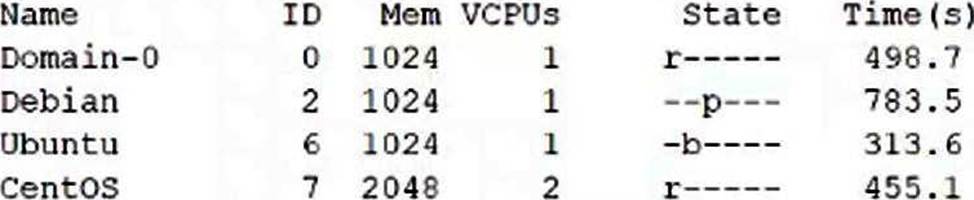
- A . Both Debian and Ubuntu require xl commands to start running.
- B . The domain with ID 2 uses Para virtualization.
- C . CentOS is the domain which has consumed the most CPU time.
- D . Ubuntu is idle or waiting for I/O.
- E . It is necessary to use the xl command to change Ubuntu’s state to running.
D
Explanation:
The output of xl list shows the state of the domains. The domain with ID 6, Ubuntu, has a state of “b―”. This means that the domain is blocked, which means it is idle or waiting for I/O.
https://xenbits.xen.org/docs/unstable/man/xl.1.html
Which utility is used to create and manage virtual machine disk images in Linux?
- A . Disk utility
- B . VirtualBox Manager
- C . Libvirt Disk Manager
- D . qemu-img
D
Explanation:
In Linux-based virtualization environments, qemu-img is the standard utility used to create, convert, inspect, and manage virtual machine disk images. Virtualization and containerization documentation clearly identifies qemu-img as a core component of the QEMU/KVM virtualization stack. It supports multiple disk image formats such as RAW, QCOW2, VMDK, and VHD, making it highly versatile across different hypervisors and platforms.
The qemu-img tool allows administrators to perform critical disk operations, including creating new disk images, resizing existing images, converting between formats, and checking disk integrity. For example, it is commonly used to create QCOW2 images, which support advanced features like copy-on-write, snapshots, and compression.
Other options listed are incorrect because Disk Utility is a general-purpose storage management tool, VirtualBox Manager is specific to Oracle VirtualBox, and Libvirt Disk Manager is not a recognized standalone utility. Libvirt relies on qemu-img internally for disk image handling.
Official virtualization notes consistently reference qemu-img as the primary disk image management tool in Linux virtualization environments, especially when working with KVM and libvirt-based systems.
Which virtualization platforms can Vagrant be used with? (Select all that apply)
- A . Docker
- B . VMware
- C . VirtualBox
- D . Haws
A, B, C
Explanation:
Vagrant supports multiple providers, allowing it to work with different virtualization and container platforms. According to official Vagrant documentation, supported providers include VirtualBox, VMware, and Docker.
VirtualBox is the default and most commonly used provider. VMware is supported through official plugins. Docker is also supported as a provider, enabling lightweight container-based development environments.
Option D (“Haws”) is an apparent typographical error and does not correspond to a valid virtualization platform. While Vagrant can integrate with AWS via community or third-party plugins, the option as written is invalid.
Therefore, the correct answers are A, B, and C.
Which of the following statements are true of full virtualization? (Select THREE correct answers)
- A . Full virtualization is faster than paravirtualization
- B . Full virtualization requires no modification to the Guest OS kernel
- C . Full virtualization works through CPU emulation
- D . Full virtualization has superior I/O performance through emulated device drivers
- E . Full virtualization requires time and system resources for emulation
B, C, E
Explanation:
Full virtualization allows unmodified guest operating systems to run in virtual machines, making statement B correct. The hypervisor presents a complete hardware abstraction to the guest OS.
Historically and conceptually, full virtualization relies on CPU emulation or hardware-assisted virtualization, making statement C correct. Even with hardware extensions, some degree of emulation is involved.
Full virtualization also requires additional system resources and processing time to emulate hardware and manage isolation, making statement E correct.
Statement A is incorrect because paravirtualization often offers better performance. Statement D is incorrect because emulated I/O devices generally perform worse than paravirtualized drivers.
Therefore, the correct answers are B, C, and E.
How does Packer interact with system images?
- A . Packer has to be installed within the target image and is executed during the image’s first boot in order to execute preparation tasks.
- B . Packer installs a client within the image which has to be run periodically via cron in order to retrieve the latest template from the Packer server and apply it locally.
- C . Packer periodically connects through the network to the Packer daemons of all running Packer images in order to re-apply the whole template to the running instance.
- D . Packer downloads and extracts an image in order to make changes to the image’s file system, repack the modified image and upload it again.
- E . Packer creates an instance based on a source image, prepares the instance through a network connection and bundles the resulting instance as a new system image.
E
Explanation:
Packer is a tool that automates the creation of identical machine images for multiple platforms from a single source configuration. Packer works by creating an instance based on a source image, which is
a pre-existing image that serves as a starting point. Packer then connects to the instance through a network connection, such as SSH or WinRM, and runs various commands and scripts to install and configure software within the instance. Packer then shuts down the instance and creates a new system image from it, which can be used to launch new instances. Packer supports many platforms, such as AWS, Azure, VMware, Docker, and others. Packer does not install any software or run any daemon within the target image, nor does it periodically connect to the running instances to re-apply the template. Packer also does not modify the source image directly, but creates a new image from the modified instance.
Reference: Packer by HashiCorp
HashiCorp Packer – Build Automated Machine Images
Introduction | Packer | HashiCorp Developer
FILL BLANK
What command is used to run a process in a new Linux namespace? (Specify ONLY the command without any path or parameters.)
Explanation:
The unshare command is used to run a process in a new Linux namespace12. It takes one or more flags to specify which namespaces to create or unshare from the parent process1.
For example, to run a shell in a new mount, network, and PID namespace, one can use:
unshare -mnp /bin/bash
Reference: 1: unshare(1) – Linux manual page – man7.org
2: A gentle introduction to namespaces in Linux – Packagecloud
What is the name of the kernel module that is required to be loaded in order to use KVM on an Intel CPU architecture?
(Specify ONLY the module name without any path information and with or without the module suffix.)
Solution:
kvm-intel.ko C or C kvm-intel C or C kvm_intel.ko C or C kvm_intel
Determine whether the given solution is correct?
- A . Correct
- B . Incorrect
A
Explanation:
Kernel-based Virtual Machine (KVM) relies on hardware-assisted virtualization features provided by modern CPUs. On Intel CPU architectures, this support is enabled through the kvm_intel kernel module. Official KVM and Linux virtualization documentation clearly states that the required module for Intel processors is named kvm_intel, with the optional .ko suffix when referring to the kernel object file.
The provided solution lists multiple acceptable representations of the module name, including kvm_intel and kvm_intel.ko, both of which are valid and correct. Linux kernel module naming conventions allow the module to be referenced with or without the .ko suffix when loading it using tools such as modprobe or lsmod.
Although variants using a hyphen (kvm-intel) are not the canonical kernel module name, the solution explicitly includes the correct and documented module name. Therefore, the solution correctly identifies the required kernel module for enabling KVM on Intel CPUs.
Virtualization documentation emphasizes that KVM functionality requires both the generic kvm module and the CPU-specific module (kvm_intel for Intel or kvm_amd for AMD). Hence, the determination that the solution is correct aligns with verified documentation.