
Practice Free FCP_FSA_AD-5.0 Exam Online Questions
Refer to the exhibit.
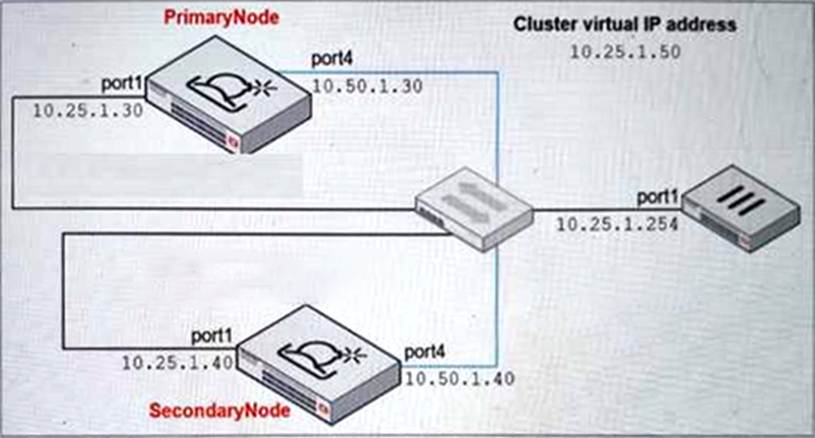
Which command must you use to configure the secondary node? (Choose one answer)
- A . hc-worker -a -s10.25.1.30 -p<password>
- B . hc-worker -a -s10.50.1.30 -p<password>
- C . hc-worker -a -s10.50.1.40 -p<password>
- D . hc-worker -a -s10.25.1.50 -p<password>
B
Explanation:
From the High Availability and Management lesson, the Study Guide states:
"You must configure the HA group name, password, and the virtual IP only on the primary node. After you configure those, you can add the secondary node to the group using the commands shown on this slide."
The hc-slave command (shown as hc-worker for secondary) requires pointing to the Primary Node’s HA interface IP, not the cluster virtual IP or the primary node’s port1.
From the exhibit:
Primary Node port4 (HA interface) = 10.50.1.30
Secondary Node port4 = 10.50.1.40
Primary Node port1 = 10.25.1.30
Cluster Virtual IP = 10.25.1.50
The secondary node must connect to the Primary Node’s dedicated HA communication port (port4 = 10.50.1.30) to join the cluster, making Option B the correct answer.
You are asked to create some custom VMs to better represent your security environment. In which two FortiSandbox deployments is this supported? (Choose two answers)
- A . Private cloud
- B . Azure non-nested mode
- C . Device-based
- D . FortiSandbox Cloud
A, C
Explanation:
From the Scanning and Rating Components lesson, the Study Guide explicitly states:
"FortiSandbox allows you to modify the number of CPUs and memory assigned to a custom VM. This feature is supported on hardware models and private cloud VMs."
Hardware models = Device-based (Option C)
Private cloud VMs = Private cloud (Option A)
Azure non-nested mode and FortiSandbox Cloud do not support custom VM creation as per the Study Guide.
Refer to the exhibit.
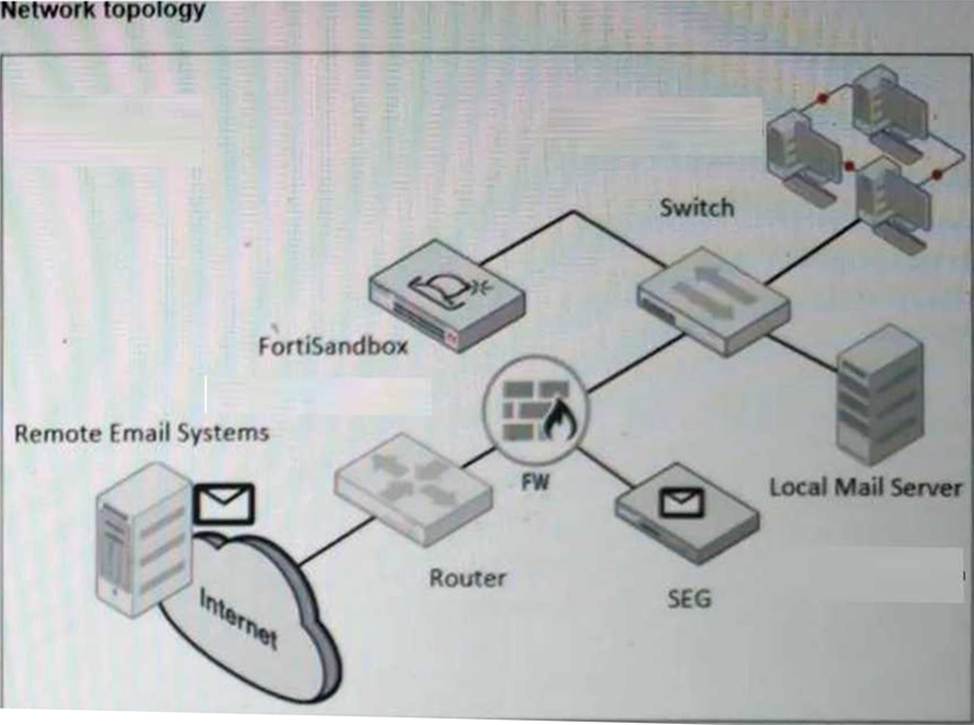
A network topology is shown.
Which two important steps must you take before you enable a BCC adapter on FortiSandbox? (Choose two answers)
- A . Configure the upstream SEG to extract files and URLs from emails and send them to FortiSandbox for analysis.
- B . Configure an A record on the DNS server for the FortiSandbox IP.
- C . Configure the sub-domain on the upstream SEG to BCC emails to FortiSandbox.
- D . Add an MX record on the DNS server for the BCC email sub-domain to resolve to the FortiSandbox IP.
C, D
Explanation:
From the Deployment and System Settings lesson, the Study Guide states:
"You can submit emails from an upstream MTA server to FortiSandbox using a BCC adapter. FortiSandbox will extract attachment files and URLs in an email body."
For a BCC adapter to function correctly, two critical prerequisites must be in place:
Option C ― The upstream SEG must be configured to BCC emails to a FortiSandbox sub-domain so that email copies are routed to FortiSandbox for analysis
Option D ― An MX record must be added to the DNS server for the BCC email sub-domain, so that the sub-domain resolves to the FortiSandbox IP address, allowing the SEG to properly deliver BCC email copies
Option A is incorrect because the BCC adapter handles full email inspection ― FortiSandbox itself extracts files and URLs rather than the SEG doing this.
Option B is incorrect because an MX record (not just an A record) is the required DNS configuration for email routing.
You are troubleshooting long delays between FortiMail file submissions to FortiSandbox and verdicts being returned form FortiSandbox.
Which FortiMail debug tool must you use to troubleshoot this issue further? (Choose one answer)
- A . diagnose debug application hoststatd
- B . diagnose debug application deferd
- C . diagnose debug application oftpd
- D . diagnose debug application mailfilterd
B
Explanation:
The FortiSandbox 5.0 Administrator Lab Guide shows that, when diagnosing FortiMail submission issues, the required FortiMail debugs are sandboxclid and deferd. It explicitly instructs: “Enter the following commands to enable both deferd and sandboxclid debugging” and then shows that the deferd daemon spools the email and later releases the email from the queue folder after FortiSandbox processing.
Because sandboxclid is not one of the answer choices, the best answer among the listed FortiMail debug tools is deferd. It is the FortiMail daemon directly shown in the official lab workflow for troubleshooting submission-and-verdict handling. The other options in the answer list are not the ones the lab uses for FortiMail-to-FortiSandbox submission troubleshooting. So, based on the uploaded guide, diagnose debug application deferd is the correct choice.
Which FortiGate daemon can you monitor in real time to verify that verdicts are being received by FortiGate? (Choose one answer)
- A . fsd
- B . quarantined
- C . wad
- D . scanunitd
B
Explanation:
From the FortiGate Integration lesson, the Study Guide explicitly states:
"The quarantine daemon is involved in submitting files to FortiSandbox."
"The quarantine daemon also receives the verdicts returned by FortiSandbox."
"The quarantine daemon is responsible for sending requests for the dynamic lists generated by FortiSandbox. This includes the malware package, URL package, and the extension lists."
From the Lab Guide (Exercise 3 – Using FortiGate Diagnostics):
"Enter the following commands to enable debugging for the quarantine daemon: diagnose debug application quarantine -1"
The quarantined daemon (Option B) handles both file submissions to FortiSandbox AND receives verdicts back from FortiSandbox in real time, making it the correct daemon to monitor for verdict reception verification.
You notice a recent file downloaded by some end stations is exhibiting malware behavior, however, on the sandbox the file is rated clean. After further investigation you determine that only end stations using the Opera browser are being affected.
What must you do to prevent these infections? (Choose one answer)
- A . Enable the STIX/TAXII Integration setting on FortiSandbox.
- B . Configure a custom VM to use the same browser as the exploited end stations.
- C . Modify the scan profile to include the malware file type.
- D . Change the job queue priority to process web-based files first.
B
Explanation:
The best answer is B. The Study Guide explains that under VM settings, “FortiSandbox has a Browser selection that allows you to choose which internet browser the VM instance will use. This helps to customize the test using an internet browser that more closely resembles the user’s environment or just monitor if the test delivers different results.” It also states that the default browser choices are Internet Explorer, Firefox, Chrome, and Edge. In addition, the guide says that “The VM images provided by Fortinet might not suit your needs… You can generate a custom VM that fits your organization’s needs and upload it to FortiSandbox.”
Because only endpoints using Opera are affected, the clean verdict likely occurred because the sandbox environment does not accurately reproduce the exploited browser environment. The most effective fix is to make the sandbox environment match the real target environment more closely by using a custom VM with the same browser behavior as the affected endpoints. The other answers do not address the root cause. STIX/TAXII is unrelated, changing the scan profile file type does not solve a browser-specific exploit path, and job queue priority affects order, not analysis fidelity. Therefore, the required action is to configure a custom VM to use the same browser as the exploited end stations.
A FortiSandbox HA cluster is configured with the MTA adapter.
What does the primary node do when it receives MTA jobs? (Choose one answer)
- A . It distributes the MTA jobs to secondary members.
- B . It distributes the MTA jobs to itself or to worker nodes.
- C . It assigns the MTA jobs to itselfز
- D . It assigns the MTA jobs only to worker members.
B
Explanation:
The Study Guide states that in an HA cluster, “As well as normal scanning duties, the primary node also manages the cluster, distributes jobs, and gathers the verdicts.” It also says that “The worker nodes provide load balancing. The primary node distributes scan jobs to the worker nodes.”
From those official statements, the primary node is not just a coordinator. It also performs normal scanning duties itself, while distributing scan jobs across worker nodes for load balancing. That rules out A, because the secondary node is for failover, not normal job distribution. It rules out C, because the primary is not restricted to itself only. It also rules out D, because the primary can still perform scanning duties and is not limited to sending all jobs only to workers. Therefore, when the primary receives MTA jobs, the correct behavior is that it distributes the MTA jobs to itself or to worker nodes.
To assign a file to a VM image, which two conditions must be true? (Choose two answers)
- A . FortiSandbox must have the appropriate license entitlements.
- B . The VM image clone value must be a non-zero number.
- C . The file type must be configured to enter the job queue.
- D . The VM image must have the software required to open the file.
B, C
Explanation:
From the Scanning and Rating Components lesson, the Study Guide explicitly states:
"The second section of the Scan Profile, VM Association, allows you to define file extensions and VM image associations. This means that specific files are sandboxed by the associated VM image.
To assign a file to a VM image, the following conditions must be true:
The file type must be configured to enter the job queue (first section of the scan profile).
The VM image clone value cannot be a non-zero number."
This directly confirms:
Option B ― The VM image clone value must be a non-zero number (clones must be allocated)
Option C ― The file type must be configured to enter the job queue via the scan profile Pre-Filter section
Options A and D, while potentially relevant in practice, are not listed as the two required conditions in the Study Guide.
A security analyst is reviewing a scan job report that indicates a true positive match. The job report displays that the malware attempts to replace vital system executables.
Which type of malware is the analyst observing? (Choose one answer)
- A . Exploit
- B . Trojan
- C . Dropper
- D . Rootkit
D
Explanation:
The Results Analysis section gives direct malware-type definitions. It says: “A downloader attempts to download malicious content from a remote system”, “A dropper installs malicious content”, “A trojan appears to be a legitimate software application”, and most importantly, “A rootkit attempts to hide its components by replacing valid system files.”
That exact wording matches the question statement about malware attempting to replace vital system executables. Replacing valid system files is classic rootkit behavior because the purpose is concealment and persistence by hiding malicious components behind trusted operating-system files. A dropper’s main role is delivering payloads. A trojan is mainly deceptive software that appears legitimate. An exploit takes advantage of a vulnerability. None of those definitions match the described behavior as precisely as the rootkit definition in the Study Guide. Therefore, the malware type being observed is Rootkit.
A FortiSandbox VM has been deployed and has been functioning correctly for several months. Suddenly, the system begins rejecting file submissions with an error message indicating a licensing problem.
How can you determine, using the CLI, if the license is still valid? (Choose one answer)
- A . vm-status
- B . hc-setting -1
- C . vm-license -1
- D . status
D
Explanation:
From the Deployment and System Settings lesson, the Study Guide explicitly states:
"The status command shows information about the system, including firmware level, device serial number, disk usage, Windows VM status, states of the boot and data disks, and more. For VM appliances, it will also show the FortiSandbox license status."
The key phrase is "For VM appliances, it will also show the FortiSandbox license status" ― making the status command the correct choice for verifying license validity on a FortiSandbox VM deployment.
While vm-license -l shows installed Windows/Microsoft Office license keys, and vm-status shows guest VM image information, neither directly reports on the FortiSandbox appliance license validity. The status command is the definitive command for checking overall system and license status.