
Practice Free NSE5_SSE_AD-7.6 Exam Online Questions
Refer to the exhibit.
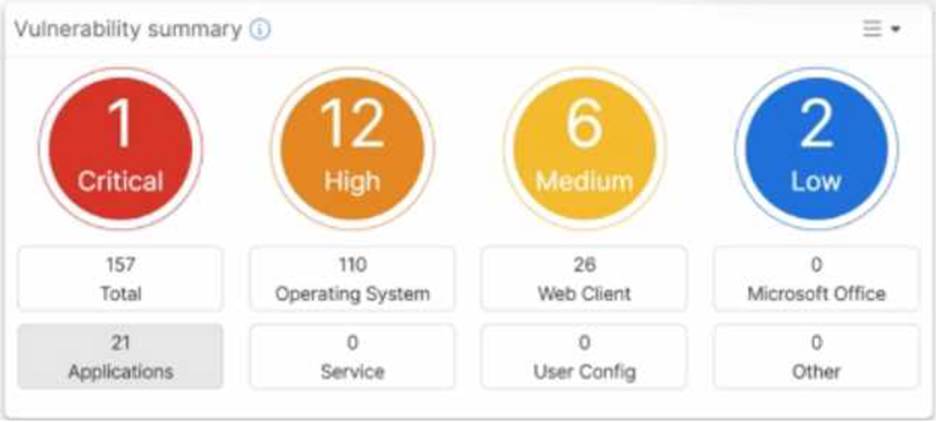
Which two statements about the Vulnerability summary dashboard in FortiSASE are correct? (Choose two.)
- A . The dashboard shows the vulnerability score for unknown applications.
- B . Vulnerability scan is disabled in the endpoint profile.
- C . The dashboard allows the administrator to drill down and view CVE data and severity classifications.
- D . Automatic vulnerability patching can be enabled for supported applications.
C, D
Explanation:
Based on the FortiSASE 7.6 (and later 2025 versions) curriculum and administration guides, the Vulnerability summary dashboard is a key component of the endpoint security posture management.
Drill Down Capability (Option C): According to the FortiSASE Administration Guide, the Vulnerability summary widget on the Security dashboard is interactive. An administrator can click on specific risk categories (e.g., Critical, High) or application types (e.g., Operating System, Web Client) to drill down. This action opens a detailed pane showing the specific affected endpoints, associated CVE identifiers, and severity classifications based on the CVSS standard.
Automatic Vulnerability Patching (Option D): In the FortiSASE 7.6/2025 feature sets, the endpoint profile configuration (under Endpoint > Configuration > Profiles) includes an "Automatic Patching" section. This feature allows the system to automatically install security updates for supported third-party applications and the underlying operating system (Windows/macOS) when vulnerabilities are detected. Furthermore, administrators can schedule these patches directly from the Vulnerability
Summary widget by selecting specific vulnerabilities.
Why other options are incorrect:
Option A: The dashboard categories (Operating System, Web Client, Microsoft Office, etc.) are based on known software signatures. While there is an "Other" category, the dashboard primarily provides scores for recognized applications where CVE data is available.
Option B: The exhibit shows active data (157 total vulnerabilities), which indicates that the vulnerability scan is enabled and currently reporting data from the endpoints. If it were disabled, the widget would be empty or show zeros.
Which two statements about configuring a steering bypass destination in FortiSASE are correct? (Choose two.)
- A . Subnet is the only destination type that supports the Apply condition
- B . Apply condition allows split tunneling destinations to ae applied to On-net. off-net. or both types of endpoints
- C . You can select from four destination types: Infrastructure, FQDN, Local Application, or Subnet
- D . Apply condition can be set only to On-net or Off-net. but not both
B, C
Explanation:
According to the FortiSASE 7.6 Feature Administration Guide, steering bypass destinations (also known as split tunneling) allow administrators to optimize bandwidth by redirecting specific trusted traffic away from the SASE tunnel to the endpoint’s local physical interface.
Destination Types (Option C): When creating a bypass destination, administrators can select from
four distinct types: Infrastructure (pre-defined apps like Zoom/O365), FQDN (specific domains), Local
Application (identifying processes on the laptop), or Subnet (specific IP ranges).
Apply Condition (Option B): The "Apply" condition is a flexible setting that allows the administrator to choose when the bypass is active. It can be applied to endpoints that are On-net (inside the office), Off-net (remote), or Both. This ensures that if a user is in the office, they don’t use the SASE tunnel for local resources, but if they are home, they might still bypass high-bandwidth sites like YouTube to preserve tunnel capacity.
Why other options are incorrect:
Option A: Subnet is one of four types and is not the only type supporting these conditions.
Option D: The system explicitly supports "Both" to ensure consistency across network transitions.
Which two statements correctly describe what happens when traffic matches the implicit SD-WAN rule? (Choose two answers)
- A . Traffic is load balanced using the algorithm set for the v4-ecmp-mode setting.
- B . Traffic does not match any of the entries in the policy route table.
- C . FortiGate flags the session with may_dirty and vwl_default.
- D . The traffic is distributed, regardless of weight, through all available static routes.
- E . The session information output displays no SD-WAN service id.
BE
Explanation:
According to the SD-WAN 7.6 Core Administrator study guide and FortiOS 7.6 Administration Guide, the "implicit rule" is the default rule at the bottom of the SD-WAN rule list (ID 0). It is only evaluated if traffic does not match any manually configured SD-WAN rules.
Policy Route Table Context (Option B): SD-WAN rules are technically a specialized form of policy-based routing. For a packet to match the implicit rule, it must first pass through the routing hierarchy. If traffic matches the implicit rule, it indicates that it did not match any higher-priority user-defined SD-WAN rules or any specific entries in the manual policy route table that would have intercepted the traffic earlier.
Session Information (Option E): When you use the CLI to inspect an active session (e.g., diagnose sys session list), the output contains a field for the SD-WAN Service ID. If traffic is steered by a user-defined rule, it displays the ID of that rule (e.g., service_id=1). However, when traffic falls through to the implicit rule, the session information displays no SD-WAN service ID (it often shows as 0 or is omitted), because the implicit rule does not function as a "service" in the same way user-defined rules do.
Routing Behavior: The implicit rule follows the standard routing table (RIB/FIB) logic. It uses the priority and distance of the static routes to determine the path. If multiple paths have the same distance and priority, it uses the algorithm set by v4-ecmp-mode, but this is a function of the routing engine, not the SD-WAN engine itself.
Why other options are incorrect:
Option A: While v4-ecmp-mode (e.g., source-ip-based) is used for ECMP routing, this is part of the general FortiOS routing behavior for equal-cost paths in the FIB, whereas the implicit rule simply "hands over" the decision to that routing table.
Option C: When traffic matches the implicit rule, the session is actually flagged with vwl_id=0 and potentially dirty if a route change occurs, but vwl_default is not the standard flag name used in this specific context in the curriculum.
Option D: This is incorrect because the implicit rule does respect weight, distance, and priority as defined in the static routes within the routing table; it does not distribute traffic "regardless" of these values.
You are configuring SD-WAN to load balance network traffic.
Which two facts should you consider when setting up SD-WAN? (Choose two.)
- A . When applicable, FortiGate load balances traffic through all members that meet the SLA target.
- B . SD-WAN load balancing is possible only when using the manual and the best quality strategies.
- C . Only the manual and lowest cost (SLA) strategies allow SD-WAN load balancing.
- D . You can select the outsessions hash mode with all strategies that allow load balancing.
A, D
Explanation:
According to the SD-WAN 7.6 Core Administrator study guide and the FortiOS 7.6 Administration Guide, configuring load balancing within SD-WAN rules requires an understanding of how the engine selects and distributes sessions across multiple links.
SLA Target Logic (Option A): In FortiOS 7.6, the Lowest Cost (SLA) strategy has been enhanced. When the load-balance option is enabled for this strategy, the FortiGate does not just pick a single "best" link; it identifies all member interfaces that currently meet the configured SLA target (e.g., latency < 100ms). It then load balances the traffic across all those healthy links to maximize resource utilization.
Hash Modes (Option D): When an SD-WAN rule is configured for load balancing (valid for Manual and Lowest Cost (SLA) strategies in 7.6), the administrator must define a hash mode to determine how sessions are distributed. While "outsessions" in the question is a common exam-variant typo for
outbandwidth (or sessions-based hashing), the core principle remains: you can select the specific load-balancing algorithm (e.g., source-ip, round-robin, or bandwidth-based) for all strategies where load-balancing is enabled.
Why other options are incorrect:
Option B and C: These options are too restrictive. In FortiOS 7.6, load balancing is not limited to only "manual and best quality" or "manual and lowest cost" in a singular way. The documentation highlights that Manual and Lowest Cost (SLA) are the primary strategies that support the explicit load-balance toggle to steer traffic through multiple healthy members simultaneously.
Which three FortiSASE use cases are possible? (Choose three answers)
- A . Secure Internet Access (SIA)
- B . Secure SaaS Access (SSA)
- C . Secure Private Access (SPA)
- D . Secure VPN Access (SVA)
- E . Secure Browser Access (SBA)
ABC
Explanation:
According to the FortiSASE 7.6 Architecture Guide and the FCP – FortiSASE 24/25 Administrator study materials, the FortiSASE solution is structured around three primary pillars or "use cases" that address the security requirements of a modern distributed workforce.
Secure Internet Access (SIA) (Option A): This use case focus on protecting remote users as they browse the public internet. It utilizes a full cloud-delivered security stack including Web Filtering, DNS Filtering, Anti-Malware, and Intrusion Prevention (IPS) to ensure that users are protected from web-based threats regardless of their physical location.
Secure SaaS Access (SSA) (Option B): This use case addresses the security of cloud-based applications (like Microsoft 365, Salesforce, and Dropbox). It leverages Inline-CASB (Cloud Access Security Broker) to identify and control "Shadow IT"―unauthorized cloud applications used by employees―and applies Data Loss Prevention (DLP) to prevent sensitive information from being leaked into unsanctioned SaaS platforms.
Secure Private Access (SPA) (Option C): This use case provides secure, granular access to private applications hosted in on-premises data centers or private clouds. It can be achieved through two main methods: ZTNA (Zero Trust Network Access), which provides session-specific access based on identity and device posture, or through SD-WAN integration, where the FortiSASE cloud acts as a spoke connecting to a corporate SD-WAN Hub.
Why other options are incorrect:
Secure VPN Access (SVA) (Option D): While SASE uses VPN technology (SSL or IPsec) as a transport for the Endpoint mode, "SVA" is not a formal curriculum-defined use case. The SASE framework is intended to evolve beyond traditional "Secure VPN Access" into the SIA and SPA models.
Secure Browser Access (SBA) (Option E): Although FortiSASE offers Remote Browser Isolation (RBI), it is considered a feature or a component of the broader Secure Internet Access (SIA) use case rather than a separate, standalone use case in the core administrator curriculum.
Refer to the exhibits.
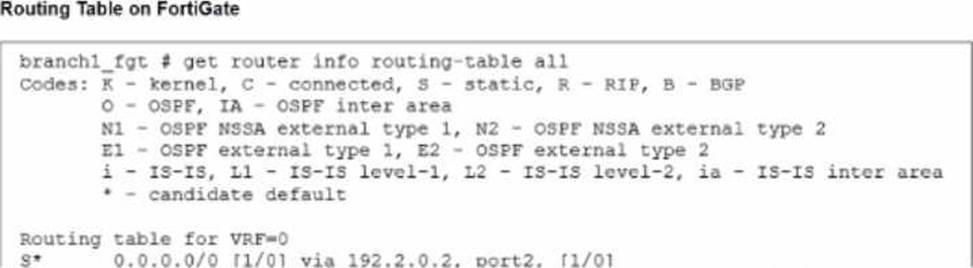
The administrator increases the member priority on port2 to 20.
Upon configuration changes and the receipt of new packets, which two actions does FortiGate perform on existing sessions established over port2? (Choose two.)
- A . FortiGate updates the gateway information of the sessions with SNAT so that they use port1 instead of port2.
- B . FortiGate flags the SNAT session as dirty only if the administrator has assigned an IP pool to the firewall policies with NAT.
- C . FortiGate routes only new sessions over port1.
- D . FortiGate continues routing all existing sessions over port2.
- E . FortiGate flags the sessions as dirty.
A, E
Explanation:
Which FortiSASE feature monitors SaaS application performance and connectivity to points of presence (POPs)?
- A . Operations widgets
- B . FortiView dashboards
- C . Event logs
- D . Digital experience monitoring
D
Explanation:
According to the FortiSASE 7.6 Administration Guide and Digital Experience Monitoring (DEM) documentation, the feature specifically designed to monitor SaaS application performance and connectivity to PoPs is Digital Experience Monitoring (DEM).
SaaS and Path Visibility: DEM assists administrators in troubleshooting remote user connectivity issues by providing enhanced health check visibility for SaaS applications, endpoint devices, and the network path. It provides real-time insights into application performance and latency issues.
PoP Connectivity: It monitors the digital journey from the end-user device through the Security Points of Presence (POPs) to the final application, identifying hops where degraded service (packet loss, delay, or jitter) is detected.
Proactive Management: By establishing thresholds and simulating user activities through Synthetic Transaction Monitoring (STM), DEM allows IT teams to identify performance problems before they impact the business.
Why other options are incorrect:
Option A: Operations widgets provide general status overviews but do not offer the granular per-hop path analysis or specific SaaS transaction monitoring found in DEM.
Option B: FortiView dashboards provide traffic visibility and session data but are not dedicated performance monitoring tools for end-to-end digital experience.
Option C: Event logs record system occurrences and security events but do not provide real-time performance metrics or health check probes for SaaS applications.
How does the FortiSASE security dashboard facilitate vulnerability management for FortiClient endpoints? (Choose one answer)
- A . It automatically patches all vulnerabilities without user intervention and does not categorize vulnerabilities by severity.
- B . It shows vulnerabilities only for applications and requires endpoint users to manually check for affected endpoints.
- C . It displays only critical vulnerabilities, requires manual patching for all endpoints, and does not allow viewing of affected endpoints.
- D . It provides a vulnerability summary, identifies affected endpoints, and supports automatic patching for eligible vulnerabilities.
D
Explanation:
According to the FortiSASE 7.6 Administration Guide and the FCP – FortiSASE 24/25 Administrator training materials, the security dashboard is a centralized hub for monitoring and remediating security risks across the entire fleet of managed endpoints.
Vulnerability Summary: The dashboard includes a dedicated Vulnerability summary widget that categorizes risks by severity (Critical, High, Medium, Low) and by application type (OS, Web Client, etc.).
Identifying Affected Endpoints: The dashboard is fully interactive; an administrator can drill down into specific vulnerability categories to view a detailed list of CVE data and, most importantly, identify the specific affected endpoints that require attention.
Automatic Patching: FortiSASE supports automatic patching for eligible vulnerabilities (such as common third-party applications and supported OS updates). This feature is configured within the Endpoint Profile, allowing the FortiClient agent to remediate risks without requiring the user to manually run updates.
Why other options are incorrect:
Option A: While it supports automatic patching, it does not do so for all vulnerabilities (only eligible/supported ones), and it specifically does categorize them by severity.
Option B: The dashboard shows vulnerabilities for the Operating System as well as applications, and it allows the administrator to identify affected endpoints rather than requiring the end-user to check.
Option C: The dashboard displays all levels of severity (not just critical) and explicitly allows the viewing of affected endpoints.
You have a FortiGate configuration with three user-defined SD-WAN zones and one or two members in each of these zones. One SD-WAN member is no longer used in health-check and SD-WAN rules. This member is the only member of its zone. You want to delete it.
What happens if you delete the SD-WAN member from the FortiGate GUI?
- A . FortiGate displays an error message. SD-WAN zones must contain at least one member.
- B . FortiGate accepts the deletion and removes static routes as required.
- C . FortiGate accepts the deletion with no further action.
- D . FortiGate accepts the deletion and places the member in the default SD-WAN zone.
B
Explanation:
Comprehensive and Detailed Explanation with all FortiSASE and SD-WAN 7.6 Core Administrator curriculum documents: According to the SD-WAN 7.6 Core Administrator study guide and FortiOS 7.6 Administration Guide, the behavior for deleting an SD-WAN member from the GUI when it is the only member in its zone is governed by the following operational logic:
Reference Checks: Before allowing the deletion of any SD-WAN member, FortiOS performs a "check for dependencies." If an interface is being used in an active Performance SLA or an SD-WAN Rule, the GUI will typically prevent the deletion or gray out the option until those references are removed. However, the question specifies that this member is no longer used in health-checks or rules.
Zone Integrity: Unlike some other network objects, an SD-WAN zone is permitted to exist without any members. When you delete the final member of a user-defined zone through the GUI, the zone itself remains in the configuration as an empty container.
Route Management: When an SD-WAN member is deleted, any static routes that were specifically tied to that interface’s membership in the SD-WAN bundle are automatically updated or removed by the FortiGate to prevent routing loops or "black-holing" traffic. This is part of the automated cleanup process handled by the FortiOS management plane.
GUI vs. CLI: In the GUI, the process is streamlined to allow the removal of the member interface. Once the member is deleted, the interface returns to being a "regular" system interface and can be used for standard firewall policies or other functions.
Why other options are incorrect:
Option A: There is no requirement that a zone must contain at least one member; "empty" zones are valid configuration objects in FortiOS 7.6.
Option C: While the deletion is accepted, it is not with "no further action"―the system must still reconcile the routing table and interface status.
Option D: FortiGate does not automatically move deleted members into the default zone (virtual-wan-link). Once deleted, the interface is simply no longer an SD-WAN member.
Refer to the exhibit.
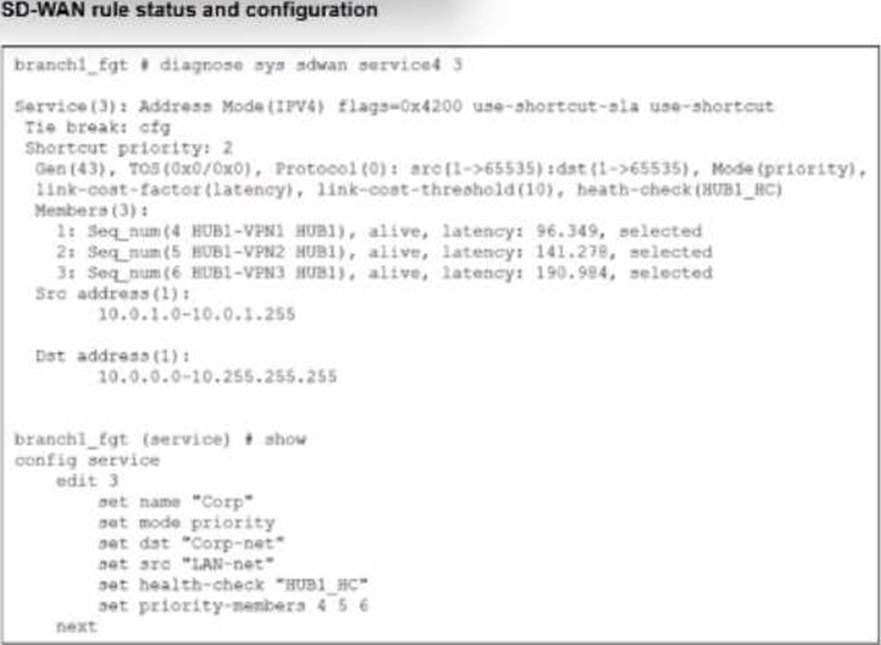
The SD-WAN rule status and configuration is shown.
Based on the exhibit, which change in the measured latency will first make HUB1-VPN3 the new preferred member?
- A . When HUB1-VPN3 has a latency of 80 ms
- B . When HUB1-VPN3 has a lower latency than HUB1-VPN1 and HUB1-VPN2
- C . When HUB1-VPN1 has a latency of 200 ms
- D . When HUB1-VPN3 has a latency of 90 ms
A
Explanation:
According to the SD-WAN 7.6 Core Administrator study guide and the FortiOS 7.6 Administration Guide, the selection of a preferred member in a Best Quality (priority) rule is determined by the measured quality metric (latency, in this case) and the link-cost-threshold.
Rule Logic (Best Quality): In the exhibit, the SD-WAN rule is configured with set mode priority, which corresponds to the Best Quality strategy. This strategy ranks members based on the link-cost-factor, which is set to latency.
The Link-Cost-Threshold: The exhibit shows link-cost-threshold(10), which is the default 10% value. This threshold is designed to prevent "link flapping". To replace the current preferred member, a new member must not only have a better latency but must be better by more than 10%.
The Calculation:
The current preferred member is HUB1-VPN1 with a real latency of 96.349 ms.
To calculate the "target" latency a lower-priority member must achieve to take over, we use the formula: $Target = frac{Current_Latency}{(1 + frac{Threshold}{100})}$.
$frac{96.349}{1.1} = mathbf{87.59text{ ms}}$.
Evaluating Options:
Option A (80 ms): Since 80 ms is lower than the required 87.59 ms target, HUB1-VPN3 successfully overcomes the 10% advantage of HUB1-VPN1 and becomes the new preferred member.
Option D (90 ms): While 90 ms is lower than 96.349 ms, it is not lower than 87.59 ms. Therefore, the 10% threshold prevents a member switch, and HUB1-VPN1 remains preferred.
Option B: Incorrect because having a "lower" latency is not enough due to the 10% threshold.
Option C: If HUB1-VPN1 moved to 200 ms, HUB1-VPN2 (at 141.278 ms) would likely become the new preferred member before HUB1-VPN3 (at 190.984 ms).