Practice Free NSE7_SOC_AR-7.6 Exam Online Questions
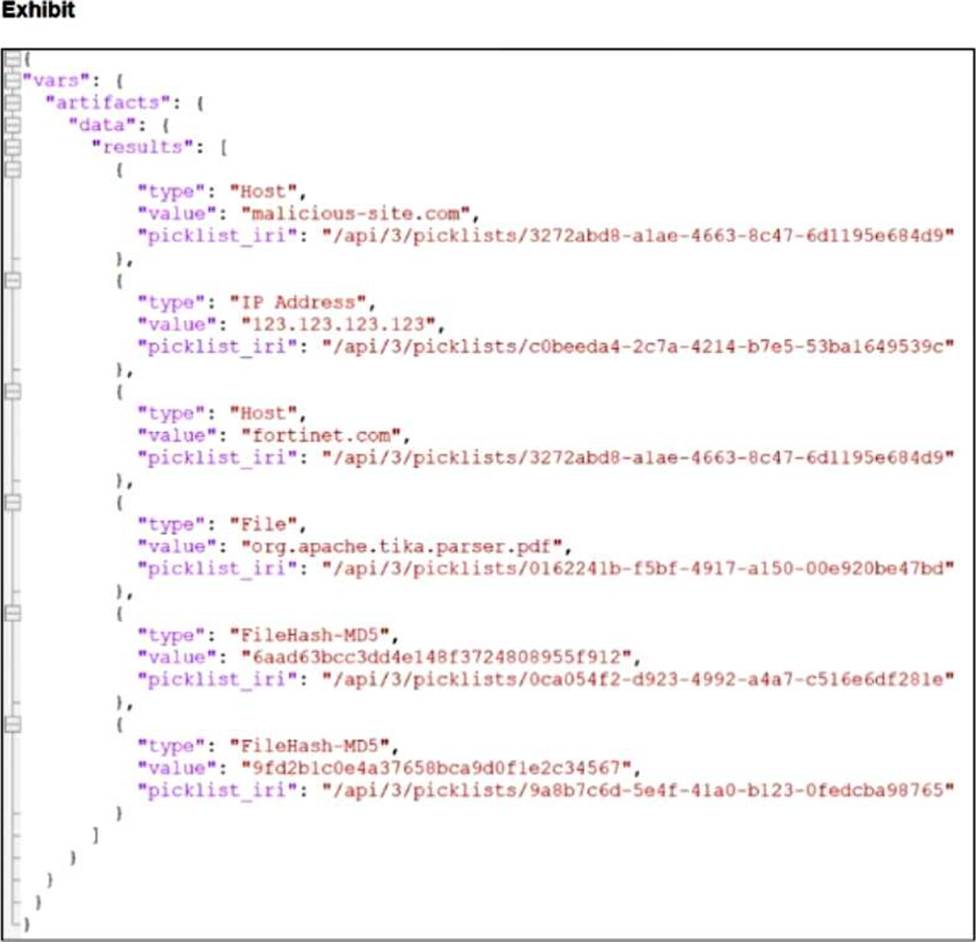
You are trying to create a playbook that creates a manual task showing a list of public IPv6 addresses. You were successful in extracting all IP addresses from a previous action into a variable calledip_list, which contains both private and public IPv4 and IPv6 addresses. You must now filter the results to display only public IPv6 addresses.
Which two Jinja expressions can accomplish this task? (Choose two answers)
- A . {{ vars.ip_list | ipv6addr(‘public’) }}
- B . {{ vars.ip_list | ipaddr(‘public’) | ipv6 }}
- C . {{ vars.ip_list | ipaddr(‘!private’) | ipv6 }}
- D . {{ vars.ip_list | ipv6 | ipaddr(‘public’) }}
B D
Explanation:
From FortiSOAR 7.6., FortiSIEM 7.3 Exact Extract study guide:
InFortiSOAR 7.6, the playbook engine utilizes the powerful ipaddr family of Jinja filters (derived from the Ansible netaddr library) to manipulate network data. To isolate public IPv6 addresses from a mixed list, the order of operations in the filter chain ensures the correct data is extracted:
Double Filtering Sequence (B): In the expression {{ vars.ip_list | ipaddr(‘public’) | ipv6 }}, the first filter ipaddr(‘public’) processes the entire list and retains only public addresses, including both IPv4 and IPv6 versions. The second filter in the pipe, | ipv6, then takes that subset of public addresses and filters them again to keep only those that conform to the IPv6 standard. The final result is a list containing only public IPv6 addresses.
Version-First Filtering (D): In the expression {{ vars.ip_list | ipv6 | ipaddr(‘public’) }}, the logic is reversed but equally effective. The first filter | ipv6 immediately strips all IPv4 and non-IP strings from the list, leaving only IPv6 addresses (both private and public). The subsequent filter | ipaddr(‘public’) then evaluates these IPv6 addresses and discards any that fall within the private/unique-local ranges (like ULA or link-local), resulting in the same set of public IPv6 addresses.
Why other options are incorrect:
A (ipv6addr ‘public’): While ipv6addr is a valid filter in many Ansible environments, FortiSOAR’s standard documentation for manual task creation and data manipulation primarily emphasizes the use of the generic ipaddr filter with specific flags or chained version filters (like | ipv6) to ensure cross-compatibility with the underlying Python libraries used by the SOAR engine.
C (!private syntax): The ipaddr filter utilizes specific keywords for classification. While "not private" is the logical requirement, the filter expects positive assertions such as ‘public’, ‘private’, or ‘multicast’. The !private syntax is not a supported or documented operator for this filter within the Fortinet SOC ecosystem.
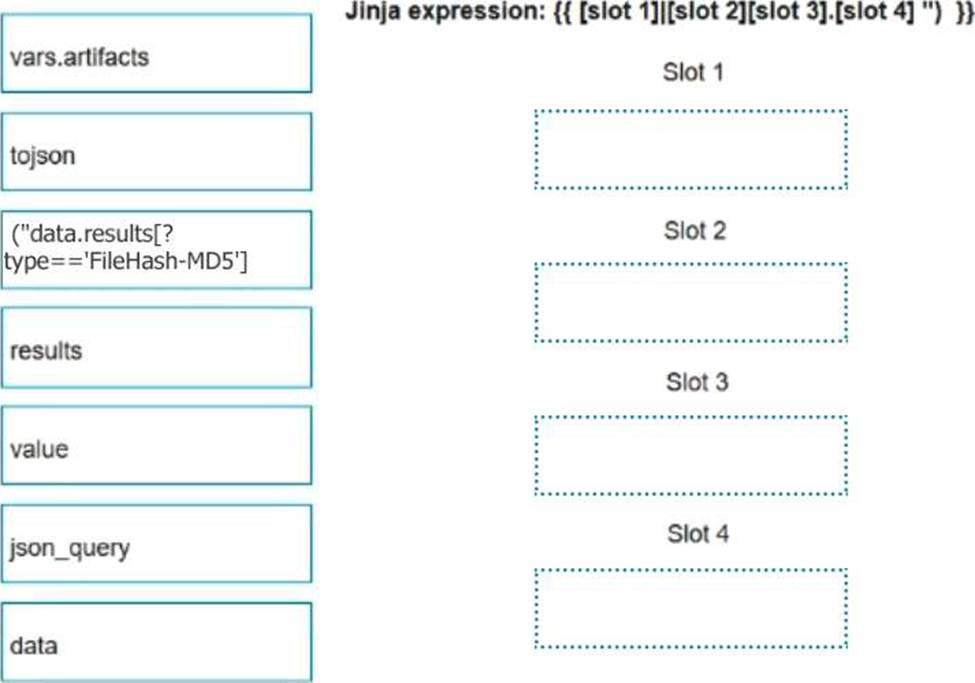
Match the FortiSIEM device type to its description. Select each FortiSIEM device type in the left column, hold and drag it to the blank space next to its corresponding description in the column on the right.

Explanation:
Collector2.Worker3.Supervisor4.Agent
The FortiSIEM 7.3 architecture is built upon a distributed multi-tenant model consisting of several distinct functional roles to ensure scalability and performance:
Supervisor: This is the primary management node in a FortiSIEM cluster. It hosts the Graphical User Interface (GUI), the Configuration Management Database (CMDB), and manages the overall system configurations, reporting, and dashboarding.
Worker: These nodes are responsible for the heavy lifting of data processing. They execute real-time event correlation against the rules engine, perform historical search queries, and handle the analytics workload to ensure the Supervisor node is not overwhelmed.
Collector: Collectors are typically deployed at remote sites or different network segments to offload log collection from the central cluster. They receive logs via Syslog, SNMP, or WMI, compress the data, and securely forward it to the Workers or Supervisor. They also perform performance monitoring of local devices.
Agent: These are lightweight software components installed directly on endpoints (Windows /Linux). Their primary role is to collect local endpoint logs, monitor file integrity (system changes), and track user activity that cannot be captured via traditional network-based logging.
Refer to the exhibits.

The FortiMail Sender Blocklist playbook is configured to take manual input and add those entries to the FortiMail abc. com domain-level block list. The playbook is configured to use a FortiMail connector and the ADD_SENDER_TO_BLOCKLIST action.
Why is the FortiMail Sender Blocklist playbook execution failing7
- A . You must use the GET_EMAIL_STATISTICS action first to gather information about email messages.
- B . FortiMail is expecting a fully qualified domain name (FQDN).
- C . The client-side browser does not trust the FortiAnalzyer self-signed certificate.
- D . The connector credentials are incorrect
B
Explanation:
Understanding the Playbook Configuration:
The playbook "FortiMail Sender Blocklist" is designed to manually input email addresses or IP addresses and add them to the FortiMail block list.
The playbook uses a FortiMail connector with the action ADD_SENDER_TO_BLOCKLIST.
Analyzing the Playbook Execution:
The configuration and actions provided show that the playbook is straightforward, starting with an ON_DEMAND STARTER and proceeding to the ADD_SENDER_TO_BLOCKLIST action.
The action description indicates it is intended to block senders based on email addresses or domains.
Evaluating the Options:
Option A: Using GET_EMAIL_STATISTICS is not required for the task of adding senders to a block list. This action retrieves email statistics and is unrelated to the block list configuration.
Option B: The primary reason for failure could be the requirement for a fully qualified domain name (FQDN). FortiMail typically expects precise information to ensure the correct entries are added to the block list.
Option C: The trust level of the client-side browser with FortiAnalyzer’s self-signed certificate does not impact the execution of the playbook on FortiMail.
Option D: Incorrect connector credentials would result in an authentication error, but the problem described is more likely related to the format of the input data.
Conclusion:
The FortiMail Sender Blocklist playbook execution is failing because FortiMail is expecting a fully qualified domain name (FQDN).
References:
Fortinet Documentation on FortiMail Connector Actions.
Best Practices for Configuring FortiMail Block Lists.
Which statement best describes the MITRE ATT&CK framework?
- A . It provides a high-level description of common adversary activities, but lacks technical details
- B . It covers tactics, techniques, and procedures, but does not provide information about mitigations.
- C . It describes attack vectors targeting network devices and servers, but not user endpoints.
- D . It contains some techniques or subtechniques that fall under more than one tactic.
D
Explanation:
Understanding the MITRE ATT&CK Framework:
The MITRE ATT&CK framework is a comprehensive matrix of tactics and techniques used by adversaries to achieve their objectives.
It is widely used for understanding adversary behavior, improving defense strategies, and conducting security assessments.
Analyzing the Options:
Option A: The framework provides detailed technical descriptions of adversary activities, including specific techniques and subtechniques.
Option B: The framework includes information about mitigations and detections for each technique and subtechnique, providing comprehensive guidance.
Option C: MITRE ATT&CK covers a wide range of attack vectors, including those targeting user endpoints, network devices, and servers.
Option D: Some techniques or subtechniques do indeed fall under multiple tactics, reflecting the complex nature of adversary activities that can serve different objectives.
Conclusion:
The statement that best describes the MITRE ATT&CK framework is that it contains some techniques or subtechniques that fall under more than one tactic.
References:
MITRE ATT&CK Framework Documentation.
Security Best Practices and Threat Intelligence Reports Utilizing MITRE ATT&CK.
Which two types of variables can you use in playbook tasks? (Choose two.)
- A . input
- B . Output
- C . Create
- D . Trigger
A B
Explanation:
Understanding Playbook Variables:
Playbook tasks in Security Operations Center (SOC) playbooks use variables to pass and manipulate data between different steps in the automation process.
Variables help in dynamically handling data, making the playbook more flexible and adaptive to different scenarios.
Types of Variables:
Input Variables:
Input variables are used to provide data to a playbook task. These variables can be set manually or derived from previous tasks.
They act as parameters that the task will use to perform its operations.
Output Variables:
Output variables store the result of a playbook task. These variables can then be used as inputs for subsequent tasks.
They capture the outcome of the task’s execution, allowing for the dynamic flow of information through the playbook.
Other Options:
Create: Not typically referred to as a type of variable in playbook tasks. It might refer to an action but not a variable type.
Trigger: Refers to the initiation mechanism of the playbook or task (e.g., an event trigger), not a type of variable.
Conclusion:
The two types of variables used in playbook tasks areinputandoutput.
References:
Fortinet Documentation on Playbook Configuration and Variable Usage.
General SOC Automation and Orchestration Practices.
Based on the Pyramid of Pain model, which two statements accurately describe the value of an indicator and how difficult it is for an adversary to change? (Choose two answers)
- A . IP addresses are easy because adversaries can spoof them or move them to new resources.
- B . Tactics, techniques, and procedures are hard because adversaries must adapt their methods.
- C . Artifacts are easy because adversaries can alter file paths or registry keys.
- D . Tools are easy because often, multiple alternatives exist.
A B
Explanation:
From FortiSOAR 7.6., FortiSIEM 7.3 Exact Extract study guide:
The Pyramid of Pain (David Bianco) is a core concept taught inFortiSIEM 7.3andFortiSOAR 7.6curriculum to help SOC analysts prioritize threat intelligence and detection logic. The model ranks indicators based on the "pain" or effort they cause an adversary to change:
IP Addresses (Easy): These are classified as "Easy" to change. An attacker can simply rotate through a proxy service, use a different VPS, or utilize a new compromised host to continue their campaign. While more valuable than a file hash, they provide relatively low-long term value to the defender because they are so ephemeral.
TTPs (Tough/Hard): This is the apex of the pyramid. TTPs (Tactics, Techniques, and Procedures) represent the fundamental way an adversary operates. If a defender successfully detects and blocks a Tactic (e.g., a specific way an attacker performs privilege escalation), the adversary is forced to reinvent their entire operational process, which is time-consuming and difficult.
Why other options are incorrect:
Artifacts (C): According to the pyramid, Network/Host Artifacts are classified as "Annoying", not "Easy". While an attacker can change them, it requires modifying their code or script behavior, which causes more friction than simply switching an IP address.
Tools (D): Tools are classified as "Challenging". While alternatives exist, an adversary usually invests significant time mastering a specific toolset; losing the ability to use that tool effectively disrupts their efficiency significantly.
Which statement describes automation stitch integration between FortiGate and FortiAnalyzer?
- A . An event handler on FortiAnalyzer executes an automation stitch when an event is created.
- B . An automation stitch is configured on FortiAnalyzer and mapped to FortiGate using the FortiOS connector.
- C . An event handler on FortiAnalyzer is configured to send a notification to FortiGate to trigger an automation stitch.
- D . A security profile on FortiGate triggers a violation and FortiGate sends a webhook call to FortiAnalyzer.
D
Explanation:
Overview of Automation Stitches: Automation stitches in Fortinet solutions enable automated responses to specific events detected within the network. This automation helps in swiftly mitigating threats without manual intervention.
FortiGate Security Profiles:
FortiGate uses security profiles to enforce policies on network traffic. These profiles can include antivirus, web filtering, intrusion prevention, and more.
When a security profile detects a violation or a specific event, it can trigger predefined actions.
Webhook Calls:
FortiGate can be configured to send webhook calls upon detecting specific security events.
A webhook is an HTTP callback triggered by an event, sending data to a specified URL. This allows FortiGate to communicate with other systems, such as FortiAnalyzer.
FortiAnalyzer Integration:
FortiAnalyzer collects logs and events from various Fortinet devices, providing centralized logging and analysis.
Upon receiving a webhook call from FortiGate, FortiAnalyzer can further analyze the event, generate reports, and take automated actions if configured to do so.
Detailed Process:
Step 1: A security profile on FortiGate triggers a violation based on the defined security policies.
Step 2: FortiGate sends a webhook call to FortiAnalyzer with details of the violation.
Step 3: FortiAnalyzer receives the webhook call and logs the event.
Step 4: Depending on the configuration, FortiAnalyzer can execute an automation stitch to respond to the event, such as sending alerts, generating reports, or triggering further actions.
Fortinet Documentation: FortiOS Automation Stitches
FortiAnalyzer Administration Guide: Details on configuring event handlers and integrating with FortiGate.
FortiGate Administration Guide: Information on security profiles and webhook configurations.
By understanding the interaction between FortiGate and FortiAnalyzer through webhook calls and automation stitches, security operations can ensure a proactive and efficient response to security events.
Which FortiAnalyzer feature uses the SIEM database for advance log analytics and monitoring?
- A . Threat hunting
- B . Asset Identity Center
- C . Event monitor
- D . Outbreak alerts
A
Explanation:
Understanding FortiAnalyzer Features:
FortiAnalyzer includes several features for log analytics, monitoring, and incident response.
The SIEM (Security Information and Event Management) database is used to store and analyze log data, providing advanced analytics and insights.
Evaluating the Options:
Option A: Threat hunting
Threat hunting involves proactively searching through log data to detect and isolate threats that may not be captured by automated tools.
This feature leverages the SIEM database to perform advanced log analytics, correlate events, and identify potential security incidents.
Option B: Asset Identity Center
This feature focuses on asset and identity management rather than advanced log analytics.
Option C: Event monitor
While the event monitor provides real-time monitoring and alerting based on logs, it does not specifically utilize advanced log analytics in the way the SIEM database does for threat hunting.
Option D: Outbreak alerts
Outbreak alerts provide notifications about widespread security incidents but are not directly related to advanced log analytics using the SIEM database.
Conclusion:
The feature that uses the SIEM database for advanced log analytics and monitoring in FortiAnalyzer isThreat hunting.
References:
Fortinet Documentation on FortiAnalyzer Features and SIEM Capabilities.
Security Best Practices and Use Cases for Threat Hunting.
Refer to the exhibits.

The DOS attack playbook is configured to create an incident when an event handler generates a denial-of-ser /ice (DoS) attack event.
Why did the DOS attack playbook fail to execute?
- A . The Create SMTP Enumeration incident task is expecting an integer value but is receiving the incorrect data type
- B . The Get Events task is configured to execute in the incorrect order.
- C . The Attach_Data_To_lncident task failed.
- D . The Attach_Data_To_lncident task is expecting an integer value but is receiving the incorrect data type.
A
Explanation:
Understanding the Playbook and its Components:
The exhibit shows the status of a playbook named "DOS attack" and its associated tasks.
The playbook is designed to execute a series of tasks upon detecting a DoS attack event.
Analysis of Playbook Tasks:
Attach_Data_To_Incident: Task ID placeholder_8fab0102, status is "upstream_failed," meaning it did not execute properly due to a previous task’s failure.
Get Events: Task ID placeholder_fa2a573c, status is "success."
Create SMTP Enumeration incident: Task ID placeholder_3db75c0a, status is "failed."
Reviewing Raw Logs:
The error log shows a ValueError: invalid literal for int() with base 10: ‘10.200.200.100’.
This error indicates that the task attempted to convert a string (the IP address ‘10.200.200.100’) to an integer, which is not possible.
Identifying the Source of the Error:
The error occurs in the file "incident_operator.py," specifically in the execute method.
This suggests that the task "Create SMTP Enumeration incident" is the one causing the issue because it failed to process the data type correctly.
Conclusion:
The failure of the playbook is due to the "Create SMTP Enumeration incident" task receiving a string value (an IP address) when it expects an integer value. This mismatch in data types leads to the error.
References:
Fortinet Documentation on Playbook and Task Configuration.
Python error handling documentation for understanding ValueError.
Refer to the exhibits.

The DOS attack playbook is configured to create an incident when an event handler generates a denial-of-ser /ice (DoS) attack event.
Why did the DOS attack playbook fail to execute?
- A . The Create SMTP Enumeration incident task is expecting an integer value but is receiving the incorrect data type
- B . The Get Events task is configured to execute in the incorrect order.
- C . The Attach_Data_To_lncident task failed.
- D . The Attach_Data_To_lncident task is expecting an integer value but is receiving the incorrect data type.
A
Explanation:
Understanding the Playbook and its Components:
The exhibit shows the status of a playbook named "DOS attack" and its associated tasks.
The playbook is designed to execute a series of tasks upon detecting a DoS attack event.
Analysis of Playbook Tasks:
Attach_Data_To_Incident: Task ID placeholder_8fab0102, status is "upstream_failed," meaning it did not execute properly due to a previous task’s failure.
Get Events: Task ID placeholder_fa2a573c, status is "success."
Create SMTP Enumeration incident: Task ID placeholder_3db75c0a, status is "failed."
Reviewing Raw Logs:
The error log shows a ValueError: invalid literal for int() with base 10: ‘10.200.200.100’.
This error indicates that the task attempted to convert a string (the IP address ‘10.200.200.100’) to an integer, which is not possible.
Identifying the Source of the Error:
The error occurs in the file "incident_operator.py," specifically in the execute method.
This suggests that the task "Create SMTP Enumeration incident" is the one causing the issue because it failed to process the data type correctly.
Conclusion:
The failure of the playbook is due to the "Create SMTP Enumeration incident" task receiving a string value (an IP address) when it expects an integer value. This mismatch in data types leads to the error.
References:
Fortinet Documentation on Playbook and Task Configuration.
Python error handling documentation for understanding ValueError.