
Practice Free Sales-Admn-202 Exam Online Questions
An admin wants to set up a bundle product so a user can view all available options and selected options by scrolling in a single page.
Which updates should the admin make to meet this requirement?
- A . Update Option Layout on the parent Product record to Wizard.
- B . Create Features related to the parent Product and assign all Options to one of the created Features.
- C . Create Features related to the parent Product and assign each Feature the Option Selection Method of Dynamic.
- D . Update Option Layout on the parent Product record to Sections.
D
Explanation:
In Salesforce CPQ, the Option Layout field on the Product record determines how bundle options are presented in the configurator. To allow users to view all available and selected options by scrolling on a single page, the "Sections" layout is ideal. This layout organizes options into collapsible sections based on Product Features, keeping everything visible on one page without requiring navigation steps like a wizard. Option A (Wizard) presents options step-by-step across multiple pages, which doesn’t meet the single-page requirement. Option B (assigning all options to one feature) limits organization and doesn’t address the layout requirement. Option C (Dynamic selection method) controls runtime behavior of options but doesn’t influence the single-page scrolling display. Salesforce CPQ documentation confirms that the "Sections" layout supports a scrollable, single-page view.
Reference: Salesforce CPQ Documentation – "Product Bundle Configuration" and "Option Layout Options".
A sales rep at Universal Containers is adjusting pricing for asubscription Product on a new business Quote. The Subscription Term Is 24 months. The Product’s Default Subscription Term Is 12 months, The Quantity is 10, The List Unit Price is $120.
If a 10% Volume Discount, 20% Additional Discount, and 5% Partner Discount are applied, what are the values at each step In the standard price waterfall?
- A . Regular Unit Price: $108.00Customer Unit Price: $168.00Net Unit Price: $156.00
- B . Regular Unit Price: $108.00Customer Unit Price: $86.40Net Unit Price: $82.08
- C . Regular Unit Price: $216.00Customer Unit Price: $172.80Net Unit Price: $164.16
C
Explanation:
Requirement Overview:
Calculate the pricing steps for a subscription product with a 24-month term.
Calculation Details:
Regular Unit Price:
Default Subscription Term = 12 months.
Adjusted for 24 months: $120 × 24 / 12 = $216.00.
Customer Unit Price:
Apply 10% Volume Discount: $216.00 × (1 − 0.10) = $194.40.
Apply 20% Additional Discount: $194.40 × (1 − 0.20) = $172.80.
Net Unit Price:
Apply 5% Partner Discount: $172.80 × (1 − 0.05) = $164.16.
Validation:
Verify each step in the Salesforce CPQ price waterfall to ensure accuracy.
A user has added multiple bundles to the Quote. Each bundle consists of Product Options of the
Product Families:
• Hardware
• Licenses
• Maintenance
On the output document, different line columns need to be rendered that contain the Products of
each Family.
Moreover, the Product Options of each Family need to be rendered separately for each bundle.
Which two steps should the admin take to meet the requirement? (Choose two.)
- A . Populate the Sort Order field on each Product record to properly sort the Quote Lines within each section.
- B . Construct a formula field on the Quote Line object that returns the bundle’s Name and Number, and use this field in the Group field on the Line Item section.
- C . Create a different Line Item section for each Product Family and leverage the Conditional Print field to show the correct products.
- D . Create a different Line Item section for each Product Family, and leverage the Filter field to show the correct products.
B,C
Explanation:
Requirement:
Render separate Line Item sections for each Product Family and bundle on the output document.
Solution Steps:
Option B: Create a Line Item section for each Product Family and use the Filter field to display only the relevant products for each section.
Option C: Use a formula field on the Quote Line object to identify the bundle’s Name and Number, then set this field in the Group field to group lines within each section. Why Other Options Are Incorrect:
A: The Conditional Print field is not used for rendering specific Product Families in Line Item sections.
D: Sort Order on Product records does not meet the grouping and filtering requirements for the output document.
Salesforce CPQ
Reference: Document generation and Line Item grouping are detailed in Quote Templates Configuration .
"UC wants to show a custom text field on their Quote Document. This field with API name Additional_Text__c
already exists and is located on the Quote object.
What is the correct syntax to insert this into an HTML Template Content?
- A . {!quote.Additional_Text__c}
- B . {Iquote__r.Additional_Text__c}
- C . {ISBQQ__Quote__r.Additional_Text__c}"
- D . {ISBQQ__Quote__c.Additional_Text__c}
A
Explanation:
Field Location and API Name:
The custom text field Additional_Text__c resides on the Quote object.
In Salesforce CPQ, the correct syntax to reference fields in HTML templates is to use the merge field
syntax appropriate to the object.
Syntax
{!quote.Additional_Text__c} directly references the field from the Quote object in a format recognized by the CPQ document generation engine.
Alternative options such as {ISBQQ__Quote__r.Additional_Text__c} reference lookup relationships
and do not apply here.
Salesforce CPQ
Reference: As per the Quote Template Content documentation, use the merge fields directly associated with the object being utilized in the template .
In which scenario must an Admin choose the Custom value for the Condition Met field of a Price Rule?
- A . One or more Price Condition records use a formula that references a non-CPQ object field.
- B . One or more Price Condition records have a lookup to a Summary Variable.
- C . The Price Rule uses a combination of AND OR logic evaluating three or more Price Conditions.
- D . The Price Rule uses a custom lookup object to store key-value pairs for price Conditions.
C
Explanation:
Scenario Overview:
The Custom value for the Condition Met field allows for complex logical operations using a mix of
AND/OR across multiple Price Conditions.
Use Case:
When a Price Rule has three or more conditions and requires specific combinations of AND and OR
logic, the Custom option is required.
Implementation:
Navigate to the Price Rule.
Set Condition Met to Custom.
Specify the logic (e.g., (Condition 1 AND Condition 2) OR Condition 3).
Validation:This ensures Salesforce CPQ evaluates the Price Rule as intended, supporting mixed logical conditions.
Universal Containers (UC) sells its Products in three currencies: USD, GBP, and EUR. UC wants to make a renewable Support SKU available for selection in only USD and EUR and has completed the necessary configuration and/or record creation to support the behavior.
What is the expected behavior when a user attempts to add the Support SKU to a Quote in each currency?
- A . • USD: Product is unavailable In Product Selection• GBP: Product is unavailable In Product
Selection• EUR: Product is unavailable in Product Selection - B . • USD: Added to Quote at Pricebook Entry’s Ust Price• GBP: Added to Quote with 0 List Price•
EUR: Added to Quote at Pricebook Entry’s List Price - C . • USD: Added to Quote at Pricebook Entry’s List Price• GBP: Product is unavailable in Product
Selection• EUR: Added to Quote at Pricebook Entry’s List Price - D . • USD: Error presented to User in Product Selection• GBP: Error presented to User In Product
Selection• EUR: Error presented to User in Product Selection
C
Explanation:
Requirement:
Ensure the Support SKU is available only in USD and EUR.
Expected Behavior:
USD: The product is available and uses the Pricebook Entry’s List Price.
EUR: The product is available and uses the Pricebook Entry’s List Price.
GBP: The product is unavailable due to the absence of a Pricebook Entry in GBP.
Why Other Options Are Incorrect:
A & D: These imply product unavailability in all currencies, which contradicts the configuration.
B: GBP would not add the product with a zero List Price due to Pricebook Entry restrictions. Salesforce CPQ
Reference: Multi-currency behavior and product availability are documented under CPQ Pricing and Product Management .
An admin has set the Group ReW on one of the Quote templates. On output documents on Quote A,
Quote Lmes appear to be grouped incorrertfy.
What are two explanations for this grouping?
Choose 2 answers
- A . Modified By field on the user^s Quote was last modified before the new Quote Template was implemented.
- B . Bundles on Quote A contain a Configuration Attribute designating location.
- C . There are Quote Line Groups related to Quote A.
- D . Template Section with Template Content of Line Items type has a value in Group Field.
C,D
Explanation:
Issue:
Quote Lines on Quote A are grouped incorrectly in the output document.
Possible Causes:
C: Quote Line Groups: Existing Quote Line Groups on the Quote override the Group Field setting in the template.
D: Group Field in Template Section: The Group Field value in the Line Items template section may cause unexpected grouping.
Why Other Options Are Incorrect:
A: The Modified By field has no impact on template grouping.
B: Configuration Attributes like location affect product selection, not grouping in Quote templates.
Salesforce CPQ
Reference: Grouping behavior is explained in the Quote Templates and Line Item Configuration documentation .
How can an Admin prevent users from reconfiguring a specific bundle after initial configuration?
- A . Set the Configuration Type to Disabled.
- B . Set the Configuration Type to Allowed and Configuration Event to Always.
- C . Set the Configuration Type to Allowed and Configuration Event to Add.
- D . Set the Active checkbox on Reconfigure Line Custom Action to False.
C
Explanation:
Requirement:
Prevent users from reconfiguring a bundle after its initial configuration.
Solution:
Set Configuration Type to Allowed to permit configuration during initial setup.
Set Configuration Event to Add to allow configuration only when the product is added, blocking reconfiguration later.
Why Other Options Are Incorrect:
A: Disabled blocks all configuration, including initial setup.
B: Configuration Event = Always allows continuous reconfiguration.
D: Reconfigure Line Custom Action is unrelated to this requirement. Salesforce CPQ
Reference: Configuration Type and Event settings are documented in Bundle Configuration .
Universal Containers needs sales reps to look up Campaign records to associate with specific Quote Lines in the Quote Une Editor. The admin created a lookup field on the Quote Line object that relates to the Campaign object, then added the lookup field Into the Line Editor Field Set on the Quote Line object
What does the admin need to do so the sales reps can search Campaign records In the Quote Line Editor without seeing a warning message?
- A . Create a twin field on the Campaign object using the same API name as the lookup field.
- B . Create and populate a Field Set on the Campaign object named CPQ_Lookup.
- C . Add the name of the lookup field into the Line Editor Field Set on the Quote object.
- D . Add the lookup field to the Quote Line page layout.
B
Explanation:
Understanding the Requirement:
Universal Containers wants sales reps to associate Campaign records with Quote Lines using a lookup field in the Quote Line Editor.
The requirement includes avoiding warning messages when searching for Campaign records.
Salesforce CPQ Lookup Field Behavior:
When a lookup field is added to the Quote Line Editor, Salesforce CPQ searches for records in the target object (e.g., Campaign).
To avoid warnings, the target object (Campaign) must have a specific field set named CPQ_Lookup, which defines the fields displayed in the search results. Steps to Implement the Solution:
Step 1: Navigate to the Campaign object in Salesforce Setup.
Step 2: Go to the "Field Sets" related list and click "New."
Step 3: Name the field set CPQ_Lookup (case-sensitive).
Step 4: Add the fields you want to display in the lookup search results (e.g., Campaign Name, Start Date, Owner).
Step 5: Save the field set.
Integration with the Quote Line Editor:
The system will now use the fields defined in the CPQ_Lookup field set when sales reps perform a search for Campaign records.
This ensures the lookup field operates without errors or warnings in the Quote Line Editor.
Key Considerations:
Ensure that all required fields for identifying Campaign records are included in the CPQ_Lookup field set.
Test the lookup functionality in the Quote Line Editor to confirm smooth operation.
Validation:
Add a Campaign lookup field to a Quote Line in the Quote Line Editor and test the search
functionality. Verify that the fields defined in the CPQ_Lookup field set appear in the search results
without warnings.
Reference: Salesforce CPQ documentation on setting up lookup fields and field sets emphasizes creating a CPQ_Lookup field set to avoid warnings
Universal Containers sells a monthly subscription service with tiered pricing:
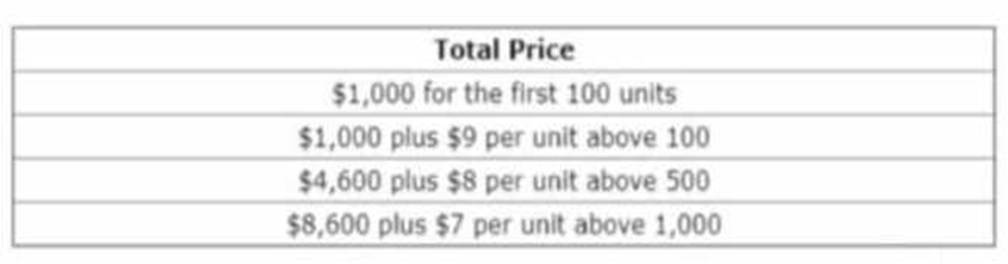
Which approach will allow the Quote Line’s List Price to reflect these tiers?
- A . Set the Product’s Pricing Method = List and Create Block Prices.
- B . Set the Product’s Pricing Method = Block and Create Block Prices
- C . Create a Discount Schedule with Type = Range and Discount Unit = Price.
- D . Create a Discount Schedule with Type = Slab and Discount Unit = Amount.
D
Explanation:
Scenario:
A tiered pricing structure requires different amounts to be applied based on the quantity purchased.
Solution:
Use a Discount Schedule with:
Type = Slab: Ensures different price amounts are applied for each tier.
Discount Unit = Amount: Specifies fixed dollar values for each tier.
Why Other Options are Incorrect:
A, B: Block pricing is unsuitable because the requirement is tier-based, not fixed blocks.
C: Range type does not handle tiered pricing accurately. Salesforce CPQ
Reference: Discount Schedules with Slab type are detailed in CPQ Discounting Guidelines .